BSOD's While Exiting Game, Exiting Chrome

Ipwnedx

New member
Member
Local time
4:49 PM
Messages
41
I have recently gotten three BSODs, one was from exiting to desktop from Far Cry 3, (the 3/12 10:26 pm) the other was when the computer was afk and not being used (3/13 6:36 PM) and 3/13 10:26pm from exiting Google Chrome.

Dump file uploaded. Please help, I really need to get rid of this, :l
I have updated my graphics drivers fully right after the AFK bsod and it still did the next bsod.

Heres a speccy link of my components
http://pastebin.com/GKXfaqFt
 

My Computer

Computer Manufacturer/Model Number
Dell Studio XPS 8100
OS
Windows 7 Home Premium 64bit
CPU
Intel(R) Core(TM) i5 CPU 750 @ 2.67GHz
Memory
6GB DDR3
Graphics Card(s)
ATI Radeon HD 5450 1GB
Monitor(s) Displays
2
Screen Resolution
1920x1080 ea
Hard Drives
x1 250GB HDD Slate Hard Drive
PSU
350 Watt
Case
Studio XPS Case
Cooling
None
Keyboard
Dell STUDIO Ultimate Game Keyboard
Mouse
C633N Dell Mouse
Avira contributes to BSOD's. Please remove it for testing purpose. Use Microsoft Security Essentials.

Recommended from a strict BSOD perspective, compatibility & stability compared to other security software:

Microsoft Security Essentials - Free Antivirus for Windows

Malwarebytes - Free

http://www.sevenforums.com/system-security/206705-good-free-system-security-combination.html

Reduce items at start-up: http://www.sevenforums.com/tutorials/1401-startup-programs-change.html

Perform a clean boot: http://www.sevenforums.com/tutorial...ation-conflicts-performing-clean-startup.html

Scan with Kaspersky TDSSKiller:Anti-rootkit utility TDSSKiller

ESET online scanner: Free Online Virus Scanner | ESET

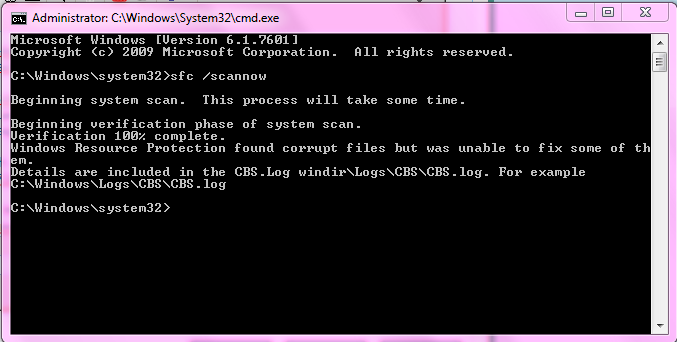
Run a System file check (SFC): http://www.sevenforums.com/tutorials/1538-sfc-scannow-command-system-file-checker.html

Install all windows updates including Service Pack One: Learn how to install Windows 7 Service Pack 1 (SP1)

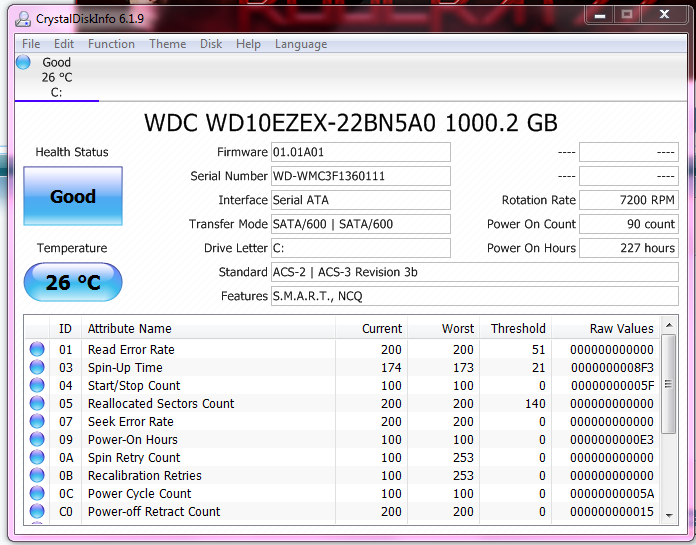
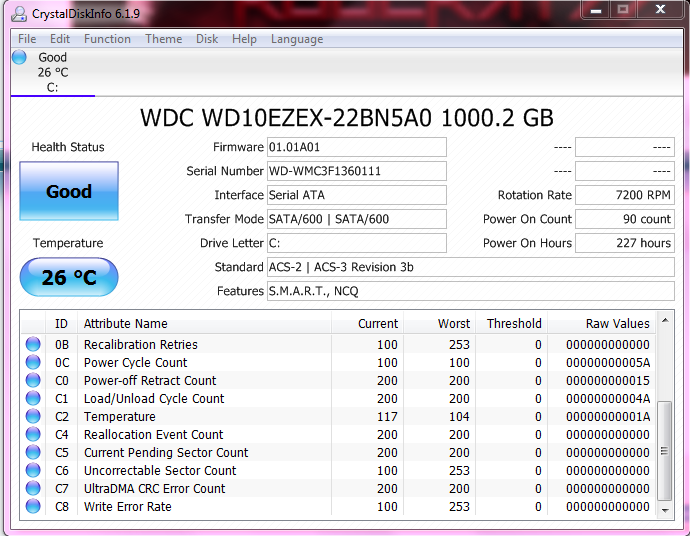
Post screenshot(s) of your Hard Drive(s) using Crystal Disk Info Software: CrystalDiskInfo - Software - Crystal Dew World

Run a Hard Drive test: http://www.sevenforums.com/tutorials/313457-seatools-dos-windows-how-use.html


Run Disk Check on your Hard Drive(s): http://www.sevenforums.com/tutorials/433-disk-check.html

Please update these older drivers. Links are included to assist in looking up the source of the drivers. If unable to find an update, please remove (un-install) the program responsible for that driver. DO NOT manually delete/rename the driver as it may make the system unbootable!:-

rtwlanu.sys Tue Sep 6 12:38:48 2011 (4E65BFF8)
Realtek RTLxxxxx Wireless USB 2.0 Adapter
Driver Reference Table - rtwlanu.sys

ElbyCDIO.sys Mon Mar 4 15:21:51 2013 (513467AF)
CDRTools/ElbyCDIO/DVD Region Killer/VirtualCloneDrive (elby CloneDVD™ 2)/AnyDVD
Driver Reference Table - ElbyCDIO.sys

BSOD DUMP OUTPUT:
Code:
[FONT="Lucida Console"]Debug session time: Fri Mar 14 08:26:44.406 2014 (UTC + 6:00)
Missing Windows 7 Service Pack 1
Built by: 7600.16385.amd64fre.win7_rtm.090713-1255
System Uptime: 0 days 2:42:18.952
Probably caused by : win32k.sys ( win32k!HmgLockEx+a3 )
BugCheck 3B, {c0000005, fffff96000124283, fffff880023c2060, 0}
BugCheck Info: SYSTEM_SERVICE_EXCEPTION (3b)
Bugcheck code 0000003B
Arguments: 
Arg1: 00000000c0000005, Exception code that caused the bugcheck
Arg2: fffff96000124283, Address of the instruction which caused the bugcheck
Arg3: fffff880023c2060, Address of the context record for the exception that caused the bugcheck
Arg4: 0000000000000000, zero.
BUGCHECK_STR:  0x3B
DEFAULT_BUCKET_ID:  WIN7_DRIVER_FAULT
PROCESS_NAME:  dwm.exe
FAILURE_BUCKET_ID:  X64_0x3B_win32k!HmgLockEx+a3
BiosVersion = 2101
BiosReleaseDate = 10/11/2013
SystemManufacturer = To be filled by O.E.M.
SystemProductName = To be filled by O.E.M.
¨¨¨¨¨¨¨¨¨¨¨¨¨¨¨¨¨¨¨¨¨¨¨¨¨¨¨¨¨¨¨¨¨¨¨¨¨¨¨¨¨¨¨¨¨¨¨¨¨¨¨¨¨¨¨¨¨¨¨¨¨¨¨¨¨¨¨¨¨¨¨¨¨¨¨¨¨¨¨¨¨¨¨¨¨¨``
Debug session time: Fri Mar 14 05:28:34.879 2014 (UTC + 6:00)
Missing Windows 7 Service Pack 1
Built by: 7600.16385.amd64fre.win7_rtm.090713-1255
System Uptime: 0 days 0:51:24.424
*** ERROR: Module load completed but symbols could not be loaded for usbhub.sys
Probably caused by : usbhub.sys
BugCheck 9F, {3, fffffa8008111060, fffff80003fa7518, fffffa80080a87d0}
BugCheck Info: DRIVER_POWER_STATE_FAILURE (9f)
Bugcheck code 0000009F
Arguments: 
Arg1: 0000000000000003, A device object has been blocking an Irp for too long a time
Arg2: fffffa8008111060, Physical Device Object of the stack
Arg3: fffff80003fa7518, nt!TRIAGE_9F_POWER on Win7, otherwise the Functional Device Object of the stack
Arg4: fffffa80080a87d0, The blocked IRP
BUGCHECK_STR:  0x9F
DEFAULT_BUCKET_ID:  WIN7_DRIVER_FAULT
PROCESS_NAME:  System
FAILURE_BUCKET_ID:  X64_0x9F_3_rtwlanu_IMAGE_usbhub.sys
BiosVersion = 2101
BiosReleaseDate = 10/11/2013
SystemManufacturer = To be filled by O.E.M.
SystemProductName = To be filled by O.E.M.
¨¨¨¨¨¨¨¨¨¨¨¨¨¨¨¨¨¨¨¨¨¨¨¨¨¨¨¨¨¨¨¨¨¨¨¨¨¨¨¨¨¨¨¨¨¨¨¨¨¨¨¨¨¨¨¨¨¨¨¨¨¨¨¨¨¨¨¨¨¨¨¨¨¨¨¨¨¨¨¨¨¨¨¨¨¨``
Debug session time: Fri Mar 14 04:36:39.212 2014 (UTC + 6:00)
Missing Windows 7 Service Pack 1
Built by: 7600.16385.amd64fre.win7_rtm.090713-1255
System Uptime: 0 days 20:10:02.757
Probably caused by : ntkrnlmp.exe ( nt!ExEnterCriticalRegionAndAcquireFastMutexUnsafe+26 )
BugCheck 3B, {c0000005, fffff80002a4701e, fffff8800882be20, 0}
BugCheck Info: SYSTEM_SERVICE_EXCEPTION (3b)
Bugcheck code 0000003B
Arguments: 
Arg1: 00000000c0000005, Exception code that caused the bugcheck
Arg2: fffff80002a4701e, Address of the instruction which caused the bugcheck
Arg3: fffff8800882be20, Address of the context record for the exception that caused the bugcheck
Arg4: 0000000000000000, zero.
BUGCHECK_STR:  0x3B
DEFAULT_BUCKET_ID:  WIN7_DRIVER_FAULT
PROCESS_NAME:  SaintsRowTheTh
FAILURE_BUCKET_ID:  X64_0x3B_nt!ExEnterCriticalRegionAndAcquireFastMutexUnsafe+26
BiosVersion = 2101
BiosReleaseDate = 10/11/2013
SystemManufacturer = To be filled by O.E.M.
SystemProductName = To be filled by O.E.M.
¨¨¨¨¨¨¨¨¨¨¨¨¨¨¨¨¨¨¨¨¨¨¨¨¨¨¨¨¨¨¨¨¨¨¨¨¨¨¨¨¨¨¨¨¨¨¨¨¨¨¨¨¨¨¨¨¨¨¨¨¨¨¨¨¨¨¨¨¨¨¨¨¨¨¨¨¨¨¨¨¨¨¨¨¨¨``
Debug session time: Thu Mar 13 08:26:06.732 2014 (UTC + 6:00)
Missing Windows 7 Service Pack 1
Built by: 7600.16385.amd64fre.win7_rtm.090713-1255
System Uptime: 1 days 7:25:20.267
Probably caused by : ntkrnlmp.exe ( nt!ExEnterCriticalRegionAndAcquireFastMutexUnsafe+26 )
BugCheck 3B, {c0000005, fffff80002a4101e, fffff8800b766e20, 0}
BugCheck Info: SYSTEM_SERVICE_EXCEPTION (3b)
Bugcheck code 0000003B
Arguments: 
Arg1: 00000000c0000005, Exception code that caused the bugcheck
Arg2: fffff80002a4101e, Address of the instruction which caused the bugcheck
Arg3: fffff8800b766e20, Address of the context record for the exception that caused the bugcheck
Arg4: 0000000000000000, zero.
BUGCHECK_STR:  0x3B
DEFAULT_BUCKET_ID:  WIN7_DRIVER_FAULT
PROCESS_NAME:  farcry3.exe
FAILURE_BUCKET_ID:  X64_0x3B_nt!ExEnterCriticalRegionAndAcquireFastMutexUnsafe+26
BiosVersion = 2101
BiosReleaseDate = 10/11/2013
SystemManufacturer = To be filled by O.E.M.
SystemProductName = To be filled by O.E.M.
¨¨¨¨¨¨¨¨¨¨¨¨¨¨¨¨¨¨¨¨¨¨¨¨¨¨¨¨¨¨¨¨¨¨¨¨¨¨¨¨¨¨¨¨¨¨¨¨¨¨¨¨¨¨¨¨¨¨¨¨¨¨¨¨¨¨¨¨¨¨¨¨¨¨¨¨¨¨¨¨¨¨¨¨¨¨``
[/FONT]

Keep us posted.
 

My Computer

Computer type
PC/Desktop
Computer Manufacturer/Model Number
Self assembled
OS
Windows 10 Home 64Bit
CPU
Intel Core i5 10400 @ 2.90GHz
Motherboard
Intel Corporation DG41WV (PROCESSOR)
Memory
8.00GB Single-Channel Unknown @ 1329MHz (16-20-20-38)
Sound Card
Realtek High Definition Audio
Monitor(s) Displays
DELL E170S
Screen Resolution
1280x1024 pixels
Hard Drives
931GB TOSHIBA DT01ACA100 (SATA)
238GB TEAM TM8PS7256G (SATA SSD)
Case
Nothing Fancy
Cooling
Fans
Keyboard
A4 Tech Co LTD
Mouse
A4 Tech Co Ltd/Logitech
Internet Speed
25 Mbps
Reply

My hard drive seemed to pass all the tests with the SeaGate tool.
Hard drive test with CrystalDiskInfo:
PASTEBIN : http://pastebin.com/ChCbMNc6
Pictures :
ef7854c877dd5240a25fbe0bc76ecce7.png

cce3d19d41ab1da24156b2ececd3de8a.png


Uninstalled Avira, and I'm yet to have a BSOD now. Haven't had one for awhile.
Installed the Realtek driver update, didn't update my VirtualCloneDrive one because it was already in date and I had recently installed in a few days ago.

Kaspersky antirootkit utility showed up with nothing. http://gyazo.com/0171e833a299ebea7292b94828c3d8e7

Just ran the check with sfc/scannow, and this was the result.
9721d7142bd9c8da8359a16d5fc49c47.png

The CBS.log link : https://www.dropbox.com/s/7qggz4rjzwsyw8w/CBS.log
 
Last edited:

My Computer

Computer Manufacturer/Model Number
Dell Studio XPS 8100
OS
Windows 7 Home Premium 64bit
CPU
Intel(R) Core(TM) i5 CPU 750 @ 2.67GHz
Memory
6GB DDR3
Graphics Card(s)
ATI Radeon HD 5450 1GB
Monitor(s) Displays
2
Screen Resolution
1920x1080 ea
Hard Drives
x1 250GB HDD Slate Hard Drive
PSU
350 Watt
Case
Studio XPS Case
Cooling
None
Keyboard
Dell STUDIO Ultimate Game Keyboard
Mouse
C633N Dell Mouse
Bumping to update. Disk Check before Windows went fine.

I'm considering honestly to just re-install Windows. It feels like a good decision.
 

My Computer

Computer Manufacturer/Model Number
Dell Studio XPS 8100
OS
Windows 7 Home Premium 64bit
CPU
Intel(R) Core(TM) i5 CPU 750 @ 2.67GHz
Memory
6GB DDR3
Graphics Card(s)
ATI Radeon HD 5450 1GB
Monitor(s) Displays
2
Screen Resolution
1920x1080 ea
Hard Drives
x1 250GB HDD Slate Hard Drive
PSU
350 Watt
Case
Studio XPS Case
Cooling
None
Keyboard
Dell STUDIO Ultimate Game Keyboard
Mouse
C633N Dell Mouse
Bumping to update. Disk Check before Windows went fine.

I'm considering honestly to just re-install Windows. It feels like a good decision.
Well go ahead.
 

My Computer

Computer type
PC/Desktop
Computer Manufacturer/Model Number
Self assembled
OS
Windows 10 Home 64Bit
CPU
Intel Core i5 10400 @ 2.90GHz
Motherboard
Intel Corporation DG41WV (PROCESSOR)
Memory
8.00GB Single-Channel Unknown @ 1329MHz (16-20-20-38)
Sound Card
Realtek High Definition Audio
Monitor(s) Displays
DELL E170S
Screen Resolution
1280x1024 pixels
Hard Drives
931GB TOSHIBA DT01ACA100 (SATA)
238GB TEAM TM8PS7256G (SATA SSD)
Case
Nothing Fancy
Cooling
Fans
Keyboard
A4 Tech Co LTD
Mouse
A4 Tech Co Ltd/Logitech
Internet Speed
25 Mbps
Back
Top