BUG: empty speed search menu

agborkowski

New member
Local time
8:51 PM
Messages
3
after upgrade i have stupid problem witch it

i type in existed files and programms in my system but windows cant found it..
 

My Computer

OS
7
Have you given the Indexer time to complete after setting the appropriate options?
 

My Computer

Computer type
PC/Desktop
Computer Manufacturer/Model Number
Virtual Machine
OS
Windows 7 Professional 32-bit SP1
CPU
AMD A4/A6
Motherboard
Intel Corporation 440BX Desktop Reference Platform
Memory
3.00GB EDO
Graphics Card(s)
VMware SVGA 3D
Sound Card
High Definition Audio Device
Monitor(s) Displays
Generic Non-PnP Monitor on VMware SVGA 3D
Screen Resolution
1440x900
Hard Drives
1 x 60GB VMware Virtual SATA Hard Drive ATA Device
Antivirus
Kaspersky Total Security
Did you click on the icon that says Microsoft Office One Note?
 

My Computer

Computer type
PC/Desktop
Computer Manufacturer/Model Number
Bruce ... somewhere in his 40's
OS
Windows 7 Ultimate 32bit SP1
CPU
Intel(R) Core(TM)2 Quad CPU @ 2.40GHz, 2400 MHz
Motherboard
INTEL/D975XBX2
Memory
4 GB
Graphics Card(s)
ATI Radeon HD 2600 Pro
Monitor(s) Displays
Samsung SyncMaster 914v
Screen Resolution
1280 x 1024
Hard Drives
2/500GB each ... ST3500630AS ATA Device.
One is not connected
PSU
Rocketfish 700 W
Case
G.Skill Gigabyte Chassis
Keyboard
Standard PS/2 Keyboard
Mouse
Microsoft PS/2 Mouse
Internet Speed
DSL
Antivirus
Avira Internet Security
Browser
IE 11
Other Info
ATI HDMI Audio
@Dzomlija yes i give time to find
@jacee after click

That's not what I meant. Have you checked the following (These instruction apply to Vista, but should be easy enough to get going on 7. I'll post proper Windows 7 instructions when I get home in about an hour or so):

  1. Open "Control Panel"
  2. Click "System and Maintenance"
  3. Click "Indexing Options" (Does it say "Indexing Complete"?)
  4. Click "Modify"
  5. Click "Show All Locations" (Respond to UAC if necessary)
  6. Have all you drive been properly indexed?
If any of the indexing options have been modified (for example, to exclude certain drive and/or folders), then your results with a search will be incomplete. Make sure that all your drives are selected, and that no folders are excluded (other than the usual like "Program Files" or "Windows" folders).

Give the computer time to complete it's indexing process (idle time overnight works best for me after making big settings changes in Indexing Optins)
 

My Computer

Computer type
PC/Desktop
Computer Manufacturer/Model Number
Virtual Machine
OS
Windows 7 Professional 32-bit SP1
CPU
AMD A4/A6
Motherboard
Intel Corporation 440BX Desktop Reference Platform
Memory
3.00GB EDO
Graphics Card(s)
VMware SVGA 3D
Sound Card
High Definition Audio Device
Monitor(s) Displays
Generic Non-PnP Monitor on VMware SVGA 3D
Screen Resolution
1440x900
Hard Drives
1 x 60GB VMware Virtual SATA Hard Drive ATA Device
Antivirus
Kaspersky Total Security
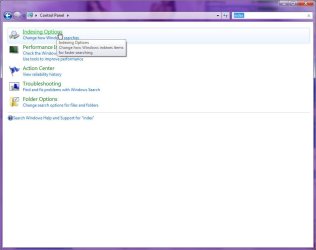
Here is the Windows 7 instructions that I promised:
  1. Open "Control Panel"
  2. In the "Search Bar", type "index" (without quotes)
  3. Click on "Indexing Options"(Does it say "Indexing Complete"?)
  4. Click "Modify"
  5. Click "Show All Locations" (Respond to UAC if necessary)
  6. Have all you drive been properly indexed?
Hope this helps...
 

Attachments

  • index_options.jpg
    index_options.jpg
    49.8 KB · Views: 8

My Computer

Computer type
PC/Desktop
Computer Manufacturer/Model Number
Virtual Machine
OS
Windows 7 Professional 32-bit SP1
CPU
AMD A4/A6
Motherboard
Intel Corporation 440BX Desktop Reference Platform
Memory
3.00GB EDO
Graphics Card(s)
VMware SVGA 3D
Sound Card
High Definition Audio Device
Monitor(s) Displays
Generic Non-PnP Monitor on VMware SVGA 3D
Screen Resolution
1440x900
Hard Drives
1 x 60GB VMware Virtual SATA Hard Drive ATA Device
Antivirus
Kaspersky Total Security
thanks for responde,
i have off uca, but "Show All Locations" button is locked (;>) i check directories my home user documents and it looks fine, after that i click "troubleshoot search and indexing" check all checkbox, but wizard no found problems, i changed index directory to new one, somethnig like that c:\AppData\Microsoft\newindex but still nothing changed.
i think is bigger problem ;>
 

My Computer

OS
7
Turn UAC back on (for reasons other than just getting your Search to work, if you must know).

Back on topic. When you in the first "Indexing Options" window, click on the "Advanced" button, then under Troubleshooting, click "Rebuild"...
 

My Computer

Computer type
PC/Desktop
Computer Manufacturer/Model Number
Virtual Machine
OS
Windows 7 Professional 32-bit SP1
CPU
AMD A4/A6
Motherboard
Intel Corporation 440BX Desktop Reference Platform
Memory
3.00GB EDO
Graphics Card(s)
VMware SVGA 3D
Sound Card
High Definition Audio Device
Monitor(s) Displays
Generic Non-PnP Monitor on VMware SVGA 3D
Screen Resolution
1440x900
Hard Drives
1 x 60GB VMware Virtual SATA Hard Drive ATA Device
Antivirus
Kaspersky Total Security
Back
Top