Bug in Calculator for all OS versions

harmohans

New member
Local time
9:16 AM
Messages
5
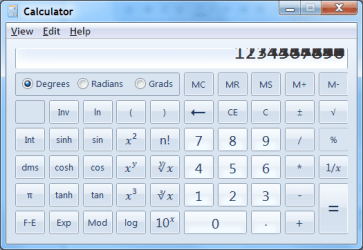
There is a bug in all the versions of Windows XP, Vista and Win 7.
On doing the operation - 2704 / 52, we get the result as 1.

This is a funny bug and means there can be other combinations on which the arithmatic operations may not result correctly.
 

My Computer My Computer

OS
Windows 7
If you hit the enter key twice or the equal you get 1 so technically its not a bug.
 

My Computer My Computer

Computer Manufacturer/Model Number
HP Compaq Presario/SR5113WM
OS
Windows 7 Ultimate x64/ Windows Vista Ultimate x64
CPU
AMD Athlon 64 X2 3600+ 1.9Ghz
Motherboard
Asus M2N68-LA
Memory
PNY Optima Memory DDR2 2GB 2x1 kit
Graphics Card(s)
PNY Nvidia 8400 GS 256MB
Sound Card
On board RealTek
Monitor(s) Displays
Acer X163W LCD
Screen Resolution
1366x768
Hard Drives
Western Digital 160 GB SATA 3G (3.0Gb/sec)
7200 rpm
Western Digital 160 GB IDE
PSU
Dynex 400w
Case
Nothin Special
Cooling
Stock
Keyboard
Standard 102 key with volume and sleep buttons
Mouse
Wireless Logitech LX7
Internet Speed
Comcrap 10mb cable
Other Info
Insignia 2.1 speakers, wireless Xbox 360 controller w/plug n play charger, Belkin wireless G + mimo usb network adapter.
As mansrm81 states. Since 2704 is the square of 52, you have to hit enter twice (which will repeat the operation) to get 1. Works as it always has here.

Gary
 

My Computer My Computer

Computer Manufacturer/Model Number
Dell XPS420
OS
Vista Ult 64 bit Seven Ult RTM x64
CPU
Intel Core2 Quad Q6600 2.40 gigahertz
Memory
Crucial Ballistix 4x2GB PC2 6400
Graphics Card(s)
NVIDIA GeForce 8600 GTS 256 MB
Sound Card
Creative SB X-Fi audio
Monitor(s) Displays
HP w2207 + HPvs15
Screen Resolution
1680x1050 + 1024x768
Hard Drives
2-WD5000AAKS-500 GB
WD5000AAV-500 GB external
Keyboard
Microsoft Comfort Curve
Mouse
MX Revolution
Other Info
Wacom Intuos 2 Graphics Tablet
Experience Index=5.5
Here's another calculator bug:

1. Do a square root of 4 -> Should return 2
2. Subtract two from that result -> Should return 0 but instead returns some negative number with a lot of decimals
 

My Computer My Computer

OS
Windows 7 32 bit

Attachments

My Computer My Computer

Computer type
PC/Desktop
Computer Manufacturer/Model Number
Self built custom
OS
64-bit Windows 11 Pro for Workstations
CPU
Intel i7-8700K OC'd to 5 GHz
Motherboard
ASUS ROG Maximus XI Formula Z390
Memory
64 GB (4x16GB) G.SKILL TridentZ RGB DDR4 3600 MHz
Graphics Card(s)
ASUS ROG-STRIX-GTX1080TI-O11G-GAMING
Sound Card
Integrated
Monitor(s) Displays
2 x Samsung Odyssey G7 27"
Screen Resolution
2560x1440
Hard Drives
1TB Samsung 990 PRO M.2,
4TB Samsung 990 PRO PRO M.2,
TerraMaster F8 SSD Plus NAS
PSU
Seasonic Prime Titanium 850W
Case
Thermaltake Core P3
Cooling
Corsair Hydro H115i
Keyboard
Logitech wireless K800
Mouse
Logitech MX Master 4
Internet Speed
2 Gb/s Download and 100 Mb/s Upload
Antivirus
Malwarebyte Anti-Malware Premium
Browser
Google Chrome
Other Info
Logitech Z625 speaker system,
Logitech BRIO 4K Pro webcam,
HP Color LaserJet Pro MFP M477fdn,
APC SMART-UPS RT 1000 XL - SURT1000XLI,
Galaxy S23 Plus phone
Each time you hit the = key it repeats the operation (divide by 52) so its not a bug, its a feature. Type a large number and divide by 10 and repeat the = a few times and it will divide by 10 each time. Also works like that on any calculation. Take a number and add 10 and repeat the = and it will add 10 each time.

Jim :geek:
 

My Computer My Computer

Computer type
PC/Desktop
Computer Manufacturer/Model Number
Home Built
OS
Windows 8.1 Pro w/Media Center 64bit, Windows 7 HP 64bit
CPU
Phenom II X6 1100T
Motherboard
ASUS M5A99X EVO
Memory
Crucial Balistic 8gb DDR3-1866 CL9
Graphics Card(s)
MSI R6850 Cyclone IGD5 PE
Sound Card
On Board
Monitor(s) Displays
ASUS VE258Q 25" LED with DVI-HDMI-DisplayPort
Screen Resolution
1920 x 1080
Hard Drives
Two WD Cavier Black 2TB Sata III, WD My Book Essential 2TB USB 3.0
PSU
Seasonic X650 80 Plus GOLD Modular
Case
Corsair 400R
Cooling
Antec Kuhler H2O 620, Two 120mm and four 140mm
Keyboard
Logitech K120
Mouse
Logitech Marble Mouse USB, Logitech Precision Game Pad
Internet Speed
15MB
Antivirus
Norton IS 2013, Malwarebytes Pro Beta 2
Browser
IE-11, FF-27
Other Info
APC UPS ES 750, Netgear WNR3500L Gigabit & Wireless N Router with SamKnows Test Program, Motorola SB6120 Gigabit Cable Modem. Brother HL-2170W Laser Printer, Epson V300 Scanner
I noticed 48/2(9+3) causes quite the quandary as well

:geek: :sarc: :huh:
 

My Computer My Computer

OS
Windows 7
I noticed 48/2(9+3) causes quite the quandary as well

:geek: :sarc: :huh:

That's because for some reason the moment you enter the ( it removes the 2 before it and just does 9+3.
 

My Computer My Computer

Computer Manufacturer/Model Number
Asus G73JH-A2
OS
Windows 7 Ultimate x64
CPU
Intel Core i7 720QM
Memory
8GB factory installed
Graphics Card(s)
ATI Mobility Radeon 5870 W/ Flashed VBIOS to fix GSOD
Screen Resolution
1920x1080
Hard Drives
1 500GB 1 250GB
Keyboard
G15
Mouse
G9x
Internet Speed
Rogers extreme/Bell fibe25 depending on where I am.
Problem with Display dpi increase

Not quite the same thing as above.

On my PC, If I increase the Display dpi to 125% (and probably 150% too) the numerals don't display in the viewer properly.

Calculator 125 Percent.png
 

My Computer My Computer

Computer type
PC/Desktop
Computer Manufacturer/Model Number
n/a
OS
W7 Ultimate SP1, LM19.2 MATE, W10 Home 1703, W10 Pro 1703 VM, #All 64 bit
CPU
AMD Phenom II x6 1100T, 3.3 GHz
Motherboard
ASUS M4A88T-M/USB3 (AM3)
Memory
12GB DDR3 1333 G-Skill (4GB x 2), G-Skill (2GB x 2)
Graphics Card(s)
NVIDIA GeForce GTX 660
Sound Card
Realtek?
Monitor(s) Displays
Samsung S23B350
Screen Resolution
1920x1080
Hard Drives
WD Green 2TB (SATA), WD Green 3TB (SATA), WD Blue 4TB (SATA), WD Blue 6TB (SATA)
PSU
Cooler Master
Case
Antec GX300 Tower
Cooling
3x Antec TRICOOL 120mm Fans
Mouse
Wired Optical
Internet Speed
DSL
Antivirus
Avast
Browser
Pale Moon (64 bit)
Other Info
2018-12-27 Upgraded HDDs
2015-12-10 Upgraded case, graphics card, storage
2015-08-15 Upgraded motherboard & RAM
2015-07-15 Upgraded LM17.1 to LM17.2
why doesn't the % key work when in scientific mode?

:confused:

is it because scientists know other ways of calculating percentages?
 

My Computer My Computer

Computer Manufacturer/Model Number
mickey megabyte 1234
OS
ultimate 64 sp1
CPU
i5 2500K [email protected]
Motherboard
MSI P67A-GD53
Memory
8 gigs GSkill Ripjaws 1600
Graphics Card(s)
amd hd6950
Sound Card
creative x-fi gamer
Monitor(s) Displays
samsung 24"
Screen Resolution
1920x1080
Hard Drives
ocz vertex 2e 60 gig, samsung f3 1tb, buffalo 2tb ext
PSU
antec 550
Case
antec three hundred
Cooling
i'm a cooling fan
Keyboard
saitek eclipse ii
Mouse
logitech g3
Internet Speed
about 4 Mbps
Other Info
i love win7
You can tell the qualify of a calculator with:

any number OTHER than 0 ^ 0 should return 1.

0 ^ 0 should return error/undefined.

Years ago when calculators were quite popular, I would never buy one unless it would only allow hitting = once in a row. IOW, to prevent accidentally having the = key triggered twice, and not notice you had done it and go on your merry way.
 

My Computer My Computer

Computer type
PC/Desktop
Computer Manufacturer/Model Number
Custom
OS
Windows 7
CPU
AMD Phenom II X2 (dual-core)
Motherboard
GA-MA785GM-US2H
Memory
4G
Graphics Card(s)
integrated ATI HD 4200
Sound Card
integrated
Monitor(s) Displays
Samsung 24"
Screen Resolution
1920x1080
Hard Drives
1 SSD - Samsung 840 - 500 GB - OS and DATA partitions
1 SSD - Intel 320 - 120 GB (used for backups) - Misc/BACKUP
1 SATA HD - WD, 500 GB - BACKUP
PSU
Ultra X4 500W
Case
Ultra X-blaster
Keyboard
Microsoft Digital Media Pro
Mouse
Logitech WIRED!
Internet Speed
15 Mbps FIOS
Back
Top