Bug in Windows 7 RTM

Also, I thought rck01 was the Kennedy person for whom so many of you possess disdain. As far the referenced Kennedy goes, I have only read two web pieces written by him. Both were lucid and cogent. And something about no pants.

Back OT - I am pursuing this anomoly for a single reason: there is nothing on the interweb regarding it's cause or solution. An unsourced citation regarding something someone said is irrelevant and amateur. To this point, MD's treatment remains the singular attempt at professional analysis that I have seen. The treatment, however, remains speculative, to a degree, and does not address the discrepancy between dllhost, explorer and chkdsk memory consumption. The discrepancies are prima facie evidence that the analysis may not be on target.

I do not know of what value it would be, other than for pride - imagine that SevenForums were able to identify the specific cause and proposed solution before the hotfix is released.
 
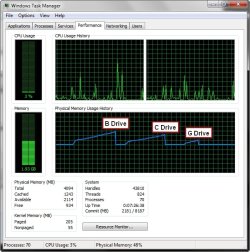
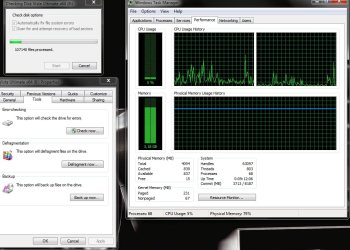
Disk Check on all 3 drives and no problems on Build 7600.16384 x64, G is the external drive and B is my second internal Drive.

2009-08-06_023546.jpg
 

My Computer

Computer Manufacturer/Model Number
Home Brew
OS
Windows 7 Ultimate Vista Ultimate x64
CPU
Core 2 Duo E8500 3.16Ghz @ 3.8Ghz
Motherboard
eVGA 750i FTW
Memory
2x2Gigs Patriot PC2-6400 LL
Graphics Card(s)
Inno3D GeForce GTX260 216 SP
Monitor(s) Displays
ASUS VW222U 22" 2ms Response time
Screen Resolution
1680x1050
Hard Drives
SATA 150GB
SATA II 250GB
USB IDE 750GB Ext.
PSU
HYTEC 600W & Thermaltake 650W Toughpower Power Exp
Case
Thermaltake Armor LCS (Liquid Cooling System)
Cooling
Liquid Cooling System
Keyboard
Logitech G15 Gaming Keyboard
Mouse
Logitech G9 Gaming Mouse
I'm using Nvidia Nforce Win 7 chipset Drivers and on G drive it was using 500MB, Primary used about 400MB and External used about 250MB.
 

My Computer

Computer Manufacturer/Model Number
Home Brew
OS
Windows 7 Ultimate Vista Ultimate x64
CPU
Core 2 Duo E8500 3.16Ghz @ 3.8Ghz
Motherboard
eVGA 750i FTW
Memory
2x2Gigs Patriot PC2-6400 LL
Graphics Card(s)
Inno3D GeForce GTX260 216 SP
Monitor(s) Displays
ASUS VW222U 22" 2ms Response time
Screen Resolution
1680x1050
Hard Drives
SATA 150GB
SATA II 250GB
USB IDE 750GB Ext.
PSU
HYTEC 600W & Thermaltake 650W Toughpower Power Exp
Case
Thermaltake Armor LCS (Liquid Cooling System)
Cooling
Liquid Cooling System
Keyboard
Logitech G15 Gaming Keyboard
Mouse
Logitech G9 Gaming Mouse
I'm using Nvidia Nforce Win 7 chipset Drivers...
I am not asking which chipset driver you are using, rather which version. There is an unsubstantiated report that legacy (pre-RTM) mfgr's chipset drivers are at fault for the observed phenomenon. Is your chipset driver dated after the release date of your OS install?

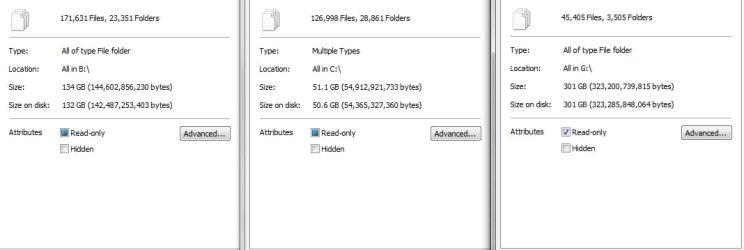
Also, the reported issue does not seem to affect the sysvol. What is the file count on your G and external drives? Low file counts are consistent with (relatively) low mem usage in other reports.
 
Drivers were pre-RTM Win 7 drivers, version 15.35 signed 8th of May.

File Count.jpg
 

My Computer

Computer Manufacturer/Model Number
Home Brew
OS
Windows 7 Ultimate Vista Ultimate x64
CPU
Core 2 Duo E8500 3.16Ghz @ 3.8Ghz
Motherboard
eVGA 750i FTW
Memory
2x2Gigs Patriot PC2-6400 LL
Graphics Card(s)
Inno3D GeForce GTX260 216 SP
Monitor(s) Displays
ASUS VW222U 22" 2ms Response time
Screen Resolution
1680x1050
Hard Drives
SATA 150GB
SATA II 250GB
USB IDE 750GB Ext.
PSU
HYTEC 600W & Thermaltake 650W Toughpower Power Exp
Case
Thermaltake Armor LCS (Liquid Cooling System)
Cooling
Liquid Cooling System
Keyboard
Logitech G15 Gaming Keyboard
Mouse
Logitech G9 Gaming Mouse
what's happened to ant's and grim's avatars???
 

My Computer

Computer Manufacturer/Model Number
mickey megabyte 1234
OS
ultimate 64 sp1
CPU
i5 2500K [email protected]
Motherboard
MSI P67A-GD53
Memory
8 gigs GSkill Ripjaws 1600
Graphics Card(s)
amd hd6950
Sound Card
creative x-fi gamer
Monitor(s) Displays
samsung 24"
Screen Resolution
1920x1080
Hard Drives
ocz vertex 2e 60 gig, samsung f3 1tb, buffalo 2tb ext
PSU
antec 550
Case
antec three hundred
Cooling
i'm a cooling fan
Keyboard
saitek eclipse ii
Mouse
logitech g3
Internet Speed
about 4 Mbps
Other Info
i love win7
I guess I missed all the Kennedy stuff?

Anyway - turned off UAC - Disk Checking via Tools is now running as Explorer AND mem usage hit 3.22GB within seconds. File count on the target drive is constant from yesterday.

Cancelled scan and Explorer DID NOT release memory. I was able to close that instance of Explorer with a right click end procees. It closed immediately with no visible affect.

FYI...

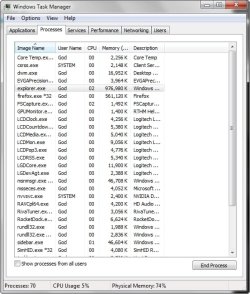
I was able to duplicate the results, with Explorer - not CHKDSK, as described above. My first reaction is - THAT is a bug. I attempted to shake it up by starting numerous secondary apps as I had in my original tests with CHKDSK. No luck.

While in the Resource Monitor-Memory tab I right clicked the hung Explorer process (after cancelling the repair) and selected "Analyze Wait States". It reported that one of the threads in the process was waiting for a Network I/O to complete....(?)

CHKDSK, DLLHOST, Explorer .... Command Window, Properties - Tools Menu....hmmmm......
 

My Computer

OS
XP Pro & Vista Home Premium (x86); Windows Ultimate 7600 x64 Retail
what's happened to ant's and grim's avatars???

It seems that Antman has morphed into a monkey named MoJo and Grim is doing his happy dance!

:roflmao:
 

My Computer

Computer type
PC/Desktop
Computer Manufacturer/Model Number
LENOVO K450 @3.0GHZ
OS
64-bit Windows 8.1 Pro
CPU
Core(TM) i5 CPU 4330 Haswell @ 3.20GHz
Motherboard
LENOVO
Memory
12.00 GB
Graphics Card(s)
Intel(R) HD Graphics
Sound Card
Intel HD integtrated
Monitor(s) Displays
HP 25' ISP Monitor
Screen Resolution
1900/1020
Hard Drives
(1) ST1000DM003-1CH162 (2) Generic STORAGE DEVICE USB Device (3) Generic STORAGE DEVICE USB Device
Internet Speed
100mb down/10mb up
Drivers were pre-RTM Win 7 drivers, version 15.35 signed 8th of May.
Interesting. Now I am curious and will do some Googling - are AMD systems affected? Are nVidia chipsets affected? What is the commonality?

Also, I still do not have enough data to fully grasp what is different about your result. a) I do not have enough non-RAID drives to run multiple instances of chkdsk (et al) to duplicate your 3 drive test. I do not have 2 drives that I can unmount (you can bet that I will revisit my drive configuration though). This is important only because you seem to be running multiple instances of chkdsk in your posted result.

I am not willing to run chkdsk /r on my RAID volumes. Please advise, anyone, if I am reticent without reason.

In order to corelate file count to mem usage per drives, I need to know the mem usage per instance of chkdsk.

Forward: chkdsk will now mean chkdsk.exe, dllhost.exe or explorer.exe unless otherwise noted.
 
It seems that Antman has morphed into a monkey named MoJo and Grim is doing his happy dance!

:roflmao:

Maybe its just rule 15 and the admins having some fun

btw they got mine too

K
 

My Computer

Computer Manufacturer/Model Number
HP Pavillion dv-7 1005 Tx
OS
Win 8 Release candidate 8400
CPU
[email protected]
Memory
4 gigs
Graphics Card(s)
Nvidia 9600M
Sound Card
HD built-in
Monitor(s) Displays
17" Wxga
Screen Resolution
1440x900
Cooling
none
Internet Speed
45Mb down 5Mb up
Interesting. Now I am curious and will do some Googling - are AMD systems affected? Are nVidia chipsets affected? What is the commonality?

Also, I still do not have enough data to fully grasp what is different about your result. a) I do not have enough non-RAID drives to run multiple instances of chkdsk (et al) to duplicate your 3 drive test. I do not have 2 drives that I can unmount (you can bet that I will revisit my drive configuration though). This is important only because you seem to be running multiple instances of chkdsk in your posted result.

I am not willing to run chkdsk /r on my RAID volumes. Please advise, anyone, if I am reticent without reason.

In order to corelate file count to mem usage per drives, I need to know the mem usage per instance of chkdsk.

Forward: chkdsk will now mean chkdsk.exe, dllhost.exe or explorer.exe unless otherwise noted.
Nice new avatar Antman...MooooJoooo-JoJo
 

My Computer

Computer Manufacturer/Model Number
Compal JFT02 (Custom Build Laptop)
OS
Windows 7 Home Premium x64 - Mac OS X 10.6.4 x64
CPU
Intel Core 2 Duo T9300 2.5 GHz
Motherboard
JFT02
Memory
4GB Kingston DDR2-800
Graphics Card(s)
NVIDIA Geforce 8600M GT (512MB Model)
Sound Card
Realtek HD Audio
Monitor(s) Displays
WUXGA Standard Laptop Display
Screen Resolution
1680*1050
Hard Drives
Toshiba 320GB 5400RPM Laptop HD
PSU
Standard Laptop Power Supply
Case
Standard Laptop Case
Cooling
Standard Laptop Cooling
Keyboard
Standard Laptop 105 Key-Keyboard
Mouse
Synaptics Touchpad
Internet Speed
Verizion Online DSL 3360/864 kbs (dl/up)

My Computer

Computer Manufacturer/Model Number
Compal JFT02 (Custom Build Laptop)
OS
Windows 7 Home Premium x64 - Mac OS X 10.6.4 x64
CPU
Intel Core 2 Duo T9300 2.5 GHz
Motherboard
JFT02
Memory
4GB Kingston DDR2-800
Graphics Card(s)
NVIDIA Geforce 8600M GT (512MB Model)
Sound Card
Realtek HD Audio
Monitor(s) Displays
WUXGA Standard Laptop Display
Screen Resolution
1680*1050
Hard Drives
Toshiba 320GB 5400RPM Laptop HD
PSU
Standard Laptop Power Supply
Case
Standard Laptop Case
Cooling
Standard Laptop Cooling
Keyboard
Standard Laptop 105 Key-Keyboard
Mouse
Synaptics Touchpad
Internet Speed
Verizion Online DSL 3360/864 kbs (dl/up)
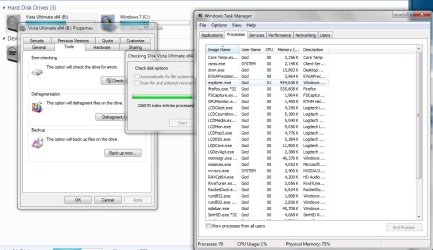
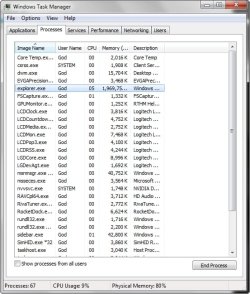
I just ran it again and checked the process Tab and explorer went from 123MB to 954MB and it was constant in it's ascent so I guess if there were fore files then it may have gone considerably higher, also you will notice in the first screen I posted of the performance Tab, the memory usage did go back to normal immediately after completion of each test.

Explorer.jpg
 

My Computer

Computer Manufacturer/Model Number
Home Brew
OS
Windows 7 Ultimate Vista Ultimate x64
CPU
Core 2 Duo E8500 3.16Ghz @ 3.8Ghz
Motherboard
eVGA 750i FTW
Memory
2x2Gigs Patriot PC2-6400 LL
Graphics Card(s)
Inno3D GeForce GTX260 216 SP
Monitor(s) Displays
ASUS VW222U 22" 2ms Response time
Screen Resolution
1680x1050
Hard Drives
SATA 150GB
SATA II 250GB
USB IDE 750GB Ext.
PSU
HYTEC 600W & Thermaltake 650W Toughpower Power Exp
Case
Thermaltake Armor LCS (Liquid Cooling System)
Cooling
Liquid Cooling System
Keyboard
Logitech G15 Gaming Keyboard
Mouse
Logitech G9 Gaming Mouse
...it was constant in it's ascent so I guess if there were fore files then it may have gone considerably higher

...also you will notice in the first screen I posted of the performance Tab, the memory usage did go back to normal immediately after completion of each test.
I misinterpreted your screenshot.

But, I do notice that you are not duplicating the test. Both check boxes should be selected to emulate chkdsk /r.

Apples and oranges. Can you test again?
 
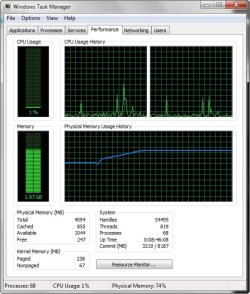
This is taking a bit longer to complete now, 30 minutes in and....

2009-08-06_035156.jpg

2009-08-06_035214.jpg

2009-08-06_035615.jpg

2009-08-06_041804.jpg
 

My Computer

Computer Manufacturer/Model Number
Home Brew
OS
Windows 7 Ultimate Vista Ultimate x64
CPU
Core 2 Duo E8500 3.16Ghz @ 3.8Ghz
Motherboard
eVGA 750i FTW
Memory
2x2Gigs Patriot PC2-6400 LL
Graphics Card(s)
Inno3D GeForce GTX260 216 SP
Monitor(s) Displays
ASUS VW222U 22" 2ms Response time
Screen Resolution
1680x1050
Hard Drives
SATA 150GB
SATA II 250GB
USB IDE 750GB Ext.
PSU
HYTEC 600W & Thermaltake 650W Toughpower Power Exp
Case
Thermaltake Armor LCS (Liquid Cooling System)
Cooling
Liquid Cooling System
Keyboard
Logitech G15 Gaming Keyboard
Mouse
Logitech G9 Gaming Mouse
Now you have seen what the buzz is about. Interesting that you get ~1GB, ~2GB and ~3GB results. I have not cross-referenced these to your file counts, I am assuming they corelate. If they do, your results are consistent with the MD's initial analysis.

I am glad that I did not bother with the Google re: AMD/nVidia.

While in the Resource Monitor-Memory tab I right clicked the hung Explorer process (after cancelling the repair) and selected "Analyze Wait States". It reported that one of the threads in the process was waiting for a Network I/O to complete....(?)

Muad Dib, MD, will always be "The Doctor" in my mind as a result of this examination. Once I get an acronym in my head, I can't shake it out.
 
I duplicated my original test to confirm that CHKDSK /R executed from a command window does relenquish its memory usage when aborted by closing the command window or via the Task Manager - Process Window.
 

My Computer

OS
XP Pro & Vista Home Premium (x86); Windows Ultimate 7600 x64 Retail
Access is denied...

Can't run here... what are the commands? CHKDSK <C:> /r

I have two HDs let's see if this crash my system...
 

My Computer

OS
Windows7 Enterprise SP1 x64 (Technet)
Back
Top