Solved Bug issues

LindenBruce

New member
Local time
9:12 AM
Messages
26
Hello all,
Okay, I rebuilt my machine about five months ago. I am using BitDefender for anit-virus-spam-firewall. Everything was working great for the first several months. Then sometime after checking my work e-mails from home on my machine I started to notice my internet brousing was going much slower than usual. I was also not able to access some websites anymore with IE. I did notice something very perculiar though. Whenever I would change my weather location on MSN on my home machine I would notice that same location was now on MSN at a work machine using XP. I think my employer placed a tracking cookie on my machine when I accessed my work e-mails.

So, I reinstalled my OS (win 7) on my SSD HD. I left out all of my other software to see if it may have been effecting my system. I did reinstall BitDefender. During a scan of my computer BitDefender came across two files that could not be scanned because they were over compressed. They belonged to Nero 7. Which was odd because I had not yet reinstalled Nero but had it installed before the re-install. And I am still; having the same weird issue with my weather location on IE. It's obvious there is still some old data lingering on my SSD HD.

So, what do I need to do to ensure my SSD HD is wiped clean so I can re-install Win 7? Is there some software out there to wipe clean my SSD HD I can use? Thanks, Bruce
 

My Computer

OS
Windows 7 64 bit
CPU
AMD 6core
Motherboard
MSI 890FXA-GD70
Memory
8gigs
Graphics Card(s)
AsusEAH 5850
Sound Card
on board
Monitor(s) Displays
Samsung 205BW
Hard Drives
Muskin ssd 220gig
PSU
Thermaltake
Cooling
Name it
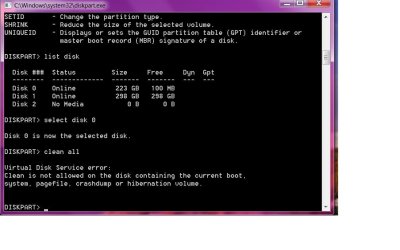
I tried that Theog and got the following error. What am I doing wrong? error.jpg Thanks, Bruce
 

My Computer

OS
Windows 7 64 bit
CPU
AMD 6core
Motherboard
MSI 890FXA-GD70
Memory
8gigs
Graphics Card(s)
AsusEAH 5850
Sound Card
on board
Monitor(s) Displays
Samsung 205BW
Hard Drives
Muskin ssd 220gig
PSU
Thermaltake
Cooling
Name it
NO error there, you can not clean Disk 0 from the desktop.
Use your Windows 7 DVD.
 

My Computer

OS
ME/XP/Vista/Win7
NO error there, you can not clean Disk 0 from the desktop.
Use your Windows 7 DVD.


Hello LindenBruce, welcome to Seven Forums!


Have a look at this tutorial at the link below for the method and then run the clean all before you start the installation process and be sure to post back with any further questions you may have and to keep us informed.


DISKPART : At PC Startup
 

My Computer

Computer Manufacturer/Model Number
* BFK Customs *
OS
W 7 64-bit Ultimate
CPU
Intel Q9550 Yorkfield
Motherboard
ASUS P5Q Pro
Memory
8GB Dominator 8500C5D
Graphics Card(s)
ATI : XFX 5870
Sound Card
Realtek HD Audio 7-1
Monitor(s) Displays
1x 47" LCD HDMI & 3x 26" LCD HDMI
Screen Resolution
1920x1080P & 1920x1200
Hard Drives
1x 80GB Intel X25-M G2 SSD : 1x 500GB & 1x 640GB WD Caviar Black(s)
PSU
Corsair 620HX
Case
Cooler Master RC-690
Cooling
Tuniq Tower 120, 2x 140mm and 3x 120mm case fans
Keyboard
Microsoft 500
Mouse
Razer Diamondback 3G
Internet Speed
14 Mb/s
Other Info
1x Koutech 3Gb/s SATA HDD Hot Swap Rack
Thanks Theog.
Bare foot kid I tried that process and my machine locks up. I will try it again today. Maybe I did something out of line. Thanks, Bruce
 

My Computer

OS
Windows 7 64 bit
CPU
AMD 6core
Motherboard
MSI 890FXA-GD70
Memory
8gigs
Graphics Card(s)
AsusEAH 5850
Sound Card
on board
Monitor(s) Displays
Samsung 205BW
Hard Drives
Muskin ssd 220gig
PSU
Thermaltake
Cooling
Name it
Ok,

When I get to the "press any key to boot from cd/dvd" screen I press any key and one of two things happens.

The machine gives me a BOOTMGR is corrupt and it freezes
or
The machine freezes and I get a beeping sound from the mobo speaker.

So what is going on here? Thanks, Bruce
 

My Computer

OS
Windows 7 64 bit
CPU
AMD 6core
Motherboard
MSI 890FXA-GD70
Memory
8gigs
Graphics Card(s)
AsusEAH 5850
Sound Card
on board
Monitor(s) Displays
Samsung 205BW
Hard Drives
Muskin ssd 220gig
PSU
Thermaltake
Cooling
Name it
Where did you buy your Windows 7 DVD from?
 

My Computer

OS
ME/XP/Vista/Win7
I bought it through Newegg when I rebuilt my machine about six months ago. Do you think I could have a BIOS issue with my MSI MoBo? Bruce
 

My Computer

OS
Windows 7 64 bit
CPU
AMD 6core
Motherboard
MSI 890FXA-GD70
Memory
8gigs
Graphics Card(s)
AsusEAH 5850
Sound Card
on board
Monitor(s) Displays
Samsung 205BW
Hard Drives
Muskin ssd 220gig
PSU
Thermaltake
Cooling
Name it
Ok, I pulled out a stick or ram leaving 4gigs still on my mobo. I'm running two four gig sticks so that's a low as I can go on memory without buying a two gig stick. I'm still getting the same "BOOTMGR image is corrupt" message and the system will not boot from the win 7 dvd. What next? Is there any software available that will do what I am after? Thanks, Bruce
 

My Computer

OS
Windows 7 64 bit
CPU
AMD 6core
Motherboard
MSI 890FXA-GD70
Memory
8gigs
Graphics Card(s)
AsusEAH 5850
Sound Card
on board
Monitor(s) Displays
Samsung 205BW
Hard Drives
Muskin ssd 220gig
PSU
Thermaltake
Cooling
Name it
Try resetting the CMOS: Clear CMOS - 3 Ways to Clear the CMOS - Reset BIOS

While in BIOS set SATA controller to AHCI to try install.

Unplug all other HD's and peripherals.

Have you wiped the HD yet? Use free Partition Wizard bootable CD which will autostart itself, then Disk tab>Wipe 1 set zeroes after highlighting target HD. Now 7 DVD should autostart, too.

If this fails, extract the ISO from DVD using ImgBurn and write to USB flash stick using this tool with Win7 chosen in drop down menu: Universal USB Installer – Easy as 1 2 3 | USB Pen Drive Linux Boot under USB or HD's.

Other tips for getting a perfect reinstall: Reinstalling Windows 7

Why MSN knows your weather location is explained by having signed into MSN which will hold the preferences wherever you sign in.
 
"Why MSN knows your weather location is explained by having signed into MSN which will hold the preferences wherever you sign in." But that's just it, I don't sign in to MSN at work. And yet my location is synchronized between the computers at work and my personnel system here at home.

I will give your suggestions a try right now. Thanks, Bruce
 

My Computer

OS
Windows 7 64 bit
CPU
AMD 6core
Motherboard
MSI 890FXA-GD70
Memory
8gigs
Graphics Card(s)
AsusEAH 5850
Sound Card
on board
Monitor(s) Displays
Samsung 205BW
Hard Drives
Muskin ssd 220gig
PSU
Thermaltake
Cooling
Name it
That did it GregRocker!!! Thanks. And with the info provided to me by Theog and Bare Foot Kid I was able to clean my hard drives and reinstall a clean version of win 7 ultimate. Thanks again guys. Bruce
 

My Computer

OS
Windows 7 64 bit
CPU
AMD 6core
Motherboard
MSI 890FXA-GD70
Memory
8gigs
Graphics Card(s)
AsusEAH 5850
Sound Card
on board
Monitor(s) Displays
Samsung 205BW
Hard Drives
Muskin ssd 220gig
PSU
Thermaltake
Cooling
Name it
Hello again Bruce, good to see you got it sorted and thanks for the update.
 

My Computer

Computer Manufacturer/Model Number
* BFK Customs *
OS
W 7 64-bit Ultimate
CPU
Intel Q9550 Yorkfield
Motherboard
ASUS P5Q Pro
Memory
8GB Dominator 8500C5D
Graphics Card(s)
ATI : XFX 5870
Sound Card
Realtek HD Audio 7-1
Monitor(s) Displays
1x 47" LCD HDMI & 3x 26" LCD HDMI
Screen Resolution
1920x1080P & 1920x1200
Hard Drives
1x 80GB Intel X25-M G2 SSD : 1x 500GB & 1x 640GB WD Caviar Black(s)
PSU
Corsair 620HX
Case
Cooler Master RC-690
Cooling
Tuniq Tower 120, 2x 140mm and 3x 120mm case fans
Keyboard
Microsoft 500
Mouse
Razer Diamondback 3G
Internet Speed
14 Mb/s
Other Info
1x Koutech 3Gb/s SATA HDD Hot Swap Rack
Back
Top