Bug report: Word 2010 - duplex printing

GRoston

New member
Power User
VIP
Local time
2:55 PM
Messages
374
OS: W7 Pro x64
Software: Office 2010 x64
Printer: Samsung CLP-550N (has native duplex printing support)

I tried to print a two page document on both sides. I could not get word to do this. I tried the following:

  1. Printer Properties, select duplex printing. This would not 'take'. After clicking OK, when I again clicked Printer Properties, they would be back to the default.
  2. Tried setting the Word option Print on Both Sides. I tried this in combination with various un/checked combinations of Option-Advanced->Printing 'Print on front of the sheet for duplex printing' and 'Print on back of the sheet for duplex printing'
I finally wound up printing to PDF, and then printing duplex from there (which implies that the printer driver is not at fault). Note that I never once had a duplex printing problem with XP/Word 2003/this printer.
 

My Computer

Computer type
PC/Desktop
OS
Windows 7 x64 Pro
CPU
Core i7 860 @ 3.8 GHz
Motherboard
MSI P55-GD80
Memory
16 GB F3-12800CL7D (DDR3 1600 7-7-7-24)
Graphics Card(s)
Sapphire Vapor-X 100283VXL Radeon HD 5770
Monitor(s) Displays
NEC LCD3090WQXi-BK
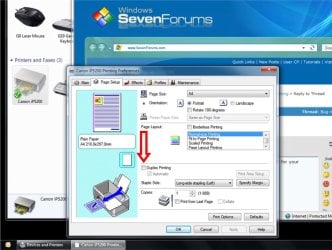
is there an option for Printing Preferences when you right-click on your printer?
(- obtainable via the Devices and Printers option in the Start Menu..)

- that's where I usually set mine for the Canon, in the Page Setup tab viz:

printerset.jpg
 

My Computer

Computer type
PC/Desktop
Computer Manufacturer/Model Number
benchtec, built to personal specs
OS
Windows10 Pro - 64Bit vs.10547
CPU
i7-965 Extreme Edition (8 Cores) at 3.3GHz (no OC)
Motherboard
BloodRageX58 (Socket1366)
Memory
12G Corsair Dominator DDR3 - tripled
Graphics Card(s)
2xAMD SapphireNITRO R9 380(4G) crossfire
Sound Card
Sonar(SB)X-Fi onboard
Monitor(s) Displays
SyncMaster P2050 20"
Screen Resolution
1600x900 (widescreen)
Hard Drives
480G\OCZSolid3SSD, 64G\OCZVertex3SSD,60G\OCZVertex2SSD, 1TB\spinpointF1SATAHDD
PSU
1200w Power Station Gold
Case
ANTEC 900/2 all blue lights, etc..
Cooling
Noctua SE1366 NH-U12P - a tight fit, but a monster cooler!!
Keyboard
Logitech G19 (wired)
Mouse
Logitech G9 Laser (wired)
Internet Speed
150mb unlimited
Browser
IE11(RP)
Other Info
Xbox One, Nokia735 Windows10 mobile, LG HD/DVD/Blu-Ray r/w, CyberlinkPowerDVD15, LogitechZ5500-SS(5.1), LogitechG35Phones-SS(7.1),MSOffice 2007,CorelDrawX7,Painter2016, Wacom Intuos Pro-SE
I would like to follow this post up, we are also having problems printing DUPLEX from Microsoft Word 2007.
If you print from Excel 2007, Powerpoint 2007 you can print duplex, it seems to be a problem with Word 2007 only. Any ideas what it could be?

We are on WIndows 7, and only had these problems since then. No reports of any problems with Windows XP and Office 2007 combination.

Thanks in advance,
 

My Computer

OS
7
Problem seems to be mostly resolved with the actual release. When I posted, I was using Office 2010 x64 beta. Under Office 2010 x86, duplex seems to work reliably the majority of the time, though it did not work the other day.
 

My Computer

Computer type
PC/Desktop
OS
Windows 7 x64 Pro
CPU
Core i7 860 @ 3.8 GHz
Motherboard
MSI P55-GD80
Memory
16 GB F3-12800CL7D (DDR3 1600 7-7-7-24)
Graphics Card(s)
Sapphire Vapor-X 100283VXL Radeon HD 5770
Monitor(s) Displays
NEC LCD3090WQXi-BK
I spoke too soon - the problem continues to exist...

Just so there is no question - the problem is not with the printer driver. My (painful) work-around is create a PDF of the document, open it in Acrobat, then print duplex from Acrobat. I have not been able to determine if there is a particular 'cause' of the problem, i.e., odd vs even number of pages, saved vs unsaved file, etc.
 

My Computer

Computer type
PC/Desktop
OS
Windows 7 x64 Pro
CPU
Core i7 860 @ 3.8 GHz
Motherboard
MSI P55-GD80
Memory
16 GB F3-12800CL7D (DDR3 1600 7-7-7-24)
Graphics Card(s)
Sapphire Vapor-X 100283VXL Radeon HD 5770
Monitor(s) Displays
NEC LCD3090WQXi-BK
No duplex printing from Word 2010

I spoke too soon - the problem continues to exist...

Just so there is no question - the problem is not with the printer driver. My (painful) work-around is create a PDF of the document, open it in Acrobat, then print duplex from Acrobat. I have not been able to determine if there is a particular 'cause' of the problem, i.e., odd vs even number of pages, saved vs unsaved file, etc.

Until last week everything was working smoothly, including being able to select two-sided printing in the Print dialog for Word. Today PowerPoint reported that there was no printer, so I tried other Office apps with the same result. I ran the Office 2010 repair process, rebooted, and the printer now appears, but it no longer offers the ability to print two-sided. My guess is that some recent Office update has screwed up printing, and I don't have a lot of faith in Microsoft fixing it anytime soon, as they never appeared to contribute to other discussions about printing issues from Office 2010. I am running the 32-bit version of Office 2010 Academic Professions under Windows 7 64-bit.
 

My Computer

Computer Manufacturer/Model Number
Custom
OS
Windows 7 Professional 64bit
CPU
Intel i5 2500
Motherboard
ASUS P8P67
Memory
16GB
Graphics Card(s)
Gigabyte GV-R577UB-1GD
Monitor(s) Displays
Samsung SyncMaster 931B
Hard Drives
3ea WD Caviar Black 1TB SATA III
Corsair CMFSSD-128GBG2D
Internet Speed
30-30 Mbps
it's of no comfort, but apparently you're not alone:
Duplex problem in Word 2010

this is something that MS must address, it's fundamental to MSOffice printing procedure..
- it seems that the Vista/Windows7 Office set-up overrides the printer's own native settings

one suspects that there ought to be a switch somewhere, allowing your own printer driver to continue with the duplexing instruction..

seems as if the OS and MSOffice2010 are trying to do too much, here..

- spooky!!:shock:
 

My Computer

Computer type
PC/Desktop
Computer Manufacturer/Model Number
benchtec, built to personal specs
OS
Windows10 Pro - 64Bit vs.10547
CPU
i7-965 Extreme Edition (8 Cores) at 3.3GHz (no OC)
Motherboard
BloodRageX58 (Socket1366)
Memory
12G Corsair Dominator DDR3 - tripled
Graphics Card(s)
2xAMD SapphireNITRO R9 380(4G) crossfire
Sound Card
Sonar(SB)X-Fi onboard
Monitor(s) Displays
SyncMaster P2050 20"
Screen Resolution
1600x900 (widescreen)
Hard Drives
480G\OCZSolid3SSD, 64G\OCZVertex3SSD,60G\OCZVertex2SSD, 1TB\spinpointF1SATAHDD
PSU
1200w Power Station Gold
Case
ANTEC 900/2 all blue lights, etc..
Cooling
Noctua SE1366 NH-U12P - a tight fit, but a monster cooler!!
Keyboard
Logitech G19 (wired)
Mouse
Logitech G9 Laser (wired)
Internet Speed
150mb unlimited
Browser
IE11(RP)
Other Info
Xbox One, Nokia735 Windows10 mobile, LG HD/DVD/Blu-Ray r/w, CyberlinkPowerDVD15, LogitechZ5500-SS(5.1), LogitechG35Phones-SS(7.1),MSOffice 2007,CorelDrawX7,Painter2016, Wacom Intuos Pro-SE
This issue has been giving me a headache!

I have been trying to print Word 2010 documents duplexed to my Dell V715w to no avail! I am glad to know this is an MS problem and not a cockpit problem.
Thanks, GRoston, for the pdf workaround. I never thought of doing that but it will have to do. :D
 

My Computer

Computer Manufacturer/Model Number
Dell inspiron 15 Model: N5010
OS
Win 7 Home Premium 64-bit
CPU
Intel P6100 2Ghz
Memory
3GB
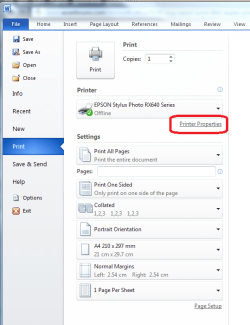
When you are about to print, selection the 'Printer Properties' from the link shown below - you are then taken to your actual printer settings, where you can select Duplex printing.

Works fine for me from there. :)
.
.
 

Attachments

  • duplex printing.PNG
    duplex printing.PNG
    49.7 KB · Views: 60

My Computer

Computer type
PC/Desktop
Computer Manufacturer/Model Number
Packard Bell
OS
Windows 7 Home Premium 64bit
CPU
Intel(R) Core(TM) i3-2120 CPU @ 3.30GHz
Motherboard
Packard Bell IPISB-AG
Memory
3.00 GB
Graphics Card(s)
(1) Intel(R) HD Graphics (2) VNC Mirror Driver
Sound Card
Realtek High Definition Audio
Monitor(s) Displays
AIO LCD
Screen Resolution
1920 x 1080
Hard Drives
WDC WD10EADX-22TDHB0 ATA Device
Fixed hard disk media
4 partitions
931.51 GB
Keyboard
Wireless
Mouse
Wireless
Antivirus
Microsoft Security Essentials
Browser
IE; Firefox
Other Info
Also:
Samsung N220 Plus Netbook - Windows 7 Home
HP laptop
iPad 5
The duplex printing problem is with Office, not the printer. I have chosen "On" on my Lexmark printer and chosen "Print both sides" in Word print window....neither has worked. Same problem in PowerPoint.
 

My Computer

OS
Win 7 32bit
I finally got mine to work by selecting duplex options in printer properties, but in Word setting, clicking print one sided. Then it bypasses the Word error. Hope that helps
 

My Computer

OS
Windows 7 Ultimate x64
Back
Top