
build 7077 - Networking Doing the "The Lambeth Walk"

jimbo45

New member
Guru
Gold Member
VIP
Local time
6:40 PM
Messages
5,941
Location
Hafnarfjörður IS
Hi all

Networking seems to be a real pain to get to work 100% ALL the time with W7.

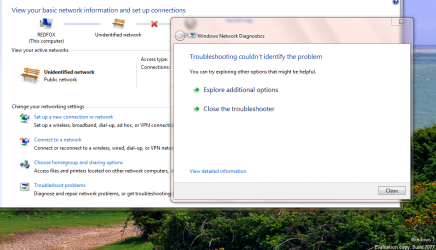
Latest build (7077 x-64) fixes the problem in Network Discovery where Computers on the network are randomly visible - but now I've got that wretched problem again (which was fixed in an earlier release) that my LAN card only has limited connectivity again even though windows reports device as working 100% correctly.

So One step forward and One step backwards ("Doing the Lambeth Walk").

Wireless etc still OK and USB==>LAN adapter (which is what I'm using now) is OK.

C'mon microsoft please FIX Networking issues -- this card works in XP and VISTA (although VISTA drivers won't work in W7.) Card is Via velocity family gigabit ethernet card.

Diagnostics can't find any error either.

What's also bad is that the adapter sort of goes into a loop if you try and do anything like IPCONFIG and you have to Force shutdown.


Cheers

jimbo
 

Attachments
  • network.png
    network.png
    123.1 KB · Views: 50

My Computer My Computer

Computer type
PC/Desktop
Computer Manufacturer/Model Number
Custom built, several laptops HP/ASUS
OS
Linux CENTOS 7 / various Windows OS'es and servers
CPU
Intel i7 Intel i5
Memory
8GB, 16GB
Graphics Card(s)
On Motherboard
Sound Card
Realtek HD audio
Monitor(s) Displays
Apple Cinema display, Samsung LCD
Screen Resolution
1920 X 1080
Hard Drives
4 X 1TB SATA
Mouse
Toshiba wireless laser
Internet Speed
> 20MB up
Heya Jimbo.... I recently installed a belkin wireless g adapter.... after some hours (random) it will totally drop signal. Its not my modem or router. Even troubleshooting it will not work for me. Eventually end up having to unplug/replug it back in and i'm running again. Could be the adapter, but am interested in feedback about usb adapters and connectivity.
 

My Computer My Computer

Computer Manufacturer/Model Number
CUSTOM
OS
XP/win7 x86 build 7127
CPU
Athlon64 X2 DUAL 4200+ 2.21ghz
Motherboard
ASUS K8 PRO SLI
Memory
2GB Dual Chan DDR2 Corsair
Graphics Card(s)
Nvidia 6800GT
Sound Card
nvidia
Monitor(s) Displays
19' LCD
Screen Resolution
1280x1024
Hard Drives
WD 250, 2x500, 2x1TB IDE/USB
WD 250 SATA (system)
SEAGATE 120 Sata
PSU
coolermaster 450
Case
SUPERFLOWER
Cooling
1 HDD bay fan, 5x80mm Case Fans, AEROGATE II Fan/Temp
Keyboard
MS wireless
Mouse
MS Wireless
Internet Speed
fassssssssst
I had that random disconnect problem with 7000, but haven't seen it since I went to 7048. Using Linksys draft N USB network adapters.
 

My Computer My Computer

Computer Manufacturer/Model Number
Self built
OS
Windows 7 Ultimate 32 & 64 -(Boot Camped Snow Leopard on a Mac Mini)
CPU
AMD Athlon A64 X2 6000+ 3.1GHz
Motherboard
DFI LanParty Jr 790GX M2RS
Memory
4GB Corsair XMS RAM
Graphics Card(s)
Gigabyte ATI Radeon HD4550/512MB/DDR3 passive cooled
Sound Card
latest RealTek HD/HDMI drivers
Monitor(s) Displays
Samsung LN40A550 (primary); Zalman 7" LCD (secondary)
Screen Resolution
1920x1080 ; 800x600
Hard Drives
WD Raptor for OS
Seagate 7211 640GB
Two Samsung EcoGreens for TV in RAID 0 = 3TB
Two WD MyBook 1TB externals for B/U and Movies
Optical Drive:
LG GGC-H20L Super Multi Blue BluRay/HD-DVD internal
PSU
Corsair HX520W
Case
Zalman HD160XT
Cooling
Zalman CNPS9500Cu on processor - Four Nexus case fans
Keyboard
Gyration wireless Media Center Keyboard
Mouse
Gyration Cordless Optical Air Mouse
Internet Speed
6344 kbps Down/1043 kbps Up (Comcast cable)
Other Info
HDMI audio/video out to Yamaha RX-V1065 receiver.
All controlled by a Harmony One universal remote.

Four other home built computers plus a Mac Mini, but this is my main Win7 testbed.
Heya Jimbo.... I recently installed a belkin wireless g adapter.... after some hours (random) it will totally drop signal. Its not my modem or router. Even troubleshooting it will not work for me. Eventually end up having to unplug/replug it back in and i'm running again. Could be the adapter, but am interested in feedback about usb adapters and connectivity.

Hiya Digger

The USB adapter I'm using is a usb at one end with a LAN slot at the other end. Just says on it "Made in China" but works fine

Windows device manager finds this as High speed USB-ETHERNET adapter. This works fine as does a PCI express APIOTEK Super GIGA ethernet adapter.

Just the built in LAN card doesn't work.

I've tried on a variety of routers and Networks so it's not a Router / ISP problem.

Here's a pic of what the device looks like.

Cheers
 

Attachments

  • usb.png
    usb.png
    27.8 KB · Views: 194

My Computer My Computer

Computer type
PC/Desktop
Computer Manufacturer/Model Number
Custom built, several laptops HP/ASUS
OS
Linux CENTOS 7 / various Windows OS'es and servers
CPU
Intel i7 Intel i5
Memory
8GB, 16GB
Graphics Card(s)
On Motherboard
Sound Card
Realtek HD audio
Monitor(s) Displays
Apple Cinema display, Samsung LCD
Screen Resolution
1920 X 1080
Hard Drives
4 X 1TB SATA
Mouse
Toshiba wireless laser
Internet Speed
> 20MB up
Back
Top