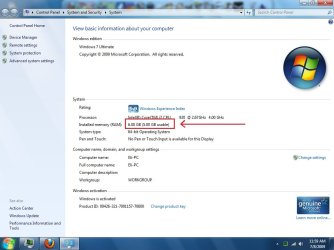
Build 7264 x64 only USES 5Gb of RAM!! (PLEASE HELP!)

aero2008

New member
Local time
7:27 AM
Messages
8
Location
North Carolina, USA

Attachments

  • Ram.jpg
    Ram.jpg
    64.6 KB · Views: 2,792
Last edited:

My Computer My Computer

At a glance

Windows 7 Ultimate x64 Build 7264Intel Core i7-920 (c0/c1) @ 3.8Ghz (190*20)6Gb OCZ Platinum 1600Mhz @ 7-7-7-20EVGA GTX 275 SuperClocked
Computer Manufacturer/Model Number
Me
OS
Windows 7 Ultimate x64 Build 7264
CPU
Intel Core i7-920 (c0/c1) @ 3.8Ghz (190*20)
Motherboard
ASRock x58 Deluxe
Memory
6Gb OCZ Platinum 1600Mhz @ 7-7-7-20
Graphics Card(s)
EVGA GTX 275 SuperClocked
Sound Card
Integrated 7 Channel HD Audio
Monitor(s) Displays
21.5 Inch Acer HD Monitor @ 1920*1080 resolution (16:9)
Hard Drives
Western Digital 640Gb 7200RPM
PSU
xClio GREATPOWER 750W PSU
Case
xClio Windtunnel Super Tower with Mods
Cooling
TRUE 120 Extreme w/ 3k rpm Scythe + many other fans
Open Task Manager then click on the Performance Monitor button (I think that's what it's called). Now, select the Memory tab. You should have a horizontal stacked histogram showing you how your memory is being allocated. The left most item will (usually) be Hardware Reserved. If you have most of that missing 1GB there, then I would suspect that you have a video card or other hardware on the system that is reserving memory for it's uses.
 

My Computer My Computer

At a glance

Win7 Ultimate, x64i7 920, currently NOT OCOCZ Platinum 12GB (6 x 2GB) 240-Pin DDR3 SDRA...nvidia geforce 7600 gt
Computer Manufacturer/Model Number
Cobbled together :)
OS
Win7 Ultimate, x64
CPU
i7 920, currently NOT OC
Motherboard
Asrock X58 Deluxe
Memory
OCZ Platinum 12GB (6 x 2GB) 240-Pin DDR3 SDRAM DDR3 1600
Graphics Card(s)
nvidia geforce 7600 gt
Sound Card
integrated
Monitor(s) Displays
Samsung SyncMaster 204t (dual monitors)
Screen Resolution
1600 x 1200
Hard Drives
WDC WD2000JS-00MHB0 ATA
WDC WD5000AAKS-65YGA0 ATA
PSU
750w
Cooling
Air, 4 120mm
Open Task Manager then click on the Performance Monitor button (I think that's what it's called). Now, select the Memory tab. You should have a horizontal stacked histogram showing you how your memory is being allocated. The left most item will (usually) be Hardware Reserved. If you have most of that missing 1GB there, then I would suspect that you have a video card or other hardware on the system that is reserving memory for it's uses.

Solved.

I figured out what to do, I'll make a post about it to help others out.
 

My Computer My Computer

At a glance

Windows 7 Ultimate x64 Build 7264Intel Core i7-920 (c0/c1) @ 3.8Ghz (190*20)6Gb OCZ Platinum 1600Mhz @ 7-7-7-20EVGA GTX 275 SuperClocked
Computer Manufacturer/Model Number
Me
OS
Windows 7 Ultimate x64 Build 7264
CPU
Intel Core i7-920 (c0/c1) @ 3.8Ghz (190*20)
Motherboard
ASRock x58 Deluxe
Memory
6Gb OCZ Platinum 1600Mhz @ 7-7-7-20
Graphics Card(s)
EVGA GTX 275 SuperClocked
Sound Card
Integrated 7 Channel HD Audio
Monitor(s) Displays
21.5 Inch Acer HD Monitor @ 1920*1080 resolution (16:9)
Hard Drives
Western Digital 640Gb 7200RPM
PSU
xClio GREATPOWER 750W PSU
Case
xClio Windtunnel Super Tower with Mods
Cooling
TRUE 120 Extreme w/ 3k rpm Scythe + many other fans
Back
Top