Building my first computer, need all the feedback i can get :)

how about the casing? do you think bitfenix can be made silent? or should i go with fractal define r3 instead?

also.. how abt the vga?

Your best bet is the 650 TI boost AMD is having sick driver issues right now and right now the only driver decent enough is 13.10 all the one's after are horrible

This is coming from personal experience
 

My Computer My Computer

At a glance

Windows 10 Home Premium 64bit sp1Intel I7-6700K @ 4.6 Ghz 1.344 volts everyday OC32GB G-Skill TridentZ 3200mhz 16-18-18-38 DDR4Sli Gigabyte Windforce GTX 980 G1
Computer type
PC/Desktop
Computer Manufacturer/Model Number
CoreI7-6700K MrFingerIII Special Builds
OS
Windows 10 Home Premium 64bit sp1
CPU
Intel I7-6700K @ 4.6 Ghz 1.344 volts everyday OC
Motherboard
Asrock Fatality K6 Z170 Socket 1151
Memory
32GB G-Skill TridentZ 3200mhz 16-18-18-38 DDR4
Graphics Card(s)
Sli Gigabyte Windforce GTX 980 G1
Sound Card
AC97 Creative Rage Tactic 3D Headphones Bluetooth
Monitor(s) Displays
27" Asus ROG Swift PG278Q G-Sync 48" Vizio Smart HD TV
Screen Resolution
2560x1440p 27"- 48" Currently Gaming at 2560x1440p Res 2K
Hard Drives
250GB Samsung Evo840SSD Seagate baracuda 500 GB WD Mybook 500Gb 1TB Seagate Barracuda
PSU
HX1050w Corsair Silver 80plus certified crosfire/sli
Case
Enthod Pro Full Tower
Cooling
Corsair H110i GT 280 mm High Performance WaterBlock
Keyboard
Logitech wireless keyboard
Mouse
Logitech wireless mouse
Internet Speed
Cox Cable 100+ mb
Antivirus
WebRoot Spysweeper with Antivirus
Browser
IE-10, Chrome, Opera
Other Info
My Other Rig is a AMD FX8320E @4.6Ghz 16GB Ballistic Sport Ram
Mobo Asrock Fatality 990FX 120GB OCZ SSD 1TB Seagate Barracuda Corsair H75 Cooling PSU Corsair CX750
GPU GTX Gigabyte 970G1
I went from zero knowledge regarding PC build and parts and spend the better half of the last 3 weeks googling and i hv been asking on the forum as well.

And you've done well. Wise to keep asking.

1. PC will be used for
4GB will suffice. However for seamless operation - 8GB is optimum. (previously you stayed with 4GB.)

(my answer will keep changing depending on re-defintion)


Thanks.


[[Almost decide but need small input]]
PSU : which one is enough for my build?
is seasonic gold g450 enough or should i get g550 or go with Seasonic Bronze M12II-620W?
I've already answered here. What is your nagging question?

Both will power a 650ti and both will be silent at idle. (or whatever card you choose)

RAM :any 2x4gb RAM as long as it have blue heatspreader
=> needs input since online vendors only list price and not pictures
Once motherboard is decided, you need to check the QVL (Qualified Vendors List) to make certain it's listed for your board.

CPU Cooler : Noctua NH-U12P SE2 or Noctua NH-U12S (will either fit on bitfenix prodigy? i read that NH-U12S is lower?)
=> read noctua's website, NH-U12S fits all ram profile, does that mean NH-U12P doesn't?
You've talked yourself into the Noctua then?

Bitfenix is 250mm deep. Nh-U12S is 158MM with fan. It'll fit.

In fact, both Noctuas will.

Tbh, if you want quiet - both will be perfect. Use the 7v resistor than comes with them and you'd be hard pressed to hear it in action.


The "all Ram profile" means that Ram with high heatsinks will fit under the fan. Since you'll be looking at low-proflie Ram, it's not a concern.


[[Need a lot of help deciding]]
Case:
I prefer quiet, but i really like small minimalistic prodigy rather than heavy mid-tower like fractal define r3.

it's either msi h87-g43 with fractal define r3
or
msi h87i with btifenix prodigy
You've asked this multiple times. From a pschology perspective - you have already decided on the btifenix prodigy. You are now just seeking validation :)

So go for the btifenix prodigy


Same answer I've given before applies. All cards will be virtually inaudible at idle/low loads. Aside from a passive card, which is not good for light gaming, all will be quiet.

Again, it's only under load (games) that the real difference between the reference vs aftermarket becomes noticeable. The exception being reference will idle a little warmer. No difference to noise.


So cable management on bitfenix prodigy is also a concern.
Both PSU's are modular. There will be cables regardless of case.

Buy cable ties. Especially to tie down the 24 pin mobo cable ( the thickest).

Your aim is to keep the flow from the front fan that blows over the HDD cage, onto the CPU cooler, and then out the back unimpeded.

Even with modular PSU's, there's going to be cables. Tie what you can down with cable ties and then shove the "bunch" on top of the bitfenix's HDD cage.
 

My Computer My Computer

At a glance

8 Pro x64i7 3770K 4.6GHz16GB G.Skill Trident X 2666mhzx2 EVGA 780 Ti Superclocked SLI
Computer type
PC/Desktop
Computer Manufacturer/Model Number
Systems by SmartEyeball
OS
8 Pro x64
CPU
i7 3770K 4.6GHz
Motherboard
ASUS P8Z77 WS
Memory
16GB G.Skill Trident X 2666mhz
Graphics Card(s)
x2 EVGA 780 Ti Superclocked SLI
Sound Card
SB X-FI Surround 5.1 PRO USB / ATH-AD900 Headphones
Monitor(s) Displays
x3 Dell U2410 / 58" Samsung
Screen Resolution
5760*1200/ 1920*1200
Hard Drives
2x Intel 520 240GB (RAID 0) * 2x WD Caviar Blacks 2TB (RAID 0) * 2TB WD Caviar Black * Sony Optirac DVD
PSU
Silverstone Strider Evolution 1200W
Case
Thermaltake Level 10 GT Snow Edition
Cooling
Noctua NH-D14
Keyboard
Topre Realforce // Ducky Shine MX Black // Filco Ninja TKL
Mouse
Thermaltake Theron (Highly Recommended) + Razer Imperator
Antivirus
MSE
Browser
IE, FF, WaterFox
Other Info
GT Extreme V2 Sim Racing Cockpit + 40" LCD and K/B Mouse stand ▼
Fanatec CSR Elite Wheel + Clubsport V1 Pedals + CSR shifter/7G-H ▼Saitek X52 Pro ▼ TrackIR 5 Pro
Buttkicker v2 Seat Rumbler with Dedicated 5.1 and Sub Woofer attached to frame ▼
=
Bloody Big Grin
I went from zero knowledge regarding PC build and parts and spend the better half of the last 3 weeks googling and i hv been asking on the forum as well.
And you've done well. Wise to keep asking.

first of all i'd like to apologize for my insufficient english in writings at conveying things.

i've read all your response and kept all of it in mind, i'm reasking because i'd like to hear the responses of ppl from this another laptop thread i made... not because i don't read or skipping or not trusting in your answers :party: :sick: :grouphug: not at all.

So... the context of why i repost my questions on that post#18 is because i made another thread about buying a new laptop... the thread was here http://www.sevenforums.com/vip/316265-new-notebook-better-go-i3-i5-intel-hd-vga-my-need.html
so on that thread, the adviced grew into what about considering making a desktop pc because i was asking about i5 ulv laptop and how i feel browsing multiple tab on it "feels more sluggish" when compared to my dead i3-2330m.
and so from there... i retyped and re-edit my questions and put it on post#18 to get opinions from other people particularly from people who've replied on the laptop thread,

regarding changes on definitions, yess, it changes because of the couple bucks savings i made from deciding to buy a cheap cheap i3 ulv instead of a $900 i5 ulv... (hence the definition change like light video editings (since im going to hv laptop and pc now), and also a few 7850 card is affordable now and g550 is affordable now)

===
you probably read my 1st post i mentioned i want to build pc while waiting for my dead laptop on warranty being repaired... well, they said its gonna take 4 months for them to "fix" my laptop so i decided to buy a new laptop.
====

actually yesterday i just bought an external hdd... when i went and asked the salesperson about PSU and casing as, and he said for my build i'd need a minimum 700w PSU and at least a full tower build like bitfenix colossus to be quiet. btifenix prodigy would sound like a jet engine according to them.
=====
i know i was being upsell or duped with that advice but as much as i rlly like the compactness of prodigy i need quiet more. the one component im still truly in doubt is how quiet can a bitfenix prodigy be, compared to define R3. no R4 here.

on noctua, i didnt talked myself into noctua, the situation does haha. unfortunately among your 4 recommendations, each one of those arent available :(

they hv thermalrights true spirit / macho scythe ninja / mugen thermaltake frio all corsair stuff and expensive zalman stuff they do have xigmatek prime, not dark knight tho

CPU cooler is the 2 components where i dont care what it is as long as its quiet and not CM :D. the cheaper the better... the other component i dont care about is RAM as long as its blue. or white. like that low profile vengeance pro, that looks cool haha :D


======
how about the casing? do you think bitfenix can be made silent? or should i go with fractal define r3 instead?

also.. how abt the vga?

Your best bet is the 650 TI boost AMD is having sick driver issues right now and right now the only driver decent enough is 13.10 all the one's after are horrible

This is coming from personal experience

any suggestion on the brands from wt ive listed?
*i know asus is considered top brand but, it also cost top dollar, like $320 atm. :haha:
 

My Computer My Computer

At a glance

windows 7 home premium 64bitIntel Core i3-2330m6 Gib 10600 DDR3 RAMRadeon 6730
Computer type
Laptop
Computer Manufacturer/Model Number
Asus K43S
OS
windows 7 home premium 64bit
CPU
Intel Core i3-2330m
Memory
6 Gib 10600 DDR3 RAM
Graphics Card(s)
Radeon 6730
Monitor(s) Displays
Generic PnP Monitor
Hard Drives
Intel SSD 330 Series 120 Gb
Seagate Momentus 750 Gb
Internet Speed
Slow, lol
Antivirus
KIS 2013
how about the casing? do you think bitfenix can be made silent? or should i go with fractal define r3 instead?

also.. how abt the vga?


For the VGA you can just get an adapter. (Usually around $10 - $20 in Best Buy) I personally prefer the Fractal Design Define R4 for silence. Hope that helps :)
 

My Computer My Computer

At a glance

Windows 8.1 Pro x86 (Temporary)AMD Phenom ll x4 840 clocked at 3.2 GHz (AM3)4.00 gigs (Two SAMSUNG 2.00 gig modules) (DDR...NVIDIA GeForce GTX 560 TI (Zotac)
Computer type
PC/Desktop
Computer Manufacturer/Model Number
Custom Build
OS
Windows 8.1 Pro x86 (Temporary)
CPU
AMD Phenom ll x4 840 clocked at 3.2 GHz (AM3)
Motherboard
Pegatron Corperation NARRA5 (AM2+)
Memory
4.00 gigs (Two SAMSUNG 2.00 gig modules) (DDR2) (802 Mhz)
Graphics Card(s)
NVIDIA GeForce GTX 560 TI (Zotac)
Sound Card
Realtek High Defintion Audio (On board)
Monitor(s) Displays
Dell E772c
Screen Resolution
1024 x 768
Hard Drives
Seagate Momentus (80 gb) (Boot) (Temporary)
Western Digital WDC WD6400AAKS-22A7B0 (596.2GB)
PSU
Corsair CX 600
Case
Some really old PC case
Cooling
AMD stock cooler,two fans from AMD heatsinks(front and back)
Keyboard
Logitech K400r
Mouse
Logitech K400r
Internet Speed
9.87 Mbps
Antivirus
Microsoft Security Essentials
Browser
Microsoft Internet Explorer 11, Google Chrome
Other Info
HP DVD drive,
Pinnacle Systems 1394 controller,
Sony 3.5 inch floppy drive,
Startech 5.25 front panel I/O
Wi-fi card
i went to the PC store yesterday to RMA my external HDD and check the goods availability of the stuffs i wanted... (yes they hv online website and price but they dont hv the stocks updated on the web a la newegg). Actually unless i'm about to buy the goods (cash in hand), they won't have the parts available, the PC store is more like a middleman between customer and distributor really. the PC store 90% of the time dont have ready stocks and they will call the distributors after cash exchanged hands and then customers wait for 30 mins or so.

=====
with that out of the way, i'd like to update my questions
sad.png
(

i've already got...
i5-4570 3.2ghz
corsair vengeance pro low profile 2x4gb
some random wireless pci adapter
windows 8

these 3 parts are empty though...
msi gtx 650ti boost 2gb twin frozr =====> Empty
fractal define r3 =====> Empty
Seasonic Gold 550 =====> Empty

Now since the above is empty... About VGA-PSU combinations... i can either go two ways... please help me decide which one..
i can either go lower VGA with higher PSU
==> 1) any 7790 (i'm good with either Asus or MSI, read the reviews and advice from sevenforums that it's quiet) WITH Corsair RM 550 ($152) or Seasonic G 650 ($152) or Seasonic X460 ($170)

or i can go higher VGA with lower PSU
==> 2) more expensive brands of 650Ti Boost / some 660 / Some R9 270 WITH Seasonic S12II bronze (they dont have M12II either
sad.png
)

Noise-wise... which one would be better...? Going higher VGA route or Going expensive PSU route?
I understand from googling the past 3 weeks that PSU is a good investment to make... but considering my basic 1 VGA non OC setup, i really feel that getting a $170 PSU is a bit overkill and not a smart decision. But again, quiet is more important than saving a few bucks
sad.png
. As limited as my bucks are
grin.png


====================
Also case-wise all Fractal R3 models are empty. noooo
sad.png

the Fractal distributor also imported NZXT and Bitfenix, and they suggested NZXT H2 and Bitfenix Ghost. After a little googling i found Corsair 330R as well with the same price. Which one would you advice i'd take?

no nanoxia here.


======
also, if i go higher VGA - lower PSU route... these are the video cards that i can get within my budget (actually all cost almost exactly the same, so i dont bother with price. it all cost $250-260). So feel free to pick ones you'd consider best in quiet and decent price-performance wise.
Winfast Geforce GTX 660 2048 MB DDR5 192 Bit
Gigabyte Geforce GTX660 2048MB DDR5 - GV-N66OC-2GD
Manli Geforce GTX 660 2GB DDR5
MSI Geforce GTX 660 2048MB DDR5 - Twin Froz/OC - N660 Twin Frozr 2GD5/OC V1 GAMING
HIS Radeon HD R9 270 ICEQ X2 TURBO 2GB DDR5 BOOST CLOCK
Sapphire Radeon R9 270 2G GDDR5 BOOST & OC VERSION
MSI Radeon HD R9-270 2GB DDR5 256 Bit - Gaming 2G

only this one are slightly cheaper
Asus Geforce GTX 650Ti 2048MB DDR5 Boost - GTX650TI-DC2O-2GD5 ($248)
 
Last edited:

My Computer My Computer

At a glance

windows 7 home premium 64bitIntel Core i3-2330m6 Gib 10600 DDR3 RAMRadeon 6730
Computer type
Laptop
Computer Manufacturer/Model Number
Asus K43S
OS
windows 7 home premium 64bit
CPU
Intel Core i3-2330m
Memory
6 Gib 10600 DDR3 RAM
Graphics Card(s)
Radeon 6730
Monitor(s) Displays
Generic PnP Monitor
Hard Drives
Intel SSD 330 Series 120 Gb
Seagate Momentus 750 Gb
Internet Speed
Slow, lol
Antivirus
KIS 2013
I would use this: EVGA GeForce GTX 660 3GB FTW Signature 2. It is in the price range of the others and it has 3gb. I also advice you to get the Corsair 330r.
 

My Computer My Computer

At a glance

Windows 7 Professional 32-bit/Windows 8 64-bi...Intel Core 2 Quad Q6600/Intel Core i7 4790/In...2GB/16GB/4GBIntel G33/G31 Express(Vostro)/NVIDIA GeForce ...
Computer type
PC/Desktop
Computer Manufacturer/Model Number
Dell Vostro 400/Dell XPS 8700(Slightly Customized for me by Dell)/Toshiba Satellite T135
OS
Windows 7 Professional 32-bit/Windows 8 64-bit/Win7 Pro64-bit
CPU
Intel Core 2 Quad Q6600/Intel Core i7 4790/Intel Pentium
Memory
2GB/16GB/4GB
Graphics Card(s)
Intel G33/G31 Express(Vostro)/NVIDIA GeForce GTX 745(XPS)
Monitor(s) Displays
HP 2009m(Vostro)/ViewSonic VX2250wm-LED(XPS)
Screen Resolution
1600x900(Vostro)/1920x1080(XPS)
Hard Drives
Seagate ST3160815AS(Vostro)/Western Digital Blue(Satellite)
External:
Western Digital My Passport 0748
Samsung HM121HC
Keyboard
Dell L100)(Vostro)/Dell KB2133p(XPS)
Mouse
Dell M-UAV-DEL8(XPS)
Internet Speed
100 Mbit/s(Only when IPTV is plugged out)
Antivirus
Avast, Malwarebytes PRO
Browser
Internet Explorer 11
Other Info
Note: Names with slashes between two different parts mean that the left is my old desktop and the right is my old laptop and the middle is my new desktop.(Unless specified)
Ping is horrible for servers overseas in US and Europe.
New laptop:LG Gram(Not available in US) Processor:Intel Core i3 4th Gen Ultra Low Power RAM:4GB Hard Drive:SK Hynix OEM MSATA or M.2 Graphics:Intel HD
I would use this: EVGA GeForce GTX 660 3GB FTW Signature 2. It is in the price range of the others and it has 3gb. I also advice you to get the Corsair 330r.

i dont list the VGA because im meticulous but because.. its (either) the only ones i could afford / (might) be available in the island... (what with the website only showing parts and price yet not listing availabilities :cry:)

anw.. GTX 660Ti from EVGA cost $390 and GTX 660Ti arent sold here

=====
btw, will Seasonic M12II fans be quiet enough or should i get Seasonic G650 (since there's no G550) / Seasonic X460 / Corsair RM550?

i want to get Corsair RM550 since price-wise its only $12 upwards of Seasonic G550 but reading the reviews... many mentioned its capacitors model to be really bad... and im really worried over it..

X460 i feel its like an overkill not to mention expensive, and G650 cost around X460. im worried Seasonic M12II fans wont be quiet though...

what do you think i should get?
 

My Computer My Computer

At a glance

windows 7 home premium 64bitIntel Core i3-2330m6 Gib 10600 DDR3 RAMRadeon 6730
Computer type
Laptop
Computer Manufacturer/Model Number
Asus K43S
OS
windows 7 home premium 64bit
CPU
Intel Core i3-2330m
Memory
6 Gib 10600 DDR3 RAM
Graphics Card(s)
Radeon 6730
Monitor(s) Displays
Generic PnP Monitor
Hard Drives
Intel SSD 330 Series 120 Gb
Seagate Momentus 750 Gb
Internet Speed
Slow, lol
Antivirus
KIS 2013
So..., i assembled my PC last weekend... Its up and running now. But i hv a couple of questions to ask about the installation though...

firstly, the PC pict. this is my 1st PC. thank you very much for sevenforums members that've helped me along the way.
0szQ1W5.jpg


1)There’s ac97 and hd audio. Which one I shud plug in to the board audio plug?
WQdA9FK.jpg


2) Before buying the board I noticed that most nicer boards have some extra audio features like audio boost / purity sound / etc.
=> My question is,, if I plug in my speaker or headphone on the green plug in front of the case,, will the purity sound / audio boost / etc feature still works if I plug my headphone or speaker to the front of the case?
=> aka... will it have different sound quality than if I plug it directly to the motherboard green plug on the back of the case?


3) So far I’ve only been using the 2 fans supplied by the case. Based on youtube videos, I plugged it directly to the board on the plug written SYSFAN1 and SYSFAN2. From my MSI command center I can control the fan from 50~100%.
=> My Q is... if i add up 4 more fans, where should i plug it in? i think i noticed the board only have 2 or 3 SYSFAN plugs. Is this the situation where PSU molex cable for?
=> What's the difference between the fans plugged into the board SYSFAN plug directly and to molex connector? Can i still control the fan speed either way?
=> Is there any way to make the fans move lesser than 50%?

4) On my research while trying to understand which parts does what and choosing it… I noticed reviews and general discussions of people talking about temperatures, VGA CPU and HDD. I notice I can check it on BIOS. Is there a way / SW where can I check temperatures from within windows?

5) I have 2 cables from my PSU that I haven’t use yet, and I don’t know what it’s for. Here are the picts.

a) No.1 is the 2 SATA + 2 Molex Cable. Why do they combine SATA plug and Molex plug? Is it because the molex plug goes into the spiky parts of the HDD?
Fp2g2pL.jpg


b) Cable no. 2 is the 3 Molex + 1 small plug cable
bISaSJN.jpg


6) I read about sleeving cables articles from google. i'm not going to DIY my cable myself since the tools is not easy to find here at my place. (at least i cant find it in my local walmart). i also find that my local retailers sell sleeved extension cables like this one here http://www.overclockers.co.uk/showproduct.php?prodid=CB-071-BX

is extension cable different than normal cables? is it only for extending PSU cable for better cable management or is it for completely replacing the PSU cable? how to use extension sleeved cable? is it PSU => plug PSU original modular cable => Plug extension sleeved cable => Motherboard?

is that the right order?


7) on to the motherboard driver and utilities... on the MSI board download page there are the drivers link. so far i've installed intel chipset / intel engine / killer driver / realtek driver.

i haven't install smartconnect / small business advantage / IRST driver for 8x and IRST driver. i don't understand any of those from just reading the title. Which one of those are compulsory to install? would you guys point out which ones is optional / or which ones i probably won't need? also... is IRST a RAID Driver or an SSD driver?

i tried googling IRST driver just now and from the little info i read it seems like a RAID driver, does that mean i won't need it ATM since i dont RAID?

8) same questions with driver utilities... there are these utilities listed there... superRAID / Live Update / Command Center / Supercharger / sound blaster / intel extreme tuning ability / fastboot

i hv no experience with PC, but based on the title alone, i think i don't need supercharger and intel extreme tuning ability, my CPU is non-K.
i definitely need command center just because i want to control the cpu fans.
i'm not sure about superRAID and Live Update. Do i need to install Live Update? and since i'm not RAIDing my storage. do i need superRAID utility?

are those all just bloatware? which ones are compulsory to install and which ones aren't?
 

My Computer My Computer

At a glance

windows 7 home premium 64bitIntel Core i3-2330m6 Gib 10600 DDR3 RAMRadeon 6730
Computer type
Laptop
Computer Manufacturer/Model Number
Asus K43S
OS
windows 7 home premium 64bit
CPU
Intel Core i3-2330m
Memory
6 Gib 10600 DDR3 RAM
Graphics Card(s)
Radeon 6730
Monitor(s) Displays
Generic PnP Monitor
Hard Drives
Intel SSD 330 Series 120 Gb
Seagate Momentus 750 Gb
Internet Speed
Slow, lol
Antivirus
KIS 2013
2. I don't think so. But to the untrained ear, it may not make a difference.
4. CoreTemp will be good.
7. Yes, you do not need it unless you use SSD caching.
8. Live Update sounds like bloatware and you will not need SuperRAID since you do not use RAID.
 

My Computer My Computer

At a glance

Windows 7 Professional 32-bit/Windows 8 64-bi...Intel Core 2 Quad Q6600/Intel Core i7 4790/In...2GB/16GB/4GBIntel G33/G31 Express(Vostro)/NVIDIA GeForce ...
Computer type
PC/Desktop
Computer Manufacturer/Model Number
Dell Vostro 400/Dell XPS 8700(Slightly Customized for me by Dell)/Toshiba Satellite T135
OS
Windows 7 Professional 32-bit/Windows 8 64-bit/Win7 Pro64-bit
CPU
Intel Core 2 Quad Q6600/Intel Core i7 4790/Intel Pentium
Memory
2GB/16GB/4GB
Graphics Card(s)
Intel G33/G31 Express(Vostro)/NVIDIA GeForce GTX 745(XPS)
Monitor(s) Displays
HP 2009m(Vostro)/ViewSonic VX2250wm-LED(XPS)
Screen Resolution
1600x900(Vostro)/1920x1080(XPS)
Hard Drives
Seagate ST3160815AS(Vostro)/Western Digital Blue(Satellite)
External:
Western Digital My Passport 0748
Samsung HM121HC
Keyboard
Dell L100)(Vostro)/Dell KB2133p(XPS)
Mouse
Dell M-UAV-DEL8(XPS)
Internet Speed
100 Mbit/s(Only when IPTV is plugged out)
Antivirus
Avast, Malwarebytes PRO
Browser
Internet Explorer 11
Other Info
Note: Names with slashes between two different parts mean that the left is my old desktop and the right is my old laptop and the middle is my new desktop.(Unless specified)
Ping is horrible for servers overseas in US and Europe.
New laptop:LG Gram(Not available in US) Processor:Intel Core i3 4th Gen Ultra Low Power RAM:4GB Hard Drive:SK Hynix OEM MSATA or M.2 Graphics:Intel HD
As to number #1, it actually could make a difference in the way the mic works, and pin configuration. That's said, and keeping it simple, AC' 97 is old school boards; being that your system is new school, you should be using the HD Audio connector.

And yes, connecting the HD Audio header will (should) allow you to use your front case headers.

5a - That hard drive will need BOTH the SATA connection (data communication) AND the Molex (power) connector to power the drive.

7 - Keeping thinks simple, you'd get better performance installing IRST, even though you aren't using RAID.

8 - Those other utilities are something you're going to have to research to see if you need or want them, as they most likely help automate stuff or add features you may or may not use. On surface I'd say you don't need them, but a little research on your part may prove other wise. I do agree with not needing the Super RAID software if you're not doing RAID.

Oh, and most of your questions could/should be answered in either the motherboard, PC case, or hard drive owner's manual. I'd highly suggest you go through them; especially the motherboard's manual as it should also give you some (added) info on the software.

Good luck.
 

My Computer My Computer

At a glance

Windows 10 ProIntel Core i7-4770K (3.5Ghz)32 gig Corsair Dominator Platinum (4x8Gig)Sapphire Tri-X R9 Fury
Computer type
PC/Desktop
Computer Manufacturer/Model Number
Custom built by me.
OS
Windows 10 Pro
CPU
Intel Core i7-4770K (3.5Ghz)
Motherboard
Gigabyte G1 Sniper 5 (F10 Bios)
Memory
32 gig Corsair Dominator Platinum (4x8Gig)
Graphics Card(s)
Sapphire Tri-X R9 Fury
Sound Card
Soundblaster ZXR
Monitor(s) Displays
NEC PA242W 24" LCD Monitor
Screen Resolution
1920 x 1200
Hard Drives
Primary - Samsung 850 Pro (512gig), Samsung 840 Pro (256gig), 2TB WD Caviar Black.
PSU
EVGA Supernova 1000 G2
Case
Cooler Master HAF X
Cooling
Corsair H100i with Corsair Air Series SP120 Quiet Fans
Keyboard
Logitech Wireless Wave
Mouse
Logitech Performance MX
Internet Speed
High Speed Cable
Antivirus
Norton Security
Browser
IE11
Other Info
Memory Timings - 1866MHz @ 9-9-9-27-1T @ 1.5 volts
1) didnt get the thick manual book with the board... the store probably dropped it when they were slapping the warranty sticker on to the board...
bitfenix manual doesn't hv anything on it at all other than installing HDD and ODD and fans.
there's no HDD owner manual either. the HDD came on a already torn apart static bag (for warranty sticker insertion i assume).

so yeah... now that that's out of the way... i managed to build the pc after watching around 12 hours of YT videos :D. and then i proceed to ask here :D. all the YT pc building videos i watched didnt mention driver and utilities installation so there's that.

2) so.. out of these drivers.. from the answer, i'd install rapid storage technology driver.
how about the other 3? which ones i would / wouldn't need? smartconnect / small business advantage / rapid start technology driver...?

====
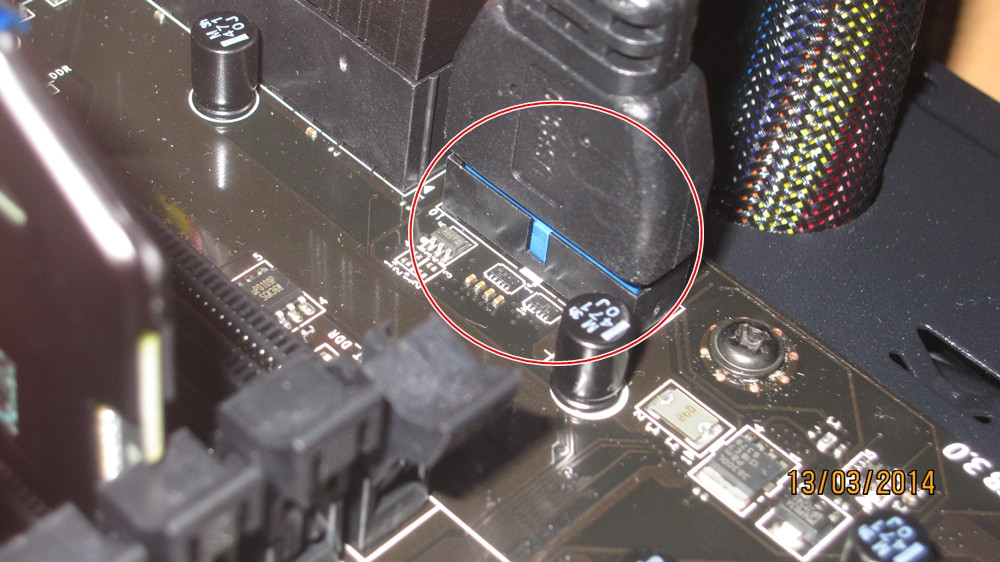
3) i also have a very nagging question regarding my case USB3 connector to the board usb 3 plug...
i noticed when i first build the PC that the USB 3.0 plug doesn't snug fit / tight at all like all the other connectors. it's less snug than fan / usb 2.0 / audio plug. it's just not fit at all. i can easily take it out when i pull the cable, unlike other connectors.

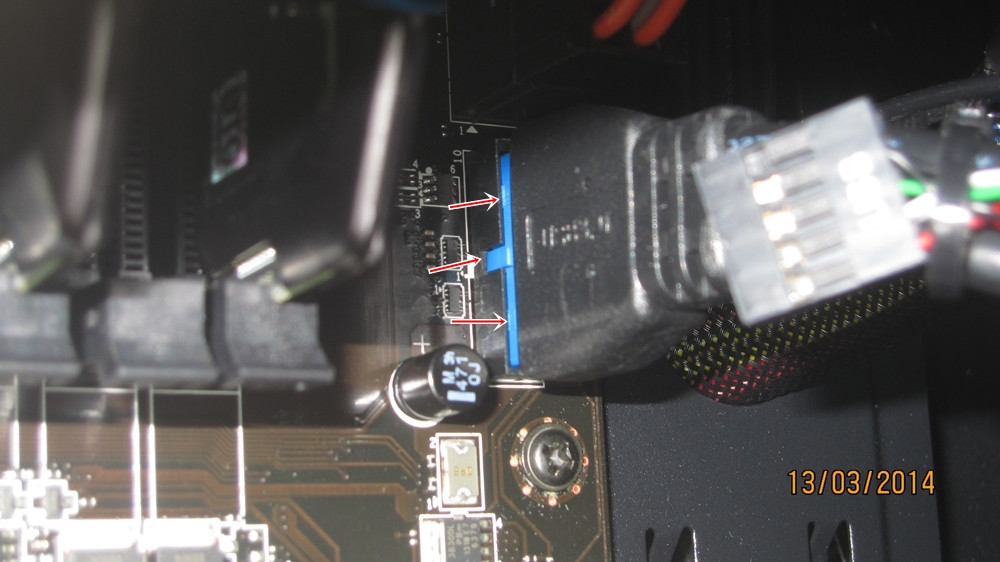
also when i plug it in, it didn't have the tactile feeling / click sound you feel / heard when something is connected. is this the bitfenix shinobi case fault or the msi motherboard fault? here's the picture.

the 1st picture is when im holding it with my hand (pressing it from outside the camera)
WlJeN7E.jpg


the 2nd picture is when i take away my hand and leave it there
DxViuQv.jpg


as you guys can see, it got very loose. i'd like to ask,, is this the shinobi 3.0 plug fault, or the MSI board connector fault?
More importantly, will it short out the motherboard if its not snug fit? i couldn't make it snug fit without breaking the board it seems...

there's a notch so it could only plugged in one-way.. and since i was watchin YT videos, i know i didnt plug it wrong.
i tried everything i could... i tried to plug it in for around 3 hours-ish last night, when i first build it, i tried it around 30 mins for that alone. i've even unplug and took everything off except the standoff just to see if it can plug and click properly. i still couldn't do it.
i tried just plugging it in without going through the back with the motherboard clean and it's still way loose.

do you guys need clearer separate picture of the board usb3 pins and the case usb3 plug?
i feel that its not there firmly enough at all. im pretty sure if i sweep or mop my room and move the case or pick it up to move it to another room, it'll get very loose

==============

=================================
also one other thing i'd like to type blow that i hope would let you gys better able to diagnose whether it's user error / bitfenix connector error / board error.

when i took the photographs, if i hold my hand like on the 1st picture, it looks firm. it's not as tight as say PSU cables but it's somewhat firm.

but when i let go of my hand, the left side of the Bitfenix Case USB3 connector went up immediately (got a little bit loose). the right side of the bitfenix case usb3 connector is firm enough and stays there unmoved. not that firm but i know its there to stay.

i checked the bitfenix usb3 connector and there's 2 bump 1 on the left and 1 on the right. the left side, is not as thick as the right side. (or maybe its placebo im not sure).

that discovery was also why i decided to touched the pins 1 by 1, particularly the left side of the board connector. its not broken or crazy bent. i dont know about slight bent...'

would you guys mind explaining the traits of a slightly bent pins? my eyes couldnt tell the difference last night....

 

My Computer My Computer

At a glance

windows 7 home premium 64bitIntel Core i3-2330m6 Gib 10600 DDR3 RAMRadeon 6730
Computer type
Laptop
Computer Manufacturer/Model Number
Asus K43S
OS
windows 7 home premium 64bit
CPU
Intel Core i3-2330m
Memory
6 Gib 10600 DDR3 RAM
Graphics Card(s)
Radeon 6730
Monitor(s) Displays
Generic PnP Monitor
Hard Drives
Intel SSD 330 Series 120 Gb
Seagate Momentus 750 Gb
Internet Speed
Slow, lol
Antivirus
KIS 2013
2. I would install only Rapid Storage and Rapid Start but not small business advantage since that's for the Q87 motherboards.
3. Pictures of the port and the plug to check for bent pins please.
 

My Computer My Computer

At a glance

Windows 7 Professional 32-bit/Windows 8 64-bi...Intel Core 2 Quad Q6600/Intel Core i7 4790/In...2GB/16GB/4GBIntel G33/G31 Express(Vostro)/NVIDIA GeForce ...
Computer type
PC/Desktop
Computer Manufacturer/Model Number
Dell Vostro 400/Dell XPS 8700(Slightly Customized for me by Dell)/Toshiba Satellite T135
OS
Windows 7 Professional 32-bit/Windows 8 64-bit/Win7 Pro64-bit
CPU
Intel Core 2 Quad Q6600/Intel Core i7 4790/Intel Pentium
Memory
2GB/16GB/4GB
Graphics Card(s)
Intel G33/G31 Express(Vostro)/NVIDIA GeForce GTX 745(XPS)
Monitor(s) Displays
HP 2009m(Vostro)/ViewSonic VX2250wm-LED(XPS)
Screen Resolution
1600x900(Vostro)/1920x1080(XPS)
Hard Drives
Seagate ST3160815AS(Vostro)/Western Digital Blue(Satellite)
External:
Western Digital My Passport 0748
Samsung HM121HC
Keyboard
Dell L100)(Vostro)/Dell KB2133p(XPS)
Mouse
Dell M-UAV-DEL8(XPS)
Internet Speed
100 Mbit/s(Only when IPTV is plugged out)
Antivirus
Avast, Malwarebytes PRO
Browser
Internet Explorer 11
Other Info
Note: Names with slashes between two different parts mean that the left is my old desktop and the right is my old laptop and the middle is my new desktop.(Unless specified)
Ping is horrible for servers overseas in US and Europe.
New laptop:LG Gram(Not available in US) Processor:Intel Core i3 4th Gen Ultra Low Power RAM:4GB Hard Drive:SK Hynix OEM MSATA or M.2 Graphics:Intel HD
Back
Top