Solved Built-In Administrator Account

Buddahfan

New member
Local time
6:26 AM
Messages
282
Location
Los Angeles
I have a couple of questions regarding the Built-In Administrator Account

First some info.

1. I purchased my computer in January 2011
2. I am the sole user of the computer
3. I have set up two accounts with Administrator privileges. Each one has its own unique name and unique password.
4. The Account Control settings are set to the maximum level of security.
5. The Built-In Administrator Account is currently not enabled; i.e it is "Inactive"
6. Password last set was in July 2009.
7. I have the Windows installation disks that came with the computer.
8. I am using Windows 7 SP1 Home Premium
9. I have been able to locate and read several tutorials on the Built-In Administrator account including those on how to enable it and how to change the user name but I have not been able to locate a tutorial on how to change the password.

What I would like to do

1. I would like to change the password on the Built-In Administrator Account

Questions:

1. Is there a tutorial that will tell me how to do this with Windows Home Premium?

2. Do I firstly have to enable the Built-In Administrator at the command prompt and reboot before I can change the Built-In Administrator Account password?

3. After enabling the Built-In Administrator Account will it show up among the user list when I go to log into Windows?

4. How do I gain access to the Built-In Administrator Account once it is enabled if it has a password that was set 18 months before I purchased the computer and don't know what the password is?

5. After enabling the Built-In Administrator Account do I just log in as to my regular Administrator account go to User Accounts---Manage Another Account and change the password to the Built-In Administrator Account even though I don't know what the original password is?

6. Or do I have to log into the Built-In Administrator Account in order to change its password?

7. How would I log into the Built-In Administrator Account if I don't know the password?

Thanks
 

My Computer My Computer

Computer Manufacturer/Model Number
Dell 570MT
OS
Windows 7 Home Premium 64bit
CPU
Athlon XII
Motherboard
?
Memory
4GB
Graphics Card(s)
ATI Radeon 4200
Sound Card
?
Monitor(s) Displays
Asus and Dell
Hard Drives
Unknown
PSU
unknown
Case
unknown
Cooling
unknown
Hi,

The built in Admin account should have no password. It's not set when Windows is installed.

The following will give you more info...

http://www.sevenforums.com/tutorials/507-built-administrator-account-enable-disable.html
http://www.sevenforums.com/tutorials/7417-built-administrator-account-change-name.html

Once you have the admin account enabled you can then set a password using User Accounts and Family Safety.
   Note
You will only be able to change the password logged in as the built-in Admin account


OS
 

My Computer My Computer

Computer Manufacturer/Model Number
Compaq Desktop
OS
Windows 7 Ultimate x64
CPU
AMD Sempron Dual Core
Memory
3GB
Graphics Card(s)
NVIDIA GeForce 6150SE nForce 430
Screen Resolution
1024x768
Hard Drives
150GB Sata
Hello Buddahfan

In addition, once you have enabled and logged on to the built-in Administrator account, you would just create a password for it like any other user account. :)
 

My Computer My Computer

Computer type
PC/Desktop
Computer Manufacturer/Model Number
Self built custom
OS
64-bit Windows 11 Pro for Workstations
CPU
Intel i7-8700K OC'd to 5 GHz
Motherboard
ASUS ROG Maximus XI Formula Z390
Memory
64 GB (4x16GB) G.SKILL TridentZ RGB DDR4 3600 MHz
Graphics Card(s)
ASUS ROG-STRIX-GTX1080TI-O11G-GAMING
Sound Card
Integrated
Monitor(s) Displays
2 x Samsung Odyssey G7 27"
Screen Resolution
2560x1440
Hard Drives
1TB Samsung 990 PRO M.2,
4TB Samsung 990 PRO PRO M.2,
TerraMaster F8 SSD Plus NAS
PSU
Seasonic Prime Titanium 850W
Case
Thermaltake Core P3
Cooling
Corsair Hydro H115i
Keyboard
Logitech wireless K800
Mouse
Logitech MX Master 4
Internet Speed
2 Gb/s Download and 100 Mb/s Upload
Antivirus
Malwarebyte Anti-Malware Premium
Browser
Google Chrome
Other Info
Logitech Z625 speaker system,
Logitech BRIO 4K Pro webcam,
HP Color LaserJet Pro MFP M477fdn,
APC SMART-UPS RT 1000 XL - SURT1000XLI,
Galaxy S23 Plus phone
Hi,

The built in Admin account should have no password. It's not set when Windows is installed.

The following will give you more info...

http://www.sevenforums.com/tutorials/507-built-administrator-account-enable-disable.html
http://www.sevenforums.com/tutorials/7417-built-administrator-account-change-name.html

Once you have the admin account enabled you can then set a password using User Accounts and Family Safety.
   Note
You will only be able to change the password logged in as the built-in Admin account


OS

Thanks I have already read those

When I went to the Accessories---Command Prompt I right clicked to run as Administrator. At the command prompt I typed in Net User Administrator and the system provided me with a bunch of information about the Built-In Administrator Account.

It said among other things

1. Account Active --- No
2. Password last set --- 7/xx/09 xx:xx.xx PM
3. Password expires ---- Never
4. Password changeable --- same date as above
5. Password required ---- yes
6. User may change password --- yes

As I typed above I had already read those Tutorials before starting the thread and did not see anything in them on how to change the password or help me in answering any of the above questions that I asked, at least not that I could see, otherwise I would not have asked the questions.
 

My Computer My Computer

Computer Manufacturer/Model Number
Dell 570MT
OS
Windows 7 Home Premium 64bit
CPU
Athlon XII
Motherboard
?
Memory
4GB
Graphics Card(s)
ATI Radeon 4200
Sound Card
?
Monitor(s) Displays
Asus and Dell
Hard Drives
Unknown
PSU
unknown
Case
unknown
Cooling
unknown
I would advise that you enable the account and log on to see if it actually has a password. It could be that the system is relating the installation date password date and thus giving false information.
 

My Computer My Computer

Computer Manufacturer/Model Number
Compaq Desktop
OS
Windows 7 Ultimate x64
CPU
AMD Sempron Dual Core
Memory
3GB
Graphics Card(s)
NVIDIA GeForce 6150SE nForce 430
Screen Resolution
1024x768
Hard Drives
150GB Sata
Hello Buddahfan

In addition, once you have enabled and logged on to the built-in Administrator account, you would just create a password for it like any other user account. :)

Thanks but I knew this.

So among other questions two of the main questions remain unanswered

1. Can I change the Built-In Administrator Account password by logging in as Administrator after having enabled the Build-In Administrator Account and then going to User Accounts and changing the account to Built-In Administrator or do I have to be logged in as the Built-In Administrator in the first place after enabling the Built-In Administrator Account to change the Built-In Administrator Account password? I don't believe the Tutorials explained/answered this otherwise I would not have started the thread.

2. If I have to be logged in as the Built-In-Administrator to do this how do I log in if the system says that there is a password that was assigned 18 months before I purchased the computer from Dell and I don't know what the password is?
 

My Computer My Computer

Computer Manufacturer/Model Number
Dell 570MT
OS
Windows 7 Home Premium 64bit
CPU
Athlon XII
Motherboard
?
Memory
4GB
Graphics Card(s)
ATI Radeon 4200
Sound Card
?
Monitor(s) Displays
Asus and Dell
Hard Drives
Unknown
PSU
unknown
Case
unknown
Cooling
unknown
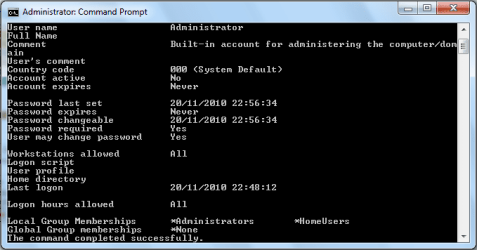
Here is a snip of my admin account from an elevated command prompt...

Admin Account Details.PNG

and I can assure you my buit-in account has no password ;)

You have to be logged into the account in order to change it as it has higher access rights than a standard admin account. You'll find that both your questions have already been answered by the pair of us ;)
 

My Computer My Computer

Computer Manufacturer/Model Number
Compaq Desktop
OS
Windows 7 Ultimate x64
CPU
AMD Sempron Dual Core
Memory
3GB
Graphics Card(s)
NVIDIA GeForce 6150SE nForce 430
Screen Resolution
1024x768
Hard Drives
150GB Sata
Hello Buddahfan

In addition, once you have enabled and logged on to the built-in Administrator account, you would just create a password for it like any other user account. :)

Thanks but I knew this.

So among other questions two of the main questions remain unanswered

1. Can I change the password from my Administrator Account or do I have to be logged in as the Built-In Administrator to do this?

2. If I have to be logged in as the Built-In-Administrator to do this how do I log in if the system says that there is a password that was assigned 18 months before I purchased the computer from Dell and I don't know what the password is?

It would be best to create or change the password of the built-in Administrator account while you are logged on to that account.

By default the built-in Administrator account does not have a password, so you should be able to just click on it's user icon at log on to log on to it after enabling the built-in Administrator account. If it asks for a password, then leave it blank and press enter.
 

My Computer My Computer

Computer type
PC/Desktop
Computer Manufacturer/Model Number
Self built custom
OS
64-bit Windows 11 Pro for Workstations
CPU
Intel i7-8700K OC'd to 5 GHz
Motherboard
ASUS ROG Maximus XI Formula Z390
Memory
64 GB (4x16GB) G.SKILL TridentZ RGB DDR4 3600 MHz
Graphics Card(s)
ASUS ROG-STRIX-GTX1080TI-O11G-GAMING
Sound Card
Integrated
Monitor(s) Displays
2 x Samsung Odyssey G7 27"
Screen Resolution
2560x1440
Hard Drives
1TB Samsung 990 PRO M.2,
4TB Samsung 990 PRO PRO M.2,
TerraMaster F8 SSD Plus NAS
PSU
Seasonic Prime Titanium 850W
Case
Thermaltake Core P3
Cooling
Corsair Hydro H115i
Keyboard
Logitech wireless K800
Mouse
Logitech MX Master 4
Internet Speed
2 Gb/s Download and 100 Mb/s Upload
Antivirus
Malwarebyte Anti-Malware Premium
Browser
Google Chrome
Other Info
Logitech Z625 speaker system,
Logitech BRIO 4K Pro webcam,
HP Color LaserJet Pro MFP M477fdn,
APC SMART-UPS RT 1000 XL - SURT1000XLI,
Galaxy S23 Plus phone
Just enable it to see. You can always rehide it by typing NO at the end of the command instead of YES.

Would you like to share what your intention is in doing this? We might have suggestions to save you some trouble.
 

My Computer My Computer

Computer Manufacturer/Model Number
Dell 570MT
OS
Windows 7 Home Premium 64bit
CPU
Athlon XII
Motherboard
?
Memory
4GB
Graphics Card(s)
ATI Radeon 4200
Sound Card
?
Monitor(s) Displays
Asus and Dell
Hard Drives
Unknown
PSU
unknown
Case
unknown
Cooling
unknown
The built-in admin account does not have a password. The links we've given are all you need to enable it. Once you log onto the admin account you can then change the password. Did you see my pic? I have no password set but it reports the exact same as yours does.
 

My Computer My Computer

Computer Manufacturer/Model Number
Compaq Desktop
OS
Windows 7 Ultimate x64
CPU
AMD Sempron Dual Core
Memory
3GB
Graphics Card(s)
NVIDIA GeForce 6150SE nForce 430
Screen Resolution
1024x768
Hard Drives
150GB Sata
Got Built-In Administrator Enabled With Password

Followed the instructions I linked above enabling the Built-In Administrator from the command prompt. Assigned a password and was good to go.

Now the fun begins in setting up myself as a user with Standard Rights deciding what programs I will give myself access to and figuring out how to give myself access to these programs without having to enter the Built-In Administrator password, which is quite long, every time I want to run a program.

Found one website with instructions on this and will start to work on it when I have some time.

This project is bringing back some memories from those days when I was a Network Administrator. I don't recall which version of Windows we were using but as I recall it was probably before Windows 98 and Windows 98 SE.:D

P.S. One of the main reasons that I started this project is because my regular password is not as long or as complex as it should be to be running with Administrator Rights. So I wanted to enable the Built-In Administrator and give it a very long and complex password.

By doing this I can log in as a user with Standard Rights without having to type in a very long and complex password and still have access to Administrator Rights when I need with a much longer and more complex password.

So if someone steals my password they will have limited access to what they can run on my computer.

Of course the password that I use to log into Windows is not the same as any of the passwords that I use on the Net.
 

My Computer My Computer

Computer Manufacturer/Model Number
Dell 570MT
OS
Windows 7 Home Premium 64bit
CPU
Athlon XII
Motherboard
?
Memory
4GB
Graphics Card(s)
ATI Radeon 4200
Sound Card
?
Monitor(s) Displays
Asus and Dell
Hard Drives
Unknown
PSU
unknown
Case
unknown
Cooling
unknown
Back
Top