Solved Burn DVD from ISO file

websquad

New member
Member
Local time
1:38 AM
Messages
78
I have Windows 7/Pro 64-bit. Need to burn an ISO image on a DVD disk to make it bootable. Is there something I can download from Microsoft to do this? Another source?
 

My Computer

Computer type
PC/Desktop
Computer Manufacturer/Model Number
Homebrew Intel 6600-based
OS
Win 7/Pro 64-bit
CPU
Intel 6600 Quad
Motherboard
eVGA 780i
Memory
8 GB DDR2
Graphics Card(s)
EVGA 512 9500 GT + nVidia GT
Monitor(s) Displays
4: (1) HP 22"W + (2) 19" + (1) 15" (pgm. icons only)
Hard Drives
SanDisk 120GB SSD (sys+pgms);WD Raptor 150GB (sys/pgm backup). Also, two of Seagate Barracuda ES.2's (data + backup)) and WD Raptor 150GB (spare)
Case
Cooler Master CM Cosmose 1000 (tower)
Keyboard
MS Natural (desktop)
Mouse
Logitech Performance Lase Wireless Mouse
Internet Speed
17 Mbs download (cable)
Antivirus
MS Defender
Other Info
Windows Experience Index on tower system: 7.1/7.1/6.9/6.9/7.0

My Computer

Computer type
PC/Desktop
Computer Manufacturer/Model Number
Custom Build
OS
Windows 7 Ultimate 64-bit
CPU
Intel G3420 3.2GHZ Dual Core
Motherboard
Gigabyte H87-HD3
Memory
Kingson 8GB 1600mhz
Graphics Card(s)
MSI R7970 TF 3GD5/OC BE
Monitor(s) Displays
21" LG & "19 Vertical Samsung
Hard Drives
120GB SSD - Boot
1TB WD
350GB External
2TB External (Wireless)
PSU
Corsair CX 500 modular
Case
Zalman Z11 Plus (modified)
Cooling
Corsair H55, 2x 120mm SP Corsair, 1x 140 Coolermaster
Keyboard
Corsair K50
Mouse
CSL Gaming
Internet Speed
164Mbps
Antivirus
Avast, Malwarebytes
Browser
Google Chrome, IE, Firefox

My Computer

Computer type
PC/Desktop
Computer Manufacturer/Model Number
Self assembled
OS
Windows 10 Home 64Bit
CPU
Intel Core i5 10400 @ 2.90GHz
Motherboard
Intel Corporation DG41WV (PROCESSOR)
Memory
8.00GB Single-Channel Unknown @ 1329MHz (16-20-20-38)
Sound Card
Realtek High Definition Audio
Monitor(s) Displays
DELL E170S
Screen Resolution
1280x1024 pixels
Hard Drives
931GB TOSHIBA DT01ACA100 (SATA)
238GB TEAM TM8PS7256G (SATA SSD)
Case
Nothing Fancy
Cooling
Fans
Keyboard
A4 Tech Co LTD
Mouse
A4 Tech Co Ltd/Logitech
Internet Speed
25 Mbps
Confused!

Alas, I followed the instructions, and when I right-clicked on the .iso file name, the menu came up with "Open with..." highlighted in bold font; Got the message "Windows can't open this file" I didn't have an appropriate app on my hard drive, so I used Microsoft Web Services and it had some suggestions, none of which were the software suggested in the .iso tutorial on this forum.

This lead to a Microsoft web page: ????????????

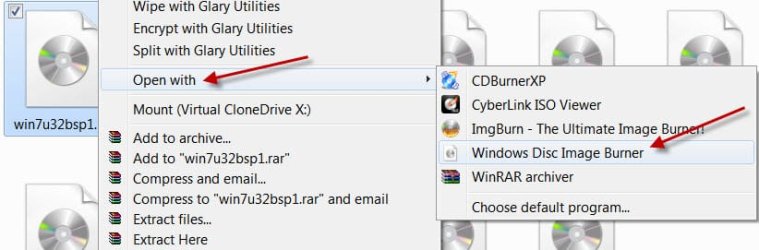
I don't know why I'm not getting the "Right-click on an ISO image and choose 'Open with > Windows Disc Image Burner'" option in the SevenForums tutorial. My Windows 7 must be defective (however, all patches are up-to-date).

Your suggested "CDBurnerXP" is also at the top of Microsoft's suggested list; however, from the name is seems to target Windows XP. Yikes!

Any suggestion? I'm confused!
 

My Computer

Computer type
PC/Desktop
Computer Manufacturer/Model Number
Homebrew Intel 6600-based
OS
Win 7/Pro 64-bit
CPU
Intel 6600 Quad
Motherboard
eVGA 780i
Memory
8 GB DDR2
Graphics Card(s)
EVGA 512 9500 GT + nVidia GT
Monitor(s) Displays
4: (1) HP 22"W + (2) 19" + (1) 15" (pgm. icons only)
Hard Drives
SanDisk 120GB SSD (sys+pgms);WD Raptor 150GB (sys/pgm backup). Also, two of Seagate Barracuda ES.2's (data + backup)) and WD Raptor 150GB (spare)
Case
Cooler Master CM Cosmose 1000 (tower)
Keyboard
MS Natural (desktop)
Mouse
Logitech Performance Lase Wireless Mouse
Internet Speed
17 Mbs download (cable)
Antivirus
MS Defender
Other Info
Windows Experience Index on tower system: 7.1/7.1/6.9/6.9/7.0
You can easily burn an ISO to a CD/DVD using Windows 7 native Image burner.

Burn a CD or DVD from an ISO file

I've come to the conclusion that I do not have any software on my Windows 7 system to burn an ISO image to a DVD disk, and also I've concluded that apparently everyone else in the world with Windows 7 has such a program. I just ain't there. I've looked via Control Panel > Uninstall a Program to see if it was there: NOPE! I've looked everywhere. Could I have uninstalled it my mistake? Can it be restored without restoring Windows 7? Must I use a third party utility?
 

My Computer

Computer type
PC/Desktop
Computer Manufacturer/Model Number
Homebrew Intel 6600-based
OS
Win 7/Pro 64-bit
CPU
Intel 6600 Quad
Motherboard
eVGA 780i
Memory
8 GB DDR2
Graphics Card(s)
EVGA 512 9500 GT + nVidia GT
Monitor(s) Displays
4: (1) HP 22"W + (2) 19" + (1) 15" (pgm. icons only)
Hard Drives
SanDisk 120GB SSD (sys+pgms);WD Raptor 150GB (sys/pgm backup). Also, two of Seagate Barracuda ES.2's (data + backup)) and WD Raptor 150GB (spare)
Case
Cooler Master CM Cosmose 1000 (tower)
Keyboard
MS Natural (desktop)
Mouse
Logitech Performance Lase Wireless Mouse
Internet Speed
17 Mbs download (cable)
Antivirus
MS Defender
Other Info
Windows Experience Index on tower system: 7.1/7.1/6.9/6.9/7.0
If your ISO files are associated with Windows Native Image burner, simply clicking/doubleclicking on the ISO should bring out the native Windows Disc Image Burner.

20-04-2014 01-31-49.jpg

If the ISO files association is usurped by some other program, then by right clicking on the ISO and then "Open with" you should be able to see the Windows Native Image Burner.

20-04-2014 01-40-17.jpg

If both does not happen, we have to examine why. Fiind out which program opens the ISO File. At the moment I have no idea if you don't get it.:)
 

My Computer

OS
Windows 7 Home Premium 32 bit
Apparently I have NO program that opens ISO files. I'd prefer to have something from Microsoft, but, alas, there is nothing there, and I have no recollection of deleting any such file.
 

My Computer

Computer type
PC/Desktop
Computer Manufacturer/Model Number
Homebrew Intel 6600-based
OS
Win 7/Pro 64-bit
CPU
Intel 6600 Quad
Motherboard
eVGA 780i
Memory
8 GB DDR2
Graphics Card(s)
EVGA 512 9500 GT + nVidia GT
Monitor(s) Displays
4: (1) HP 22"W + (2) 19" + (1) 15" (pgm. icons only)
Hard Drives
SanDisk 120GB SSD (sys+pgms);WD Raptor 150GB (sys/pgm backup). Also, two of Seagate Barracuda ES.2's (data + backup)) and WD Raptor 150GB (spare)
Case
Cooler Master CM Cosmose 1000 (tower)
Keyboard
MS Natural (desktop)
Mouse
Logitech Performance Lase Wireless Mouse
Internet Speed
17 Mbs download (cable)
Antivirus
MS Defender
Other Info
Windows Experience Index on tower system: 7.1/7.1/6.9/6.9/7.0
Back
Top