Burning problem

igalep132

New member
Local time
6:06 PM
Messages
34
Hey all,

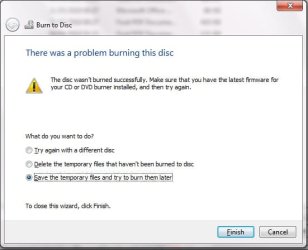
I've some problem during the cd burning, it's doesn't work, each try i'm getting "disk error message", but the same disk do burnable in other pc...

the DVD burning works ok with the same drive...

I'm using win 7 ultimate build 7600 and Optiarc DVD RW AD-7200S ATA Device

thanks for help
 

My Computer

OS
7
Burn

Welcome to Windows 7 Supoort forums.

Please fill out your system specs and 32/64 bit OS along with a complete event description and what you are using to perform a disk copy.
IE: Nero or anyother 3rd party software.

Adrian
 

My Computer

Computer Manufacturer/Model Number
Custom Build
OS
Windows 7 7600 1 X64
CPU
AMD PHENOM II X 550 PROCESSOR 3.1 ghz
Motherboard
ASUS M4A78-TE
Memory
Corsair 4 gig ddr 3
Graphics Card(s)
ati radeon 3300
Sound Card
ati hd
Monitor(s) Displays
syncmaster 2033sw
Screen Resolution
1600X900 60 hz refresh
Hard Drives
twin_seagates SATA's 1 TB & 500 Gig, hitachi_slimline 160 gig
PSU
antec_550 watt
Case
cooler master GLite
Cooling
stock_heat sink
Internet Speed
20mbs up/ 1.5mbs down
Other Info
favorite child "stewie"
favorite dog "brian"
my system ...

hey, thanks for your first answer,

my system is : 32 bit OS, 2 GB RAM, Pentium D 945

I'm using windows default burner...

and about the event description, as I wrote, after i select requested files, and burning speed i get a window which tells me that there was a problem with the disc, and i've three options to choose from (try different disc, try later, delete burned files...)
 

My Computer

OS
7
Incomplete Info

In order to provide better trouble shooting we need to know if you are capable of providing screen shots, images etc.
Also what media are you using to conduct the burn operation, speed etc.
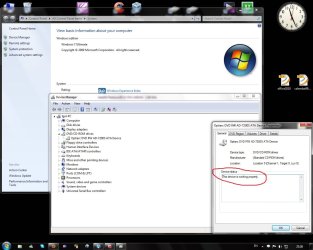
So if you could go to control panel and open up your device manager we would like to see if your optical drive is corresctly recognised and that there are no errors.
Attached is what this would look like.
 

Attachments

  • cd drive.jpg
    cd drive.jpg
    116.9 KB · Views: 57

My Computer

Computer Manufacturer/Model Number
Custom Build
OS
Windows 7 7600 1 X64
CPU
AMD PHENOM II X 550 PROCESSOR 3.1 ghz
Motherboard
ASUS M4A78-TE
Memory
Corsair 4 gig ddr 3
Graphics Card(s)
ati radeon 3300
Sound Card
ati hd
Monitor(s) Displays
syncmaster 2033sw
Screen Resolution
1600X900 60 hz refresh
Hard Drives
twin_seagates SATA's 1 TB & 500 Gig, hitachi_slimline 160 gig
PSU
antec_550 watt
Case
cooler master GLite
Cooling
stock_heat sink
Internet Speed
20mbs up/ 1.5mbs down
Other Info
favorite child "stewie"
favorite dog "brian"
hey, thanks for your first answer,

my system is : 32 bit OS, 2 GB RAM, Pentium D 945

I'm using windows default burner...

and about the event description, as I wrote, after i select requested files, and burning speed i get a window which tells me that there was a problem with the disc, and i've three options to choose from (try different disc, try later, delete burned files...)

Try using an alternative Image burning program:Both of these are excellent -

The Official ImgBurn Website

CDBurnerXP: Introduction and News

And for the problem machine, try a different set of media.
 

My Computer

OS
Windows XP - Now Windows 7 Home Premium (64-bit).
screenShot

In order to provide better trouble shooting we need to know if you are capable of providing screen shots, images etc.
Also what media are you using to conduct the burn operation, speed etc.
So if you could go to control panel and open up your device manager we would like to see if your optical drive is corresctly recognised and that there are no errors.
Attached is what this would look like.

here you go ...
no problems
 

Attachments

  • Untitled.jpg
    Untitled.jpg
    107.9 KB · Views: 35

My Computer

OS
7
hey, thanks for your first answer,

my system is : 32 bit OS, 2 GB RAM, Pentium D 945

I'm using windows default burner...

and about the event description, as I wrote, after i select requested files, and burning speed i get a window which tells me that there was a problem with the disc, and i've three options to choose from (try different disc, try later, delete burned files...)

Try using an alternative Image burning program:Both of these are excellent -

The Official ImgBurn Website

CDBurnerXP: Introduction and News

And for the problem machine, try a different set of media.

I tried 3 rd party program (nero) and the same problem persist ...
I've tried the same media on different pc, it works there
 

My Computer

OS
7
Image Lens

Try using an image lens cleaner.
 

My Computer

Computer Manufacturer/Model Number
Custom Build
OS
Windows 7 7600 1 X64
CPU
AMD PHENOM II X 550 PROCESSOR 3.1 ghz
Motherboard
ASUS M4A78-TE
Memory
Corsair 4 gig ddr 3
Graphics Card(s)
ati radeon 3300
Sound Card
ati hd
Monitor(s) Displays
syncmaster 2033sw
Screen Resolution
1600X900 60 hz refresh
Hard Drives
twin_seagates SATA's 1 TB & 500 Gig, hitachi_slimline 160 gig
PSU
antec_550 watt
Case
cooler master GLite
Cooling
stock_heat sink
Internet Speed
20mbs up/ 1.5mbs down
Other Info
favorite child "stewie"
favorite dog "brian"
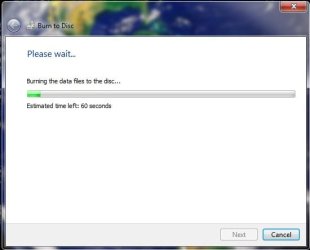
i've tried that,
and then i tried to burn it again
then i saw next ...
 

Attachments

  • Untitled.jpg
    Untitled.jpg
    16.8 KB · Views: 7
  • Untitled1.jpg
    Untitled1.jpg
    24.4 KB · Views: 17

My Computer

OS
7
Try using the IMGBurner
The Official ImgBurn Website

I was having the same problem ,wasted like 10 CD's and then suddenly I discovered the IMGBURN and guess what when I create an Image of the Data I want to burn and then subsequently burn that image on the Disk it is easily able to write the CD or DVD.

Try it and you would just love it. :)
Vidhiraj
 

My Computer

OS
Windows 7 Ultimate x86
Back
Top