
You are using an out of date browser. It may not display this or other websites correctly.
You should upgrade or use an alternative browser.
You should upgrade or use an alternative browser.
Burning tools
- Thread starter moparken
- Start date

Burning tools, do you mean ISO Burning or something for movies/music?
My Computer
- Computer Manufacturer/Model Number
- Custom | Whitebox
- OS
- Windows 7 Ultimate, OS X 10.7, Ubuntu 11.04
- CPU
- Intel E6750 @ 3.80GHz
- Motherboard
- Gigabyte GA-EP45-UD3L (Revision 1.1)
- Memory
- 2x2GB & 2x1GB (6GB) OCZ Reaper 1066MHz @ 1080MHz
- Graphics Card(s)
- EVGA nVidia GTX 260 896mb (216 Core) FTW Edition
- Sound Card
- Realtek ALC888
- Monitor(s) Displays
- 21" VIZIO TV
- Screen Resolution
- 1680x1050 @ 60Hz
- Hard Drives
- Western Digital WD6401AALS - 640GB
Hitachi HDP725016GLA380 - 160GB
- PSU
- Corsair 750W
- Case
- NZXT Nemesis Elite
- Cooling
- Thermaltake SpinQ
- Keyboard
- Logitech Wireless S520
- Mouse
- Logitech Wireless S520 - Microsoft Wireless Arc Mouse
- Internet Speed
- Download: 20mbps, Upload: 3mbps

Windows 7 has built in ISO Burning software
I have never burned a movie so I wouldn't know what program to use for that, for music I use Windows Media Player.
I have never burned a movie so I wouldn't know what program to use for that, for music I use Windows Media Player.
My Computer
- Computer Manufacturer/Model Number
- Custom | Whitebox
- OS
- Windows 7 Ultimate, OS X 10.7, Ubuntu 11.04
- CPU
- Intel E6750 @ 3.80GHz
- Motherboard
- Gigabyte GA-EP45-UD3L (Revision 1.1)
- Memory
- 2x2GB & 2x1GB (6GB) OCZ Reaper 1066MHz @ 1080MHz
- Graphics Card(s)
- EVGA nVidia GTX 260 896mb (216 Core) FTW Edition
- Sound Card
- Realtek ALC888
- Monitor(s) Displays
- 21" VIZIO TV
- Screen Resolution
- 1680x1050 @ 60Hz
- Hard Drives
- Western Digital WD6401AALS - 640GB
Hitachi HDP725016GLA380 - 160GB
- PSU
- Corsair 750W
- Case
- NZXT Nemesis Elite
- Cooling
- Thermaltake SpinQ
- Keyboard
- Logitech Wireless S520
- Mouse
- Logitech Wireless S520 - Microsoft Wireless Arc Mouse
- Internet Speed
- Download: 20mbps, Upload: 3mbps

No problem, but if you want to use a different ISO Burner, that lets you specify the speed of the burn (windows doesn't let you)
You can use Active-ISO at Active@ ISO Burner. Data CD DVD burning software. Write ISO image to CD,DVD,CD-RW,CDR,DVD-RW.
You can use Active-ISO at Active@ ISO Burner. Data CD DVD burning software. Write ISO image to CD,DVD,CD-RW,CDR,DVD-RW.
My Computer
- Computer Manufacturer/Model Number
- Custom | Whitebox
- OS
- Windows 7 Ultimate, OS X 10.7, Ubuntu 11.04
- CPU
- Intel E6750 @ 3.80GHz
- Motherboard
- Gigabyte GA-EP45-UD3L (Revision 1.1)
- Memory
- 2x2GB & 2x1GB (6GB) OCZ Reaper 1066MHz @ 1080MHz
- Graphics Card(s)
- EVGA nVidia GTX 260 896mb (216 Core) FTW Edition
- Sound Card
- Realtek ALC888
- Monitor(s) Displays
- 21" VIZIO TV
- Screen Resolution
- 1680x1050 @ 60Hz
- Hard Drives
- Western Digital WD6401AALS - 640GB
Hitachi HDP725016GLA380 - 160GB
- PSU
- Corsair 750W
- Case
- NZXT Nemesis Elite
- Cooling
- Thermaltake SpinQ
- Keyboard
- Logitech Wireless S520
- Mouse
- Logitech Wireless S520 - Microsoft Wireless Arc Mouse
- Internet Speed
- Download: 20mbps, Upload: 3mbps

zigzag3143
New member
- Local time
- 6:29 AM
- Messages
- 27,140
burning tools
Just about anything. The only one that MAY have a problem is nero. Alcohol works, depends mostly on the format you want to burn
Ken
what burning tools work with windows 7
Just about anything. The only one that MAY have a problem is nero. Alcohol works, depends mostly on the format you want to burn
Ken
My Computer
- Computer Manufacturer/Model Number
- HP Pavillion dv-7 1005 Tx
- OS
- Win 8 Release candidate 8400
- Memory
- 4 gigs
- Graphics Card(s)
- Nvidia 9600M
- Sound Card
- HD built-in
- Monitor(s) Displays
- 17" Wxga
- Screen Resolution
- 1440x900
- Cooling
- none
- Internet Speed
- 45Mb down 5Mb up
ImgBurn is good for burning ISOs.
My Computer
- Computer Manufacturer/Model Number
- self built
- OS
- Windows 7 Professional 64-bit
- CPU
- Intel E8400 3GHz
- Motherboard
- Intel DX48BT2
- Memory
- Kingston PC3-10700H 4Gb
- Graphics Card(s)
- XFX Radeon HD 5850 BlackEd.
- Sound Card
- Asus Xonar DG
- Monitor(s) Displays
- 2x Samsung SM-T220HD 22"
- Screen Resolution
- 1680x1050 on two monitors
- Hard Drives
- OCZ Vertex 2 120gb 3.5" (OS)
Seagate Momentus XT 500gb
Samsung F3 1Tb (games)
2x Samsung F1 1Tb
- PSU
- Thermaltake ToughPower 850w
- Case
- Thermaltake Armor
- Cooling
- Scythe Mugen II
- Keyboard
- Microsoft Comfort Curve USB
- Mouse
- Razer Diamondback 3G
- Internet Speed
- 8128/443

sisiphus
New member
Wayward
New member
Nero 7 works, although I only use Burning ROM and Recode, so I don't know if the rest of the suite works.
My Computer
- OS
- Windows 7 x64
- CPU
- Intel Core i7 2600K
- Motherboard
- Asus P8P67 Deluxe
- Memory
- 8 GB ADATA DDR3 1600
- Graphics Card(s)
- HIS Hightech Radeon 4670 (fanless)
- Sound Card
- Creative X-Fi XtremeGamer
- Monitor(s) Displays
- Samsung 213T
- Screen Resolution
- 1600 x 1200
- Hard Drives
- Western Digital Black 640GB (boot), Western Digital Black 2TB x 2 (data and scratch), Western Digital Green 2TB (backup)
- PSU
- Corsair TX650W
- Case
- Antec P182
- Cooling
- Prolimatech Megahalems Rev.B
- Keyboard
- HP Elite wireless
- Mouse
- Logitech Performance MX

People mentioned they got CDBurnerXP to work on Windows 7, but for me, it never detected my Lite-on DVD burner/Blu-ray player. I think it's just an issue with not having support yet for my burner as opposed to a Windows 7 thing, because the install and launching the app was flawless.
I had to use the bundled Cyberlink software which I don't like. I might play around with CDBurnerXP or see when they updates to support my burner since I prefer that UI.
I had to use the bundled Cyberlink software which I don't like. I might play around with CDBurnerXP or see when they updates to support my burner since I prefer that UI.
My Computer
- Computer Manufacturer/Model Number
- custom build
- OS
- Windows 7 Ultimate 64-bit RTM
- CPU
- Intel Core i7 920 (D0), overclocked @ 3.6GHz (4.2GHz stable)
- Motherboard
- EVGA X58 A1
- Memory
- 6GB of OCZ DDR3-1600 triple channel @ 7-7-7-20
- Graphics Card(s)
- EVGA GTX 295 Co-Op
- Sound Card
- Auzentech X Meridian 7.1
- Monitor(s) Displays
- (3x) Samsung 943BX, (1x) Samsung 2333HD, (1x) BenQ FP202W
- Screen Resolution
- 3840x1024 + 1920x1080 + 1680x1050
- Hard Drives
- (4x) OCZ Vertex 30GB SATA2 SSDs on RAID 0 for 120GB total
(2x) Western Digital Black 1TB SATA2 on RAID 0
(1x) Lite-on DVD Burner and Blu-Ray player
- PSU
- PC Power & Cooling Super-quiet Silencer 910
- Case
- (modified) Tagan Black Pearl full tower, WCR edition
- Cooling
- Scythe Mugen2 CPU cooler, (5x) Scythe SFF21F, Zalaman cntrl.
- Keyboard
- Logitech G19
- Mouse
- Logitech G9x
- Internet Speed
- Comcast Cable, 22Mbps down and 5Mbps up
- Other Info
- Logitech Z-5500 Digital speaker system

CDBurnerXP Pro (free for home use)
DeepBurner (free)
BurnAware (free)
Infra Recorder (free)
ImgBurn (CD Images only - free)
Nero (not free)
Roxio Creator 2009 (not free)
...
I cannot tell how much of those solutions exists. Everything will work on Windows 7. In fact, most free software will work cause they don't need deep registery modification.

DeepBurner (free)
BurnAware (free)
Infra Recorder (free)
ImgBurn (CD Images only - free)
Nero (not free)
Roxio Creator 2009 (not free)
...
I cannot tell how much of those solutions exists. Everything will work on Windows 7. In fact, most free software will work cause they don't need deep registery modification.
My Computer
- Computer type
- PC/Desktop
- Computer Manufacturer/Model Number
- Custom build
- OS
- Windows 10 Professional 64-bit
- CPU
- Ryzen 9 5900X
- Motherboard
- Gigabyte X570 Aorus Master
- Memory
- G.Skill 3600Mhz CL16 16GB × 4
- Graphics Card(s)
- EVGA GeForce RTX 3070 Ti FTW3 Ultra Gaming
- Sound Card
- On-board
- Monitor(s) Displays
- Dell Alienware AW3418DW
- Screen Resolution
- 3440x1440
- Hard Drives
- 1×Sabrent Rocket 4 Plus 2TB nvme SSD (System, internal)
2x4TB Western Digital Blue (Internal)
1x4TB HDST 7200RPM (Internal)
- PSU
- Seasonic Focus Plus 850W Platinum
- Case
- Corsair 680X
- Cooling
- Stock fans + 3× Corsair QL120, Corsair H100i Platinum
- Keyboard
- Logitech K350
- Mouse
- Logitech M510
- Internet Speed
- 120Mbits dl - 20Mbits up
- Antivirus
- ESET NOD32 Antivirus
- Browser
- Firefox (latest version)
- Other Info
- Headphones : Audio-Technica ATH-M50x
Scanner : Canon Canoscan LiDE 220 + Plustek OptiBook 4800

on windows 7
for DVD Movies I use convertxtodvd and it works perfectly
for other burning purposes I use Nero 7 and it works fine
for DVD Movies I use convertxtodvd and it works perfectly
for other burning purposes I use Nero 7 and it works fine
My Computer
- Computer Manufacturer/Model Number
- home made
- OS
- Windows 7 7264x64(main), 7260x86(secendary), XP SP3 Triple Boot
- CPU
- Intel Core 2 Duo E7400 2.8Mhz
- Motherboard
- Intel G33 express chipset
- Memory
- 2GB DD2 667
- Graphics Card(s)
- Intel(R) 82G33 Graphics and Memory Controller Hub
- Sound Card
- Realtek Built into the G31
- Monitor(s) Displays
- 19"
- Screen Resolution
- 1280x1024
- Hard Drives
- 320GB SATA (Main), 160GB IDE (Backup)
- Case
- Gigabyte SETTO
- Keyboard
- Genius
- Mouse
- Logitech
- Internet Speed
- 1MB Download, 128k Upload
wich version of nero do you use? couse my nero 7 is can't be installed (nero 7.7.5.1)on windows 7
for DVD Movies I use convertxtodvd and it works perfectly
for other burning purposes I use Nero 7 and it works fine
i'm using nero 9.4.13.2 it always failed burning DVD but succeed f i'm burning CD
My Computer
- OS
- Windows 7 x86
- CPU
- Amd x2 3600 Brisbane @ 3,0GHz
- Motherboard
- Biostar TA690
- Memory
- Kingston 2x1GB PC-5300
- Graphics Card(s)
- Onboard
- Sound Card
- Onboard
- Monitor(s) Displays
- Samsung 17" CRT
- Hard Drives
- Seagate SATA II 80GB (sistem only)
Maxtor SATA I 120GB (data only)
- PSU
- FSP BlueStorm II 500watt
- Case
- Powerlogic Atrix 5000
- Cooling
- Thermaltake Big Typhoon
I recommend ImgBurn cause it's both free and lightweight. It is faster than many other Burning Tools and does it's job well. The Official ImgBurn Website
My Computer
- Computer Manufacturer/Model Number
- Apple Inc.
- OS
- Windows 7
- CPU
- Intel(R) Core 2 Duo CPU T8100 @ 2.10GHz
- Motherboard
- MB41.88Z.00C1.B00.0802091535
- Memory
- 1.00GB
- Graphics Card(s)
- Mobile Intel 965 Express Chipset Family
- Sound Card
- Apple Sound Card
- Monitor(s) Displays
- Apple Display
- Screen Resolution
- 1280 X 800
- Hard Drives
- Fujitsu MHY2120BH ATA Device 110GB
- PSU
- The Apple PSU
- Case
- The Apple Case
- Cooling
- The Apple Cooling Fan
- Keyboard
- Apple Keyboard
- Mouse
- IBM Mouse Model MO32BO
- Internet Speed
- 10MBPS
Wayward
New member
wich version of nero do you use? couse my nero 7 is can't be installed (nero 7.7.5.1)
i'm using nero 9.4.13.2 it always failed burning DVD but succeed f i'm burning CD
Go to Nero - Nero 7 - Update and download the latest update for Nero 7 (7.11.10.0). In fact, it's a full version of Nero 7, so the next time you have to install, just install the "update" and you're good to go.
My Computer
- OS
- Windows 7 x64
- CPU
- Intel Core i7 2600K
- Motherboard
- Asus P8P67 Deluxe
- Memory
- 8 GB ADATA DDR3 1600
- Graphics Card(s)
- HIS Hightech Radeon 4670 (fanless)
- Sound Card
- Creative X-Fi XtremeGamer
- Monitor(s) Displays
- Samsung 213T
- Screen Resolution
- 1600 x 1200
- Hard Drives
- Western Digital Black 640GB (boot), Western Digital Black 2TB x 2 (data and scratch), Western Digital Green 2TB (backup)
- PSU
- Corsair TX650W
- Case
- Antec P182
- Cooling
- Prolimatech Megahalems Rev.B
- Keyboard
- HP Elite wireless
- Mouse
- Logitech Performance MX

misterck
New member
ahsampoo burning studio 9 is awesome, works fine in windows 7.
My Computer
- Computer Manufacturer/Model Number
- Custom Build
- OS
- Dual Boot : Windows 7 7264 X64/Windows Vista Ultimate
- CPU
- AMD Athlon 64 X2 Dual Core 5000+
- Motherboard
- Gigabyte MA78GM-S2H
- Memory
- 4x 1GB OCZ Platinum 800MHZ
- Graphics Card(s)
- Radeon HD3200 On Board
- Sound Card
- On Board
- Monitor(s) Displays
- Dell 2208WFP
- Screen Resolution
- 1680 x 1050
- Hard Drives
- Western Digital Caviar blue 320GB
- PSU
- Corsair HX620W
- Case
- CM Storm Scout
- Cooling
- Foxconn Stock Heatsink
- Keyboard
- Keysonic Wireless
- Internet Speed
- 8MB

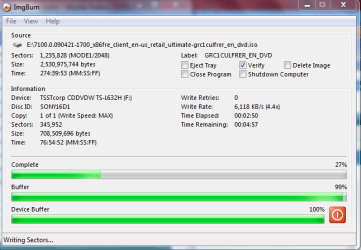
ImgBurn is excellent for .ISO file types. It also adds itself to right click context menu for .iso file types, ie. you just need to right click the .iso file and click Burn with ImgBurn.
This is how it looks, simple and easy UI.
This is how it looks, simple and easy UI.
My Computer
- Computer Manufacturer/Model Number
- Samsung NP530U4B-S02IN
- OS
- Windows® 8 Pro (64-bit)
- CPU
- Intel® Core™ i5 Processor 2467M (1.60GHz, 3MB L3 Cache)
- Motherboard
- Samsung Electronics
- Memory
- 6GB DDR3 System Memory at 1,333MHz (on BD 4GB + 2GB x 1)
- Graphics Card(s)
- AMD Radeon™ HD7550M 1GB DDR3 (Ext. Graphic)
- Sound Card
- Realtek High Definition Audio
- Monitor(s) Displays
- 35.56cm (14.0) SuperBright 300nit HD LED Display
- Screen Resolution
- 1366x768
- Hard Drives
- 1TB S-ATA II Hard Drive (5400RPM) with ExpressCache 16GB SSD
- Internet Speed
- sucks
- Antivirus
- Microsoft Security Essentials
- Browser
- Google Chrome (Sync enabled)