HDRoadKing
New member
Hi All,
I'm hoping one of the skilled photoshop guru's that inhabit this forum can help me out with this
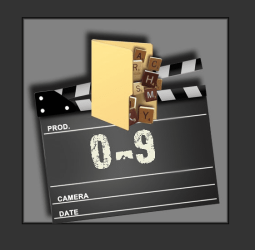
Basically I have a set of PNG files that were made for my media center by Xzener. In order for them to display correctly, I need them in JPG format. Now before you say it, yes I can convert them myself, but when I do they loose their transparency and look rather poor.
What I need is for someone to take my existing PNG files (and since I can't have a JPG with a transparent backgound), "buttonize" them (perhaps a glassy look), then save them to JPG.
Below is an example. The A - C PNG file is my original and would like for it to look something like the 3D Movies image (but feel free to expand on the idea).
Anyone up to the task?
I've attached the zip file with the rest of the images that need converting. There are 10 in all.
Thanks in advance,
Mike
I'm hoping one of the skilled photoshop guru's that inhabit this forum can help me out with this
Basically I have a set of PNG files that were made for my media center by Xzener. In order for them to display correctly, I need them in JPG format. Now before you say it, yes I can convert them myself, but when I do they loose their transparency and look rather poor.
What I need is for someone to take my existing PNG files (and since I can't have a JPG with a transparent backgound), "buttonize" them (perhaps a glassy look), then save them to JPG.
Below is an example. The A - C PNG file is my original and would like for it to look something like the 3D Movies image (but feel free to expand on the idea).
Anyone up to the task?
I've attached the zip file with the rest of the images that need converting. There are 10 in all.
Thanks in advance,
Mike
Attachments


My Computer
At a glance
Windows 7 Ultimate x64Core i5 2500K @ 4.6GhzG.SKILL 16GB DDR3eVGA GeForce 465GTX
- Computer Manufacturer/Model Number
- Custom PC
- OS
- Windows 7 Ultimate x64
- CPU
- Core i5 2500K @ 4.6Ghz
- Motherboard
- ASRock P67 Extreme4 Gen3
- Memory
- G.SKILL 16GB DDR3
- Graphics Card(s)
- eVGA GeForce 465GTX
- Sound Card
- Creative X-Fi Fatality
- Monitor(s) Displays
- Dual Acer 22" Widescreens
- Screen Resolution
- 3360 X 1050
- Hard Drives
- 1 x Corsair 120GB SSD
2 x 320GB Seagate 7200rpm
RAID 0
- PSU
- Thermaltake 850 TruPower
- Case
- Corsair 600T
- Cooling
- Corsair Hydro Series H70
- Mouse
- Logitech MX518 Gaming mouse
- Internet Speed
- Road Runner Turbo 30Mbs