Solved Buying Games Off Steam

Maccman

New member
Member
VIP
Local time
2:40 PM
Messages
113
Location
England
I have just bought my first game off steam but have just wondered if I download the game and sometime in the future I buy a new computer or reinstall windows can I download the game again?
 

My Computer

OS
Windows 7 Pro x64
CPU
i7 870
Motherboard
asrock h55
Memory
8gb
Graphics Card(s)
gts450
Sound Card
onboard
Monitor(s) Displays
logik 22"
Hard Drives
1TB
Case
Achilles
yes,if you buy the game it will be saved to your steam account
TIP: dont give out your password or you will lose much money if you have much payed games :P
even your best frend or familie can be a hacker...
 

My Computer

OS
64 bit Home Premium
Graphics Card(s)
NVIDEA GeForce GTX 550
Internet Speed
Fast enough :)
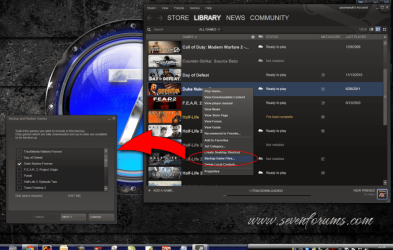
Steam has an option to backup your installed/downloaded games ;)
 

Attachments

  • steam.png
    steam.png
    202.3 KB · Views: 73

My Computer

Computer type
PC/Desktop
Computer Manufacturer/Model Number
Self Built
OS
Windows 7 Ultimate 64bit
CPU
AMD Phenom Quad core 9950 black edition
Motherboard
Gigabyte
Memory
16Gb
Graphics Card(s)
2x XFX Radeon 5850
Sound Card
PCI Express X-Fi Titanium / Logitech G35
Monitor(s) Displays
2x HP 2410i
Screen Resolution
1920x1080
Hard Drives
2x 500Gb Seagate
1x 300Gb Seagate
1x 1Tb Seagate
2x 1Tb Hitatchi
PSU
Jean Tech Storm 700W
Case
Cooler Master COSMOS S
Cooling
Akasa Evo Blue Pro
Keyboard
Logitech G15
Mouse
Mad Catz M.M.O. 7
Internet Speed
12mb
Steam has an option to backup your installed/downloaded games ;)

nice games ;)
DUKE NUKEM FOREVER
(that i dont play :( )
cod mw2
total off topic sorry :(
 

My Computer

OS
64 bit Home Premium
Graphics Card(s)
NVIDEA GeForce GTX 550
Internet Speed
Fast enough :)
Thanks for the replies. The game I bought was F1 2010.
 

My Computer

OS
Windows 7 Pro x64
CPU
i7 870
Motherboard
asrock h55
Memory
8gb
Graphics Card(s)
gts450
Sound Card
onboard
Monitor(s) Displays
logik 22"
Hard Drives
1TB
Case
Achilles
i have my steam installed over several machine's at the same time, just cant play them at once (u do only have 1 set of hands though)
 

My Computer

Computer Manufacturer/Model Number
Windows 7 Ultimate 64-bit
OS
Windows 7 Ultimate N 64-bit
CPU
AMD Black Edition - AMD Phenom X4 2.5 GHz Processor
Motherboard
Bio Star
Memory
8GB DDR2 800MHZ BRANDED
Graphics Card(s)
Palti NVIDIA GeForce GTX 460
Monitor(s) Displays
3D 23.6" & 22"
Screen Resolution
1920x1080@120Hz
Hard Drives
313GB SAMSUNG SAMSUNG HD321KJ
PSU
OCZ 600W StealthXStream PSU, PowerWhisper, Active PFC
Internet Speed
22793
Technically, you only have to DL the game once.
Like PooMan pointed theres a backup option.

What I do, is after the game downloads, I make a backup. Then burn those files to a DVD.

Theres a few games that have SecuROM on them. This will be noted on the store page.
On games like that, just be sure to uninstall the game or revoke the activation before you format your PC.

Other than those few, theres no limit to how many times you can download/install your games. Just pay attention for any (3rd Party DRM) messages, so you'll know how to handle that particular game -- As these will have a limited number of installs.


Download times are slow ATM due to the summer sale, but its usually pretty fast.
 

My Computer

Computer Manufacturer/Model Number
Custom (Self Build)
OS
Windows 7 Home Premium 64bit
CPU
Intel Core i7 2700k
Motherboard
eVGA P67 SLI
Memory
8GB Mushkin Redline Ridgebacks @1866
Graphics Card(s)
EVGA GTX570 SC
Sound Card
XiFi Titanium HD
Monitor(s) Displays
LG W2453V
Screen Resolution
1920x1080
Hard Drives
Intel 320 80GB -- Intel X25-V 40GB --WD Black 1TB x2 -- WD Blue 640GB
PSU
Seasonic x750
Case
Corsair 600T SE White
Cooling
eVGA Superclocked CPU Cooler
Keyboard
Saitek Cyborg
Antivirus
Kaspersky
Browser
IE
Other Info
LG BD/DVD
F1 2010 is an awesome game. I just got it as well but I need to get a nice steering setup to enjoy the heck out of it...too many things to buy and enjoy but not enough time and definitely not enough money!
 

My Computer

OS
Windows 7 x64 Pro
CPU
Intel 990X
Motherboard
Asus P6T Deluxe V2
Memory
CORSAIR XMS3 6GB SDRAM DDR3 1600 (7-7-7-20)
Graphics Card(s)
2 x BFG 285 GTX OCXs in SLI
Sound Card
X-fi Elite Pro
Monitor(s) Displays
HP LP 3065
Screen Resolution
2560 x 1600
Hard Drives
2 x 150 gb Velociraptors RAID 0
PSU
PC Power & Cooling 750W
Case
CM Stacker 832
Cooling
Stock cooler
Keyboard
Saitek Eclipse II
Mouse
Logitech MX Revolution
Technically, you only have to DL the game once.
Like PooMan pointed theres a backup option.

What I do, is after the game downloads, I make a backup. Then burn those files to a DVD.

Theres a few games that have SecuROM on them. This will be noted on the store page.
On games like that, just be sure to uninstall the game or revoke the activation before you format your PC.

Other than those few, theres no limit to how many times you can download/install your games. Just pay attention for any (3rd Party DRM) messages, so you'll know how to handle that particular game -- As these will have a limited number of installs.


Download times are slow ATM due to the summer sale, but its usually pretty fast.

I am going to get my old joystick out and use that if it still works or else buy a new one.
 

My Computer

OS
Windows 7 Pro x64
CPU
i7 870
Motherboard
asrock h55
Memory
8gb
Graphics Card(s)
gts450
Sound Card
onboard
Monitor(s) Displays
logik 22"
Hard Drives
1TB
Case
Achilles
Technically, you only have to DL the game once.
Like PooMan pointed theres a backup option.

What I do, is after the game downloads, I make a backup. Then burn those files to a DVD.

Theres a few games that have SecuROM on them. This will be noted on the store page.
On games like that, just be sure to uninstall the game or revoke the activation before you format your PC.

Other than those few, theres no limit to how many times you can download/install your games. Just pay attention for any (3rd Party DRM) messages, so you'll know how to handle that particular game -- As these will have a limited number of installs.


Download times are slow ATM due to the summer sale, but its usually pretty fast.

In other words don't support games with DRM!!! :mad:
 

My Computer

OS
Windows 7 Ultimate x64
CPU
AMD Athlon 7550
Motherboard
M3N78-VM
Memory
4 GB DDR2
Graphics Card(s)
HD 5770 1GB
Monitor(s) Displays
LG E2250V
Screen Resolution
1920x1080
I hate DRM! Steam is great though because I can download the games on any computer I want. (Just recently got 26 games for the price of one. :D ) And others can still play them if you lend the game to them. (3 days) DRM tripped me up on iTunes once. I burned music and then ripped it with WM to get rid of the DRM. Failed to do it with my movies though. Anyhow, because the games are linked with your acount you can download them again and again from any internet enabled computer in the world. I highly recommend Steam as a choice to buy games.
 

My Computer

Computer type
PC/Desktop
Computer Manufacturer/Model Number
Custom Build
OS
Windows 7 Ultimate x64
CPU
Core i7 3820 @ 4.6Ghz (Overclocked)
Motherboard
Asrock x79 Extreme9 (2011)
Memory
16384MB DDR3 1600mhz Corsair Vengeance
Graphics Card(s)
2x Nvidia GTX 295 (In quad SLI)
Sound Card
Creative SoundCore 3D
Monitor(s) Displays
24" LG 24EN31 LED
Screen Resolution
1920x1080
Hard Drives
OCZ Agility 3 120GB SSD (Boot Disk)
OCZ Vertex 2 240GB SSD (x2, Spanned Volume)
Western Digital 2TB Caviar Green (x2, Spanned Volume)
PSU
OCZ ModXStream 900W
Case
Fractal Design Define R4
Cooling
Corsair Hydro H60
Keyboard
Cooler Master Quickfire Rapid (Blue)
Mouse
Logitech M510
Internet Speed
Upload:5mbps Download:15mbps
Antivirus
Malware Bytes
Browser
Mozilla Firefox
I actually just back up my steam folder from /Program Files/ and if I ever reinstall, during the reinstall process I choose that folder as the install location. Works great every single time that I do it! If i had to download all of them I would blow through my bandwidth cap quickly.. My steam folder is almost 200gb!
 

My Computer

Computer Manufacturer/Model Number
Custom Built
OS
Windows 7 Ultimate x64
CPU
AMD Athlon II X4 640 3.0GHz
Motherboard
GA-990FXA-UD5
Memory
8.0 GB 1600MHz DDR3
Graphics Card(s)
ATI Radeon HD 5770 x2
Monitor(s) Displays
Acer p221w x2
Screen Resolution
1680x1050 x3
Hard Drives
OCZ Agility 3 60gb SSD
(3)Western Digital Caviar Black 7200RPM 500gb
PSU
OCZ Fatal1ty Modular 550w
Case
Antec P180 (with modded wire management)
Cooling
Cooler Master v8
Keyboard
Microsoft Sidewinder x4
Mouse
Logitech Performance MX
SecuROM and Steam Best Practices

Technically, you only have to DL the game once.
Like PooMan pointed theres a backup option.

What I do, is after the game downloads, I make a backup. Then burn those files to a DVD.

Theres a few games that have SecuROM on them. This will be noted on the store page.

Perhaps that has something to do with my issue I posted elsewhere on here... hm.

On games like that, just be sure to uninstall the game or revoke the activation before you format your PC.

Other than those few, theres no limit to how many times you can download/install your games. Just pay attention for any (3rd Party DRM) messages, so you'll know how to handle that particular game -- As these will have a limited number of installs.


Download times are slow ATM due to the summer sale, but its usually pretty fast.

I just started another thread, asking why I can't seem to be able to re-enable Steam Guard Account Security. I've had no problems iwth my games (LOVE the Valve id Complete Pack... all the old Apogee/Wolfenstein titles, Doom, etc.,) can re-activate them after reformatting, etc., but wanted to add to this post..

1.) Yes, you can backup & restore games. Even if you do NOT burn them to CD or DVD, choose the 4.7GB DVD option when backing up. It simply puts them into more manageable files & file sizes! (each game you have.)

- Make sure you save them & verify that they work. I personally right-click & customize the folder by changing the icon to the Steam logo (browsing into the ProgramFiles(x86) folder & using that for quick reference...) lots of posts are on the forums about incorrect file paths, etc., when restoring.

2.) If you do NOT back them up to DVD format (to disk) or onto actual** writable media, do know that however much content you have, you will have to re-download all of that.

If you bought Left 4 Dead, for example, on DVD, typed your product key in & all that... but played out all the maps, won achievements/unlcoked stuff, networked, friends, etc., that'll make it much, much larger than the size of your original DVD. Most, including myself, didn't realize how much we'd have to re-download.

3.) Always make sure to de-authorize your computer before reformatting. If you auto-login with Windows (at startup,) log-off. When you log back-in, there are settings to log out permanently and "disable all other..." computers, or just that one.

--- Good "best practices," from someone who had to learn them the hard way! :-)
 

My Computer

Computer Manufacturer/Model Number
System
OS
Operating System
CPU
Intel Core 2 Quad Q6600 @ 2.4GHz / Core i7 Q740 @ 1.73GHz
Motherboard
A
Memory
A
Graphics Card(s)
A
Sound Card
A
Monitor(s) Displays
S
Screen Resolution
s
Hard Drives
A
PSU
A
Case
A
Cooling
A
Keyboard
A
Mouse
A
Internet Speed
A
Other Info
A
Some nice info there pal +1 :thumbsup:
 

My Computer

Computer type
PC/Desktop
Computer Manufacturer/Model Number
Self Built
OS
Windows 7 Ultimate 64bit
CPU
AMD Phenom Quad core 9950 black edition
Motherboard
Gigabyte
Memory
16Gb
Graphics Card(s)
2x XFX Radeon 5850
Sound Card
PCI Express X-Fi Titanium / Logitech G35
Monitor(s) Displays
2x HP 2410i
Screen Resolution
1920x1080
Hard Drives
2x 500Gb Seagate
1x 300Gb Seagate
1x 1Tb Seagate
2x 1Tb Hitatchi
PSU
Jean Tech Storm 700W
Case
Cooler Master COSMOS S
Cooling
Akasa Evo Blue Pro
Keyboard
Logitech G15
Mouse
Mad Catz M.M.O. 7
Internet Speed
12mb
I don't use the backup feature. What I do is copy my complete Steam folder to one of my externals.
this gives me the option of taking my games with me and makes it easy to restore all my games, just copy that folder to my new drive or new computer.
If I take the drive with me to play on someone elses computer, then all I do is plug the drive in, install steam and point the install to that external drive and all my games are live in matter of seconds.
Only thing now is that you need to have access to your email if you log in on a different computer since they implemented another security feature to help keep accounts from being hacked.
 

My Computer

Computer Manufacturer/Model Number
HAL-9000
OS
Windows 7 Ultimate 64bit
CPU
Intel i7 3770K
Motherboard
Asus Sabertooth Z77
Memory
16GB DDR3 1333 Corsair XMS3
Graphics Card(s)
XFX HD6950 2GB EyeFinity
Sound Card
Logitech G35 & Sennheiser PC135 & VIA HD
Monitor(s) Displays
23" HP 2310e, 23" Samsung B2230, 21.5" Viewsonic
Screen Resolution
5760x1080
Hard Drives
16TB of Storage
128GB & 256GB Crucial M4 SSD's, 2X 1TB WD Black, 3x 2TB WD, 3x 2TB Samsung F4, 1.5TB Seagate, WD 500GB,
PSU
Antec True Power New 650watt
Case
Cooler Master HAF-932
Cooling
Corsair H60 Hydro Cooler, 3x 230mm Fans, 2x120mm Fan
Keyboard
Logitech G15 and G13
Mouse
Logitech G700 Gaming Mouse
Internet Speed
50/10 Mbit
Other Info
Speakers : Alesis M1 Active Mk2 Studio Monitors , APC RS 1200 UPS, HP 4500DN Color Laser, HP P1006 mono Laser, Kodak 8500 Dye-Sub, Epson 1280 inkjet, Epson Worforce 610 MFC
Back
Top