JavaScript is disabled. For a better experience, please enable JavaScript in your browser before proceeding.
You are using an out of date browser. It may not display this or other websites correctly.
You should upgrade or use an
alternative browser .
Buzzing Sound Unable To Locate Source
I've researched it.. I've listened.. I've removed components. I cannot find the source. Only thing I haven't been able to test is the power supply. Here is a link to a video (ignore the images) to show you what the noise sounds like. Hopefully that can help determine the source.
Yfrog Video : yfrog.com/ndy5iz
Nothing is hitting fans and my DVD drive isn't even currently inside of the machine. I have nothing my rear case fan though intermittently stop working.. slowing then spinning back up a few times but nothing it hitting the blades. Also my two big LED side intakes went out then came back on all on their own. Heeeeelp.
AMD Phenom II X4 925 2.8 GHz
Nvidia GeForce GTS 250 1GB
500W Power Supply
2x SATA Hard Drives (160GB & 250GB)
6x Case Fans
Windows 7 Home Premium 32bit
OS Windows 7 CPU AMD Phenom II X4 925 @ 2.8GHz Motherboard Gigabyte M68M-S2 Memory 4 GB Kingston DDR2 Graphics Card(s) ZOTAC GeForce GTX 260 Core 216 Sound Card Realtek OnBoard Monitor(s) Displays 20" HP S2031a & Acer 19" AL1916W Screen Resolution 1600x900 & 1440x900 Hard Drives 160 GB Hitachi Deskstar PSU Corsair TX 650 Case Xclio Cooling Air Keyboard Logitech Wireless K250 Dark Fleur Mouse Logitech MX Revolution Internet Speed 30 Mbps Cable
New member
Guru
Gold Member
VIP
It's not very loud. Unless that's something to do with the recording. Sounds like speaker hum rather than an impact noise like a fan catching.
Computer Manufacturer/Model Number The Monolith. 3.1 OS Windows 7 Home Premium 64 bit CPU i7 [email protected] Motherboard Gigabyte Z77-D3H Memory 2x4GB Corsair Vegeance DDR3 Graphics Card(s) XFX GTX 260 Black Edition Sound Card none-through large stereo hi fi Monitor(s) Displays Croosover 27MDP LED IPS Dell 2408 WFP Screen Resolution 2560x1440 1920x1200 Hard Drives 1x Samsung 840Pro 128GB SSD PSU Corsair AX 850 Watt Case Cooler Master ACTS 840 Cooling Be Quiet! Dark Rock Pro Keyboard Enermax Aurora Mouse Logitech Ballmouse Internet Speed 20MBPS
New member
Thread Starter
Do you mean the internal speaker? Its definitely loud in here with the buzzing. I figure its not any issue with fans because the buzzing does not start until about the time I get the standard POST beep from the motherboard.. thats usually when the buzzing kicks in. I assume if it was a fan it would happen as soon as I powered up the machine.
OS Windows 7 CPU AMD Phenom II X4 925 @ 2.8GHz Motherboard Gigabyte M68M-S2 Memory 4 GB Kingston DDR2 Graphics Card(s) ZOTAC GeForce GTX 260 Core 216 Sound Card Realtek OnBoard Monitor(s) Displays 20" HP S2031a & Acer 19" AL1916W Screen Resolution 1600x900 & 1440x900 Hard Drives 160 GB Hitachi Deskstar PSU Corsair TX 650 Case Xclio Cooling Air Keyboard Logitech Wireless K250 Dark Fleur Mouse Logitech MX Revolution Internet Speed 30 Mbps Cable
This might sound incredibly stupid, but I use a paper towel tube to localize sounds in my case.
Computer Manufacturer/Model Number OEM - Me OS Windows 7 Home Premium x64 CPU AMD Phenom II X6 1600T Motherboard GigaByte GZ-990FXA-UD3 Memory 16GB PC3-10700 (1342MHz) Graphics Card(s) ATI Radeon 5770 HD (x2) CrossFire Sound Card On-board RealTek chipset Monitor(s) Displays 3x Hanns-G 1920x1080 Monitors Screen Resolution 3x Hanns-G 1920x1080 Monitors Hard Drives Intel 25-V SSD 40GB: 218 MB/s AT: 0.1ms PSU OCZ Stealth X Stream 750W Case Cheap (unknown) Cooling Stock Keyboard HP USB Mouse LogiTech USB Internet Speed 1.5 Mbps - Slow - At the tail-end of a rural network Other Info Printer: Epson Stylus C-84
Righteous Dude
Guru
VIP
SF Team
This might sound incredibly stupid, but I use a paper towel tube to localize sounds in my case.
It is not at all stupid. In many years as a TV tech, I carried a cardboard (non conductive) paper towel tube to locate noises. This is a great way to localize the cause. A Guy
Computer type PC/Desktop OS Windows 10 Home x64 CPU INTEL Core i5-750 Quad-Core 3.37GHz Motherboard ASUS P7P55D Memory HyperX Fury Black Series 8GB (2 x 4GB) 1866Mhz Graphics Card(s) EVGA GeForce GTX 750 Superclocked 1GB 128-Bit GDDR5 Monitor(s) Displays LG 32MA68HY 32" IPS Screen Resolution 1920 x 1080 Hard Drives Samsung 840 Evo 120GB, SEAGATE 500GB Barracuda® 7200.12, SATA 3 Gb/s, 7200 RPM, 16MB cache PSU ANTEC TruePower New TP-550, 80 PLUS, 550W Case ANTEC Three Hundred Illusion Cooling COOLER MASTER Hyper 212 Plus, 4 x 120mm 1 x 140mm Noctua's Internet Speed 85 + Mbps Antivirus Avast Browser Vivaldi
New member
Thread Starter
I disconnected SATA power from my drives.. booted up and the buzzing stopped. Then reconnected the SATA power.. booted up.. still no buzzing. If the hard drive was failing wouldn't it still make the noise? Is it possible dust on contacts or loose connection...
OS Windows 7 CPU AMD Phenom II X4 925 @ 2.8GHz Motherboard Gigabyte M68M-S2 Memory 4 GB Kingston DDR2 Graphics Card(s) ZOTAC GeForce GTX 260 Core 216 Sound Card Realtek OnBoard Monitor(s) Displays 20" HP S2031a & Acer 19" AL1916W Screen Resolution 1600x900 & 1440x900 Hard Drives 160 GB Hitachi Deskstar PSU Corsair TX 650 Case Xclio Cooling Air Keyboard Logitech Wireless K250 Dark Fleur Mouse Logitech MX Revolution Internet Speed 30 Mbps Cable
I'd bet its the PSU. What brand is it and what is the rail info - 3.3V/12V etc?
Computer Manufacturer/Model Number Self-Built OS Windows 7 Ultimate x64 CPU AMD Phenom 965 @ 3.4GHz w/ Thermaltake Contac 29 (updraft) Motherboard Gigabyte 790GPT-UD3H w/ F3 BIOS & IGP disabled Memory Kingston 8GB DDR3 1333MHz 9-9-9-24 (2 x 4GB kits) Graphics Card(s) Sapphire 6870 1GB GDDR5 (reference model) Sound Card Onboard Realtek 889A codec Monitor(s) Displays BenQ 22" M2200HD Screen Resolution 1920x1080 Hard Drives 1 x Seagate Barracuda 7200.12 1TB 7200RPM w/32MB cache PSU Xigmatek NRP-MC651 650w 80+ bronze certified Case Antec Two Hundred Cooling 1 x 140mm exhaust top, 1 x 120mm exhaust rear Keyboard Stock PS/2 model Mouse Razer Salmosa Internet Speed ADSL2+/ 2MB/s
New member
Thread Starter
OS Windows 7 CPU AMD Phenom II X4 925 @ 2.8GHz Motherboard Gigabyte M68M-S2 Memory 4 GB Kingston DDR2 Graphics Card(s) ZOTAC GeForce GTX 260 Core 216 Sound Card Realtek OnBoard Monitor(s) Displays 20" HP S2031a & Acer 19" AL1916W Screen Resolution 1600x900 & 1440x900 Hard Drives 160 GB Hitachi Deskstar PSU Corsair TX 650 Case Xclio Cooling Air Keyboard Logitech Wireless K250 Dark Fleur Mouse Logitech MX Revolution Internet Speed 30 Mbps Cable
Its the PSU. Apevia isn't exactly a good brand. That Corsair will probably last longer than anything else in your PC.
Computer Manufacturer/Model Number Self-Built OS Windows 7 Ultimate x64 CPU AMD Phenom 965 @ 3.4GHz w/ Thermaltake Contac 29 (updraft) Motherboard Gigabyte 790GPT-UD3H w/ F3 BIOS & IGP disabled Memory Kingston 8GB DDR3 1333MHz 9-9-9-24 (2 x 4GB kits) Graphics Card(s) Sapphire 6870 1GB GDDR5 (reference model) Sound Card Onboard Realtek 889A codec Monitor(s) Displays BenQ 22" M2200HD Screen Resolution 1920x1080 Hard Drives 1 x Seagate Barracuda 7200.12 1TB 7200RPM w/32MB cache PSU Xigmatek NRP-MC651 650w 80+ bronze certified Case Antec Two Hundred Cooling 1 x 140mm exhaust top, 1 x 120mm exhaust rear Keyboard Stock PS/2 model Mouse Razer Salmosa Internet Speed ADSL2+/ 2MB/s
New member
Thread Starter
Guess I got lucky since I was able to use it for a couple users under heavy load no less. I needed a new PSU anyways as I just installed a quad core and I'm upgrading to a GTX 260 core 216. I'm pretty tough on my computer as I use it every day and quite often.
OS Windows 7 CPU AMD Phenom II X4 925 @ 2.8GHz Motherboard Gigabyte M68M-S2 Memory 4 GB Kingston DDR2 Graphics Card(s) ZOTAC GeForce GTX 260 Core 216 Sound Card Realtek OnBoard Monitor(s) Displays 20" HP S2031a & Acer 19" AL1916W Screen Resolution 1600x900 & 1440x900 Hard Drives 160 GB Hitachi Deskstar PSU Corsair TX 650 Case Xclio Cooling Air Keyboard Logitech Wireless K250 Dark Fleur Mouse Logitech MX Revolution Internet Speed 30 Mbps Cable
You won't need more than 600w with that setup. The PSU needs to run at 50-60% for maximum efficiency. Any higher or lower, the efficiency decreases. You should have considered the HX model too as the TX has captive (non-removable cables) so depending on your case, the cables can become an unsightly mess.
Computer Manufacturer/Model Number Self-Built OS Windows 7 Ultimate x64 CPU AMD Phenom 965 @ 3.4GHz w/ Thermaltake Contac 29 (updraft) Motherboard Gigabyte 790GPT-UD3H w/ F3 BIOS & IGP disabled Memory Kingston 8GB DDR3 1333MHz 9-9-9-24 (2 x 4GB kits) Graphics Card(s) Sapphire 6870 1GB GDDR5 (reference model) Sound Card Onboard Realtek 889A codec Monitor(s) Displays BenQ 22" M2200HD Screen Resolution 1920x1080 Hard Drives 1 x Seagate Barracuda 7200.12 1TB 7200RPM w/32MB cache PSU Xigmatek NRP-MC651 650w 80+ bronze certified Case Antec Two Hundred Cooling 1 x 140mm exhaust top, 1 x 120mm exhaust rear Keyboard Stock PS/2 model Mouse Razer Salmosa Internet Speed ADSL2+/ 2MB/s
New member
Thread Starter
That being said.. any tips on cable management?
OS Windows 7 CPU AMD Phenom II X4 925 @ 2.8GHz Motherboard Gigabyte M68M-S2 Memory 4 GB Kingston DDR2 Graphics Card(s) ZOTAC GeForce GTX 260 Core 216 Sound Card Realtek OnBoard Monitor(s) Displays 20" HP S2031a & Acer 19" AL1916W Screen Resolution 1600x900 & 1440x900 Hard Drives 160 GB Hitachi Deskstar PSU Corsair TX 650 Case Xclio Cooling Air Keyboard Logitech Wireless K250 Dark Fleur Mouse Logitech MX Revolution Internet Speed 30 Mbps Cable
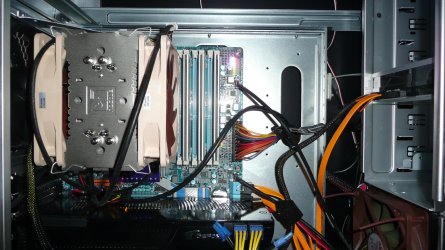
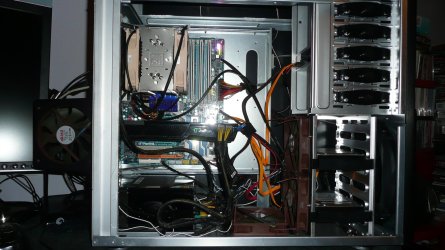
I would get the long fat ATX cable and tie any cables to it that can be tied with cable ties. Just don't strangle the cables. I would then push this bundle behind the 5.25in bays if you have space or route them through cable routing holes if your case has some. I can post some pictures of my setup if you want.
Computer Manufacturer/Model Number Self-Built OS Windows 7 Ultimate x64 CPU AMD Phenom 965 @ 3.4GHz w/ Thermaltake Contac 29 (updraft) Motherboard Gigabyte 790GPT-UD3H w/ F3 BIOS & IGP disabled Memory Kingston 8GB DDR3 1333MHz 9-9-9-24 (2 x 4GB kits) Graphics Card(s) Sapphire 6870 1GB GDDR5 (reference model) Sound Card Onboard Realtek 889A codec Monitor(s) Displays BenQ 22" M2200HD Screen Resolution 1920x1080 Hard Drives 1 x Seagate Barracuda 7200.12 1TB 7200RPM w/32MB cache PSU Xigmatek NRP-MC651 650w 80+ bronze certified Case Antec Two Hundred Cooling 1 x 140mm exhaust top, 1 x 120mm exhaust rear Keyboard Stock PS/2 model Mouse Razer Salmosa Internet Speed ADSL2+/ 2MB/s
New member
Thread Starter
Yes. Visual aids are always welcome. Thank you.
OS Windows 7 CPU AMD Phenom II X4 925 @ 2.8GHz Motherboard Gigabyte M68M-S2 Memory 4 GB Kingston DDR2 Graphics Card(s) ZOTAC GeForce GTX 260 Core 216 Sound Card Realtek OnBoard Monitor(s) Displays 20" HP S2031a & Acer 19" AL1916W Screen Resolution 1600x900 & 1440x900 Hard Drives 160 GB Hitachi Deskstar PSU Corsair TX 650 Case Xclio Cooling Air Keyboard Logitech Wireless K250 Dark Fleur Mouse Logitech MX Revolution Internet Speed 30 Mbps Cable
This is the system in my specs, and yes I know I need a better camera:
Computer Manufacturer/Model Number Self-Built OS Windows 7 Ultimate x64 CPU AMD Phenom 965 @ 3.4GHz w/ Thermaltake Contac 29 (updraft) Motherboard Gigabyte 790GPT-UD3H w/ F3 BIOS & IGP disabled Memory Kingston 8GB DDR3 1333MHz 9-9-9-24 (2 x 4GB kits) Graphics Card(s) Sapphire 6870 1GB GDDR5 (reference model) Sound Card Onboard Realtek 889A codec Monitor(s) Displays BenQ 22" M2200HD Screen Resolution 1920x1080 Hard Drives 1 x Seagate Barracuda 7200.12 1TB 7200RPM w/32MB cache PSU Xigmatek NRP-MC651 650w 80+ bronze certified Case Antec Two Hundred Cooling 1 x 140mm exhaust top, 1 x 120mm exhaust rear Keyboard Stock PS/2 model Mouse Razer Salmosa Internet Speed ADSL2+/ 2MB/s
New member
Guru
Gold Member
VIP
I'll go with the cardboard tube. Works a treat.
You say the hum has stopped now. That might indicate it was a poor connection. Sometimes if a connector is not quite connecting properly a hum or buzz can result.
But you're getting a new PSU anyway and that sounds like the most likely culprit.
Here's a pic of my insides. Not the tidiest job in the world but it keeps most of the wiring behind the motherboard tray. The idea is to not impede the flow of air through the case. This is only possible with large cases which have routing holes already cut. Or cut your own
Parabellum. Is your PSU drawing air from inside the case?
P1010146.jpg
576.8 KB
· Views: 5
Computer Manufacturer/Model Number The Monolith. 3.1 OS Windows 7 Home Premium 64 bit CPU i7 [email protected] Motherboard Gigabyte Z77-D3H Memory 2x4GB Corsair Vegeance DDR3 Graphics Card(s) XFX GTX 260 Black Edition Sound Card none-through large stereo hi fi Monitor(s) Displays Croosover 27MDP LED IPS Dell 2408 WFP Screen Resolution 2560x1440 1920x1200 Hard Drives 1x Samsung 840Pro 128GB SSD PSU Corsair AX 850 Watt Case Cooler Master ACTS 840 Cooling Be Quiet! Dark Rock Pro Keyboard Enermax Aurora Mouse Logitech Ballmouse Internet Speed 20MBPS
New member
Guru
Gold Member
VIP
Ooops. wrong picture. There's my PSU at the bottom. The fan is on the underside.
P1010145.jpg
494.6 KB
· Views: 11
Computer Manufacturer/Model Number The Monolith. 3.1 OS Windows 7 Home Premium 64 bit CPU i7 [email protected] Motherboard Gigabyte Z77-D3H Memory 2x4GB Corsair Vegeance DDR3 Graphics Card(s) XFX GTX 260 Black Edition Sound Card none-through large stereo hi fi Monitor(s) Displays Croosover 27MDP LED IPS Dell 2408 WFP Screen Resolution 2560x1440 1920x1200 Hard Drives 1x Samsung 840Pro 128GB SSD PSU Corsair AX 850 Watt Case Cooler Master ACTS 840 Cooling Be Quiet! Dark Rock Pro Keyboard Enermax Aurora Mouse Logitech Ballmouse Internet Speed 20MBPS
New member
Thread Starter
Fairly tidy there. I'll get a shot of mine once my stuff arrives. Unfortuneately my case is not pre-equipped with cable management features but I will make it work somehow.
OS Windows 7 CPU AMD Phenom II X4 925 @ 2.8GHz Motherboard Gigabyte M68M-S2 Memory 4 GB Kingston DDR2 Graphics Card(s) ZOTAC GeForce GTX 260 Core 216 Sound Card Realtek OnBoard Monitor(s) Displays 20" HP S2031a & Acer 19" AL1916W Screen Resolution 1600x900 & 1440x900 Hard Drives 160 GB Hitachi Deskstar PSU Corsair TX 650 Case Xclio Cooling Air Keyboard Logitech Wireless K250 Dark Fleur Mouse Logitech MX Revolution Internet Speed 30 Mbps Cable
@johnwillyums - yes its facing up. Temps are fine though. CPU idles at 35 and never pushes past 42.
Computer Manufacturer/Model Number Self-Built OS Windows 7 Ultimate x64 CPU AMD Phenom 965 @ 3.4GHz w/ Thermaltake Contac 29 (updraft) Motherboard Gigabyte 790GPT-UD3H w/ F3 BIOS & IGP disabled Memory Kingston 8GB DDR3 1333MHz 9-9-9-24 (2 x 4GB kits) Graphics Card(s) Sapphire 6870 1GB GDDR5 (reference model) Sound Card Onboard Realtek 889A codec Monitor(s) Displays BenQ 22" M2200HD Screen Resolution 1920x1080 Hard Drives 1 x Seagate Barracuda 7200.12 1TB 7200RPM w/32MB cache PSU Xigmatek NRP-MC651 650w 80+ bronze certified Case Antec Two Hundred Cooling 1 x 140mm exhaust top, 1 x 120mm exhaust rear Keyboard Stock PS/2 model Mouse Razer Salmosa Internet Speed ADSL2+/ 2MB/s