
C:\Boot Language Files

seekermeister

Old School
Guru
Gold Member
VIP
Local time
6:54 PM
Messages
6,618
Location
Indian Territory
There are about 22 additional foreign language files in this folder, that occupy ~2GB of harddrive space. If a person is like myself, and only speaks English, is there any good reason to leave these files alone?
 

My Computer

Computer Manufacturer/Model Number
DIY
OS
W7x64 Pro, SuSe 12.1/** W7 x64 Pro, XP MCE
CPU
Phenom II 1090T w/Noctua NH-D14 /**4400+ X2 w/CM Hyper TX 3
Motherboard
ASRock 890FX Deluxe 4/**A8N-SLI
Memory
2 x 2GB Patriot PGS34g1600LLKA/**4x1GB Corsair VS
Graphics Card(s)
EVGA GTX460 SC/**EVGA 8800GTS
Sound Card
Asus Xonar D2X/**Xonar D1
Monitor(s) Displays
Acer X233H, Dell E152FPc /**LG M237-WD
Screen Resolution
1920x1080 & 1024x768/**1980x1080
Hard Drives
WDC 2TB, 1.5TB, 1TB, 500GB,Seagate 500GB , Maxtor 80GB /**500GB Seagate & WDC 1TB Black
PSU
CM RS600 w/ APC BX1000G/**Antec 500 TP w/ APC BX1000
Case
HAF922/**Antec 1040IIB
Cooling
3x200mm, 1x140 and 1x120mm/**5x80mm fans
Keyboard
Logitech Media USB/**Saitek Eclipse
Mouse
Cordless Trackman Wheel/**Ditto
Internet Speed
3.3Mbps
Other Info
SB 560 5.1 w/ Sennheiser RS140/**Creative T20 speakers, Dvico FusionHDTV7 Gold RT, Cisco E3000, HP 5510V AIO, Linksys E3000, Belkin F5U237 hub and **F5D8055 adapter
(** = 2nd rig)
c:\boot language files is not a built in folder. languages are not installed in that folder either. check control panel>Region and language>keyboard and languages tab>install/uninstall languages button>choose Uninstall display languages. that will show you what languages are installed...if it's only english, then i'd say it's safe to delete the folder
 

My Computer

OS
XP Vista 7
with the hard drives you have i don't see the need to remove them.
handy if you install some software that could use them later??

i may be wrong though:shock:
 

My Computer

Computer Manufacturer/Model Number
Self
OS
W7, Xp Pro
CPU
AMD Sempron 2600+
Motherboard
K8V-MX
Memory
1GB
Graphics Card(s)
Radeon HD3650
Sound Card
Soundmax
Monitor(s) Displays
17" HP CRT
Screen Resolution
1024x768
Hard Drives
1x WDC WD800BB
1x HDS728080
PSU
? 460W
Case
Coolermaster
Cooling
enough
Keyboard
M$S
Mouse
Optical
Internet Speed
1500kbs
Other Info
OLD!!! does the job i need.
PoPPeR,

Perhaps I should clarify, the folder is C:\Boot, which is an essential built-in folder, required for booting. It is simply not visible, unless "Hide protected system files" is disabled in Folder Options>View. The language files are within multiple subfolders. I suspect that these are used to set the language upon installation, but I'm not certain. The only thing that I can think of that these could be used for, is displaying foreign language characters on a webpage, but I think that is not the case.
 

My Computer

Computer Manufacturer/Model Number
DIY
OS
W7x64 Pro, SuSe 12.1/** W7 x64 Pro, XP MCE
CPU
Phenom II 1090T w/Noctua NH-D14 /**4400+ X2 w/CM Hyper TX 3
Motherboard
ASRock 890FX Deluxe 4/**A8N-SLI
Memory
2 x 2GB Patriot PGS34g1600LLKA/**4x1GB Corsair VS
Graphics Card(s)
EVGA GTX460 SC/**EVGA 8800GTS
Sound Card
Asus Xonar D2X/**Xonar D1
Monitor(s) Displays
Acer X233H, Dell E152FPc /**LG M237-WD
Screen Resolution
1920x1080 & 1024x768/**1980x1080
Hard Drives
WDC 2TB, 1.5TB, 1TB, 500GB,Seagate 500GB , Maxtor 80GB /**500GB Seagate & WDC 1TB Black
PSU
CM RS600 w/ APC BX1000G/**Antec 500 TP w/ APC BX1000
Case
HAF922/**Antec 1040IIB
Cooling
3x200mm, 1x140 and 1x120mm/**5x80mm fans
Keyboard
Logitech Media USB/**Saitek Eclipse
Mouse
Cordless Trackman Wheel/**Ditto
Internet Speed
3.3Mbps
Other Info
SB 560 5.1 w/ Sennheiser RS140/**Creative T20 speakers, Dvico FusionHDTV7 Gold RT, Cisco E3000, HP 5510V AIO, Linksys E3000, Belkin F5U237 hub and **F5D8055 adapter
(** = 2nd rig)
is this a company laptop? your IT department might have left it there for ease of installing other languages. follow these and check if other languages are installed.

control panel>Region and language>keyboard and languages tab>install/uninstall languages button>choose Uninstall display languages. that will show you what languages are installed...if it's only english, then i'd say it's safe to delete the folder
 

My Computer

OS
XP Vista 7
is this a company laptop? your IT department might have left it there for ease of installing other languages. follow these and check if other languages are installed.

control panel>Region and language>keyboard and languages tab>install/uninstall languages button>choose Uninstall display languages. that will show you what languages are installed...if it's only english, then i'd say it's safe to delete the folder
No, this is a desktop that I built myself for personal use.
 

My Computer

Computer Manufacturer/Model Number
DIY
OS
W7x64 Pro, SuSe 12.1/** W7 x64 Pro, XP MCE
CPU
Phenom II 1090T w/Noctua NH-D14 /**4400+ X2 w/CM Hyper TX 3
Motherboard
ASRock 890FX Deluxe 4/**A8N-SLI
Memory
2 x 2GB Patriot PGS34g1600LLKA/**4x1GB Corsair VS
Graphics Card(s)
EVGA GTX460 SC/**EVGA 8800GTS
Sound Card
Asus Xonar D2X/**Xonar D1
Monitor(s) Displays
Acer X233H, Dell E152FPc /**LG M237-WD
Screen Resolution
1920x1080 & 1024x768/**1980x1080
Hard Drives
WDC 2TB, 1.5TB, 1TB, 500GB,Seagate 500GB , Maxtor 80GB /**500GB Seagate & WDC 1TB Black
PSU
CM RS600 w/ APC BX1000G/**Antec 500 TP w/ APC BX1000
Case
HAF922/**Antec 1040IIB
Cooling
3x200mm, 1x140 and 1x120mm/**5x80mm fans
Keyboard
Logitech Media USB/**Saitek Eclipse
Mouse
Cordless Trackman Wheel/**Ditto
Internet Speed
3.3Mbps
Other Info
SB 560 5.1 w/ Sennheiser RS140/**Creative T20 speakers, Dvico FusionHDTV7 Gold RT, Cisco E3000, HP 5510V AIO, Linksys E3000, Belkin F5U237 hub and **F5D8055 adapter
(** = 2nd rig)
PoPPeR,

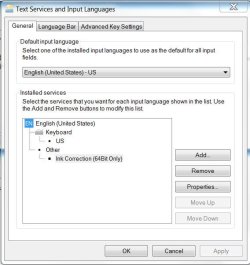
English is the only language shown in Region And Language, but I found something else that I'm curious about...the item tagged for (64 bit only). Any idea what that is for? The window displayed by the Properties button says that "This property setting for ink correction is not available.
 

Attachments

  • Language.JPG
    Language.JPG
    47.9 KB · Views: 35

My Computer

Computer Manufacturer/Model Number
DIY
OS
W7x64 Pro, SuSe 12.1/** W7 x64 Pro, XP MCE
CPU
Phenom II 1090T w/Noctua NH-D14 /**4400+ X2 w/CM Hyper TX 3
Motherboard
ASRock 890FX Deluxe 4/**A8N-SLI
Memory
2 x 2GB Patriot PGS34g1600LLKA/**4x1GB Corsair VS
Graphics Card(s)
EVGA GTX460 SC/**EVGA 8800GTS
Sound Card
Asus Xonar D2X/**Xonar D1
Monitor(s) Displays
Acer X233H, Dell E152FPc /**LG M237-WD
Screen Resolution
1920x1080 & 1024x768/**1980x1080
Hard Drives
WDC 2TB, 1.5TB, 1TB, 500GB,Seagate 500GB , Maxtor 80GB /**500GB Seagate & WDC 1TB Black
PSU
CM RS600 w/ APC BX1000G/**Antec 500 TP w/ APC BX1000
Case
HAF922/**Antec 1040IIB
Cooling
3x200mm, 1x140 and 1x120mm/**5x80mm fans
Keyboard
Logitech Media USB/**Saitek Eclipse
Mouse
Cordless Trackman Wheel/**Ditto
Internet Speed
3.3Mbps
Other Info
SB 560 5.1 w/ Sennheiser RS140/**Creative T20 speakers, Dvico FusionHDTV7 Gold RT, Cisco E3000, HP 5510V AIO, Linksys E3000, Belkin F5U237 hub and **F5D8055 adapter
(** = 2nd rig)
found this: How to Delete a System File in Windows 7 or Vista - the How-To Geek

How to Delete a System File in Windows 7 or Vista

Warning: Do not delete system files. Bad things will probably ensue.
If you need to delete or overwrite a system file in Windows 7 or Vista, you’ll quickly notice that you cannot delete system files, even as administrator. This is because Windows system files are owned by the TrustedInstaller service by default, and Windows File Protection will keep them from being overwritten.
Thankfully, there’s a way that you can get around this. You need to take ownership of the files, and then assign yourself rights to delete or modify the file. For this, we’ll use the command line.
Open an administrator command prompt by typing cmd into the start menu search box, and hit the Ctrl+Shift+Enter key combination.
image%7B0%7D1.png

To take ownership of the file, you’ll need to use the takeown command. Here’s an example:
takeown /f C:\Windows\System32\en-US\winload.exe.mui
That will give you ownership of the file, but you still have no rights to delete it. Now you can run the cacls command to give yourself full control rights to the file:
cacls C:\Windows\System32\en-US\winload.exe.mui /G geek:F
Note that my username is geek, so you will substitute your username there.
At this point, you should be able to delete the file. If you still can’t do so, you may need to reboot into Safe Mode and try it again. For the filename in the example, I was able to overwrite it without safe mode, but your mileage may vary.
 

My Computer

OS
XP Vista 7
found this: How to Delete a System File in Windows 7 or Vista - the How-To Geek

How to Delete a System File in Windows 7 or Vista

Warning: Do not delete system files. Bad things will probably ensue.
If you need to delete or overwrite a system file in Windows 7 or Vista, you’ll quickly notice that you cannot delete system files, even as administrator. This is because Windows system files are owned by the TrustedInstaller service by default, and Windows File Protection will keep them from being overwritten.
Thankfully, there’s a way that you can get around this. You need to take ownership of the files, and then assign yourself rights to delete or modify the file. For this, we’ll use the command line.
Open an administrator command prompt by typing cmd into the start menu search box, and hit the Ctrl+Shift+Enter key combination.
image%7B0%7D1.png

To take ownership of the file, you’ll need to use the takeown command. Here’s an example:
takeown /f C:\Windows\System32\en-US\winload.exe.mui
That will give you ownership of the file, but you still have no rights to delete it. Now you can run the cacls command to give yourself full control rights to the file:
cacls C:\Windows\System32\en-US\winload.exe.mui /G geek:F
Note that my username is geek, so you will substitute your username there.
At this point, you should be able to delete the file. If you still can’t do so, you may need to reboot into Safe Mode and try it again. For the filename in the example, I was able to overwrite it without safe mode, but your mileage may vary.
I haven't gotten to that point yet, I'm still pondering my first question.
 

My Computer

Computer Manufacturer/Model Number
DIY
OS
W7x64 Pro, SuSe 12.1/** W7 x64 Pro, XP MCE
CPU
Phenom II 1090T w/Noctua NH-D14 /**4400+ X2 w/CM Hyper TX 3
Motherboard
ASRock 890FX Deluxe 4/**A8N-SLI
Memory
2 x 2GB Patriot PGS34g1600LLKA/**4x1GB Corsair VS
Graphics Card(s)
EVGA GTX460 SC/**EVGA 8800GTS
Sound Card
Asus Xonar D2X/**Xonar D1
Monitor(s) Displays
Acer X233H, Dell E152FPc /**LG M237-WD
Screen Resolution
1920x1080 & 1024x768/**1980x1080
Hard Drives
WDC 2TB, 1.5TB, 1TB, 500GB,Seagate 500GB , Maxtor 80GB /**500GB Seagate & WDC 1TB Black
PSU
CM RS600 w/ APC BX1000G/**Antec 500 TP w/ APC BX1000
Case
HAF922/**Antec 1040IIB
Cooling
3x200mm, 1x140 and 1x120mm/**5x80mm fans
Keyboard
Logitech Media USB/**Saitek Eclipse
Mouse
Cordless Trackman Wheel/**Ditto
Internet Speed
3.3Mbps
Other Info
SB 560 5.1 w/ Sennheiser RS140/**Creative T20 speakers, Dvico FusionHDTV7 Gold RT, Cisco E3000, HP 5510V AIO, Linksys E3000, Belkin F5U237 hub and **F5D8055 adapter
(** = 2nd rig)
Back
Top