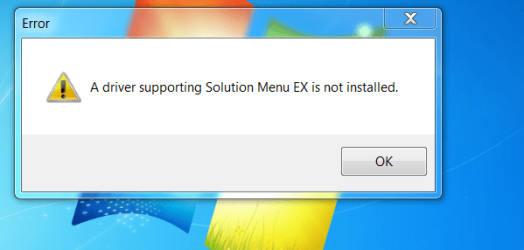
I built a SB running Win 7 Home and the Samsung 103SJ decided to go on a long vacation.
Luckily I had a Seagate Barracuda 1TB ST31000524AS brand new at home and took out the Samsung and did a reinstall.
Now I am left with an error message that comes up on boot and it is to do with a driver for a Canon printer MG5250 I bought very recently for printing CD disks.
I have downloaded the driver from the Canon site - I have reinstalled the Canon software three times now but still this annoying message keeps coming up.
The odd thing is when I am running the Canon software it doesn't want to go past step 3 - the help section into step 4 which I am assuming is the final part. Plus another odd thing I noticed is that it originally said it wasn't compatible with a 64bit system - something I wasn't aware of when buying the printer.
Any idea on what I can do apart from uninstall the Canon software sell the printer and get something different, because I am at loss as to what to do.
Finally having said that it wasn't compatible with 64bit it printed out test pages!
Attachments
CaptureERRORex.PNG
29.4 KB
· Views: 2
My Computer
Computer type
PC/Desktop
Computer Manufacturer/Model Number
Own build (new) Desk1 / Asus ROG Win 7 / Desk2 1st build
OS
Desk1 7 Home Prem / Desk2 10 Pro / Main lap Asus ROG 10 Pro 2 laptop Toshiba 7 Pro Asus P2520 7 & 10
One other Desktop (tester) and spare Toshba laptop both with SSD's
Running Kaspersky 2016 ISS on all machines config'd identically
Logitec audio stereo systems on each machine (x3)
Canon MG5250MFC
Router/modem TP-Link running WPA2SK
Thanks Theog and whs I was afraid that this might be the outcome, and I am really very angry that the Canon did not have this on the outside of the box when I bought it or even put it out knowing that more and more of us are using 64bit systems in 7 now.
So I shall probably try the Vista driver if that doesn't work then I shall have a ceremonial bonfire to put it on, and go and buy another brand and just put it down to experience. But I am going to contact Canon and let them know just how I feel about it - after all I have used Canon printers just about all of my computing life apart from a Dell that came with the machine back in 2004 and it turned out to be a Lexmark at that.
Hey but thanks for your time and help!!
My Computer
Computer type
PC/Desktop
Computer Manufacturer/Model Number
Own build (new) Desk1 / Asus ROG Win 7 / Desk2 1st build
OS
Desk1 7 Home Prem / Desk2 10 Pro / Main lap Asus ROG 10 Pro 2 laptop Toshiba 7 Pro Asus P2520 7 & 10
One other Desktop (tester) and spare Toshba laptop both with SSD's
Running Kaspersky 2016 ISS on all machines config'd identically
Logitec audio stereo systems on each machine (x3)
Canon MG5250MFC
Router/modem TP-Link running WPA2SK
That is very unusual for Canon. I use 6 different Canon printers on my x64 systems (some are 4 years old) and never had any problems. On this system right here I use a MP610 without problems. I would certainly first talk to them before you start the bondfire. They have always been very cooperative with me - even replaced a 3 year old photo printer free of charge when it started to have problems with the paper feed.
My Computer
Computer Manufacturer/Model Number
HP, Dell, Gateway, Toshiba - 4 laptops and 2 desktops
Hey mate I have just been on their site and they admit that the printer is not compatible with IE9 / numerous complaints etc etc and who's to say this doesn't extend to 64bit systems too as someone else put forward I saw somewhere tonight.
So tomorrow they will be getting a phone call from me to ask why this is not made obvious when one is buying their products.
Like you I have always had Canon apart from that Dell and have never had this sort of rot before. For the money one pays out for their equipment one should at least expect some life out of it as i know a lot of devices are virtually throw away these days eh?? I mean a couple of years would be nice what??
One other Desktop (tester) and spare Toshba laptop both with SSD's
Running Kaspersky 2016 ISS on all machines config'd identically
Logitec audio stereo systems on each machine (x3)
Canon MG5250MFC
Router/modem TP-Link running WPA2SK
The drivers and all software for Win7 64 bit are on the product's Support Downloads webpage here: PIXMA MG5250
You need to uninstall whatever you've tried to install so far which is generating the error.
In cases like these, I would first wait for the optional Windows Updates driver which should present when the machine has been scanned by Updates with the printer turned on. If the driver doesn't provide enough functionality then add the software package from the manufacturers' Support Downloads webpage which apparently wasn't checked. Automatically get recommended drivers and updates for your hardware
Yeah mate got onto Canon today and they instructed me to uninstall everything except the navigator and MP driver sections so far so good haven't tried it yet as I have problems with another machine now but will let you know the outcome. The fellow told me they knew about IE9 problems and was not overly impressed with it's performance as such. At least I haven't got that annoying message anyomre
Which I am beginning to think maybe have a shred of truth in it as the 32bit version has just dropped it's bundle on the laptop.
Anyhow thanks again for your input.
My Computer
Computer type
PC/Desktop
Computer Manufacturer/Model Number
Own build (new) Desk1 / Asus ROG Win 7 / Desk2 1st build
OS
Desk1 7 Home Prem / Desk2 10 Pro / Main lap Asus ROG 10 Pro 2 laptop Toshiba 7 Pro Asus P2520 7 & 10
One other Desktop (tester) and spare Toshba laptop both with SSD's
Running Kaspersky 2016 ISS on all machines config'd identically
Logitec audio stereo systems on each machine (x3)
Canon MG5250MFC
Router/modem TP-Link running WPA2SK