C: drive messed up. How do I fix?

blockie

New member
Member
VIP
Local time
7:55 AM
Messages
605
Location
in Assisted Care facility, Calif
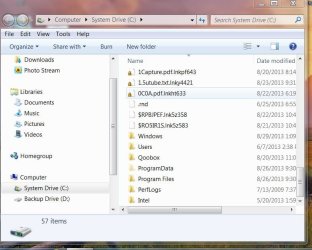
I am attaching a screen shot of the open c: folder. Note that the folders are displayed at the bottom, just the opposite of all my other folders. Note also, that there has been an addition to the file extensions as well as a yellow padlock symbol just prior to all the file names. I cannot open those with an added file extension.
Any clues as to what might have happened and how do I fix?
 

Attachments

  • w7.JPG
    w7.JPG
    68.7 KB · Views: 50

My Computer My Computer

Computer type
Laptop
Computer Manufacturer/Model Number
Asus
OS
W7 Ultimate
CPU
2.2 bh Intel Core i3-2330M
Motherboard
Asustek Computer Inc. P53E 1.0
Memory
4MB
Graphics Card(s)
On Board
Sound Card
On Board
Monitor(s) Displays
On Board
Screen Resolution
1366 X 768
Hard Drives
ST9500423AS
ST2000DM USB Backup Drive External
Hello Blockie:

As far as the sorting is concerned just right click in the explorer window then choose sort by then choose Ascending instead of Descending and that will put your folders back at the top.

The locked files with the lnk extension "could" point to a malware or virus infection I especially suspect this due to the random numbers and letters after the lnk extension. Are all your files like this?

One of the virus pros should be along shortly to look at this post and they will get you fixed up.
 

My Computer My Computer

Computer type
PC/Desktop
Computer Manufacturer/Model Number
Custom Build MPCBS AMII
OS
Windows 7 Professional x64
CPU
AMD Athlon II x4 3.00 GHz
Motherboard
MSI GF615M-p33
Memory
16GB Kingston DDR3
Graphics Card(s)
Nvidia 8600 (dual DVI out for 2 monitors)
Sound Card
Onboard
Monitor(s) Displays
Acer H233H 23", ASUS 23"
Screen Resolution
1366 x 768
Hard Drives
(2) WD Blue 1 TB 3 partitions, (1) Seagate 7200 500GB with 2 partitions for useless and frequently deleted data Looking forward do an ssd for os soon.
PSU
Corsair 1100Watt
Case
Apevia HAF
Cooling
HAF AMD High Profile Heat sink and fan
Keyboard
wireless Logitech
Mouse
wireless Logitech
Internet Speed
16 mbps
Antivirus
eSet, AVG, Clam and Clamwin (depends on machine)
Browser
Firefox
Other Info
(9) Win 7 machines all x64 (POS Updated to Windows 7 pro YEA), (4) Linux machines x64 and x86 including a v3000 compaq lappy brought back to life with Mint 9 used to scan drives, (1) Linux Machine dual boot XP Pro (for testing and destroying), (1) Win 7 pro x64/Win 8.1 Lenovo Laptop Dual Boot.
Thanks for the info. I got the sort sorted out.
As far as I can determine, only the root folder of C: drive has the funny extensions.
What I did notice though is that most of the files with funny extensions used to be on the desktop and that a number of files such as autoexec.bat, msdos.sys, config.sys, bootmgr, etc are missing. Looked in the recycle bin for them and found that it had been emptied a few days ago.
Ran Anti-malware by Malwarebytes full scan and didn't find anything.
Will run a scan by MSE in a few minutes. Both MSE and Anti-malware are scheduled daily for quick scans. They also are set for full protection.
 

My Computer My Computer

Computer type
Laptop
Computer Manufacturer/Model Number
Asus
OS
W7 Ultimate
CPU
2.2 bh Intel Core i3-2330M
Motherboard
Asustek Computer Inc. P53E 1.0
Memory
4MB
Graphics Card(s)
On Board
Sound Card
On Board
Monitor(s) Displays
On Board
Screen Resolution
1366 X 768
Hard Drives
ST9500423AS
ST2000DM USB Backup Drive External
Hello Blockie,

The weirdly named folders are most likely folders that are supposed to be hidden. They are created and used by your OS and you are not meant to open/use/delete them.
Please follow step one and three of option one of this tutorial to hide them again.

Something else I noticed, there is a folder named Qoobox on your computer. Qoobox is a folder created by a strong malware removal tool called ComboFix.
:warn:
No one should run or use ComboFix unless specifically instructed to do so by one of our malware removers such as Jacee and Cottonball! Using this tool incorrectly and without supervision can lead to disastrous problems with your operating system such as preventing it from starting ever again!
Please read this thread for more information.

Is ComboFix currently installed on your system or have you ever used it to get rid of malware?


Also, did you empty the recycle bin yourself or use a registry cleaner or scheduled task to do so? If none of those, run a free online scan with the ESET Online Scanner

Note: You will need to use Internet Explorer for this scan.

  1. Tick the box next to YES, I accept the Terms of Use.
  2. Click Start.
  3. When asked, allow the ActiveX control to install.
  4. Click Start.
  5. Make sure that the options Remove found threats and the option Scan unwanted applications is checked.
  6. Click Scan (This scan can take several hours, so please be patient).
  7. Once the scan is completed, you may close the window.
  8. Use Notepad to open the logfile located at C:\Program Files\EsetOnlineScanner\log.txt
  9. Copy and paste that log between [code] [/code] tags in your next reply.
I have requested help from one of our malware experts to assist in properly removing ComboFix and it's left overs.


Good luck and keep us posted,
Nommy

 
Last edited:

My Computer My Computer

Computer type
Laptop
Computer Manufacturer/Model Number
Dell Inspiron 5547
OS
Microsoft Windows 8.1 64-bit Professional
CPU
Intel(R) Core(TM) i7-4510U CPU @ 2.00GHz
Motherboard
Dell Inc. 08KNCD
Memory
8.00 GB (2 x 4.00 GB)
Graphics Card(s)
AMD Radeon R7 M265
Screen Resolution
1366 x 768 x 4294967296 colors
Hard Drives
(1) 1TB ST1000LM024 HN-M101MBB (2) 2TB Western Digital external hard drive (3) 500GB Packard Bell external hard drive
Mouse
Corsair Vengeance M60
Antivirus
Windows Defender & Malwarebytes
Browser
Firefox, Chromium
Other Info
+ Acer TravelMate 7730G with 32bit Ubuntu 14.04 LTS Trusty Tahr.
Did ComboFix find anything to quarantine? Please copy and paste the contents of qoobox, so that I can see what has been moved to that folder.
 

My Computer My Computer

Computer type
PC/Desktop
Computer Manufacturer/Model Number
Bruce ... somewhere in his 40's
OS
Windows 7 Ultimate 32bit SP1
CPU
Intel(R) Core(TM)2 Quad CPU @ 2.40GHz, 2400 MHz
Motherboard
INTEL/D975XBX2
Memory
4 GB
Graphics Card(s)
ATI Radeon HD 2600 Pro
Monitor(s) Displays
Samsung SyncMaster 914v
Screen Resolution
1280 x 1024
Hard Drives
2/500GB each ... ST3500630AS ATA Device.
One is not connected
PSU
Rocketfish 700 W
Case
G.Skill Gigabyte Chassis
Keyboard
Standard PS/2 Keyboard
Mouse
Microsoft PS/2 Mouse
Internet Speed
DSL
Antivirus
Avira Internet Security
Browser
IE 11
Other Info
ATI HDMI Audio
I guess I'm impatient but I needed the computer for a class I am conducting. Fortunately I make backup images of my C: drive every few days, so I restored the HDD to the state it as before this happened. Doing this also destroyed the evidence. So will not be able to take any screen shots as requested. I do remember that Combofix did not find any errors.
Have not DL'd ESET Online Scanner yet. Should I go ahead and do a scan with it?
Thanks to all who came aboard to help.
BILL
 

My Computer My Computer

Computer type
Laptop
Computer Manufacturer/Model Number
Asus
OS
W7 Ultimate
CPU
2.2 bh Intel Core i3-2330M
Motherboard
Asustek Computer Inc. P53E 1.0
Memory
4MB
Graphics Card(s)
On Board
Sound Card
On Board
Monitor(s) Displays
On Board
Screen Resolution
1366 X 768
Hard Drives
ST9500423AS
ST2000DM USB Backup Drive External
Let's see what Jacee has to say, she's the malware expert:)


Nommy
 

My Computer My Computer

Computer type
Laptop
Computer Manufacturer/Model Number
Dell Inspiron 5547
OS
Microsoft Windows 8.1 64-bit Professional
CPU
Intel(R) Core(TM) i7-4510U CPU @ 2.00GHz
Motherboard
Dell Inc. 08KNCD
Memory
8.00 GB (2 x 4.00 GB)
Graphics Card(s)
AMD Radeon R7 M265
Screen Resolution
1366 x 768 x 4294967296 colors
Hard Drives
(1) 1TB ST1000LM024 HN-M101MBB (2) 2TB Western Digital external hard drive (3) 500GB Packard Bell external hard drive
Mouse
Corsair Vengeance M60
Antivirus
Windows Defender & Malwarebytes
Browser
Firefox, Chromium
Other Info
+ Acer TravelMate 7730G with 32bit Ubuntu 14.04 LTS Trusty Tahr.
Yes, go ahead and run a scan with Eset ... it could put your mind at ease ;)
 

My Computer My Computer

Computer type
PC/Desktop
Computer Manufacturer/Model Number
Bruce ... somewhere in his 40's
OS
Windows 7 Ultimate 32bit SP1
CPU
Intel(R) Core(TM)2 Quad CPU @ 2.40GHz, 2400 MHz
Motherboard
INTEL/D975XBX2
Memory
4 GB
Graphics Card(s)
ATI Radeon HD 2600 Pro
Monitor(s) Displays
Samsung SyncMaster 914v
Screen Resolution
1280 x 1024
Hard Drives
2/500GB each ... ST3500630AS ATA Device.
One is not connected
PSU
Rocketfish 700 W
Case
G.Skill Gigabyte Chassis
Keyboard
Standard PS/2 Keyboard
Mouse
Microsoft PS/2 Mouse
Internet Speed
DSL
Antivirus
Avira Internet Security
Browser
IE 11
Other Info
ATI HDMI Audio
DL'd and ran the ESET scanner. No threats found. Anything else?
Bill
 

My Computer My Computer

Computer type
Laptop
Computer Manufacturer/Model Number
Asus
OS
W7 Ultimate
CPU
2.2 bh Intel Core i3-2330M
Motherboard
Asustek Computer Inc. P53E 1.0
Memory
4MB
Graphics Card(s)
On Board
Sound Card
On Board
Monitor(s) Displays
On Board
Screen Resolution
1366 X 768
Hard Drives
ST9500423AS
ST2000DM USB Backup Drive External
You should be good to go :D
 

My Computer My Computer

Computer type
PC/Desktop
Computer Manufacturer/Model Number
Bruce ... somewhere in his 40's
OS
Windows 7 Ultimate 32bit SP1
CPU
Intel(R) Core(TM)2 Quad CPU @ 2.40GHz, 2400 MHz
Motherboard
INTEL/D975XBX2
Memory
4 GB
Graphics Card(s)
ATI Radeon HD 2600 Pro
Monitor(s) Displays
Samsung SyncMaster 914v
Screen Resolution
1280 x 1024
Hard Drives
2/500GB each ... ST3500630AS ATA Device.
One is not connected
PSU
Rocketfish 700 W
Case
G.Skill Gigabyte Chassis
Keyboard
Standard PS/2 Keyboard
Mouse
Microsoft PS/2 Mouse
Internet Speed
DSL
Antivirus
Avira Internet Security
Browser
IE 11
Other Info
ATI HDMI Audio
Back
Top