MakeAppleSauce
New member
- Local time
- 1:02 PM
- Messages
- 3
Greetings, I need help trying to recover some files on my pc.
I had an XP installation working fine on a single hd setup with about 25 gb free space.
I tried partitioning the drive (c to free up that empty space so that I could install Windows 7 on it, (i guess its called dual boot?)
I used a free partition manager program from download.com, it went through the setup and had to restart the pc and continue from dos to finish. That's where it went to hell.
I could not boot the drive again, due to a NTLDR file missing error.
I tried some recommendations on using the XP install CD. The cd can't find any windows installs. The recovery console, FIXBOOT didn't work. BOOTCFG recommended I use CHKDSK to look for errors and fix them-I didn't find any.
FIXMBR says I have invalid MBR, so I had it write a new one.
Now my current normal boot results in :
Windows could not start because the following file is missing or corrupt:
<Windows root>\system32\hal.dll.
Please re-install a copy of the above file.
I also tried the recommendations on ntldrismissing.com to no avail.
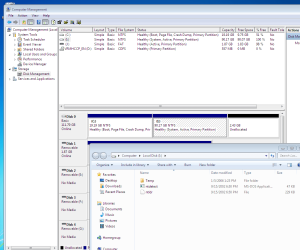
The only thing I care about right now is a couple of important folders on that drive that I would like to recover. So I connected the drive to another PC and attempted to use Easus partition tools to recover. Nothing.
Any Ideas?
I had an XP installation working fine on a single hd setup with about 25 gb free space.
I tried partitioning the drive (c
to free up that empty space so that I could install Windows 7 on it, (i guess its called dual boot?)I used a free partition manager program from download.com, it went through the setup and had to restart the pc and continue from dos to finish. That's where it went to hell.
I could not boot the drive again, due to a NTLDR file missing error.
I tried some recommendations on using the XP install CD. The cd can't find any windows installs. The recovery console, FIXBOOT didn't work. BOOTCFG recommended I use CHKDSK to look for errors and fix them-I didn't find any.
FIXMBR says I have invalid MBR, so I had it write a new one.
Now my current normal boot results in :
Windows could not start because the following file is missing or corrupt:
<Windows root>\system32\hal.dll.
Please re-install a copy of the above file.
I also tried the recommendations on ntldrismissing.com to no avail.
The only thing I care about right now is a couple of important folders on that drive that I would like to recover. So I connected the drive to another PC and attempted to use Easus partition tools to recover. Nothing.
Any Ideas?
My Computer
At a glance
XPCeleron2 gb RamNA
- Computer Manufacturer/Model Number
- HP Pavilion a1110n
- OS
- XP
- CPU
- Celeron
- Motherboard
- P4GV-LA
- Memory
- 2 gb Ram
- Graphics Card(s)
- NA
- Sound Card
- NA