Solved c drive

bridges

New member
Member
Local time
9:48 PM
Messages
30
Hi,

I installed a 1tb drive with win7. I set it up so the c drive has 830gb and the d drive has 100gb. I just notice this has changed.

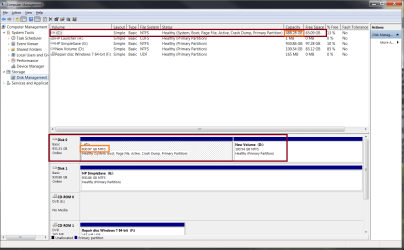
In computer management where the drop down list is, it is showing drive c capacity is 488gb and 65gb free. D is 100gb, While in the next section below that it shows the drives again, so disk 0 is 931.gb, c 830gb and d 100gb.

How on earth would I correct this, I don't even know how it happen.

Thanks for any help.
 

My Computer

Computer Manufacturer/Model Number
Dell XPS-730
OS
Windows 7 pro x64
Hello bridges, welcome to Seven Forums!


Before we make any specific recommendations will you please post a snip/screen-shot of the entire disk management drive map with a full description as to which drive/partition is which, so we can see what you have going on as there may be a fairly simple way to resolve the situation.

In the Windows start menu right click computer and click manage, in the left pane of the "Computer Management" window that opens click disk management and post a maximized snip of that.


How to Upload and Post a Screenshot and File in Seven Forums
 

My Computer

Computer Manufacturer/Model Number
* BFK Customs *
OS
W 7 64-bit Ultimate
CPU
Intel Q9550 Yorkfield
Motherboard
ASUS P5Q Pro
Memory
8GB Dominator 8500C5D
Graphics Card(s)
ATI : XFX 5870
Sound Card
Realtek HD Audio 7-1
Monitor(s) Displays
1x 47" LCD HDMI & 3x 26" LCD HDMI
Screen Resolution
1920x1080P & 1920x1200
Hard Drives
1x 80GB Intel X25-M G2 SSD : 1x 500GB & 1x 640GB WD Caviar Black(s)
PSU
Corsair 620HX
Case
Cooler Master RC-690
Cooling
Tuniq Tower 120, 2x 140mm and 3x 120mm case fans
Keyboard
Microsoft 500
Mouse
Razer Diamondback 3G
Internet Speed
14 Mb/s
Other Info
1x Koutech 3Gb/s SATA HDD Hot Swap Rack
Here is a screen shot I marked out the drive.

Thanks
 

Attachments

  • driveshot.png
    driveshot.png
    48 KB · Views: 110

My Computer

Computer Manufacturer/Model Number
Dell XPS-730
OS
Windows 7 pro x64
I haven't seen that before that I'm aware of, let's see if others have any input.

You may care to download and install to Windows 7, the excellent program Partition Wizard from the link below to see if it reports the same sizes, just out of curiosity.


Partition Wizard Free Home Edition
 

My Computer

Computer Manufacturer/Model Number
* BFK Customs *
OS
W 7 64-bit Ultimate
CPU
Intel Q9550 Yorkfield
Motherboard
ASUS P5Q Pro
Memory
8GB Dominator 8500C5D
Graphics Card(s)
ATI : XFX 5870
Sound Card
Realtek HD Audio 7-1
Monitor(s) Displays
1x 47" LCD HDMI & 3x 26" LCD HDMI
Screen Resolution
1920x1080P & 1920x1200
Hard Drives
1x 80GB Intel X25-M G2 SSD : 1x 500GB & 1x 640GB WD Caviar Black(s)
PSU
Corsair 620HX
Case
Cooler Master RC-690
Cooling
Tuniq Tower 120, 2x 140mm and 3x 120mm case fans
Keyboard
Microsoft 500
Mouse
Razer Diamondback 3G
Internet Speed
14 Mb/s
Other Info
1x Koutech 3Gb/s SATA HDD Hot Swap Rack
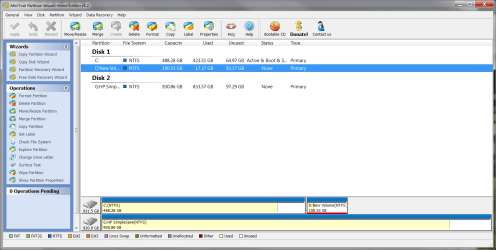
I actually I already have that installed and it is showing the same.

Thank you
 

Attachments

  • drive.png
    drive.png
    57.2 KB · Views: 47

My Computer

Computer Manufacturer/Model Number
Dell XPS-730
OS
Windows 7 pro x64
By any chance does this HD have a jumper on it that limits the size of a partition ?
 

My Computer

Computer type
PC/Desktop
Computer Manufacturer/Model Number
Built them myself, Science Experiments !
OS
Win7 Enterprise, Win7 x86 (Ult 7600), Win7 x64 Ult 7600, TechNet RTM on AMD x64 (2.8Ghz)
CPU
AMD fx8350 4ghz, AMD-32 2400mhz, AMD-64 3200mhz, AMDx64 2.8G
Motherboard
SIS 755, ECS-K8M890M-M (Ult 7600), GigaByte & others
Memory
2gb, 4gb on the Ult 7600, 4gb on Technet RTM, 32gb on FX8350
Graphics Card(s)
Draw my own Graphics, several nVidia cards
Sound Card
on motherboard
Monitor(s) Displays
19" flat scr, 28" I-Inc widescr,22" Emprex Widescr, 23" Acer
Screen Resolution
1280 x 1024, 1440 x 900, 1920 x 1080
Hard Drives
6 pata Ide HD's & 2 Sata HD's
added 80gb external on Ult 7600 computer,
numerous extra 1tb, 2TB, 3Tb SATA HD's
A collection of ext HD Docks w/ HDs
PSU
430w, 550w, 600w, 700, 800, etc
Case
All Generic Full Towers
Cooling
Open Air & a few fans, some w/ colored LEDs
Keyboard
Compaq & Dell recycled from GoodWill
Mouse
Made in China Optical Wired Mouse
Internet Speed
Fast Cable InterNet
Antivirus
AVG Free on 24 different Desktops, NO Problems!
Browser
IE 8 is preferred, but use FireFox sometimes
Other Info
Linksys Routers, switches, & Hubs
Too Many USB Flash Drives to count, Biggest is 64GB !
Eight computers in my home network.
Sixteen computers at my business network.
Linked via TeamViewer !
Lots of old used spare computer parts everywhere!

My Computer

Computer Manufacturer/Model Number
* BFK Customs *
OS
W 7 64-bit Ultimate
CPU
Intel Q9550 Yorkfield
Motherboard
ASUS P5Q Pro
Memory
8GB Dominator 8500C5D
Graphics Card(s)
ATI : XFX 5870
Sound Card
Realtek HD Audio 7-1
Monitor(s) Displays
1x 47" LCD HDMI & 3x 26" LCD HDMI
Screen Resolution
1920x1080P & 1920x1200
Hard Drives
1x 80GB Intel X25-M G2 SSD : 1x 500GB & 1x 640GB WD Caviar Black(s)
PSU
Corsair 620HX
Case
Cooler Master RC-690
Cooling
Tuniq Tower 120, 2x 140mm and 3x 120mm case fans
Keyboard
Microsoft 500
Mouse
Razer Diamondback 3G
Internet Speed
14 Mb/s
Other Info
1x Koutech 3Gb/s SATA HDD Hot Swap Rack
By any chance does this HD have a jumper on it that limits the size of a partition ?

I don't know. the drive is caviar black. It was fine after I first set it up.
 

My Computer

Computer Manufacturer/Model Number
Dell XPS-730
OS
Windows 7 pro x64
The show hidden files only drop the free space to 64.96 everything else stayed the same.
 

My Computer

Computer Manufacturer/Model Number
Dell XPS-730
OS
Windows 7 pro x64
My first guess would be corrupt file system. Also make sure that disc "0" is disc "c", as vista/seven windows versions will change your boot drive to "c" regardless of what drive/partition it's on.

I've recently purchased an HP computer and came across a problem when trying to install a secondary windows version on it. They have an "instant-on" environment that appears to be based on a very simple linux gui, and windows is designed to boot from that, so there may be something specific you have to do in order to install a new boot drive. Have you considered installing the new drive as drive "1" and leave the original as drive "0"?

I really don't know if it would make a difference, but as drive "1" you can still boot from it and it will appear as your "c" drive after booting.

However, to eliminate possibility of a file system error, I think I would wipe the partitions from the drive and remake them, then do a "full" format, so all sectors are tested. doing a quick format on a new drive would fail to find problems that might stay hidden until after the warranty expires.

The full format will take a considerable amount of time, so be prepared.
 

My Computer

Computer Manufacturer/Model Number
Lenovo ThinkPad T61
OS
Windows 7 ultimate x64, premium x64, ultimate x86
CPU
Intel Core2 T9300 2.5ghz
Motherboard
Lenovo Proprietary
Memory
4gB ddr2
Graphics Card(s)
Nvidia Quadro NVS 140M
Sound Card
SoundMax integrated
Monitor(s) Displays
ThinkPad LCD
Screen Resolution
1280x800
Hard Drives
320GB SATA2
PSU
Lenova PS
Case
Notebook
Cooling
Variable speed fan
Keyboard
usa integrated
Mouse
Trackpoint and touchpad
Internet Speed
25mbit (up and down) FiOS
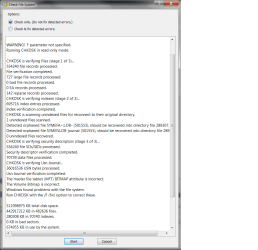
I ran the check file system in partition wizard. I ran it in read only. Looks like it found some errors.
 

Attachments

  • disk.png
    disk.png
    36.5 KB · Views: 24

My Computer

Computer Manufacturer/Model Number
Dell XPS-730
OS
Windows 7 pro x64
I'm going to restart the pc and run the scan to fix the errors. I will post back when done.
 

My Computer

Computer Manufacturer/Model Number
Dell XPS-730
OS
Windows 7 pro x64
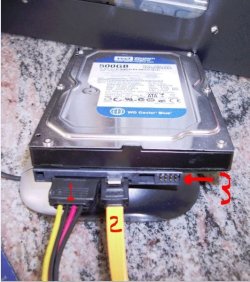
If you can while computer is OFF, check for any jumpers on the pins in #3
 

Attachments

  • SATA_HD_jumper_pins.JPG
    SATA_HD_jumper_pins.JPG
    61.8 KB · Views: 6

My Computer

Computer type
PC/Desktop
Computer Manufacturer/Model Number
Built them myself, Science Experiments !
OS
Win7 Enterprise, Win7 x86 (Ult 7600), Win7 x64 Ult 7600, TechNet RTM on AMD x64 (2.8Ghz)
CPU
AMD fx8350 4ghz, AMD-32 2400mhz, AMD-64 3200mhz, AMDx64 2.8G
Motherboard
SIS 755, ECS-K8M890M-M (Ult 7600), GigaByte & others
Memory
2gb, 4gb on the Ult 7600, 4gb on Technet RTM, 32gb on FX8350
Graphics Card(s)
Draw my own Graphics, several nVidia cards
Sound Card
on motherboard
Monitor(s) Displays
19" flat scr, 28" I-Inc widescr,22" Emprex Widescr, 23" Acer
Screen Resolution
1280 x 1024, 1440 x 900, 1920 x 1080
Hard Drives
6 pata Ide HD's & 2 Sata HD's
added 80gb external on Ult 7600 computer,
numerous extra 1tb, 2TB, 3Tb SATA HD's
A collection of ext HD Docks w/ HDs
PSU
430w, 550w, 600w, 700, 800, etc
Case
All Generic Full Towers
Cooling
Open Air & a few fans, some w/ colored LEDs
Keyboard
Compaq & Dell recycled from GoodWill
Mouse
Made in China Optical Wired Mouse
Internet Speed
Fast Cable InterNet
Antivirus
AVG Free on 24 different Desktops, NO Problems!
Browser
IE 8 is preferred, but use FireFox sometimes
Other Info
Linksys Routers, switches, & Hubs
Too Many USB Flash Drives to count, Biggest is 64GB !
Eight computers in my home network.
Sixteen computers at my business network.
Linked via TeamViewer !
Lots of old used spare computer parts everywhere!
Just my opinion here, but if this is a brand new drive and you have filesystem errors already, I'd definitely repartition and reformat it (full format), not simply try to repair the errors. You could have a bad drive and if it is only a failed partition/format, then I'd prefer to begin again, and if the problem persists, get the drive replaced.
 

My Computer

Computer Manufacturer/Model Number
Lenovo ThinkPad T61
OS
Windows 7 ultimate x64, premium x64, ultimate x86
CPU
Intel Core2 T9300 2.5ghz
Motherboard
Lenovo Proprietary
Memory
4gB ddr2
Graphics Card(s)
Nvidia Quadro NVS 140M
Sound Card
SoundMax integrated
Monitor(s) Displays
ThinkPad LCD
Screen Resolution
1280x800
Hard Drives
320GB SATA2
PSU
Lenova PS
Case
Notebook
Cooling
Variable speed fan
Keyboard
usa integrated
Mouse
Trackpoint and touchpad
Internet Speed
25mbit (up and down) FiOS
No jumpers are on the drive.

I ran it but for some reason i don't think it fixed anything.

TuuS, Can I restore the drive with a backup I have taken from the same drive? I'm using ghost so I would do a full restore of os, programs, files and folders.
 

My Computer

Computer Manufacturer/Model Number
Dell XPS-730
OS
Windows 7 pro x64
I don't use Ghost, but I believe it works within the drives filesystem, so won't correct filesystem errors, only the contents of the drive.

Someone correct me if I'm wrong here.

What I would do is re-partition and do a full format, then restore the drive either with Ghost, or by reinstalling your OS.

You might want to start the format before you go to bed, as it could take hours to complete.
 

My Computer

Computer Manufacturer/Model Number
Lenovo ThinkPad T61
OS
Windows 7 ultimate x64, premium x64, ultimate x86
CPU
Intel Core2 T9300 2.5ghz
Motherboard
Lenovo Proprietary
Memory
4gB ddr2
Graphics Card(s)
Nvidia Quadro NVS 140M
Sound Card
SoundMax integrated
Monitor(s) Displays
ThinkPad LCD
Screen Resolution
1280x800
Hard Drives
320GB SATA2
PSU
Lenova PS
Case
Notebook
Cooling
Variable speed fan
Keyboard
usa integrated
Mouse
Trackpoint and touchpad
Internet Speed
25mbit (up and down) FiOS
I'm just curious...is the 488GB amount as you would have expected it? The reason that I ask is because that is larger than most people would have on their C: volume.
 

My Computer

Computer Manufacturer/Model Number
DIY
OS
W7x64 Pro, SuSe 12.1/** W7 x64 Pro, XP MCE
CPU
Phenom II 1090T w/Noctua NH-D14 /**4400+ X2 w/CM Hyper TX 3
Motherboard
ASRock 890FX Deluxe 4/**A8N-SLI
Memory
2 x 2GB Patriot PGS34g1600LLKA/**4x1GB Corsair VS
Graphics Card(s)
EVGA GTX460 SC/**EVGA 8800GTS
Sound Card
Asus Xonar D2X/**Xonar D1
Monitor(s) Displays
Acer X233H, Dell E152FPc /**LG M237-WD
Screen Resolution
1920x1080 & 1024x768/**1980x1080
Hard Drives
WDC 2TB, 1.5TB, 1TB, 500GB,Seagate 500GB , Maxtor 80GB /**500GB Seagate & WDC 1TB Black
PSU
CM RS600 w/ APC BX1000G/**Antec 500 TP w/ APC BX1000
Case
HAF922/**Antec 1040IIB
Cooling
3x200mm, 1x140 and 1x120mm/**5x80mm fans
Keyboard
Logitech Media USB/**Saitek Eclipse
Mouse
Cordless Trackman Wheel/**Ditto
Internet Speed
3.3Mbps
Other Info
SB 560 5.1 w/ Sennheiser RS140/**Creative T20 speakers, Dvico FusionHDTV7 Gold RT, Cisco E3000, HP 5510V AIO, Linksys E3000, Belkin F5U237 hub and **F5D8055 adapter
(** = 2nd rig)
Here's some useful information that may sort the issue and is worth a try if you're going to reinstall, it's a lot more effective than a simple format.


After you have copied out or made back-ups of the data you need to save to external media, use Step One of this tutorial at the first link below to do a wipe (secure erase) to the entire Hard Disk Drive / Solid State Drive.
  • Then if you do not want to create the new Windows 7 "System Reserved" partition use the outline in Step Two #2 to create, format and mark Active a single 100GB partition to do the installation to.
  • If you do want to create the "System Reserved" partition use the outline in Step Two #3 to create, format and mark Active the System Reserved partition and then create and format the 100GB partition to do the installation to.
Either way, running the "clean all" then creating and formatting the partition(s) using diskpart will get you the best possible space to do a clean install of Windows 7 to; you can always extend the Windows partition to include the remaining unallocated space on the HDD / SSD or create additional Primary partitions or an Extended partition after the installation completes if you choose.

SSD / HDD : Optimize for Windows Reinstallation

DISKPART : At PC Startup

Do a Clean Install with a Upgrade Windows 7 Version
 

My Computer

Computer Manufacturer/Model Number
* BFK Customs *
OS
W 7 64-bit Ultimate
CPU
Intel Q9550 Yorkfield
Motherboard
ASUS P5Q Pro
Memory
8GB Dominator 8500C5D
Graphics Card(s)
ATI : XFX 5870
Sound Card
Realtek HD Audio 7-1
Monitor(s) Displays
1x 47" LCD HDMI & 3x 26" LCD HDMI
Screen Resolution
1920x1080P & 1920x1200
Hard Drives
1x 80GB Intel X25-M G2 SSD : 1x 500GB & 1x 640GB WD Caviar Black(s)
PSU
Corsair 620HX
Case
Cooler Master RC-690
Cooling
Tuniq Tower 120, 2x 140mm and 3x 120mm case fans
Keyboard
Microsoft 500
Mouse
Razer Diamondback 3G
Internet Speed
14 Mb/s
Other Info
1x Koutech 3Gb/s SATA HDD Hot Swap Rack
I'm just curious...is the 488GB amount as you would have expected it? The reason that I ask is because that is larger than most people would have on their C: volume.

Well I had wanted it bigger, why should I leave the c drive just for the os and put everything else on another drive or partition?

Can I reformat this drive from another drive and still do a secure erase? This way I don't feel like I have to get this done so quickly.

Thanks
 

My Computer

Computer Manufacturer/Model Number
Dell XPS-730
OS
Windows 7 pro x64
I'm just curious...is the 488GB amount as you would have expected it? The reason that I ask is because that is larger than most people would have on their C: volume.

Well I had wanted it bigger, why should I leave the c drive just for the os and put everything else on another drive or partition?

Can I reformat this drive from another drive and still do a secure erase? This way I don't feel like I have to get this done so quickly.

Thanks

I just stuck my nose in, being curious. As far as the more technical aspect of your questions, I will leave you in more capable hands than mine.

However, as far as a secure erase, reformatting will not do that, unless you do a low level format first, or use a number of other methods that will be described by others.

The primary reason for offloading data to other partitions is to increase their security, if the OS partition becomes corrupted to the point that it is unbootable. It also makes the chore of imaging and recovering C: much quicker, requiring less space for backup images. However, if you like it the way that you have it, then that is as it should be.
 

My Computer

Computer Manufacturer/Model Number
DIY
OS
W7x64 Pro, SuSe 12.1/** W7 x64 Pro, XP MCE
CPU
Phenom II 1090T w/Noctua NH-D14 /**4400+ X2 w/CM Hyper TX 3
Motherboard
ASRock 890FX Deluxe 4/**A8N-SLI
Memory
2 x 2GB Patriot PGS34g1600LLKA/**4x1GB Corsair VS
Graphics Card(s)
EVGA GTX460 SC/**EVGA 8800GTS
Sound Card
Asus Xonar D2X/**Xonar D1
Monitor(s) Displays
Acer X233H, Dell E152FPc /**LG M237-WD
Screen Resolution
1920x1080 & 1024x768/**1980x1080
Hard Drives
WDC 2TB, 1.5TB, 1TB, 500GB,Seagate 500GB , Maxtor 80GB /**500GB Seagate & WDC 1TB Black
PSU
CM RS600 w/ APC BX1000G/**Antec 500 TP w/ APC BX1000
Case
HAF922/**Antec 1040IIB
Cooling
3x200mm, 1x140 and 1x120mm/**5x80mm fans
Keyboard
Logitech Media USB/**Saitek Eclipse
Mouse
Cordless Trackman Wheel/**Ditto
Internet Speed
3.3Mbps
Other Info
SB 560 5.1 w/ Sennheiser RS140/**Creative T20 speakers, Dvico FusionHDTV7 Gold RT, Cisco E3000, HP 5510V AIO, Linksys E3000, Belkin F5U237 hub and **F5D8055 adapter
(** = 2nd rig)
Back
Top