
C partition is filled to the brim with Windows-generated files

br0kenspear

New member
Local time
12:44 AM
Messages
2
I have 50 (48.3) GB allocated in C: partition:

  • there's no games, not even <1GB games
  • most installed programs are printer drivers, and work stuff, the biggest four programs doesn't even take 4.2GB of space
  • most other files are in 'Documents' library are either .docx, .pdf, or just .txt all under 1MB
  • Recycle Bin is empty
  • I have run Disk Cleanup before checking again

my point is that user-generated files aren't that big, but somehow my C: got filled up to +40GB with only 8GB free space left

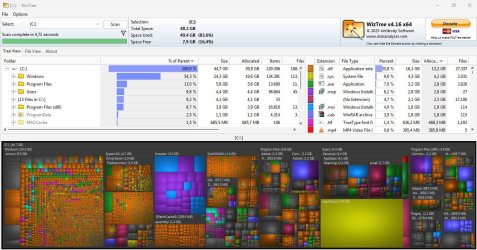
after checking with WizTree, most of those data are Windows-generated files like the WinSXS folder, or pagefile.sys

WizTree screenshot:
big.JPG

what can I do against these files? googling about deleting them seems to lead that it's a bad idea
I use this old laptop for work, so much prefer if I don't lose my data lol

Any help is appreciated, thank you beforehand
 

My Computers My Computers

  • At a glance

    Windows 7 Ultimate x64 SP1Intel Core i5 3317U4,00GB Single-Channel DDR3 @ 798MHz (11-11-11...Intel HD Graphics 4000 + NVIDIA GeForce GT 620M
    Computer type
    Laptop
    Computer Manufacturer/Model Number
    Acer
    OS
    Windows 7 Ultimate x64 SP1
    CPU
    Intel Core i5 3317U
    Motherboard
    Acer Aspire V5-471G
    Memory
    4,00GB Single-Channel DDR3 @ 798MHz (11-11-11-28)
    Graphics Card(s)
    Intel HD Graphics 4000 + NVIDIA GeForce GT 620M
    Hard Drives
    298GB Western Digital WDC WD3200BUCT-63TWBY0 ATA Device (SATA )
    Antivirus
    -
    Browser
    Firefox
  • Computer type
    PC/Desktop
in start search box type:

cleanmgr
 

My Computers My Computers

  • At a glance

    7 X64i5 84002x8gb 3200mhz
    Computer type
    PC/Desktop
    OS
    7 X64
    CPU
    i5 8400
    Motherboard
    gigabyte b365m ds3h
    Memory
    2x8gb 3200mhz
    Hard Drives
    various
    PSU
    pure power 11 400w cm
    Case
    Coolermaster
    Cooling
    cryorig m9i
  • At a glance

    7x64g54008gb ddr4 2400
    Computer type
    PC/Desktop
    OS
    7x64
    CPU
    g5400
    Motherboard
    ga b365m ds3h
    Memory
    8gb ddr4 2400
    PSU
    xfx pro 450w
I have used disk cleanup a couple times before, it didn't "catch" those big files

cleanup.JPG

the biggest one it shows me is just "Thumbnails" which is just 3 MB
 

My Computers My Computers

  • At a glance

    Windows 7 Ultimate x64 SP1Intel Core i5 3317U4,00GB Single-Channel DDR3 @ 798MHz (11-11-11...Intel HD Graphics 4000 + NVIDIA GeForce GT 620M
    Computer type
    Laptop
    Computer Manufacturer/Model Number
    Acer
    OS
    Windows 7 Ultimate x64 SP1
    CPU
    Intel Core i5 3317U
    Motherboard
    Acer Aspire V5-471G
    Memory
    4,00GB Single-Channel DDR3 @ 798MHz (11-11-11-28)
    Graphics Card(s)
    Intel HD Graphics 4000 + NVIDIA GeForce GT 620M
    Hard Drives
    298GB Western Digital WDC WD3200BUCT-63TWBY0 ATA Device (SATA )
    Antivirus
    -
    Browser
    Firefox
  • Computer type
    PC/Desktop
You will have to show what they are. Your previous screenshot doesnt. 20gb or so is not unusual for the windows directory. Pagefile of 16gb is not unusual.
 

My Computers My Computers

  • At a glance

    7 X64i5 84002x8gb 3200mhz
    Computer type
    PC/Desktop
    OS
    7 X64
    CPU
    i5 8400
    Motherboard
    gigabyte b365m ds3h
    Memory
    2x8gb 3200mhz
    Hard Drives
    various
    PSU
    pure power 11 400w cm
    Case
    Coolermaster
    Cooling
    cryorig m9i
  • At a glance

    7x64g54008gb ddr4 2400
    Computer type
    PC/Desktop
    OS
    7x64
    CPU
    g5400
    Motherboard
    ga b365m ds3h
    Memory
    8gb ddr4 2400
    PSU
    xfx pro 450w
The biggest offender is Windows itself at 24GB, while the second is program files at almost 6GB. That's pretty much the normal thing for a fully working Windows install with some programs and not much else.

Your entire profile folder is 4GB and a little more and I suppose that's where your files are. Everything else is the system itself.
For cleanup you may look into the Windows\Installer folder that the screenshot shows at 3.5GB and the MSOCache folder is also completely useless. You could also look at the various temp file locations, but you won't get much more space than that.

The whole C drive is 48GB and that's a bit small for Windows. Since you're mentioning partitions, I may recommend to join them all into one drive, unless you have a good reason to keep them separated.
 

My Computer My Computer

At a glance

Windows 7 Ultimate x64Intel Core i7-740QM8 GB DDR3NVIDIA GeForce 330GT
Computer type
Laptop
Computer Manufacturer/Model Number
Toshiba Sattelite A665-S6092
OS
Windows 7 Ultimate x64
CPU
Intel Core i7-740QM
Memory
8 GB DDR3
Graphics Card(s)
NVIDIA GeForce 330GT
Screen Resolution
1366x768
Hard Drives
Samsung 840 SSD 500GB
1TB USB3 external HD
Cooling
Coolermaster Notepal U3 notebook cooling pad
Internet Speed
3mbps ASDL
Antivirus
ClamWin 0.98.7
Browser
Opera 12.17 x86 (main), Firefox 38 (sec), IE11 (last resort)
Back
Top