C: Reserved?

jpetrou

New member
Local time
4:59 PM
Messages
11
Hey guys, My C has a partition with a system reserved. This is normal, correct?

system reserved has usually been 100mb I belive everytime i have noticed it over the years with a certain amount of data on it. Recently I have loaded a saved backup image as my pc shit itself, and now i have noticed my system reserved is much larger - 59.32 gb with 59.23 gb of free space.

Can I use disk managment in windows 7 to reduce this partition in size without affecting the data needed on my c drive?

the reason is i only have a small 320gb ssd that is near capacity and i would like to free up the 60gb in the system reserved to install some software.

What has happened to cause the change in size of the system reserved?
what is the system reserved?
can i reduce it/ delete it to the regular 100mb allocation?

Please help.

Thanks,

jp
 

My Computer

OS
windos xp 32 SP3
CPU
i7 - 920
Motherboard
gigabyte ex58-ds4
Memory
6gb ddr3
Graphics Card(s)
sapphire x1800xt
Hard Drives
4x seagate 1tb
Yep, somethin`s way wrong with that. Can you post a full shot of disk management.
Make yourself a system repair disc if you do not have a Windows 7 install disc b4 attempting anything.
 

My Computer

Computer type
PC/Desktop
Computer Manufacturer/Model Number
Skylake Special #666
OS
Windows 10 Pro x64
CPU
Intel Core i7 6700K
Motherboard
Asus Sabertooth Z170 Mark 1
Memory
GSkill TridentZ RGB 16GB 3600 16-16-16-36
Graphics Card(s)
EVGA GTX 980 Ti SC x2
Sound Card
Realtek High Definition
Monitor(s) Displays
AOC G2460PG
Screen Resolution
1920 x 1080 144Hz
Hard Drives
Samsung 860 Pro 256GB, Seagate Barracuda 4TB x2
PSU
EVGA 1000 P2, EVGA White Custom Braided Cables
Case
Corsair Vengeance C70 Gunmetal Black
Cooling
Corsair H100i v2, Corsair ML120 x2, Thermal Grizzly Kryonaut
Keyboard
Logitech G910 Orion Spectrum
Mouse
Logitech G700s
Internet Speed
Verizon Fios Quantum Gateway 75/75
Antivirus
Windows Defender, Malwarebytes Free 3.8.3
Browser
Chrome
Other Info
Corsair SP120 x4, LG Blu-ray Drive, Durabrand HT-395 100 Watt Dolby Digital Amp, Corsair H2100 Wireless 7.1 Headset
Yes, it is normal for some hard drives to include a system reserved partition. It depends on how the operating system was originally installed as to whether there will be a system reserved partition. This 100MB partition is a system partition and contains boot files. The general "rule" is as follows"
  • If you want to have the 100 MB System Reserved partition in addition to the Windows 7 C: partition on a HDD or SSD after installation, then you would need to make sure that all partitions on the drive have been deleted until it is only unallocated space. Next, select the unallocated drive to install Windows 7 on. If there are no partitions on the disk, you will get the 100 MB System Reserved.
  • If you do not want to have the 100 MB System Reserved partition partition and only the Windows 7 C: partition on a HDD or SSD after installation, then select a formatted partition or drive to install Windows 7 on. If there are any partitions on the disk, you won't get the 100 MB System Reserved.
Source (see Note after Step 8)

Since the partition contains boot files I would be very careful about altering the partition size. I don't know the mechanics of how shrinking a partition affects the data on that partition - if the data gets moved or if it just gets deleted.

This tutorial shows how to delete the 100 MB System Reserved partition and do a repair so Windows 7 will still be able to boot. I don't know if the partition will remain as unallocated space or not. But if it does, a free tool called Partition Wizard should be able to extend the C: partition using that unallocated space.

http://www.sevenforums.com/tutorials/71363-system-reserved-partition-delete.html

Best Free Partition Manager Freeware and free partition magic for Windows 7, Windows 8, Windows Vista and Windows XP 32 bit & 64 bit. MiniTool Free Partition Manager Software Home Edition.

   Warning
Suggest you make a system image "just in case".
 

My Computer

Computer type
Laptop
Computer Manufacturer/Model Number
Sony Vaio VPCEB47GM Laptop
OS
Win 7 Pro 64-bit
CPU
Intel i5 2.4 Ghz
Memory
8GB DDR3
Graphics Card(s)
Intel HD 3000
Sound Card
IDT High Definition
Monitor(s) Displays
15.6 WGXA Anti-Glare LED
Screen Resolution
1280x800
Hard Drives
640Gb 7200rpm
Antivirus
MSE
Browser
Opera (primary) with IE9 backup
system reserved partition weird-out!

Thanks for the replies.

I use acronis 2013, and I have a complete image of my c: drive, but also with it in the image I have selected the system reserved partition as it suggests to include it with the backup.

So then, if i have to use this backup if something goes wrong, wont it just load the current partition and the 60gb system reserved again anyway?

Will an Acronis boot disk work fine, or should i just do a win7 one?

I have never done this thing before but I have recently had alot of dramas with a c: drive change that caused me much stress, so im a bit reluctant to try anything without someones guidance that has successfull reduced the size in disk management...

Any other ideas?

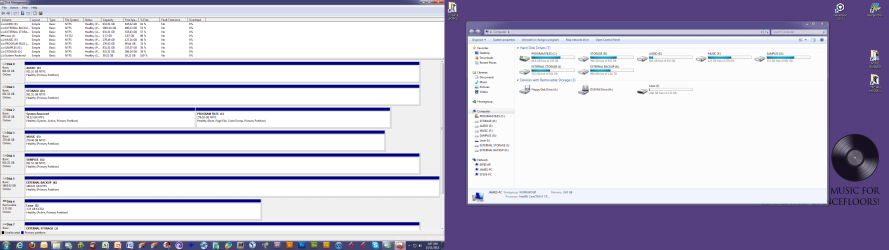
Here is a screenshot to check out.

Thanks!
 

Attachments

  • partitions.png
    partitions.png
    138.3 KB · Views: 13

My Computer

OS
windos xp 32 SP3
CPU
i7 - 920
Motherboard
gigabyte ex58-ds4
Memory
6gb ddr3
Graphics Card(s)
sapphire x1800xt
Hard Drives
4x seagate 1tb
Really take a screen shot with the snipping tool and post it. Don't combine 2 images.

And the link you posted is NOT to you image. It is to download it. Why would I want to Download something to looking.
 

My Computer

OS
7 x64
Thanks for the replies.

I use acronis 2013, and I have a complete image of my c: drive, but also with it in the image I have selected the system reserved partition as it suggests to include it with the backup.

So then, if i have to use this backup if something goes wrong, wont it just load the current partition and the 60gb system reserved again anyway?

Will an Acronis boot disk work fine, or should i just do a win7 one?

I have never done this thing before but I have recently had alot of dramas with a c: drive change that caused me much stress, so im a bit reluctant to try anything without someones guidance that has successfull reduced the size in disk management...

Any other ideas?

Here is a screenshot to check out.

Thanks!

Just took another look at your larger view of Disk Management. Don't know how it happened but it's showing Disk 0 as Audio E: instead of the much more common and usual C: drive/partition.

If you need to use the Acronis image then yes, it will restore that 60GB system reserved partition. Will the image work? It should. But the only way to know for sure is to try it. Have you ever used this Acronis to do a system restore?

Should you also do a Windows 7 system image and create the Windows 7 system repair disk? It certainly won't do any harm to have another backup available just in case the Acronis doesn't work.

If it was my computer, I would use the tutorial on how to delete the 100 MB System Reserved partition, and then do the necessary repair steps to get Windows 7 to boot again. And then I would reclaim that freed up space for the C: partition. But that's just me.
 

My Computer

Computer type
Laptop
Computer Manufacturer/Model Number
Sony Vaio VPCEB47GM Laptop
OS
Win 7 Pro 64-bit
CPU
Intel i5 2.4 Ghz
Memory
8GB DDR3
Graphics Card(s)
Intel HD 3000
Sound Card
IDT High Definition
Monitor(s) Displays
15.6 WGXA Anti-Glare LED
Screen Resolution
1280x800
Hard Drives
640Gb 7200rpm
Antivirus
MSE
Browser
Opera (primary) with IE9 backup
Really take a screen shot with the snipping tool and post it. Don't combine 2 images.

And the link you posted is NOT to you image. It is to download it. Why would I want to Download something to looking.


Its one image. i have 2 screens. and its only 200kb, so downloading it is not as big an effort as your making out, but thanks for your reply.
 

My Computer

OS
windos xp 32 SP3
CPU
i7 - 920
Motherboard
gigabyte ex58-ds4
Memory
6gb ddr3
Graphics Card(s)
sapphire x1800xt
Hard Drives
4x seagate 1tb
Thanks for the replies.

I use acronis 2013, and I have a complete image of my c: drive, but also with it in the image I have selected the system reserved partition as it suggests to include it with the backup.

So then, if i have to use this backup if something goes wrong, wont it just load the current partition and the 60gb system reserved again anyway?

Will an Acronis boot disk work fine, or should i just do a win7 one?

I have never done this thing before but I have recently had alot of dramas with a c: drive change that caused me much stress, so im a bit reluctant to try anything without someones guidance that has successfull reduced the size in disk management...

Any other ideas?

Here is a screenshot to check out.

Thanks!

Just took another look at your larger view of Disk Management. Don't know how it happened but it's showing Disk 0 as Audio E: instead of the much more common and usual C: drive/partition.

If you need to use the Acronis image then yes, it will restore that 60GB system reserved partition. Will the image work? It should. But the only way to know for sure is to try it. Have you ever used this Acronis to do a system restore?

Should you also do a Windows 7 system image and create the Windows 7 system repair disk? It certainly won't do any harm to have another backup available just in case the Acronis doesn't work.

If it was my computer, I would use the tutorial on how to delete the 100 MB System Reserved partition, and then do the necessary repair steps to get Windows 7 to boot again. And then I would reclaim that freed up space for the C: partition. But that's just me.


Cheers mate, Ill give this a shot, but where can i find the tutorial on deleting the system reserved partition? can you link me.

Thanks
 

My Computer

OS
windos xp 32 SP3
CPU
i7 - 920
Motherboard
gigabyte ex58-ds4
Memory
6gb ddr3
Graphics Card(s)
sapphire x1800xt
Hard Drives
4x seagate 1tb
Has anyone used the SHRINK VOLUME option when you right click in disk management? I might try this first. I have backed up everything and done an image in acronis. And created a boot disk in acronis and win7.

Before I do it, I would like to hear if anyone has shrink volumed before though.

Appreciate all your help,

jp
 

My Computer

OS
windos xp 32 SP3
CPU
i7 - 920
Motherboard
gigabyte ex58-ds4
Memory
6gb ddr3
Graphics Card(s)
sapphire x1800xt
Hard Drives
4x seagate 1tb
Cheers mate, Ill give this a shot, but where can i find the tutorial on deleting the system reserved partition? can you link me.

Thanks

See my Post # 3 :)
 

My Computer

Computer type
Laptop
Computer Manufacturer/Model Number
Sony Vaio VPCEB47GM Laptop
OS
Win 7 Pro 64-bit
CPU
Intel i5 2.4 Ghz
Memory
8GB DDR3
Graphics Card(s)
Intel HD 3000
Sound Card
IDT High Definition
Monitor(s) Displays
15.6 WGXA Anti-Glare LED
Screen Resolution
1280x800
Hard Drives
640Gb 7200rpm
Antivirus
MSE
Browser
Opera (primary) with IE9 backup
Back
Top