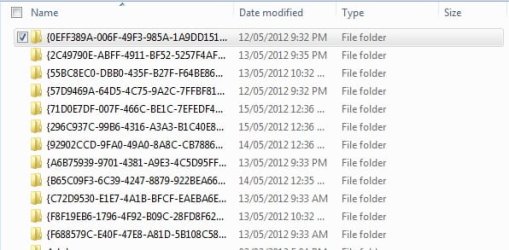
C:\users\username\Appdata\Local ....... empty folders

t-4-2

Banned
Local time
11:12 PM
Messages
997
local folders.jpg

I have been regularly deleting those empty folders. Not a big deal, just annoyance.
Question......
How did that happen ?
Someone had suggested that it has something to do with WLM. If so, anyway to stop them from appearing under Local ?
IF WLM does not cause that, then what causes that ?

t-4-2
 

My Computer

Computer Manufacturer/Model Number
Acer Aspire 7741Z
OS
Windows 7 Home Premium 64-bit, SP1
CPU
Intel Pentium P6200, Cores 2, 2.13 GHz
Memory
4 GB
Graphics Card(s)
Intel HD
Sound Card
unknown
Monitor(s) Displays
17.3 inches
Screen Resolution
1600 x 900
Hard Drives
640 GB, 5400 PRM
It is WLM that creates these. I don't think there is a way to stop it. I just delete them when they get enough to annoy me.
 

My Computer

Computer type
Laptop
Computer Manufacturer/Model Number
Hewlett-Packard/G62-107SA Notebook
OS
Microsoft Windows 7 Home Premium 64-bit Service Pack 1
CPU
Intel(R) Core(TM) i3 CPU M 330 @ 2.13GHz
Motherboard
Hewlett-Packard 1425
Memory
8 GB DDR3
Graphics Card(s)
Intel(R) HD Graphics
Sound Card
Realtek High Definition Audio
Monitor(s) Displays
Builtin
Screen Resolution
1366 x 768 x 32 bits (4294967296 colors) @ 60 Hz
Hard Drives
250 GB SATA Hard Disk Drive 7200 rpm
2TB Seagate GoFlex USB 2 Drive
1TB Iomega Prestige USB 2 Drive
1.5TB Iomega Prestige USB 2 Drive (Samsung)
2TB WD MyBook Live NAS.
Mouse
Logitech Anywhere MX
Internet Speed
152 Mbs download 10 Mbs upload
Antivirus
Norton 360
Browser
Chrome
It is WLM that creates these. I don't think there is a way to stop it. I just delete them when they get enough to annoy me.

Thank you.

Any way you can provide evidence/facts to support your assertion ?
A " bug report " from Microsoft itself would be perfect.

t-4-2
 

My Computer

Computer Manufacturer/Model Number
Acer Aspire 7741Z
OS
Windows 7 Home Premium 64-bit, SP1
CPU
Intel Pentium P6200, Cores 2, 2.13 GHz
Memory
4 GB
Graphics Card(s)
Intel HD
Sound Card
unknown
Monitor(s) Displays
17.3 inches
Screen Resolution
1600 x 900
Hard Drives
640 GB, 5400 PRM
It is WLM that creates these. I don't think there is a way to stop it. I just delete them when they get enough to annoy me.

Thank you.

Any way you can provide evidence/facts to support your assertion ?
A " bug report " from Microsoft itself would be perfect.

t-4-2

No bug report but open the AppData/Local folder and delete the folders. Leave it open and start WLM and one or two of them will appear.
 

My Computer

Computer type
Laptop
Computer Manufacturer/Model Number
Hewlett-Packard/G62-107SA Notebook
OS
Microsoft Windows 7 Home Premium 64-bit Service Pack 1
CPU
Intel(R) Core(TM) i3 CPU M 330 @ 2.13GHz
Motherboard
Hewlett-Packard 1425
Memory
8 GB DDR3
Graphics Card(s)
Intel(R) HD Graphics
Sound Card
Realtek High Definition Audio
Monitor(s) Displays
Builtin
Screen Resolution
1366 x 768 x 32 bits (4294967296 colors) @ 60 Hz
Hard Drives
250 GB SATA Hard Disk Drive 7200 rpm
2TB Seagate GoFlex USB 2 Drive
1TB Iomega Prestige USB 2 Drive
1.5TB Iomega Prestige USB 2 Drive (Samsung)
2TB WD MyBook Live NAS.
Mouse
Logitech Anywhere MX
Internet Speed
152 Mbs download 10 Mbs upload
Antivirus
Norton 360
Browser
Chrome
It is WLM that creates these. I don't think there is a way to stop it. I just delete them when they get enough to annoy me.

Thank you.

Any way you can provide evidence/facts to support your assertion ?
A " bug report " from Microsoft itself would be perfect.

t-4-2

No bug report but open the AppData/Local folder and delete the folders. Leave it open and start WLM and one or two of them will appear.

Negative.
I deleted all the empty folders from Local > left the window open > closed WLM > re-opened WLM > no empty folder.

t-4-2
 

My Computer

Computer Manufacturer/Model Number
Acer Aspire 7741Z
OS
Windows 7 Home Premium 64-bit, SP1
CPU
Intel Pentium P6200, Cores 2, 2.13 GHz
Memory
4 GB
Graphics Card(s)
Intel HD
Sound Card
unknown
Monitor(s) Displays
17.3 inches
Screen Resolution
1600 x 900
Hard Drives
640 GB, 5400 PRM
Thank you.

Any way you can provide evidence/facts to support your assertion ?
A " bug report " from Microsoft itself would be perfect.

t-4-2

No bug report but open the AppData/Local folder and delete the folders. Leave it open and start WLM and one or two of them will appear.

Negative.
I deleted all the empty folders from Local > left the window open > closed WLM > re-opened WLM > no empty folder.

t-4-2

Interesting. I just did it and got the folders. It seemed to be while it was syncing. I don't use it very much so it was the first time WLM was opened today as I normally use the online GMail.
 

My Computer

Computer type
Laptop
Computer Manufacturer/Model Number
Hewlett-Packard/G62-107SA Notebook
OS
Microsoft Windows 7 Home Premium 64-bit Service Pack 1
CPU
Intel(R) Core(TM) i3 CPU M 330 @ 2.13GHz
Motherboard
Hewlett-Packard 1425
Memory
8 GB DDR3
Graphics Card(s)
Intel(R) HD Graphics
Sound Card
Realtek High Definition Audio
Monitor(s) Displays
Builtin
Screen Resolution
1366 x 768 x 32 bits (4294967296 colors) @ 60 Hz
Hard Drives
250 GB SATA Hard Disk Drive 7200 rpm
2TB Seagate GoFlex USB 2 Drive
1TB Iomega Prestige USB 2 Drive
1.5TB Iomega Prestige USB 2 Drive (Samsung)
2TB WD MyBook Live NAS.
Mouse
Logitech Anywhere MX
Internet Speed
152 Mbs download 10 Mbs upload
Antivirus
Norton 360
Browser
Chrome
I'll go check my MSE for updates, if there is one ( it usually is ), I'll check the local agin after the update.
If there is an MSE update, I'll post back the finding.
If not, I won't post back.
 

My Computer

Computer Manufacturer/Model Number
Acer Aspire 7741Z
OS
Windows 7 Home Premium 64-bit, SP1
CPU
Intel Pentium P6200, Cores 2, 2.13 GHz
Memory
4 GB
Graphics Card(s)
Intel HD
Sound Card
unknown
Monitor(s) Displays
17.3 inches
Screen Resolution
1600 x 900
Hard Drives
640 GB, 5400 PRM
Back
Top