Cache clearing in IE10

milleras

New member
Local time
9:01 PM
Messages
22
Location
Menton,France
Hi
I hope that someone can assist I have 3 comp all running win 7/pro/sp1, and all running IE10 and every 7 days all cache is being cleared, is there anyway to stop this????.

on the home page a message just below message box comes up

HP Desktop 64 bit
Toshiba 64 and 32 bit laptops

All upgraded from IE 9

Tony
 

My Computer

Computer Manufacturer/Model Number
Toshiba Satellite L350D-215
OS
win7
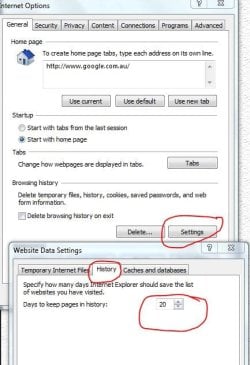
In IE go to tools>internet options>settings button, in window that opens go to history and select amount of days you wish it to keep.
Capture.JPG
Is this what you're after or am I on the wrong track?
 

My Computer

Computer Manufacturer/Model Number
Put together
OS
Win7 Pro-64 Bit
CPU
i7-2600-3.4GHz
Motherboard
ASRock Z68M
Memory
8 GIG DDR3
Graphics Card(s)
onboard
Sound Card
onboard
Hard Drives
Seagate 1TB 7200RPM
PSU
680 W
Case
black
Cooling
stock fans
Keyboard
Microsoft
Mouse
Microsoft optical
Cache Clearing in IE 10

Sorry but you are on wrong page I am aware of history clearance, what I am referring to after 7 days the IE10 home has a little box just below search box and advises that Microsoft use cookies, without touching close JUST CLOSE ie10 home page.

Then next time any site which uses your info with a cache has been cleared and you have to re enter the info . ie like this site your user name and password.

Is this by any chance someone Microsoft have had to do with Europe I live in France

Tony
 

My Computer

Computer Manufacturer/Model Number
Toshiba Satellite L350D-215
OS
win7
I'm a bit lost on this one, sorry I could not help you.
 

My Computer

Computer Manufacturer/Model Number
Put together
OS
Win7 Pro-64 Bit
CPU
i7-2600-3.4GHz
Motherboard
ASRock Z68M
Memory
8 GIG DDR3
Graphics Card(s)
onboard
Sound Card
onboard
Hard Drives
Seagate 1TB 7200RPM
PSU
680 W
Case
black
Cooling
stock fans
Keyboard
Microsoft
Mouse
Microsoft optical
Sorry but you are on wrong page I am aware of history clearance, what I am referring to after 7 days the IE10 home has a little box just below search box and advises that Microsoft use cookies, without touching close JUST CLOSE ie10 home page.

Then next time any site which uses your info with a cache has been cleared and you have to re enter the info . ie like this site your user name and password.

Is this by any chance someone Microsoft have had to do with Europe I live in France

Tony
Can you post screen print(s) showing what you see?
http://www.sevenforums.com/tutorials/9733-screenshots-files-upload-post-seven-forums.html#post93869
My Home page (and IE settings) are probably not the same as yours...
 

My Computer

Computer type
PC/Desktop
Computer Manufacturer/Model Number
home built
OS
Multi-Boot W7_Pro_x64 W8.1_Pro_x64 W10_Pro_x64 +Linux_VMs +Chromium_VM
CPU
AMD Athlon II x4 620
Motherboard
Gigabyte GA-MA785G-UD3H
Memory
6GB GSkill DDR2 800
Graphics Card(s)
AMD 4670 GPU + AMD 4200 IGP
Sound Card
on board Realtek ALC889A
Monitor(s) Displays
RCA 40" LCD TV, Insignia 32" LCD TV, HP 15" LCD monitor
Screen Resolution
1680 x 1050
Hard Drives
OCZ Vertex 3 120GB,
Samsung F3 1TB (3),
Several others - WD, Seagate, Hitachi, ...
PSU
Corsair 500 W
Case
Rosewill mid tower
Cooling
CM 90mm rifle
Keyboard
Gyration wireless, Logitech wireless, Dell USB wired
Mouse
Gyration wireless, Logitech wireless, V7 USB wired
Internet Speed
Spectrum - 100Mbps D / 10Mbps U
Antivirus
Avast, MBAM3, EMET, WinPatrol
Browser
Pale Moon, Firefox, IE
Other Info
2 multi-boot PC's
Mainly HTPC/Office/Gen purpose (no gaming).
Trendnet USB KVM.
LG DVD burner/Blue Ray Player.
Tray system for removable SATA backup drives.

Not currently OCd, under-volted.
I use Hybrid sleep, rarely re-boot or shutdown.

Hauppauge HD-PVR, Avermedia PCIe TV Tuner, Hauppauge PCI TV Tuner.
Back
Top