
Cached memory?

reallyloud

New member
Local time
3:02 AM
Messages
1
Hi

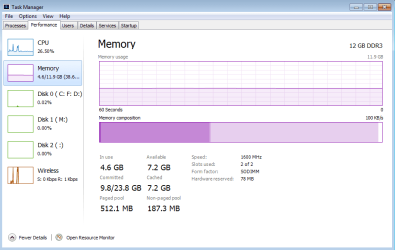
Ive been having issues with various programs lagging and I keep getting an out of memory msg in PS CC 2015. I can see there is over 7GB of "cached memory" in task manager, what does this mean? is my laptop able to access it? Do the memory graphs look normal for a machine with just a few programs running?
1.png

Sorry for the newbie questions
 

My Computer

Computer type
PC/Desktop
OS
windows 7
Hello reallyloud and welcome to seven forums.

Cached memory stores items and instructions that the Operating System uses often, thereby speeding up performance. Basically, it is memory used by the Operating System.

If you want to free up memory to use in photoshop, go to photoshop > preferences > performance and adjust the amount of memory that you are prepared to let photoshop use. If you were to increase the amount sufficiently, then the message should soon disappear. The statistics show that you have 7.2 GB available RAM.
 

My Computer

Computer type
PC/Desktop
OS
Windows 7 x64, Vista x64, 8.1 smartphone
CPU
Intel E8400 65W 64-bit
Motherboard
Gigabyte EP45-UD3LR
Memory
DDR2 2 x 2GB, 1GB x 2
Graphics Card(s)
XFX Radeon HD5750
Sound Card
AMD High Definition Audio; Realtek High Definition Audio
Monitor(s) Displays
iiyama prolite X2377HDS
Screen Resolution
1920 x 1080
Hard Drives
500GB 7200 rpm Seagate ST3500413AS 16MB, 500GB 5400 rpm Toshiba MQ02ABF050H 32MB, 200GB 7200 rpm Seagate ST3200820AS 8MB, 2TB 7200 rpm Western Digital WD20EZRX 64MB
PSU
Enermax Liberty Modular
Case
Antec P193 Midi Tower
Keyboard
Mionix ZIBAL 60
Mouse
Razer USB 2.0 Diamondback Mouse or Huion Graphics Tablet
Browser
Internet Explorer, Lunascape, Firefox, Opera, Avast Safezone
A high value for cached memory is a good thing. Generally the higher the better. This is mostly memory on the standby list which is the ideal state for available memory.

If you are getting out of memory errors it means the commit charge is very close to the commit limit. It has nothing to do with low available RAM and Windows doesn't even have an error for this. But the commit shown in the screenshot, 9.8 GB with a limit of 23.8 GB does not show this at all. The numbers shown are very good. The commit may be high but there are many legitimate reasons why this might be so and it is certainly not causing a problem at the time the screenshot was take.
 

My Computer

Computer type
PC/Desktop
Computer Manufacturer/Model Number
HP
OS
Windows 7 Pro 64 bit
CPU
Xeon W3520
Memory
8 GB
Graphics Card(s)
Nvidia Geforce 210
Back
Top