Calculator - Change Modes

How to Open and Change Calculator View in Windows 7

   Information
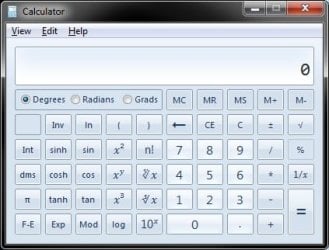
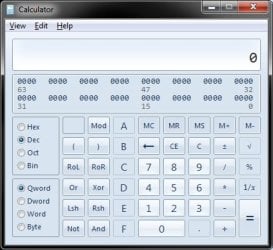
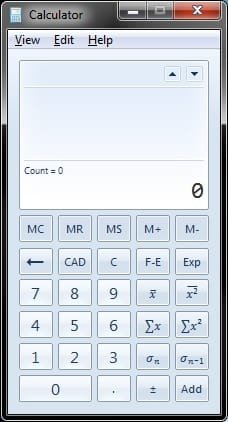
You can use Calculator to perform addition, subtraction, multiplication, and division. Calculator now also offers the advanced capabilities of scientific and statistical calculators. This will show you how to open the Windows 7 Calculator and change the Calculator to either the Standard, Scientific, Programmer, or Statistics view.
   Note
The Calculator exe file is located at C:\Windows\System32\calc.exe.
   Tip
You can perform calculations by clicking on the calculator buttons, or you can type calculations by using your keyboard. You can also use the numeric keypad to type numbers and operators by pressing NUM LOCK.


Here's How:
1. Open the Start Menu, type calc in the search box, and press Enter.

2. Click on the View menu bar item, and click on the mode you want to use in Calculator. (see screenshots below)
NOTE: You can choose between the Standard, Scientific, Programmer, or Statistics modes.
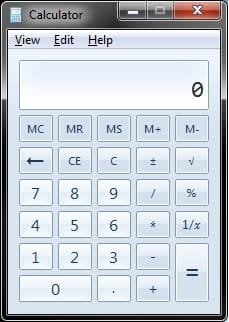
Standard.jpgScientific.jpg
Programmer.jpgStatistics.jpg
That's it,
Shawn


Last edited:
Thanks!
 

My Computer

Computer Manufacturer/Model Number
Self build
OS
Windows 7 Ultimate x64
CPU
AMD Phenom II x4
Motherboard
Gigabyte 880
Memory
8GB
Graphics Card(s)
NVIDIA GeForce HD
Sound Card
Realtek HD Audio
Screen Resolution
1920 x 1080
Hard Drives
2 x 1TB
PSU
Thermalake 550w
Case
XCase
Internet Speed
8MB
You're welcome Echrada. It's nice to see these modes added.

Shawn
 

My Computer

Computer type
PC/Desktop
Computer Manufacturer/Model Number
Self built custom
OS
64-bit Windows 11 Pro for Workstations
CPU
Intel i7-8700K OC'd to 5 GHz
Motherboard
ASUS ROG Maximus XI Formula Z390
Memory
64 GB (4x16GB) G.SKILL TridentZ RGB DDR4 3600 MHz
Graphics Card(s)
ASUS ROG-STRIX-GTX1080TI-O11G-GAMING
Sound Card
Integrated
Monitor(s) Displays
2 x Samsung Odyssey G7 27"
Screen Resolution
2560x1440
Hard Drives
1TB Samsung 990 PRO M.2,
4TB Samsung 990 PRO PRO M.2,
TerraMaster F8 SSD Plus NAS
PSU
Seasonic Prime Titanium 850W
Case
Thermaltake Core P3
Cooling
Corsair Hydro H115i
Keyboard
Logitech wireless K800
Mouse
Logitech MX Master 4
Internet Speed
2 Gb/s Download and 100 Mb/s Upload
Antivirus
Malwarebyte Anti-Malware Premium
Browser
Google Chrome
Other Info
Logitech Z625 speaker system,
Logitech BRIO 4K Pro webcam,
HP Color LaserJet Pro MFP M477fdn,
APC SMART-UPS RT 1000 XL - SURT1000XLI,
Galaxy S23 Plus phone
How to display results history

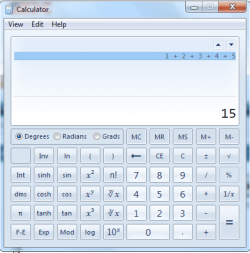
Before I switched to Windows 7 there was a calculator I was using in Vista that was supposed to be the Win7 calc. It looked *very* similar to what I have now in Win7 but there's one glaring difference I can't seem to figure out. How do I get the Win7 calculator to actually show the formula result history in the results window at the top. Each calculation shows it's result in the bottom section with the formula entered in the top section. To see each result I have to click on each of the formulas, one at a time, at the top. I just want to see, for example, "1+1=2" at the top rather than "1+1" and then "2" at the bottom. That way I can see a running list of the results to reference back to all at once.
 

My Computer

OS
Dual boot into Windows 7 & Ubuntu (Linux)
Did you tryed with History ? From the View menu select History. I can't remember to the Vista calculator,but this may help you.
calc.PNG
 

My Computer

Computer type
PC/Desktop
Computer Manufacturer/Model Number
Custom Build
OS
Windows 10 Pro x64
CPU
Intel Core i5 4440 @Stock
Motherboard
Gigabyte Z97 D3H
Memory
4 x 4GB HyperX Fury DDR3
Graphics Card(s)
Gigabyte GTX 1050Ti O4G
Sound Card
Integrated
Monitor(s) Displays
Dell P2417H
Screen Resolution
1920 x 1080
Hard Drives
Samsung EVO 850 120GB / Toshiba DT01ACA050 1TB 7200prm 32MB
PSU
Riotoro Onyx 750W
Case
NZXT H500 Black-Red
Cooling
Stock CPU + NZXT 120mm + 2x120mm red fans
Keyboard
Modecom Volcano Lanparty
Mouse
Asus ROG Gladius / DeepCool E-Pad Plus
Internet Speed
DOCSIS 50/3 Mbit
Browser
Google Chrome
Other Info
Asus K55VJ(i5 3210M, GT635M / 2GB, 8GB DDR3, 500GB HDD)
History allows me to see a running list of the functioned entered, but not with their associated results.
 

My Computer

OS
Dual boot into Windows 7 & Ubuntu (Linux)
Back
Top