Solved Calibrate battery

ish4d0w

New member
Member
VIP
Local time
11:31 PM
Messages
179
Hi


This is a HP 6720s notebook. I'm having problems with my battery.

The percentage indicator is not accurate.

It randomly hibernates below 40%. It's only supposed to do that when it's on 5%. It's supposed to give a "low battery" warning on 10% but it never does that.


Do I need to calibrate the battery? If so what's the best method to do that? Do I need to run it until it's completely empty?
 
Last edited:

My Computer

Computer type
Laptop
Computer Manufacturer/Model Number
HP Compaq 6720s
OS
Microsoft® Windows 7 Professional 64-bit
CPU
Intel(R) Pentium(R) Dual CPU T2310 @ 1.46GHz
Motherboard
Hewlett-Packard 30D8
Memory
4,00 GB
Graphics Card(s)
(1) Mobile Intel(R) 965 Express Chipset Family (2) Mobile
Sound Card
(1) Bluetooth Hands-free Audio (2) Bluetooth Stereo Audio
Screen Resolution
1280 x 800 x 32 bits (4294967296 colors) @ 59 Hz
Hard Drives
(1) Hitachi HTS542516K9SA00 ATA Device (2) Multi Flash Reader USB Device
With most modern batteries you really don't need to "calibrate" them anymore. Having said that.... I do mine about once every six weeks or so, but only if I remember. My battery is over a year and a half old now and gets used on a regular basis. It still charges to 100% so I guess I'm doing something right ;)

I run mine till it turns off by itself or gets to less than 10%, then charge it completely. Or did until recently I should say. I've been running it down to around 50% and then recharge it to full now. No ill effects yet to the "new" routine.

I have a free program that includes a battery monitor .... but I am not on my machine at this moment so cannot recommend/remember :o what it was/is. Thinking it was primarily a HDD type program. Having said that I have never used it for the battery.

One last thought, have you considered running an sfc/scannow to find and possibly repair any corrupted system files? This may or may not help this specific problem but cannot hurt and may be worth a try. We have many excellent tutorials here written by some very talented people. Just click the link :http://www.sevenforums.com/tutorials/1538-sfc-scannow-command-system-file-checker.html

Hope this helps.
 

My Computer

Computer type
Laptop
Computer Manufacturer/Model Number
MSI GE72VR Apache Pro-416
OS
Windows 10x64 Build 1709
CPU
Intel i7 7700HQ Kaby Lake
Motherboard
Micro-Star Intl. MS-179B (U3C1)
Memory
16 GB DDR4 @2400
Graphics Card(s)
Nvidia Geforce GTX 1060
Screen Resolution
1920x1080 120Hz
Hard Drives
256 GB Nvme M.2 SSD

1TB HDD@7200
Cooling
Cooler Blast 4
Keyboard
Steel Series
Antivirus
Bit Defender Free
Browser
Edge

My Computer

Computer type
PC/Desktop
Computer Manufacturer/Model Number
Self Built
OS
Win 10 Pro x64
CPU
Intel I5-2500K @3.3GHz
Motherboard
Asrock P67 Extreme4
Memory
16GB G.Skill Ripjaws X (4x4GB)
Graphics Card(s)
EVGA GeForce 750 Ti SC 2GB
Sound Card
ASUS Xonar DG 5.1 Channels 24-bit 96KHz PCI Interface Sound
Monitor(s) Displays
auria eq2367
Screen Resolution
1920 x 1080
Hard Drives
250GB Samsung 850 EVO SSD
1TB WD Blue
1TB Hitachi
PSU
SeaSonic X 650W 80 Plus Gold
Case
Corsair Obsidian 750D
Cooling
Corsair H60, Three 140mm case fans
Keyboard
Logitech Wireless Keyboard K520
Mouse
Logitech Wireless Mouse M310
Internet Speed
Wave Broadband ~ 100 dn 5 up
Antivirus
Windows Defender, Malwarebytes Premium
Browser
Edge, IE11, Chrome
Other Info
Laptop specs: HP g7-1365dx /
CPU: AMD A6-3420M APU with Radeon(tm) HD Graphics /
RAM: Crucial 8Gb (2x4Gb) /
SSD: Crucial M4-CT128M4SSD2 ATA Device/ FW 000F /
GFX: AMD Radeon HD 6520G /
OS: Windows 10 Pro x64
Thanks to both of you! :)
I'll try the SFC trick soon.


I'm not sure what should I do with this battery (other than replacing it)


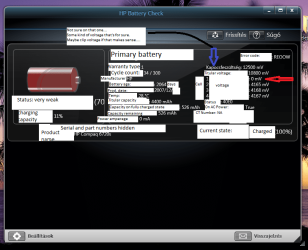
Here's a screenshot of HP Battery Check. I was unable to switch it to English but I provided an English translation via captions.
There's only one string I'm not sure about, I marked that one with a blue arrow.

The red arrow shows an interesting data: Cell 1's voltage is 0 mV, why is that?


BTW. The computer was mostly on charger while this battery was in. That might explain it. Is it safe to continue use this battery? It still provides some power.

I have a battery in a better condition BUT I'd like to use this one too, as a backup when the first one runs out and I need more battery time
 

Attachments

  • hp-battery-diag.png
    hp-battery-diag.png
    62.1 KB · Views: 8
Last edited:

My Computer

Computer type
Laptop
Computer Manufacturer/Model Number
HP Compaq 6720s
OS
Microsoft® Windows 7 Professional 64-bit
CPU
Intel(R) Pentium(R) Dual CPU T2310 @ 1.46GHz
Motherboard
Hewlett-Packard 30D8
Memory
4,00 GB
Graphics Card(s)
(1) Mobile Intel(R) 965 Express Chipset Family (2) Mobile
Sound Card
(1) Bluetooth Hands-free Audio (2) Bluetooth Stereo Audio
Screen Resolution
1280 x 800 x 32 bits (4294967296 colors) @ 59 Hz
Hard Drives
(1) Hitachi HTS542516K9SA00 ATA Device (2) Multi Flash Reader USB Device
I've had to run a battery down to zero and wait for the sys to shut itself down. Then I try to power up several times, to the point where it won't even TRY to boot. Then, without using the computer at all, charge the battery to full. Of course, this was years ago, as I no longer support laptops, and battery tech has progressed, I'm sure. This may still work as a method of reinvigorating a battery and making the indicator a bit more accurate.
 

My Computer

Computer type
PC/Desktop
Computer Manufacturer/Model Number
iBuyPower NZXT
OS
Microsoft Windows 10 Home Build 15036
CPU
Intel(R) Core(TM) i7-860 @ 2.80GHz
Motherboard
Gigabyte Technology Co., Ltd. P55-UD3L
Memory
4.00 GB
Graphics Card(s)
NVIDIA GeForce GTX 750
Sound Card
(1) Line 6 UX2 (2) Realtek High Definition Audio
Monitor(s) Displays
23" acer
Screen Resolution
1920 x 1080 x 32 bits (4294967296 colors) @ 60 Hz
Hard Drives
(1) WDC WD5000AAKS-00D2B0 ATA Device (2) Seagate FreeAgent Go 250G USB Device
Cooling
Corsair H75 liquid cooler (Very easy to install, actually)
Internet Speed
60M cable modem-->Linksys E1200-->1Gbps net card
Browser
Chrome
Other Info
This is probably the longest I've ever had a Windows machine run without having to restore it to scratch. I'm used to restoring to "factory" about every 2 yrs. I've run with Win7 since new in 2009 and only recently (Nov, '14) restored to clean up the machine from all my 'xperimenting. LOL!! I may never need another machine.

Upgraded to 10 when it was still free, then installed 2017 update.
you have a bad (dead) cell

Modern LiOn batteries (laptops and phones) are built out of cells that are switched sequentially as the battery is discharged. The switching is done by a "smart chip" inside. It is the same chip who provides diagnostic info to the software testing layer.

If you see a cell with 0V (when you have fully charged your battery), this cell is dead and is (normally) not recoverable. That is why your machine "suddenly turns off/hibernates" when it reaches it and tries to switch to it for workload.

This (normally) cannot be fixed with any tool/calibration method and is only "fixed" by battery replacement.

*NOTE: Smart phone batteries have more than 50 such cells and for these, if your phone is rooted, there are a few apps that will let you "test and mark bad cells" - which a kind of works for a while, but more and more cells go bad every week or so, and this is really *not a solution*...

Hope this info helps you to avoid frustration - trying to understand/troubleshoot your battery issue
 

My Computer

Computer type
PC/Desktop
Computer Manufacturer/Model Number
HP8530p
OS
Windows7 64bin Ultimate
Hi

Thank you very much everyone. I learned a LOT about batteries, so your answers were very useful for me.
I just replaced the battery and now it works fine.
 

My Computer

Computer type
Laptop
Computer Manufacturer/Model Number
HP Compaq 6720s
OS
Microsoft® Windows 7 Professional 64-bit
CPU
Intel(R) Pentium(R) Dual CPU T2310 @ 1.46GHz
Motherboard
Hewlett-Packard 30D8
Memory
4,00 GB
Graphics Card(s)
(1) Mobile Intel(R) 965 Express Chipset Family (2) Mobile
Sound Card
(1) Bluetooth Hands-free Audio (2) Bluetooth Stereo Audio
Screen Resolution
1280 x 800 x 32 bits (4294967296 colors) @ 59 Hz
Hard Drives
(1) Hitachi HTS542516K9SA00 ATA Device (2) Multi Flash Reader USB Device
Back
Top