
Also Loopy
New member
- Local time
- 7:50 PM
- Messages
- 1
I've tried space sniffer as administrator, it says unaccessible 180 GB. I've run Sea Tools long generic and received a Pass. I've unhidden files and folders, unhidden protected files, there are 3 recycle bins showing on the external drive but all seem to be empty. There are also 2 folders named Found and Found 1 (if I remember the names correctly) these also seem to be empty.
I've run virus, malware & spybot scans and there are no problems there. Not long before this problem arose, I was typing something and one of the fingers of my left hand caught a key and a small message flashed on the screen but it didn't stay long enough to read it, I have no idea which key it was but it was in the lower left area of the keyboard around where the windows key is located, and, with typing so quickly I could have hit a key with my right hand at the same time and I'm wondering if this has done some weird system thing causing the space to become unaccessible.
TrustMe on Windows 8 Forum suggested trying Linux Mint Bootable but that didn't like the drive and seemed to go a bit berserk, I don't want to cause any damage so, not knowing anything about Linux, I didn't pursue that avenue. TrustMe suggested putting a post on here as " There is a hard drive guru on our sister site Windows 7 Forum. I would post your problem there and hope he picks it up".
Any help would be very much appreciated.
post edited as follows
I'm using Windows 8.1, I asked for help from Windows 8 Forum, it was suggested I try 'the hard drive guru' on Windows 7 Forum.
My Toshiba 1 TB external hard drive was fine and had well over 100 GB of free space. The next time I plugged the external drive into my PC it opened 3 times, I closed all three windows, clicked the safely remove option, unplugged the drive and shut down the PC. The next time I plugged in the drive it opened once and I accessed my files. I was doing some organising, moving and deleting of my files, after a short time I got a message saying that I would need to delete some files as there was insufficient space.
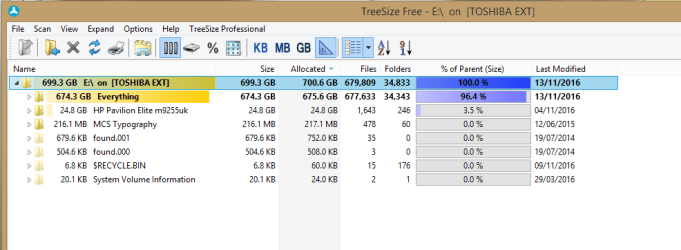
I ran chkdsk to find and repair any problems, after about 8 hours I got the result that there was insufficient space. I ran SeaTools Long Generic Test and received a Pass. I ran SpaceSniffer which shows the drive as 931.5 GB and tells me that there is 180 GB of unaccessible files and 49.3 GB of free space. I ran TreeSize (free) which shows the disk as having 700.6 GB Allocated. The Toshiba Device Properties is blank.
At some time before this problem, I was typing something and one of the fingers of my left hand caught a key and a small message flashed on the screen but it didn't stay long enough to read it, I have no idea which key it was but it was in the lower left area of the keyboard around where the windows key is located, and, with typing so quickly I could have hit a key with my right hand at the same time and I'm wondering if this has done some weird system thing causing the space to become unaccessible.
I've run virus, malware & spybot scans and there are no problems there. Not long before this problem arose, I was typing something and one of the fingers of my left hand caught a key and a small message flashed on the screen but it didn't stay long enough to read it, I have no idea which key it was but it was in the lower left area of the keyboard around where the windows key is located, and, with typing so quickly I could have hit a key with my right hand at the same time and I'm wondering if this has done some weird system thing causing the space to become unaccessible.
TrustMe on Windows 8 Forum suggested trying Linux Mint Bootable but that didn't like the drive and seemed to go a bit berserk, I don't want to cause any damage so, not knowing anything about Linux, I didn't pursue that avenue. TrustMe suggested putting a post on here as " There is a hard drive guru on our sister site Windows 7 Forum. I would post your problem there and hope he picks it up".
Any help would be very much appreciated.
post edited as follows
I'm using Windows 8.1, I asked for help from Windows 8 Forum, it was suggested I try 'the hard drive guru' on Windows 7 Forum.
My Toshiba 1 TB external hard drive was fine and had well over 100 GB of free space. The next time I plugged the external drive into my PC it opened 3 times, I closed all three windows, clicked the safely remove option, unplugged the drive and shut down the PC. The next time I plugged in the drive it opened once and I accessed my files. I was doing some organising, moving and deleting of my files, after a short time I got a message saying that I would need to delete some files as there was insufficient space.
I ran chkdsk to find and repair any problems, after about 8 hours I got the result that there was insufficient space. I ran SeaTools Long Generic Test and received a Pass. I ran SpaceSniffer which shows the drive as 931.5 GB and tells me that there is 180 GB of unaccessible files and 49.3 GB of free space. I ran TreeSize (free) which shows the disk as having 700.6 GB Allocated. The Toshiba Device Properties is blank.
At some time before this problem, I was typing something and one of the fingers of my left hand caught a key and a small message flashed on the screen but it didn't stay long enough to read it, I have no idea which key it was but it was in the lower left area of the keyboard around where the windows key is located, and, with typing so quickly I could have hit a key with my right hand at the same time and I'm wondering if this has done some weird system thing causing the space to become unaccessible.
Attachments



Last edited:
My Computer
At a glance
Windows 8.1 64 bit
- Computer type
- PC/Desktop
- OS
- Windows 8.1 64 bit
- Motherboard
- Gigabyte


