
Calling home

Kari

An Angry Old Man
Guru
VIP
SF Team
Local time
10:23 PM
Messages
17,473
Location
A Finnish ex-pat in Leipzig, Germany
   Information
Please notice this post is only my own, personal and subjective opinion. I feel this subject is important enough to clearly voice my opinion, although I do not want to start an argument. We've had them enough.


Like ET in Spielberg’s epic movie, today’s computers want to call home. Like ET, they would like to do it without us humans knowing but are forced to ask our help. Reasons are many, from validity checks and crash reports to check if software or OS needs updates installed. One common reason is various Customer Experience programs, software companies collecting information on how we users use their software and which problems we might have with it.

Most of these home calls are completely automatic once we have opted-in, given permission to an application or OS to call home when need arises. Choosing automatic updates in Windows gives it a permission to call home to Microsoft, check if Windows and other Microsoft software is up to date, and install updates when needed. Most well designed, well coded third party applications can also do the same if we have enabled automatic updates.

This issue, computers calling home, got new wind under its wings last February when Microsoft published an update to Windows 7. Update for Windows Activation Technologies (KB971033) was not only designed to check you are running a valid and correctly activated copy of Windows, but is was also coded to call home every now and then, to check that the validity status of Windows installation had not changed.

Windows themed forums were suddenly full of complaints. My home in the Interwebs, The Seven Forums got its share; thread after thread full with complaints. The consensus was that it’s user who should decide what to install, not Windows Update or Microsoft. Some of us tried to offer another approach, to tell that if you have a valid, legal setup, there’s nothing to be afraid of. A few second or so home call without user even noticing them, what’s the problem?

Although installing WAT update voluntarily as soon as it was possible, I can understand those who opposed it. Opponents were and are the same users who have for instance protested against Google’s way to call home, collect information and statistics without normal user even knowing it. These pro-privacy advocates get my sympathy and respect. The other significant opponent group is the pirates, common criminals who steal what they need, even software running on their computers and Lady Gaga singing in their iPods. These people get my antipathy and disrespect.

I have decided, long time ago, to let most of my software to call home. I have a short list of companies I have decided to trust that they are not trying to find out my personal passwords, PIN codes, internet banking credentials or my personal photos. My list includes companies like Microsoft, Norton, F-Secure, Adobe, Google, Skype, and so on. Products of these companies can always call home when they want to.

I have even taken this a bit further by joining a Customer Experience Program whenever it’s possible if the company belongs to my A-list. Why? Because I love Windows 7! Without the huge army of beta testers and users who joined Vista’s and Seven Beta's and RC's Customer Experience Programs Seven wouldn’t be what it is. The final product you and me are using is not only because those coders in Redmond, it’s also because Microsoft could get so much reports from users. And they listened. If Microsoft wants to get an occasional report from my computer, my Seven can call home whenever it (she?) wants to.

If you are running a valid Windows setup and you want to help to create an even better next generation Windows, join Microsoft Customer Experience Improvement Program. This Seven Forums tutorial tells how. More information on CEIP here.

Almost all new software have something similar. Just to give one example, here’s how to join Windows Live CEIP from Live Messenger:
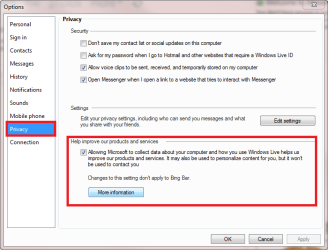
Live_CEIP.png


Finally, don’t automatically believe everything I say. Don’t automatically believe all counter arguments you hear. Find out yourself. Here are a few spoilers, un-truths surprisingly often heard:
  • Microsoft is not interested in what you and neighbour's wife are doing when secretly chatting
  • Microsoft does not watch you through your webcam
  • Mister Ballmer couldn’t care less if he had your Citibank's internet banking credentials
  • Multinational software companies are not interested in finding your social security number and mother’s maiden name
  • No company cares what you were doing when that photo was taken
  • Participating for instance Microsoft CEIP does not make your computer or Internet connection slower, nor does it fill your HD or Windows Registry
Kari
 
Last edited:

My Computer

Computer type
Laptop
Computer Manufacturer/Model Number
HP ENVY 17-1150eg
OS
Windows 10 Pro x64 EN-GB
CPU
1.6 GHz Intel Core i7-720QM Processor
Memory
6 GB
Graphics Card(s)
ATI Mobility Radeon HD 5850 Graphics
Sound Card
Beats sound system with integrated subwoofer
Monitor(s) Displays
17" laptop display, 22" LED and 32" Full HD TV through HDMI
Screen Resolution
1600*900 (1), 1920*1080 (2&3)
Hard Drives
Internal: 2 x 500 GB SATA Hard Disk Drive 7200 rpm
External: 2TB for backups, 3TB USB3 network drive for media
Cooling
As Envy runs a bit warm, I have it on a Cooler Master pad
Keyboard
Logitech diNovo Media Desktop Laser (bluetooth)
Mouse
Logitech Performance Mouse MX
Internet Speed
50/10 Mbps VDSL
Antivirus
Windows Defender 4.3.9431.0
Browser
Maxthon 3.5.2., IE11
Hi Kari -

So glad to see you back in fine form.

I only care about performance and tend to want nothing extra that will put even a nick in CPU/RAM, Startup Time or bother me.

For that reason I edit msconfig>Startup list to the bone, only permitting AV and gadgets/stickies.

I find that the Adobes/Javas will find a way to notify me of Updates when they are called to run.

However I really appreciate the interactivity of Win7's Problem solving feature which will now deliver fixes when problems aren't even reported. If that were somehow enhanced by joining something then I am certainly not opposed and would help spread the word.

I am a Windows 7 guy before anything else tech-wise, because Win7 now equals superb performance and that is all I ever wanted.
 
Greg, I hope you already know it but you are one those good guys I respect. The above was and is only one single mans personal approach, these thoughts tonight triggered because I can finally move a bit and booted my desktop first time in almost three months.I think it will be updating all night...

Anyways, I installed Live 2011 replacing Live Beta, and searching the CEIP switch to turn it on, suddenly remembered our heated WAT debate back in February. I just took a pot of coffee beside me and wrote what I was thinking.

One man, one way to do things. Another man, another way.

Peace, Man ;)

Kari
 

My Computer

Computer type
Laptop
Computer Manufacturer/Model Number
HP ENVY 17-1150eg
OS
Windows 10 Pro x64 EN-GB
CPU
1.6 GHz Intel Core i7-720QM Processor
Memory
6 GB
Graphics Card(s)
ATI Mobility Radeon HD 5850 Graphics
Sound Card
Beats sound system with integrated subwoofer
Monitor(s) Displays
17" laptop display, 22" LED and 32" Full HD TV through HDMI
Screen Resolution
1600*900 (1), 1920*1080 (2&3)
Hard Drives
Internal: 2 x 500 GB SATA Hard Disk Drive 7200 rpm
External: 2TB for backups, 3TB USB3 network drive for media
Cooling
As Envy runs a bit warm, I have it on a Cooler Master pad
Keyboard
Logitech diNovo Media Desktop Laser (bluetooth)
Mouse
Logitech Performance Mouse MX
Internet Speed
50/10 Mbps VDSL
Antivirus
Windows Defender 4.3.9431.0
Browser
Maxthon 3.5.2., IE11
Well written Kari.

There are a lot paranoid people out there that believe everything is out to get you. While it's true you should always take proper precautions about what you let in and out of your computer, some things such as this only serves to help make Windows a better product for us all since they cannot possibly duplicate every different type of system and how Windows may run on it. Plus, the phone calls home to help make sure a pirate does not stay activated only helps to keep the costs of Windows down when we buy it and future releases.
 

My Computer

Computer type
PC/Desktop
Computer Manufacturer/Model Number
Self built custom
OS
64-bit Windows 11 Pro for Workstations
CPU
Intel i7-8700K OC'd to 5 GHz
Motherboard
ASUS ROG Maximus XI Formula Z390
Memory
64 GB (4x16GB) G.SKILL TridentZ RGB DDR4 3600 MHz
Graphics Card(s)
ASUS ROG-STRIX-GTX1080TI-O11G-GAMING
Sound Card
Integrated
Monitor(s) Displays
2 x Samsung Odyssey G7 27"
Screen Resolution
2560x1440
Hard Drives
1TB Samsung 990 PRO M.2,
4TB Samsung 990 PRO PRO M.2,
TerraMaster F8 SSD Plus NAS
PSU
Seasonic Prime Titanium 850W
Case
Thermaltake Core P3
Cooling
Corsair Hydro H115i
Keyboard
Logitech wireless K800
Mouse
Logitech MX Master 4
Internet Speed
2 Gb/s Download and 100 Mb/s Upload
Antivirus
Malwarebyte Anti-Malware Premium
Browser
Google Chrome
Other Info
Logitech Z625 speaker system,
Logitech BRIO 4K Pro webcam,
HP Color LaserJet Pro MFP M477fdn,
APC SMART-UPS RT 1000 XL - SURT1000XLI,
Galaxy S23 Plus phone
Great post Kari. :) I was always told to respect other peoples beliefs since I was just a boy. ( 40 some years later ) Always enjoy your post. GL :)
 

My Computer

Computer Manufacturer/Model Number
Toshiba Satellite
OS
Windows 7 Home Premium 64-bit
CPU
Pentium(R) Dual-Core T4300 @ 2.10GHz
Motherboard
Toshiba Model KSWAA - Chipset Intel GL40 Rev 07
Memory
3 GB DDR2 PC2-6400 (400 MHz) Samsung M4 70T2864Q23-CF7
Graphics Card(s)
Mobile Intel GMA4500M 32bit OS (64bit OS) dynamically
Sound Card
Realtek ALC272-GR Software Sound
Monitor(s) Displays
16.0" HD TFT with TrueBrite Matrix colour LCD display
Screen Resolution
1366 x 768
Hard Drives
FUJITSU MJA2320BH G2-(S2) 320GB (5400RPM) Serial-ATA
Keyboard
Canadian Bilingual Keyboard 105 keys with 13 Function keys
Mouse
Touchpad Point device & Lexma USB Mouse
Internet Speed
Walking is Faster
Other Info
Wireless LAN Realtek RTL89191SE 802.11n PCI-E NIC + a
LAN Realek PCIe FE Family Controller and
TOSHIBA Software Modem
Thanks for posting, Kari. I can't say I completely agree with everything you've said, nor do I agree with the vehemently vocal opposition. My opinion exists somewhere in between. I do tend to trust MS and some other companies, but I don't kid myself regarding two issues:

1) Corporate lust for personal data that can be used for marketing purposes.
2) The potential abuse for that same marketing data by corporations and Government.

Especially where the Government is concerned.

Society is changing by the minute, and Information Technology is, in large part, the driving force. Privacy issues are rampant. Some are a trade off for our safety (one example being TSA, hassles in flight travel, etc), but make no mistake that liberties are on the table. I don't see this getting better, on the contrary, it will grow worse. Something we must find a way to live with (within reason).

I believe that there must be some form of regulation asserted to protect 'the people', but I'm not holding my breath.

I don't foresee a solution for any of these issues. There's a big picture here that bodes not well for free society, of which 'phoning home' is an obvious component.

James
 

My Computer

OS
Win7U 64 RTM
CPU
Q9550
Motherboard
GA-EP45-UD3R
Memory
8GB Gskill
Graphics Card(s)
ASUS|EAH4850/HTDI/1GD3/A
Sound Card
xfi Plat
Monitor(s) Displays
Dell 2405fpw
Screen Resolution
1920x1200
Hard Drives
Seagate & WD sata Drives
PSU
Antec
Case
Antec
Keyboard
MS Natural Ergonomic 4000
Mouse
Logitech MX610 USB Cordless
Thanks, guys.

@James Near the end of the post, I ask people not to automatically believe what I've said, or those counter arguments. It's up to each and everyone of us to find the balance between paranoia and reality, smooth and fast running computer and security.

My balance was found when I decided I can not continue computing if I'm afraid of everything. it's a paradox that quite a many user is simultaneously overly paranoid and runs several AV and malware apps simultaneously, computing in sandbox or cloud, but on the other hand don't want those companies to find out anything.

I really have the mentioned A-list, based on my own credibility rankings. The companies on that list can install updates automatically, and I always join their CEIP or similar. I can forget them. On the other hand, I have set almost as complete auditing policy in my home network (Home Server, HTPC, 3 desktops, 3 laptops) as possible, logging about everything.

It's my balance. Like I mentioned in my response to Greg here above, I came to this subject when booting one desktop first time in almost three months and updatind Live. I started to smile when I noticed the first thing I did after I got it installed was to go to settings to turn CEIP on.
 

My Computer

Computer type
Laptop
Computer Manufacturer/Model Number
HP ENVY 17-1150eg
OS
Windows 10 Pro x64 EN-GB
CPU
1.6 GHz Intel Core i7-720QM Processor
Memory
6 GB
Graphics Card(s)
ATI Mobility Radeon HD 5850 Graphics
Sound Card
Beats sound system with integrated subwoofer
Monitor(s) Displays
17" laptop display, 22" LED and 32" Full HD TV through HDMI
Screen Resolution
1600*900 (1), 1920*1080 (2&3)
Hard Drives
Internal: 2 x 500 GB SATA Hard Disk Drive 7200 rpm
External: 2TB for backups, 3TB USB3 network drive for media
Cooling
As Envy runs a bit warm, I have it on a Cooler Master pad
Keyboard
Logitech diNovo Media Desktop Laser (bluetooth)
Mouse
Logitech Performance Mouse MX
Internet Speed
50/10 Mbps VDSL
Antivirus
Windows Defender 4.3.9431.0
Browser
Maxthon 3.5.2., IE11
@James Near the end of the post, I ask people not to automatically believe what I've said, or those counter arguments. It's up to each and everyone of us to find the balance between paranoia and reality, smooth and fast running computer and security.

My balance was found...

Apologies if I appeared to be criticizing your opinion. Quite the opposite. I felt comfortable adding mine because your opinion was not the domineering, my way or highway opinion so often heard these days. Your post conveyed respect for differing ideas, freeing others to respect yours. And btw, I may not have agreed with everything you said, but much of it resonates.

James
 

My Computer

OS
Win7U 64 RTM
CPU
Q9550
Motherboard
GA-EP45-UD3R
Memory
8GB Gskill
Graphics Card(s)
ASUS|EAH4850/HTDI/1GD3/A
Sound Card
xfi Plat
Monitor(s) Displays
Dell 2405fpw
Screen Resolution
1920x1200
Hard Drives
Seagate & WD sata Drives
PSU
Antec
Case
Antec
Keyboard
MS Natural Ergonomic 4000
Mouse
Logitech MX610 USB Cordless
Most privacy concerns and allegations of personal information collection are associated with click-stream data generated through online activities like surfing, gaming and shopping. Personally I never heard of WAT, CEIP or any security software transmitting personal data by themselves (unless one thinks the name of the computer is personal).

As for Google, I do believe it harvests personal data through search and probably even email. As long as it doesnt splash the contents of my last amorous email all over the web, its OK.

But privacy is an issue thats only going to get bigger and bigger. All "credible" companies have a reputation to sustain but the competition out there is getting meaner and boundaries are being pushed.
 

My Computer

Computer Manufacturer/Model Number
Too many to describe...
OS
Windows 7 x64 pro/ Windows 7 x86 Pro/ XP SP3 x86
As Kari has rightly noted, the whole "calling home" thing is a non-issue, and is mostly responsible for making Windows 7 such a great product. One only needs to look at how Windows itself has evolved over the years to realize this. All the way from Windows 95 through to Windows 7, performance and usability has improved, which will not have been possible if Microsoft could not automatically collect usage data, which has defintely been put to good use.

Case in point. When a program crashed in Windows XP, you have a chance to click "Send" or "Dont Send" crash data to Microsoft. It was extremely rare to get any kind of positive feedback from sending said crash report - maybe 1 in 100, if you got lucky. This was improved significantly with Vista and Windows 7, and now perhaps 1 in 100 "fault reports" do not get positive responses.

Even finding drivers for hardware via Microsoft Update has become better. Even though I'm old-skool and still prefer to go directly to the manufacturer, Windows Update has on countless occasions helped me to get an obscure piece of hardware functioning again after a reload.

None of this would have been possible without Windows "phone home" or without my own participation in Customer Experience Improvment Programs.
 

My Computer

Computer type
PC/Desktop
Computer Manufacturer/Model Number
Virtual Machine
OS
Windows 7 Professional 32-bit SP1
CPU
AMD A4/A6
Motherboard
Intel Corporation 440BX Desktop Reference Platform
Memory
3.00GB EDO
Graphics Card(s)
VMware SVGA 3D
Sound Card
High Definition Audio Device
Monitor(s) Displays
Generic Non-PnP Monitor on VMware SVGA 3D
Screen Resolution
1440x900
Hard Drives
1 x 60GB VMware Virtual SATA Hard Drive ATA Device
Antivirus
Kaspersky Total Security
Great, thoughtful post Kari.

The only thing I ask, for this subject and so many related subjects like it, is Transparency and Choice.

Transparency: in knowing when the OS wants to phone home - a pop-up window or a log of all transmissions and their content.

Choice: a simple way to say yes or no - either on the pop-up or a toggle in settings.

Whether talking about Phone-Home or Franken-salmon, I just want to know what it is and have to option to choose it or not. Honest transactions do not have to be conducted behind the scenes or in the shadows - the piracy/privacy sword cuts both ways.


In case any developers are listening!
 

My Computer

Computer type
PC/Desktop
Computer Manufacturer/Model Number
Home Built - Jan 2013
OS
Windows 7 64 Bit Home Premium SP1
CPU
i7-3820
Motherboard
Asus P9X79-PRO - Bios 4608
Memory
GSkill F3-14900CL9Q - 16GB
Graphics Card(s)
EVGA GeForce GTX660 - Driver 352.86
Sound Card
On board Realtek ALC898
Monitor(s) Displays
Acer S271HL
Screen Resolution
1920 x 1080
Hard Drives
#1- Samsung 840 Pro Series
#2- Western Digital WD1002FAEX Sata3 Black
#3- Western Digital WD1002FAEX Sata3 Black
PSU
Corsair CMPSU-850TX-V2 - 850 watt (by Seasonic)
Case
Corsair Obsidian 550D
Cooling
Standard 3 120mm case fans, Cooler Master Hyper 212 EVO
Keyboard
MS KC-0405
Mouse
Intellimouse 5-button
Internet Speed
56 Mbits/Sec (on a good day)
Antivirus
Avast & Malwarebytes
Browser
Firefox
Other Info
Asus DVD - DRW-24B1ST 24X
Good point, TVeblen.

I like the way Windows Update does this. You have three opt-in choices:
  1. Install updates automatically. Nothing is asked once I have enabled automatic updates, the process is executed without noticing me. Afterwards, WU notifies me of possibly required reboot, and tells me new updates were installed
  2. Download updates without notifying me, ask me then if I want to install the updates or not
  3. Check if updates are available, notify me if yes. Do nothing else without asking
Kari
 

My Computer

Computer type
Laptop
Computer Manufacturer/Model Number
HP ENVY 17-1150eg
OS
Windows 10 Pro x64 EN-GB
CPU
1.6 GHz Intel Core i7-720QM Processor
Memory
6 GB
Graphics Card(s)
ATI Mobility Radeon HD 5850 Graphics
Sound Card
Beats sound system with integrated subwoofer
Monitor(s) Displays
17" laptop display, 22" LED and 32" Full HD TV through HDMI
Screen Resolution
1600*900 (1), 1920*1080 (2&3)
Hard Drives
Internal: 2 x 500 GB SATA Hard Disk Drive 7200 rpm
External: 2TB for backups, 3TB USB3 network drive for media
Cooling
As Envy runs a bit warm, I have it on a Cooler Master pad
Keyboard
Logitech diNovo Media Desktop Laser (bluetooth)
Mouse
Logitech Performance Mouse MX
Internet Speed
50/10 Mbps VDSL
Antivirus
Windows Defender 4.3.9431.0
Browser
Maxthon 3.5.2., IE11
if anybody is interested in an example of what microsoft do with CEIP data, then take a look at this video about the evolution of the office ribbon interface.

warning - video is for geeks (and nerds) only and lasts 90 minutes - it sustained my interest throughout, but ymmv. :geek:
 

My Computer

Computer Manufacturer/Model Number
mickey megabyte 1234
OS
ultimate 64 sp1
CPU
i5 2500K [email protected]
Motherboard
MSI P67A-GD53
Memory
8 gigs GSkill Ripjaws 1600
Graphics Card(s)
amd hd6950
Sound Card
creative x-fi gamer
Monitor(s) Displays
samsung 24"
Screen Resolution
1920x1080
Hard Drives
ocz vertex 2e 60 gig, samsung f3 1tb, buffalo 2tb ext
PSU
antec 550
Case
antec three hundred
Cooling
i'm a cooling fan
Keyboard
saitek eclipse ii
Mouse
logitech g3
Internet Speed
about 4 Mbps
Other Info
i love win7
I wonder how much useful info MS gets from Problem Reports - which can provide solutions even if you don't Send them in Win7.

It makes me wonder how much telemetry is still being transmitted even without CEIP, and how much more useful the Solutions would be if one subscribes.
 
Excellent, informative thread. Thanks!
 

My Computer

Computer type
PC/Desktop
Computer Manufacturer/Model Number
Self Built
OS
Win 10 Pro x64
CPU
Intel I5-2500K @3.3GHz
Motherboard
Asrock P67 Extreme4
Memory
16GB G.Skill Ripjaws X (4x4GB)
Graphics Card(s)
EVGA GeForce 750 Ti SC 2GB
Sound Card
ASUS Xonar DG 5.1 Channels 24-bit 96KHz PCI Interface Sound
Monitor(s) Displays
auria eq2367
Screen Resolution
1920 x 1080
Hard Drives
250GB Samsung 850 EVO SSD
1TB WD Blue
1TB Hitachi
PSU
SeaSonic X 650W 80 Plus Gold
Case
Corsair Obsidian 750D
Cooling
Corsair H60, Three 140mm case fans
Keyboard
Logitech Wireless Keyboard K520
Mouse
Logitech Wireless Mouse M310
Internet Speed
Wave Broadband ~ 100 dn 5 up
Antivirus
Windows Defender, Malwarebytes Premium
Browser
Edge, IE11, Chrome
Other Info
Laptop specs: HP g7-1365dx /
CPU: AMD A6-3420M APU with Radeon(tm) HD Graphics /
RAM: Crucial 8Gb (2x4Gb) /
SSD: Crucial M4-CT128M4SSD2 ATA Device/ FW 000F /
GFX: AMD Radeon HD 6520G /
OS: Windows 10 Pro x64
It's great to see posts like this which truly make you sit down and think...and want to formulate a constructive comment about the subject at hand.

I'm in the camp that I don't worry about what is transmitted. Even if they are collecting marketing information to personalize marketing towards me, I don't really mind. I mean if they see that I like Porn of type X...I guess since I get spam as it is, it might as well be spam about Porn of type X that I like :)

With regards to MS pushing an update via Windows update that does this automatically, i don't really care about that either. I understand that I don't "Own" my copy of Windows...but rather am a licensed user of the software. If MS decides they want to change it's behavior, than I usually accept it or change products. But I do realize that many don't feel this way and believe that once they pay the money for the product they should be allowed to use it any way they see fit.

From a sheer performance standpoint, I believe my PC has plenty of horsepower and I have plenty of bandwidth from my ISP to support this level of activity. However, some people may not have this same feeling about their setup and I could understand their wanting to limit it's impact. Although, I'm sure it's easier to quantify in "theory", versus actually proving the time lost on these random occasional transmissions.
 

My Computer

Computer Manufacturer/Model Number
Self-Built in July 2009
OS
Windows 7 Ultimate x64
CPU
Intel Q9550 2.83Ghz OC'd to 3.40Ghz
Motherboard
Gigabyte GA-EP45-UD3R rev. 1.1, F12 BIOS
Memory
8GB G.Skill PI DDR2-800, 4-4-4-12 timings
Graphics Card(s)
EVGA 1280MB Nvidia GeForce GTX570
Sound Card
Realtek ALC899A 8 channel onboard audio
Monitor(s) Displays
23" Acer x233H
Screen Resolution
1920x1080
Hard Drives
Intel X25-M 80GB Gen 2 SSD
Western Digital 1TB Caviar Black, 32MB cache. WD1001FALS
PSU
Corsair 620HX modular
Case
Antec P182
Cooling
stock
Keyboard
ABS M1 Mechanical
Mouse
Logitech G9 Laser Mouse
Internet Speed
15/2 cable modem
Other Info
Windows and Linux enthusiast. Logitech G35 Headset.
Very well thought out and expressed. I'm also in the camp that I don't mind certain things phoning home, because I'm not doing anything illegal with my computer, nor am I running pirated software. If Windows 7 wants to call home and check for updates that will fix problems...then I'm all for it. Like others, I disable some of these, mainly because I don't like being prompted or bothered by them (I'm looking at you, Adobe and Java!).

I truly believe people get their panties in a bunch for no good reason...when there are plenty of other valid reasons elsewhere in life to be worried about.
 

My Computer

OS
Windows 7 Ultimate x64 SP1
CPU
Intel Core i7-2600
Motherboard
Gigabyte GA-P67A-UD3P-B3
Memory
12 GB Patriot Extreme DDR3-1333
Graphics Card(s)
Nvidia GTX 470
Monitor(s) Displays
Dell UltraSharp 2209WA
Hard Drives
OCZ Agility3 240 GB, WD5001AALS, WD7501AALS
PSU
OCZ ModStream 700W
Case
CoolerMaster HAF 912 Advanced
Cooling
CoolerMaster Hyper 212 Plus
Deacon, Java although not in my A-list but I allow all updates. It's because of internet banking; my bank uses a Java-based security system, and as soon as there's been an update in Java, they seem to update their systems demanding customers to use the latest version, so that's it.

Adobe is on my A-list because Photoshop and Dreamweaver.

:) Kari
 

My Computer

Computer type
Laptop
Computer Manufacturer/Model Number
HP ENVY 17-1150eg
OS
Windows 10 Pro x64 EN-GB
CPU
1.6 GHz Intel Core i7-720QM Processor
Memory
6 GB
Graphics Card(s)
ATI Mobility Radeon HD 5850 Graphics
Sound Card
Beats sound system with integrated subwoofer
Monitor(s) Displays
17" laptop display, 22" LED and 32" Full HD TV through HDMI
Screen Resolution
1600*900 (1), 1920*1080 (2&3)
Hard Drives
Internal: 2 x 500 GB SATA Hard Disk Drive 7200 rpm
External: 2TB for backups, 3TB USB3 network drive for media
Cooling
As Envy runs a bit warm, I have it on a Cooler Master pad
Keyboard
Logitech diNovo Media Desktop Laser (bluetooth)
Mouse
Logitech Performance Mouse MX
Internet Speed
50/10 Mbps VDSL
Antivirus
Windows Defender 4.3.9431.0
Browser
Maxthon 3.5.2., IE11
Im in the same boat.

I have my A list applications that are free to call home any time they choose.

All Microsoft Software, Norton, Acronis, Perfect Disc, and Nero is my list.

I also joined up in the Customer Improvement programs each offers, if they do.
Beyond that, Im a bit cautious.
 

My Computer

Computer Manufacturer/Model Number
Custom (Self Build)
OS
Windows 7 Home Premium 64bit
CPU
Intel Core i7 2700k
Motherboard
eVGA P67 SLI
Memory
8GB Mushkin Redline Ridgebacks @1866
Graphics Card(s)
EVGA GTX570 SC
Sound Card
XiFi Titanium HD
Monitor(s) Displays
LG W2453V
Screen Resolution
1920x1080
Hard Drives
Intel 320 80GB -- Intel X25-V 40GB --WD Black 1TB x2 -- WD Blue 640GB
PSU
Seasonic x750
Case
Corsair 600T SE White
Cooling
eVGA Superclocked CPU Cooler
Keyboard
Saitek Cyborg
Antivirus
Kaspersky
Browser
IE
Other Info
LG BD/DVD
I'm another in the camp of letting the computer phone home for it's updates, as someone said I'm not doing anything illegal nor do I have anything on my machine that's illegal so I nothing to hide.

Some of my programs actually ask when you start them if you want to check for updates and you have to say either yes or no, they don't do it without permission and I'm not at all paranoid about it.

Thank you for the post Kari it made for interesting reading and led to a worthy discussion, glad to see you back in form.:thumbsup:
 

My Computer

Computer type
PC/Desktop
Computer Manufacturer/Model Number
Acer Aspire XC-704 x64 bit/ Asus K55A Notebook PC/HP Envy x360 Convertible 15-bq0xx
OS
Windows 10 64bit/Windows 10 64bit/Windows 10 64bit
CPU
Intel Pentium J3710 @ 60GHz/Intel B820,1.7GHz/AMD A9 Radeon
Motherboard
Acer Aspire XC-704 (SOCKET 0)/Asus/HP 8312 (Socket FP4)
Memory
8.00GB DDR3 @ 1599MHz/8GB 2 x 4GB DDR3/8.00GB Dual-Channel
Graphics Card(s)
Intel HD Graphics/Intel/512MB ATI AMD Radeon R5 Graphics (HP
Sound Card
Realtek High Definition Audio/Onboard/AMD High Definition Au
Monitor(s) Displays
Acer LCD K222HQL /Asus 15.6/Generic PnP Monitor (1920x1080@6
Screen Resolution
1920x1080@59Hz/1366 x 768/1920x1080@60Hz
Hard Drives
1863GBWesternn Digital WDC/Asus/119GB SanDisk SD8SN8U-128G-1006 (SSD)
931GB Hitachi HGST HTS721010A9E630 (SATA)
Keyboard
Microsoft Natural Ergonomic Keyboard 4000 (UK)/Inbuilt/Inbui
Mouse
Microsoft Optical Wheel Mouse/Same plus Touchpad/Same + Pad
Internet Speed
Infinity 2 up to 76 Mbps
Antivirus
MSE/MSE/MSE and all 3 have MalwareBytes Premium
Browser
Edge, Firefox/Edge, Firefox/Edge, Firefox, Chrome
Other Info
Seagate Expansion 500GB External Desktop Drive
Seagate Expansion Portable Drives 500GB and 1TB
Epson XP-332 Wireless Printer
Back
Top