Cambiar idioma

Odd Job

New member
Member
Local time
12:47 PM
Messages
93
I live in Spain and have just bought my daughter a laptop for christmas, a Packard Bell Easynote TE.

The windows 7 home premium 64 bit is pre-installed but in Spanish. Is it possible to change this to English? My daughter is fluent in Spanish so it is not a problem for her, but if I ever need to sort out any problems on the machine my Spanish isn't good enough.

There are no disks with the laptop so I assume there is a partition with a ghost copy of everything to put the machine back to OEM spec, so cannot reinstall windows in English (or assume I can't).

Any suggestions anyone please.
 

My Computer

Computer type
PC/Desktop
Computer Manufacturer/Model Number
Self build
OS
Windows 7 professional X 64
CPU
Phenom 11 X 6 1090t 3.2 GHz
Motherboard
Asus Crosshair III Formula 790FX
Memory
8 gb Corsair 1600MHz C9 DDR3
Graphics Card(s)
2 X Saphire HD5770 Vapour X in crossfire
Sound Card
SupremeFX X-Fi
Monitor(s) Displays
Samsung 24" full HD
Screen Resolution
1920 X 1080
Hard Drives
1 X 1Tb Sata HHD
PSU
Corsair TX 650 watt
Case
Antec 902 ultimate gamer case
Cooling
Zalman CNPS 9900

My Computer

Computer type
PC/Desktop
Computer Manufacturer/Model Number
Golden Mk. I.4
OS
Windows 10 Pro x64 ; Xubuntu x64
CPU
Intel i7 860 @ 2.80 GHz O/C'ed to 4.0GHz
Motherboard
Gigabyte P55A-UD3R Rev.1. Award BIOS F13
Memory
16GB Corsair Vengance DDR3 @ 661 MHz Dual Channel (9-9-9-24)
Graphics Card(s)
EVGA NVidia GTX 560 1024MB
Sound Card
Realtek Integrated
Monitor(s) Displays
Dual Samsung SyncMaster 2494HS
Screen Resolution
1920*1080 and 1920*1080
Hard Drives
1*Samsung 840 EVO 120GB SSD;
1*OCZ Vertex 2 60GB SSD;
2*Samsung F3 SpinPoint 1TB in RAID0;
1*Samsung F1 SpinPoint 1TB;
2*Western Digital 1TB External USB 3.0
1*Western Digital 500GB External USB 3.0
1*Seagate 500GB External USB 2.0
PSU
Thermaltake ToughPower QFan 750W
Case
Thermaltake Element S VK60001W2Z
Cooling
Corsair H60 Water Cooling, 2*230mm and 2*80mm case fans
Keyboard
Logitech G110
Mouse
Logitech MX518
Actually it did end up quite simple. The link above led me Here where I found a free program called vistalizator. I downloaded the language pack and this freebie installed it, so I now have an English OS. So thanks for the original link.

Strangely some things still come up in Spanish but I can live with that. However.....

This laptop has microsoft office 2010 starter installed and that is still totally in Spanish. Any ideas how that can be changed anyone?
 

My Computer

Computer type
PC/Desktop
Computer Manufacturer/Model Number
Self build
OS
Windows 7 professional X 64
CPU
Phenom 11 X 6 1090t 3.2 GHz
Motherboard
Asus Crosshair III Formula 790FX
Memory
8 gb Corsair 1600MHz C9 DDR3
Graphics Card(s)
2 X Saphire HD5770 Vapour X in crossfire
Sound Card
SupremeFX X-Fi
Monitor(s) Displays
Samsung 24" full HD
Screen Resolution
1920 X 1080
Hard Drives
1 X 1Tb Sata HHD
PSU
Corsair TX 650 watt
Case
Antec 902 ultimate gamer case
Cooling
Zalman CNPS 9900
Hi,

I think the language is controlled from within the MSOffice menu's - something like Tool/Options or similar.

Be careful of that vistalizator link - my malware software (Malwarebytes) flags that site as malicious. Scan whatever you downloaded using this:

https://www.metascan-online.com/


Regards,
Golden
 

My Computer

Computer type
PC/Desktop
Computer Manufacturer/Model Number
Golden Mk. I.4
OS
Windows 10 Pro x64 ; Xubuntu x64
CPU
Intel i7 860 @ 2.80 GHz O/C'ed to 4.0GHz
Motherboard
Gigabyte P55A-UD3R Rev.1. Award BIOS F13
Memory
16GB Corsair Vengance DDR3 @ 661 MHz Dual Channel (9-9-9-24)
Graphics Card(s)
EVGA NVidia GTX 560 1024MB
Sound Card
Realtek Integrated
Monitor(s) Displays
Dual Samsung SyncMaster 2494HS
Screen Resolution
1920*1080 and 1920*1080
Hard Drives
1*Samsung 840 EVO 120GB SSD;
1*OCZ Vertex 2 60GB SSD;
2*Samsung F3 SpinPoint 1TB in RAID0;
1*Samsung F1 SpinPoint 1TB;
2*Western Digital 1TB External USB 3.0
1*Western Digital 500GB External USB 3.0
1*Seagate 500GB External USB 2.0
PSU
Thermaltake ToughPower QFan 750W
Case
Thermaltake Element S VK60001W2Z
Cooling
Corsair H60 Water Cooling, 2*230mm and 2*80mm case fans
Keyboard
Logitech G110
Mouse
Logitech MX518
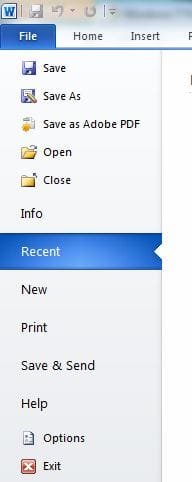
Here is a couple of images that may help with Office. These are from Word but I believe it's the same for Excel and probably the others. Not sure what limitations Starter Ed. will have though.

First go File - Options
WordLang.JPG

I think Screen Tip may be helpful but Display and Help Languages I think you have to purchase. Check the website links for more info.
WordLang2.JPG
 
Last edited:

My Computer

Computer Manufacturer/Model Number
Self built
OS
Windows 7 Ultimate x64
CPU
Intel Pentium Dual Core E5200 2.5GHz (3.77GHz OC)
Motherboard
Asus P5Q-E
Memory
Corsair 4GB DDR2 (4x1GB CM2X1024-6400C4)
Graphics Card(s)
Palit GeForce GTS 250 (1024MB)
Sound Card
On Board (ADI AD2000B 8ch HD)
Monitor(s) Displays
Samsung 32in LCD TV
Screen Resolution
1360x768
Hard Drives
2 x 1TB Samsung 103SJ (Raid0)
2 x External 500GB Samsung 502IJ (NexStar 3 HD Enclosures)
PSU
550W Antec Neo HE 550
Case
Antec P180
Cooling
Xigmatex Red Scorpion CPU Cooler. 3x120mm Fans
Keyboard
Logitech MX5000 Laser (Combo)
Mouse
Logitech MX5000 Laser (Combo)
Internet Speed
ADSL2+ (avg 10 Mbps Down, 0.80 Mbps up)
Other Info
Gigabyte GN-WP01GS 54g Wireless Lan Card
If what you have isn't sufficient you can Clean Reinstall - Factory OEM Windows 7 using the English ISO file provided for your licensed version.

Make your Recovery Disks first, and I'd also save a Win7 backup image of what you have now to easily go back. You could even shrink C in Disk Mgmt to temporarily Dual Boot the two OS's and have 30 days to decide before needing to delete or activate the English one. We can give you exact steps if you like.
 
Back
Top