Solved Camera and Scanner Wizard

noyb

New member
Local time
5:02 PM
Messages
1,040
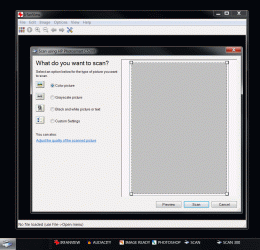
I can't find the Camera and Scanner wizard in W7 ..
Has it been renamed or eliminated ???
 

My Computer

Computer Manufacturer/Model Number
HP d4996t (upgraded)
OS
XP MCE .... XP Pro 64 .... W7 U x64
CPU
E6750, 2.67GHz C2D
Memory
4GB, PC2 6400
Graphics Card(s)
GeForce 9400GT
Monitor(s) Displays
Twin Samsung 2443BWT
Screen Resolution
1920x1200
Hard Drives
Many .. 3 Installed
PSU
460W
Internet Speed
Cable
Hello Noyb,

I believe it may have been replaced by Devices and Printers instead. After opening it, make sure that your device it plugged in, then right click on a empty area in Devices and Printers and click on Add a device. Then you can just follow the onscreen instructions for Add a device.

Hope this helps,
Shawn
 
Last edited:

My Computer

Computer type
PC/Desktop
Computer Manufacturer/Model Number
Self built custom
OS
64-bit Windows 11 Pro for Workstations
CPU
Intel i7-8700K OC'd to 5 GHz
Motherboard
ASUS ROG Maximus XI Formula Z390
Memory
64 GB (4x16GB) G.SKILL TridentZ RGB DDR4 3600 MHz
Graphics Card(s)
ASUS ROG-STRIX-GTX1080TI-O11G-GAMING
Sound Card
Integrated
Monitor(s) Displays
2 x Samsung Odyssey G7 27"
Screen Resolution
2560x1440
Hard Drives
1TB Samsung 990 PRO M.2,
4TB Samsung 990 PRO PRO M.2,
TerraMaster F8 SSD Plus NAS
PSU
Seasonic Prime Titanium 850W
Case
Thermaltake Core P3
Cooling
Corsair Hydro H115i
Keyboard
Logitech wireless K800
Mouse
Logitech MX Master 4
Internet Speed
2 Gb/s Download and 100 Mb/s Upload
Antivirus
Malwarebyte Anti-Malware Premium
Browser
Google Chrome
Other Info
Logitech Z625 speaker system,
Logitech BRIO 4K Pro webcam,
HP Color LaserJet Pro MFP M477fdn,
APC SMART-UPS RT 1000 XL - SURT1000XLI,
Galaxy S23 Plus phone
Thanks, but I don't think that's what I was looking for.
For example, In XP/Vista, one could run a HP all-in-one scanner without loading all of HP's problematic Image Zone software ..
using the M$ Camera n Scanner Wizard.

The closest W7 app I can find is the W7 Fax n Scan Wizard ...
but it looks a little more difficult to use as compared to the previous Camera n Scanner Wizard.
 

Attachments

  • Clip.gif
    Clip.gif
    271.3 KB · Views: 1,549

My Computer

Computer Manufacturer/Model Number
HP d4996t (upgraded)
OS
XP MCE .... XP Pro 64 .... W7 U x64
CPU
E6750, 2.67GHz C2D
Memory
4GB, PC2 6400
Graphics Card(s)
GeForce 9400GT
Monitor(s) Displays
Twin Samsung 2443BWT
Screen Resolution
1920x1200
Hard Drives
Many .. 3 Installed
PSU
460W
Internet Speed
Cable
That's the way it works and slowly u'll get used to it...:(

I just wanted to know if it's still there and what it's capabilities were.
It's a good utility to run if someone is having problems with their scanner software ...
If it works, then one knows the scanner Twain driver is installed and functional.

Don't think I'll be getting used to it ....
I cheat and use Irfanview to run my HP scanners ..
and do my OCR work from M$ Office :D
 

Attachments

  • Clip.gif
    Clip.gif
    147.9 KB · Views: 769

My Computer

Computer Manufacturer/Model Number
HP d4996t (upgraded)
OS
XP MCE .... XP Pro 64 .... W7 U x64
CPU
E6750, 2.67GHz C2D
Memory
4GB, PC2 6400
Graphics Card(s)
GeForce 9400GT
Monitor(s) Displays
Twin Samsung 2443BWT
Screen Resolution
1920x1200
Hard Drives
Many .. 3 Installed
PSU
460W
Internet Speed
Cable
anyone knows what dll this wizard is actually using or how to open it directly? Would be handy for creating a shortcut...

i mean the scan-wizard, not the install one!
 

My Computer

OS
Win7 64bit / WinXP 64bit
CPU
Core i5 750
Motherboard
Asus P7P55D LE
Memory
2x 2GB Mushkin Silver
Graphics Card(s)
ATI HD5770
Sound Card
HD onboard
Monitor(s) Displays
Dual View
Hard Drives
2x Samsung Sata 250GB
PSU
Seasonic 80+ 330W
Case
Antec Solo
Cooling
Stock + Case Fan
Windows Image Acquisition (WIA)

Most Image viewers that can acquire a scan ... use WIA
I have Shortcuts for my Ifanview that can start Irfanview .. And acquire the scan from the scanner.
Scanner software not required.

I haven't tried this in W7 yet

Does this help any ??
 

My Computer

Computer Manufacturer/Model Number
HP d4996t (upgraded)
OS
XP MCE .... XP Pro 64 .... W7 U x64
CPU
E6750, 2.67GHz C2D
Memory
4GB, PC2 6400
Graphics Card(s)
GeForce 9400GT
Monitor(s) Displays
Twin Samsung 2443BWT
Screen Resolution
1920x1200
Hard Drives
Many .. 3 Installed
PSU
460W
Internet Speed
Cable
I can relate to what the person is trying to get an answer to...I teach computer classes at the local college, and one of the subjects is how to scan. When we had the previous verson of windows - I used the scan wizard for instructing on how to use a scanner. The college upgraded to Windows 7, and I did find the Fax and Scan wizard that is a pain in the butt, quite frankly. Could anyone tell me where I might be able to get some written instructions and graphics of the windows so that I can better instruct the students on the processes envolved in using the so called "wizard" to just do a simple scan?
 

My Computer

OS
windows XP

My Computer

Computer type
PC/Desktop
Computer Manufacturer/Model Number
Self built custom
OS
64-bit Windows 11 Pro for Workstations
CPU
Intel i7-8700K OC'd to 5 GHz
Motherboard
ASUS ROG Maximus XI Formula Z390
Memory
64 GB (4x16GB) G.SKILL TridentZ RGB DDR4 3600 MHz
Graphics Card(s)
ASUS ROG-STRIX-GTX1080TI-O11G-GAMING
Sound Card
Integrated
Monitor(s) Displays
2 x Samsung Odyssey G7 27"
Screen Resolution
2560x1440
Hard Drives
1TB Samsung 990 PRO M.2,
4TB Samsung 990 PRO PRO M.2,
TerraMaster F8 SSD Plus NAS
PSU
Seasonic Prime Titanium 850W
Case
Thermaltake Core P3
Cooling
Corsair Hydro H115i
Keyboard
Logitech wireless K800
Mouse
Logitech MX Master 4
Internet Speed
2 Gb/s Download and 100 Mb/s Upload
Antivirus
Malwarebyte Anti-Malware Premium
Browser
Google Chrome
Other Info
Logitech Z625 speaker system,
Logitech BRIO 4K Pro webcam,
HP Color LaserJet Pro MFP M477fdn,
APC SMART-UPS RT 1000 XL - SURT1000XLI,
Galaxy S23 Plus phone
As this thread still seems active - i solved the issue with the shortcut by now:

wiaacmgr.exe is the file. If you do a search you will find it somewhere in your windows folder. However, for some reason it can be accessed via a shortcut here.
So i just copy-pasted it in my C:\Windows\System32 folder.

From here you can do shortcuts as ur pleased which will get you directly to the scanning interface!
 

My Computer

OS
Win7 64bit / WinXP 64bit
CPU
Core i5 750
Motherboard
Asus P7P55D LE
Memory
2x 2GB Mushkin Silver
Graphics Card(s)
ATI HD5770
Sound Card
HD onboard
Monitor(s) Displays
Dual View
Hard Drives
2x Samsung Sata 250GB
PSU
Seasonic 80+ 330W
Case
Antec Solo
Cooling
Stock + Case Fan
Back
Top