Camtasia Studio Ultra Slow speed?

Vistangel

New member
Local time
1:40 PM
Messages
58
Hello maybe someone could help me. Camtasia Studio 6 used only 60% of my old i7 laptop to render (1.6ghz, 4 cores) and now I have a new PC with i7 4790 (3.8ghz, 4 cores) and upgraded to camtasia studio 8. Rendering in every other program is 3x-4x times faster than my laptop. However Camtasia renders at the same slow speed, now with CPU utilization of only 20%. A 30 minute video takes up to 2 hours to render just like with my old laptop. What the***? I bought a new PC to render faster not to use my faster processor with 20% utilization instead of 60%.
So what can I do to make camtasia use 100% of my CPU? This speed ain't right at all. And as you can see, it was never the problem of my processor but that camtasia didn't use the 100% of processor power.
I tried a 30 minute h.264 mp4 1080p video in camtasia and it's been rendering it for 1 hour and it's less than half way in. For example Premiere Pro renders the same video in about 8-10 minutes with 100% CPU usage, same settings.
 

My Computer My Computer

At a glance

Windows 7 Home Premium x64Intel Core I7 4790 @ 3.6ghz (4.0ghz turbo boo...8gb DDR3 Corsair Vengeance (2x4)iGPU intel HD graphics 4600
Computer type
PC/Desktop
Computer Manufacturer/Model Number
Custom Built Desktop
OS
Windows 7 Home Premium x64
CPU
Intel Core I7 4790 @ 3.6ghz (4.0ghz turbo boost), stock
Motherboard
Asus z97m-plus, stock BIOS
Memory
8gb DDR3 Corsair Vengeance (2x4)
Graphics Card(s)
iGPU intel HD graphics 4600
Sound Card
Integrated Asus Crystal Sound
Screen Resolution
1920x1080
Hard Drives
WD Caviar Green 1tb,
Kingston v300 120gb
PSU
Cooler Master B600 - 600W
Case
Aerocool qs-200 White Lite
Cooling
Stock case cooler and stock CPU cooler
Antivirus
None
Browser
Chrome/IE
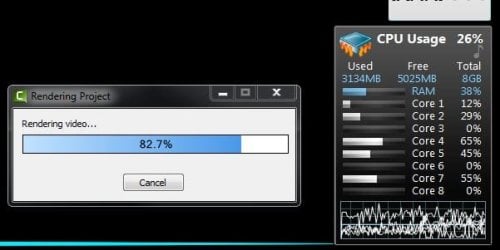
I've just done a 1080p render test with Camtasia 8 on an o/c 2600K 8GB system and cpu usage showed around 20%. See screenshot - the Camtasia codec doesn't seem to use all the threads. Maybe your old pc was using all 4 cores, but the new cpu can't use all available threads. Premiere Pro and similar progs will use all threads.

My test was a 1 minute screen record tutorial type presentation, so not much movement. The 1 min clip took 2m 30s to render with settings h.264, 1080p, 30fps, 5 sec key, level 5, 100% quality. Final bitrate was 15Mbps.

I don't know your settings/content, but if you were recording fast movement (ie games), your long render times might be about par for the course. I believe you can use other output codecs eg Quicktime that may be better threaded, but I've never tried that route. Maybe look on a Camtasia forum.

camtasia_render.JPG

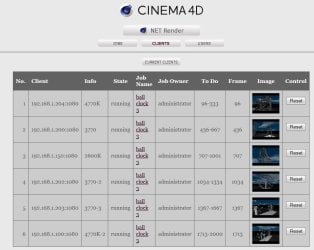
BTW - re : rendering, here's a snip of my little render farm - 6 * i7's = 24C/48T

48 core render.JPG
 
Last edited:

My Computer My Computer

At a glance

Windows 7 pro x64 SP1Intel i7-2600k o/c to 4.6GHz8GB Mushkin 1866MHzNvidia GTX 750 Ti 2GB
Computer type
PC/Desktop
Computer Manufacturer/Model Number
self build
OS
Windows 7 pro x64 SP1
CPU
Intel i7-2600k o/c to 4.6GHz
Motherboard
MSI Z68-GD80
Memory
8GB Mushkin 1866MHz
Graphics Card(s)
Nvidia GTX 750 Ti 2GB
Sound Card
integrated
Monitor(s) Displays
Liyama ProLite 27"
Screen Resolution
1920*1080 px
Hard Drives
Seagate 2TB
PSU
Coolermaster GX 750W
Case
Antec 300 case + 5 fans
Cooling
Dark Rock Pro
Internet Speed
62Mbit down 18Mbit up
Antivirus
MSE
Browser
Firefox
Other Info
Blackgold BGT3650 Quad HD TV card. Also have various 3770 + 4770K render boxes.
I've just done a 1080p render test with Camtasia 8 on an o/c 2600K 8GB system and cpu usage showed around 20%. See screenshot - the Camtasia codec doesn't seem to use all the threads. Maybe your old pc was using all 4 cores, but the new cpu can't use all available threads. Premiere Pro and similar progs will use all threads.

My test was a 1 minute screen record tutorial type presentation, so not much movement. The 1 min clip took 2m 30s to render with settings h.264, 1080p, 30fps, 5 sec key, level 5, 100% quality. Final bitrate was 15Mbps.

I don't know your settings/content, but if you were recording fast movement (ie games), your long render times might be about par for the course. I believe you can use other output codecs eg Quicktime that may be better threaded, but I've never tried that route. Maybe look on a Camtasia forum.

View attachment 327068

BTW - re : rendering, here's a snip of my little render farm - 6 * i7's = 24C/48T

View attachment 327072

Thanks for the reply. I used the same settings lol but with level 4 quality. The bad things is if I save the original .avi file and not render with camtasia, I can't use premiere pro to edit the video because it lags and has some frame issues. So it triples the editing time. I tried other codecs with worse results.
But I could make it use 80% of the processor! Here's what I did: I noticed if I produce instantly the video after recording, it resets the resolution to 800x600 instead of 1080p. It seemed weird and even after I set it to 1080p and started rendering, it used 20% CPU. BUT when I went to produce then cancel, the Camtasia Studio popped up. I deleted the video from the timeline and put it back. Started rendering and bumm 80-90% processor utilization :D Although it's still slower than most video editors, now it took 18 minutes to render a 30 minute long video with same settings.
Btw nice render farm you got there. 24 cores o.O
 

My Computer My Computer

At a glance

Windows 7 Home Premium x64Intel Core I7 4790 @ 3.6ghz (4.0ghz turbo boo...8gb DDR3 Corsair Vengeance (2x4)iGPU intel HD graphics 4600
Computer type
PC/Desktop
Computer Manufacturer/Model Number
Custom Built Desktop
OS
Windows 7 Home Premium x64
CPU
Intel Core I7 4790 @ 3.6ghz (4.0ghz turbo boost), stock
Motherboard
Asus z97m-plus, stock BIOS
Memory
8gb DDR3 Corsair Vengeance (2x4)
Graphics Card(s)
iGPU intel HD graphics 4600
Sound Card
Integrated Asus Crystal Sound
Screen Resolution
1920x1080
Hard Drives
WD Caviar Green 1tb,
Kingston v300 120gb
PSU
Cooler Master B600 - 600W
Case
Aerocool qs-200 White Lite
Cooling
Stock case cooler and stock CPU cooler
Antivirus
None
Browser
Chrome/IE
Back
Top