Can anyone help me remove these context menu items?

DDjusD

New member
Member
Local time
8:22 PM
Messages
25
Location
Chickamauga, Georgia, USA
First off I'd like to say that I have been search for a few hours now to no success. I've tried programs that remove or disable context menu items but none have worked. Can anyone please help me remove the following context menu items?

New
- Microsoft Word Document
- Microsoft PowerPoint Presentation
- WinRAR Archive
- Microsoft Excel Spreadsheet
- WinRAR ZIP Archive

Picture Files
- Rotate Clockwise
- Rotate Counterclockwise
- Set as Desktop Background

Computer
- Add A Network Location

Video Files
- Add To Windows Media Player list
- Play To
-- Xbox 360
 

My Computer

OS
Windows 7 Ultimate x64
One detail that would help is; where do you usually see this menu, the Desktop, Folders, Files, shortcuts?

What else is on it, can you post a snip of one?

You might have to rebuild them: http://www.sevenforums.com/tutorials/28677-new-context-menu-remove-restore-default-menu-items.html

Have you seen the other tutorials on context menus?
Scroll down a bit to where "context menus" start and see if any of them will help, the list goes into the next page: Windows 7 Tutorial Index | C

There is also the possibility of removing some of your list if you have CCleaner - PC Optimization and Cleaning - Free Download It might handle some of that.

Just be careful with it, you don't want to go pruning too much! This may help as a guide: CCleaner Tutorial « How-To Geek Forums
 

My Computer

Computer type
PC/Desktop
Computer Manufacturer/Model Number
Gateway DX4831-01e (Mid-Tower Desktop)
OS
Originally Win 7 Hm Prem x64 Ver 6.1.7600 Build 7601-SP1 | Upgraded to Windows 10 December 14, 2019
CPU
Intel i3 530 2.93GHz, 2933MHz 2 Cores 4 Logical Processors
Motherboard
Gateway H57M01 133 megahertz
Memory
6GB of 1,333MHz DDR3 SDRAM
Graphics Card(s)
32MB Intel Graphics Media Accelerator HD IGChip
Sound Card
Realtek High Definition Audio
Monitor(s) Displays
Gateway HX2000 20inch TFT active matrix TN
Screen Resolution
1600 x 900 x 59 hertz
Hard Drives
WDC WD10EADS-00M2B0 [HDD] (1000.20 GB) -- drive 0,
HL-DT-ST DVDRAM GH41N [CD-ROM dr]
Four card readers, and Four USB 2.0
PSU
300watts.
Case
Mid-Tower Desktop
Cooling
Stock from Gateway
Keyboard
Natural Ergonomic Keyboard 4000, see Other Info
Mouse
Orig. Gateway wore out now using Insignia USB wired optical
Internet Speed
Vz FIOS 10ms png 57.64Mbps down 65.53Mbps up Speedtest.org
Antivirus
Zamana Anti-logger with Anti-malware, MSE, Windows Firewall,
Browser
IE11.0.9600.19399-Upd ver11.0.135, Firefox 68.0.1 x64
Other Info
System Specs by Belarc.

BIOS: American Megatrends Inc. P01-A0 11/17/2009

Replaced the MS 'Natural' Standard PS/2 Enhanced 101-102 Keyboard with a new Natural Ergonomic Keyboard 4000 on August 1st 2014.

Canon Pixma MG3222 Printer.

Updated to IE11 on 12102015 | Fios Quantum Router g1100

Additional AV: SpywareBlaster, manual Mbam, SAS
For the New

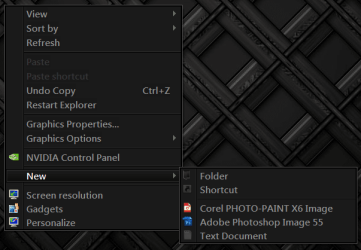
Make a New (I will use CorelDRAW X6 Graphic)
and look at it's Extension for this 1 it's .cdr
Backup the Registry 1st http://www.sevenforums.com/tutorials/4230-registry-backup-restore.html
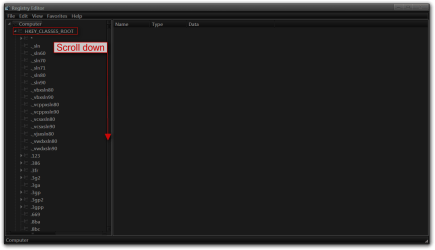
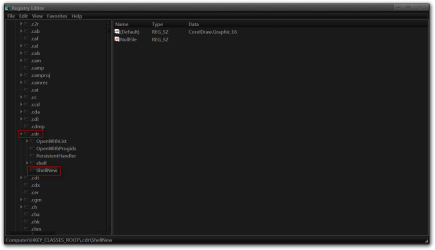
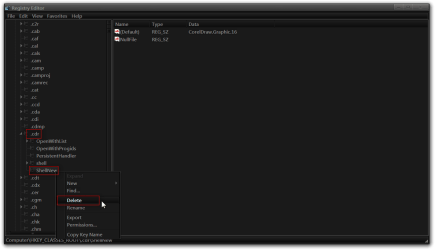
Type in start search regedit click on it and go to HKEY_CLASSES_ROOT expaned the tree and find the Extension (.cdr) expaned the tree and right click on shellnew and delete it.
Should be gone.

Jerry
1.PNG

2.PNG

3.png

4.png

5.png

6.png

7.PNG
 

My Computer

Computer type
Laptop
Computer Manufacturer/Model Number
Sager NP9170
OS
Win 7 Pro x64 / Win 10 Pro
CPU
Intel(R) Core(TM) i7-3630QM CPU @ 2.40GHz
Motherboard
CLEVO P170EM
Memory
12 GB
Graphics Card(s)
(1) Intel(R) HD Graphics 4000 (2) NVIDIA GeForce GTX 675M
Sound Card
(1) Realtek High Definition Audio (2) Intel(R) Display Aud
Monitor(s) Displays
17.3
Screen Resolution
1920x1080
Hard Drives
(1) Samsung 860 EVO 500GB(OS) (1) Samsung 860 EVO 500GB(Data)
Keyboard
Backlite
Antivirus
MSE, Malwarebytes Pro
Browser
Firefox
Other Info
DESKTOP: Custom-built.
OS: Win 10 Pro x64.
CASE: Rosewill R5.
CPU: Intel I5 4670K CPU @ 3.40GHz.
CPU COOLER: Cool Master Hyper 212 EVO.
MOTHERBOARD: Asus Z87-A.
MEMORY: Kingston HyperX 2x4 GB.
GPU: Nvidia Geforce 650 TI.
PSU: Corsair TX750.
DRIVES: (1) Samsung 840 120 GB SSD (2) Western Digital blue 500 GB 7200 RPM.

My Computer

Computer type
PC/Desktop
OS
Windows 10 Home x64
CPU
INTEL Core i5-750 Quad-Core 3.37GHz
Motherboard
ASUS P7P55D
Memory
HyperX Fury Black Series 8GB (2 x 4GB) 1866Mhz
Graphics Card(s)
EVGA GeForce GTX 750 Superclocked 1GB 128-Bit GDDR5
Monitor(s) Displays
LG 32MA68HY 32" IPS
Screen Resolution
1920 x 1080
Hard Drives
Samsung 840 Evo 120GB, SEAGATE 500GB Barracuda® 7200.12, SATA 3 Gb/s, 7200 RPM, 16MB cache
PSU
ANTEC TruePower New TP-550, 80 PLUS, 550W
Case
ANTEC Three Hundred Illusion
Cooling
COOLER MASTER Hyper 212 Plus, 4 x 120mm 1 x 140mm Noctua's
Internet Speed
85 + Mbps
Antivirus
Avast
Browser
Vivaldi
Back
Top