
Can anyone help me with my problem please

mg031612

New member
Local time
2:58 AM
Messages
7
Can anyone help me with my problem please
 

Attachments

  • IMG-20121201-00002.jpg
    IMG-20121201-00002.jpg
    197.8 KB · Views: 13

My Computer My Computer

OS
Microsoft Windows 7 Ultimate 32-bit
CPU
Intel(R) Core(TM)2 Quad CPU Q6700 @ 2.66GHz
Motherboard
ASUSTeK Computer INC.
Memory
2.00 GB
Graphics Card(s)
AMD Radeon HD 6700 Series 1GB
Sound Card
AMD High Definition Audio Device
Screen Resolution
1920x1080
Hard Drives
1TB WDC WD10EACS-00D6B1 ATA Device
Please post a maximized screenshot of Disk Management.

How To Access Disk Management in Windows 7

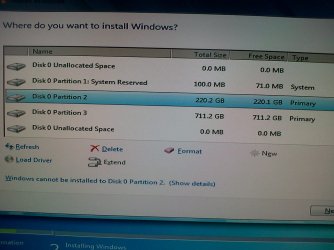
I see that you're trying to install Windows on Disk 0 Partition 2 and it can't be installed. According to your system specs you have Windows 7 Ultimate 32-bit already installed. Is it on Disk 0 Partition 2?

Are you trying to replace Ultimate 32-bit with something else?

Did you click on the error message "show details" link to find out what the problem is?

What exactly are you trying to acomplish? More details would be helpful. ;)
 

My Computer My Computer

Computer type
Laptop
Computer Manufacturer/Model Number
Sony Vaio VPCEB47GM Laptop
OS
Win 7 Pro 64-bit
CPU
Intel i5 2.4 Ghz
Memory
8GB DDR3
Graphics Card(s)
Intel HD 3000
Sound Card
IDT High Definition
Monitor(s) Displays
15.6 WGXA Anti-Glare LED
Screen Resolution
1280x800
Hard Drives
640Gb 7200rpm
Antivirus
MSE
Browser
Opera (primary) with IE9 backup
i am trying to reinstall my windows 7 32 bit ultimate.. and when i make partition 2 or (C) disk 0 will automatically appear.. and when i make partition 2 or (D) disk 0 unallocated space will automatically appear.. but before when im reinstalling my windows it doesnt look like this..
 

My Computer My Computer

OS
Microsoft Windows 7 Ultimate 32-bit
CPU
Intel(R) Core(TM)2 Quad CPU Q6700 @ 2.66GHz
Motherboard
ASUSTeK Computer INC.
Memory
2.00 GB
Graphics Card(s)
AMD Radeon HD 6700 Series 1GB
Sound Card
AMD High Definition Audio Device
Screen Resolution
1920x1080
Hard Drives
1TB WDC WD10EACS-00D6B1 ATA Device

My Computer My Computer

Computer type
PC/Desktop
Computer Manufacturer/Model Number
Home Built - Jan 2013
OS
Windows 7 64 Bit Home Premium SP1
CPU
i7-3820
Motherboard
Asus P9X79-PRO - Bios 4608
Memory
GSkill F3-14900CL9Q - 16GB
Graphics Card(s)
EVGA GeForce GTX660 - Driver 352.86
Sound Card
On board Realtek ALC898
Monitor(s) Displays
Acer S271HL
Screen Resolution
1920 x 1080
Hard Drives
#1- Samsung 840 Pro Series
#2- Western Digital WD1002FAEX Sata3 Black
#3- Western Digital WD1002FAEX Sata3 Black
PSU
Corsair CMPSU-850TX-V2 - 850 watt (by Seasonic)
Case
Corsair Obsidian 550D
Cooling
Standard 3 120mm case fans, Cooler Master Hyper 212 EVO
Keyboard
MS KC-0405
Mouse
Intellimouse 5-button
Internet Speed
56 Mbits/Sec (on a good day)
Antivirus
Avast & Malwarebytes
Browser
Firefox
Other Info
Asus DVD - DRW-24B1ST 24X
This tutorial shows all of the steps to do a clean install. If you want to reinstall on Disk 0 Partition 2 and leave everything else alone (Step 7 in the tutorial), you need to click on the Drive Options (advanced) link and follow the prompts. Or you could just format the entire hard drive and make one large partition.

http://www.sevenforums.com/tutorials/1649-clean-install-windows-7-a.html
 

My Computer My Computer

Computer type
Laptop
Computer Manufacturer/Model Number
Sony Vaio VPCEB47GM Laptop
OS
Win 7 Pro 64-bit
CPU
Intel i5 2.4 Ghz
Memory
8GB DDR3
Graphics Card(s)
Intel HD 3000
Sound Card
IDT High Definition
Monitor(s) Displays
15.6 WGXA Anti-Glare LED
Screen Resolution
1280x800
Hard Drives
640Gb 7200rpm
Antivirus
MSE
Browser
Opera (primary) with IE9 backup

My Computer My Computer

Computer type
Laptop
Computer Manufacturer/Model Number
Sony Vaio VPCEB47GM Laptop
OS
Win 7 Pro 64-bit
CPU
Intel i5 2.4 Ghz
Memory
8GB DDR3
Graphics Card(s)
Intel HD 3000
Sound Card
IDT High Definition
Monitor(s) Displays
15.6 WGXA Anti-Glare LED
Screen Resolution
1280x800
Hard Drives
640Gb 7200rpm
Antivirus
MSE
Browser
Opera (primary) with IE9 backup
Back
Top