Solved Can anyone help with this display problem

Ukdodger

New member
Member
VIP
Local time
12:37 AM
Messages
178
Location
Surrey England
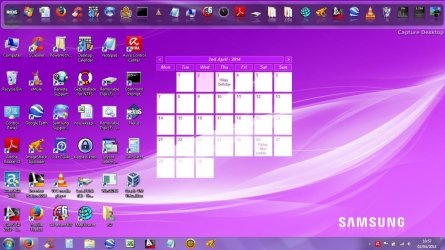
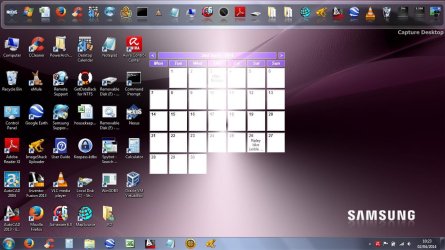
My laptop screen is going haywire the screenshots below show it's progression in the last hour. Right now it's bright green. Strangely it only affects the Desktop. The browser pages are unaffected. I've tried altering the various display options without result. My laptop is a Samsung RV510 and I'm running W7 home. Thanks. Any help greatly appreciated.
 

Attachments
  • Screenshot (10h 23m 38s).jpg
    Screenshot (10h 23m 38s).jpg
    136.8 KB · Views: 0
  • Screenshot (10h 57m 23s).jpg
    Screenshot (10h 57m 23s).jpg
    147.1 KB · Views: 1

My Computer

Computer type
Laptop
OS
Windows 7 home
Hi there ... Its an Intel Graphics Card you have ? Have you tried Restoring Defaults ?
 

My Computer

Computer Manufacturer/Model Number
W530-3630QM1
OS
windows 7 home 64bit
CPU
INTEL-CORE I7
Memory
16GB
Hard Drives
750GB
Browser
Chrome
Have a look at the personalize settings, look at the background.
Some times they can have a slide show set up, meaning it will change background colors ect.
 

My Computer

Computer type
PC/Desktop
Computer Manufacturer/Model Number
Custom Build
OS
Windows 7 Ultimate 64-bit
CPU
Intel G3420 3.2GHZ Dual Core
Motherboard
Gigabyte H87-HD3
Memory
Kingson 8GB 1600mhz
Graphics Card(s)
MSI R7970 TF 3GD5/OC BE
Monitor(s) Displays
21" LG & "19 Vertical Samsung
Hard Drives
120GB SSD - Boot
1TB WD
350GB External
2TB External (Wireless)
PSU
Corsair CX 500 modular
Case
Zalman Z11 Plus (modified)
Cooling
Corsair H55, 2x 120mm SP Corsair, 1x 140 Coolermaster
Keyboard
Corsair K50
Mouse
CSL Gaming
Internet Speed
164Mbps
Antivirus
Avast, Malwarebytes
Browser
Google Chrome, IE, Firefox
The only colours that appear to be changing are the background. In both screen shots, the icons, on the desktop and on the "bars" have not changed colour. I would agree with the suspicion that your background image is cycling through different images automatically.
 

My Computer

Computer type
PC/Desktop
Computer Manufacturer/Model Number
Custom
OS
Win7 Pro 32-bit, Win8 Pro 32-bit
CPU
AMD Phenom II X6 1090T
Motherboard
Gigabyte
Memory
4GB ddr3 1300
Graphics Card(s)
AMD HD 4290 onboard
Sound Card
Builtin Realtek HD Audio
Monitor(s) Displays
Samsung 24" widescreen, LG 23" widescreen
Screen Resolution
1920x1200/1920x1080
Hard Drives
Kingston 256GB SSD
Keyboard
Logitech Illuminated Keyboard
Mouse
Logitech M705 wireless mouse
Antivirus
Norton Av 2013
Browser
IE v10
The only colours that appear to be changing are the background. In both screen shots, the icons, on the desktop and on the "bars" have not changed colour. I would agree with the suspicion that your background image is cycling through different images automatically.

Thank you.

OP - have you tried my fix.
 

My Computer

Computer type
PC/Desktop
Computer Manufacturer/Model Number
Custom Build
OS
Windows 7 Ultimate 64-bit
CPU
Intel G3420 3.2GHZ Dual Core
Motherboard
Gigabyte H87-HD3
Memory
Kingson 8GB 1600mhz
Graphics Card(s)
MSI R7970 TF 3GD5/OC BE
Monitor(s) Displays
21" LG & "19 Vertical Samsung
Hard Drives
120GB SSD - Boot
1TB WD
350GB External
2TB External (Wireless)
PSU
Corsair CX 500 modular
Case
Zalman Z11 Plus (modified)
Cooling
Corsair H55, 2x 120mm SP Corsair, 1x 140 Coolermaster
Keyboard
Corsair K50
Mouse
CSL Gaming
Internet Speed
164Mbps
Antivirus
Avast, Malwarebytes
Browser
Google Chrome, IE, Firefox
The only colours that appear to be changing are the background. In both screen shots, the icons, on the desktop and on the "bars" have not changed colour. I would agree with the suspicion that your background image is cycling through different images automatically.

Thank you.

OP - have you tried my fix.

Thanks for all the replies. I appreciate your help. It's curious. Yes it looks as though it was cycling through backgrounds. As to why I dont know. I made no changes. In fact I didnt even know how to make that change. If it happens again I'll be back!

Thanks again.
 

My Computer

Computer type
Laptop
OS
Windows 7 home
No worries, Glad we could help.
 

My Computer

Computer type
PC/Desktop
Computer Manufacturer/Model Number
Custom Build
OS
Windows 7 Ultimate 64-bit
CPU
Intel G3420 3.2GHZ Dual Core
Motherboard
Gigabyte H87-HD3
Memory
Kingson 8GB 1600mhz
Graphics Card(s)
MSI R7970 TF 3GD5/OC BE
Monitor(s) Displays
21" LG & "19 Vertical Samsung
Hard Drives
120GB SSD - Boot
1TB WD
350GB External
2TB External (Wireless)
PSU
Corsair CX 500 modular
Case
Zalman Z11 Plus (modified)
Cooling
Corsair H55, 2x 120mm SP Corsair, 1x 140 Coolermaster
Keyboard
Corsair K50
Mouse
CSL Gaming
Internet Speed
164Mbps
Antivirus
Avast, Malwarebytes
Browser
Google Chrome, IE, Firefox
Back
Top