Can anyone Identify This?

pageyboy

New member
Member
Local time
12:48 PM
Messages
55
I noticed this morning a small file had appeared on my main drive. I have took a snip and attached it this message. I know its small and when I go to delete it, it requires an administrator to do this. The file isn't hidden anywhere. All I did was click on computer - C Drive and it was sitting beneath the folders. Now I could easily click yes on the permissions box to delete but I don't want to just yet incase it's of some importance.

Any help would be appreciated.
 

Attachments

  • Capture.JPG
    Capture.JPG
    13.8 KB · Views: 63

My Computer

OS
Windows 7 Ultimate x64
CPU
i7 CORE 2 QUAD 920 (2.66GHZ, 8MB L2 CACHE, 1066MHZ FSB)
Motherboard
GIGABYTE GA-EX58-UD3R MOTHERBOARD
Memory
3 x CORSAIR 2GB PC12800 DDR3 1600MHZ RAM
Graphics Card(s)
XFX NVIDIA GTS 250 512MB PCI-E GRAPHICS CARD
Sound Card
X-Fi Titanium Fatal1ty Pro 7.1 Soundcard - PCI-Express
Monitor(s) Displays
Samsung SM2343BW 23"
Screen Resolution
2048x1152
Hard Drives
2 x 500GB S-ATA 7200RPM Hard Drive
PSU
NorthQ 850W Dual Rail PSU
Case
Coolermaster Elite 330
Cooling
Noctua CPU Heatsink and Cooler
Keyboard
Microsoft Wireless Laser Keyboard 5000
Mouse
Microsoft Wireless Laser Mouse 5000
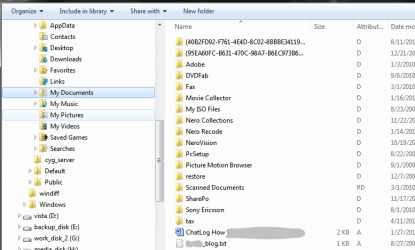
This happens rather often. Look at the attached snip of my "My Documents". Every single entry in the list was automatically created by some program or other. Most of them put their own names to the folders, some put the alphanumeric string similar to what you've got.

This string is the identifier code used in the registry. Basically you can go to the registry, find that string and this way figure out which program put that files there. To do this, open the registry (run regedit) and go to HKEY_CLASSES_ROOT -> CLSID and find that string. If it's not there, you can search for it by pressing Ctrl-F and typing first few characters.

In any case, these files are rarely important. To test that you can simply create a restore point, rename the file (add old to the end of the filename or something), and restart. If everything is functioning normally for a while, then you're safe to delete it. Just try to use several programs before you do so, just to make sure that nothing got broken.
 

Attachments

  • Capture.PNG
    Capture.PNG
    20.6 KB · Views: 27

My Computer

Computer Manufacturer/Model Number
Dell Inspiron 530
OS
Windows 7 Ultimate (x64)
CPU
Q6600
Memory
8 GB
Graphics Card(s)
ATI Radeon HD 2600 XT
Monitor(s) Displays
Samsung Syncmaster P2450
Screen Resolution
1920x1080
Hard Drives
Samsung HD103UJ
Samsung HD501LJ
Internet Speed
25 Mb/s
Thanks for the response. I tried what you suggested and the folder wasn't there. So I tried to "Find It" using Ctrl-F and typed in the first sevral characters and nothing came back.

I may try what you have suggested in your next step about seeing if the system runs ok without it. I was interested to see what program created it though. Thanks for the help.
 

My Computer

OS
Windows 7 Ultimate x64
CPU
i7 CORE 2 QUAD 920 (2.66GHZ, 8MB L2 CACHE, 1066MHZ FSB)
Motherboard
GIGABYTE GA-EX58-UD3R MOTHERBOARD
Memory
3 x CORSAIR 2GB PC12800 DDR3 1600MHZ RAM
Graphics Card(s)
XFX NVIDIA GTS 250 512MB PCI-E GRAPHICS CARD
Sound Card
X-Fi Titanium Fatal1ty Pro 7.1 Soundcard - PCI-Express
Monitor(s) Displays
Samsung SM2343BW 23"
Screen Resolution
2048x1152
Hard Drives
2 x 500GB S-ATA 7200RPM Hard Drive
PSU
NorthQ 850W Dual Rail PSU
Case
Coolermaster Elite 330
Cooling
Noctua CPU Heatsink and Cooler
Keyboard
Microsoft Wireless Laser Keyboard 5000
Mouse
Microsoft Wireless Laser Mouse 5000
Such folders are usually temp folders left behind by app installs like .NET, service packs and office.
 

My Computer

Computer Manufacturer/Model Number
Too many to describe...
OS
Windows 7 x64 pro/ Windows 7 x86 Pro/ XP SP3 x86
Such folders are usually temp folders left behind by app installs like .NET, service packs and office.

Thanks, I have made a copy of the file on a different drive. I have deleted the file and will use the computer for a few days. If everything goes ok then I will get rid of it altogether.
 

My Computer

OS
Windows 7 Ultimate x64
CPU
i7 CORE 2 QUAD 920 (2.66GHZ, 8MB L2 CACHE, 1066MHZ FSB)
Motherboard
GIGABYTE GA-EX58-UD3R MOTHERBOARD
Memory
3 x CORSAIR 2GB PC12800 DDR3 1600MHZ RAM
Graphics Card(s)
XFX NVIDIA GTS 250 512MB PCI-E GRAPHICS CARD
Sound Card
X-Fi Titanium Fatal1ty Pro 7.1 Soundcard - PCI-Express
Monitor(s) Displays
Samsung SM2343BW 23"
Screen Resolution
2048x1152
Hard Drives
2 x 500GB S-ATA 7200RPM Hard Drive
PSU
NorthQ 850W Dual Rail PSU
Case
Coolermaster Elite 330
Cooling
Noctua CPU Heatsink and Cooler
Keyboard
Microsoft Wireless Laser Keyboard 5000
Mouse
Microsoft Wireless Laser Mouse 5000
Back
Top