Solved Can I add hard drive to pictured PC and is the fan OK

April Raine

New member
Member
Local time
3:37 PM
Messages
78
Here is a photo of the inside of a windows 7 64 bit PC

1 Does it look like second hard drive can be fitted?I want to add one but what will hold it in place to its left?

2 Is the fan a bit sideways

3 That is the psu top right?

Thanks
 

Attachments

  • PC_Inside.JPG
    PC_Inside.JPG
    485.2 KB · Views: 20

My Computer My Computer

At a glance

win 7 home premium 64 bit16GB
Computer type
PC/Desktop
Computer Manufacturer/Model Number
Medion
OS
win 7 home premium 64 bit
Motherboard
ms 7616
Memory
16GB
Hard Drives
Two 1 TB
I guess that's your drive bottom left and looks like bay next to it will accommodate another drive.
I don't know what's going on with that fan. Is it just laying there or attached somehow?
Yes, the PSU is top rear.
Good luck. :cool:
 

My Computer My Computer

At a glance

Windows 7
Computer type
Laptop
OS
Windows 7
What will support the drive at the left side?

The fan is attached but ssems loose
 

My Computer My Computer

At a glance

win 7 home premium 64 bit16GB
Computer type
PC/Desktop
Computer Manufacturer/Model Number
Medion
OS
win 7 home premium 64 bit
Motherboard
ms 7616
Memory
16GB
Hard Drives
Two 1 TB
That fan does not look right. I would explore alternative places where it can be properly fixed.
 

My Computer My Computer

At a glance

Vista, Windows7, Mint Mate, Zorin, Windows 8from 1.6GHz Duo to i7
Computer Manufacturer/Model Number
HP, Dell, Gateway, Toshiba - 4 laptops and 2 desktops
OS
Vista, Windows7, Mint Mate, Zorin, Windows 8
CPU
from 1.6GHz Duo to i7
Monitor(s) Displays
2x HP w2207
Hard Drives
5x HDD, 7x SSD, 12x Externals
Keyboard
with trackball - no mices
Mouse
Trackball mice
Internet Speed
DSL 6000
That looks like a CPU heatsink fan with a plastic air duct to help get cool air to the CPU.
Does that air duct line up with a vent opening on the PC case (side panel) ?
It looks like a custom air duct for that PC so the air duct doesn't interfere with the RAM.
 

My Computer My Computer

At a glance

Multi-Boot W7_Pro_x64 W8.1_Pro_x64 W10_Pro_x6...AMD Athlon II x4 6206GB GSkill DDR2 800AMD 4670 GPU + AMD 4200 IGP
Computer type
PC/Desktop
Computer Manufacturer/Model Number
home built
OS
Multi-Boot W7_Pro_x64 W8.1_Pro_x64 W10_Pro_x64 +Linux_VMs +Chromium_VM
CPU
AMD Athlon II x4 620
Motherboard
Gigabyte GA-MA785G-UD3H
Memory
6GB GSkill DDR2 800
Graphics Card(s)
AMD 4670 GPU + AMD 4200 IGP
Sound Card
on board Realtek ALC889A
Monitor(s) Displays
RCA 40" LCD TV, Insignia 32" LCD TV, HP 15" LCD monitor
Screen Resolution
1680 x 1050
Hard Drives
OCZ Vertex 3 120GB,
Samsung F3 1TB (3),
Several others - WD, Seagate, Hitachi, ...
PSU
Corsair 500 W
Case
Rosewill mid tower
Cooling
CM 90mm rifle
Keyboard
Gyration wireless, Logitech wireless, Dell USB wired
Mouse
Gyration wireless, Logitech wireless, V7 USB wired
Internet Speed
Spectrum - 100Mbps D / 10Mbps U
Antivirus
Avast, MBAM3, EMET, WinPatrol
Browser
Pale Moon, Firefox, IE
Other Info
2 multi-boot PC's
Mainly HTPC/Office/Gen purpose (no gaming).
Trendnet USB KVM.
LG DVD burner/Blue Ray Player.
Tray system for removable SATA backup drives.

Not currently OCd, under-volted.
I use Hybrid sleep, rarely re-boot or shutdown.

Hauppauge HD-PVR, Avermedia PCIe TV Tuner, Hauppauge PCI TV Tuner.
That looks like a CPU heatsink fan with a plastic air duct to help get cool air to the CPU.
Does that air duct line up with a vent opening on the PC case (side panel) ?
It looks like a custom air duct for that PC so the air duct doesn't interfere with the RAM.
yes it does line up with opening in the case to allow air from fan out. it is lined up properly when the case is closed but probably needs some paste hold in place.

Is the blue one above the psu a pci express slot?

what does
Drives
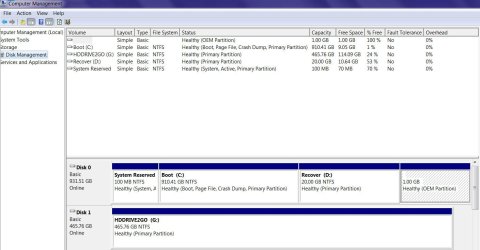
1499.13 Gigabytes Usable Hard Drive Capacity
143.92 Gigabytes Hard Drive Free Space
mean?
i get it from Belarc Advisor. There is a 1tb disk almost full
 

My Computer My Computer

At a glance

win 7 home premium 64 bit16GB
Computer type
PC/Desktop
Computer Manufacturer/Model Number
Medion
OS
win 7 home premium 64 bit
Motherboard
ms 7616
Memory
16GB
Hard Drives
Two 1 TB
That fan does not look right. I would explore alternative places where it can be properly fixed.
There is nowhere else. The air duct lines with an opening in the case to form a sort of 'tunnel' to move the air to the opening in the case. It is OK when case closed
 

My Computer My Computer

At a glance

win 7 home premium 64 bit16GB
Computer type
PC/Desktop
Computer Manufacturer/Model Number
Medion
OS
win 7 home premium 64 bit
Motherboard
ms 7616
Memory
16GB
Hard Drives
Two 1 TB
Well, we can't see the most important part of the motherboard to determine if you can fit another drive, the SATA ports. According to the picture they should be located under the jumble of wires coming out of the power supply. Look there and see if there is a free port. If yes , then you are good.
 

My Computer My Computer

At a glance

Windows 7 Professional 64bitAMD Athlon II X3 44012.0 GB Dual-Channel DDR3 @ 669MHzAMD Radeon HD 6850
OS
Windows 7 Professional 64bit
CPU
AMD Athlon II X3 440
Motherboard
ASUS M4A77TD
Memory
12.0 GB Dual-Channel DDR3 @ 669MHz
Graphics Card(s)
AMD Radeon HD 6850
Sound Card
AMD High Definition Audio Device
Monitor(s) Displays
Dell 317FP, Generic PnP Monitor
Screen Resolution
1920x1080
Hard Drives
112GB OCZ OCZ-AGIL ITY3 SATA Disk Device (SSD)
932GB Western Digital WDC WD10 01FALS-00E3A0 SATA Disk Device (SATA)
466GB Western Digital WDC WD50 01AALS-00L3B2 SATA Disk Device (SATA)
Case
ANTEC 300 ILLUSION
Cooling
CoolerMaster Hyper 212 plus
Other Info
I have two 4GB Corsair XMS3 modules and two 2GB Corsair XMS3 modules.
That looks like a CPU heatsink fan with a plastic air duct to help get cool air to the CPU.
Does that air duct line up with a vent opening on the PC case (side panel) ?
It looks like a custom air duct for that PC so the air duct doesn't interfere with the RAM.

I agree with the above. I had one like that many moons ago. If the black funnel above the fan is not loose, then it will be OK. The blue slot below the PSU can be used for PCI-Express. A PCI-Express is the short blue part on the left. You can either put a PCI-Express card in the short slot or a regular card and use the whole slot. Some motherboards have only the short PCI-Express slot by itself. == Follow the red SATA wire from your Hard Drive (HDD) to where it is plugged in on the Motherboard. Most likely there will be an empty slot next to it. If so you can plug in the additional HDD in to it and there is room to put another HDD next to the one you have. There are usually little rails where the HDD just slides in and you can put a couple screws in to make sure it says there. The screws come with the HDD.
 

My Computer My Computer

At a glance

Windows 7 Home Premium 32-Bit - Build 7600 SP1Intel Core i3-2120 3.30GhzKingston 4 GB DDR3 1333 mhzAMD Radeon HD6670
Computer type
PC/Desktop
Computer Manufacturer/Model Number
Custom Build
OS
Windows 7 Home Premium 32-Bit - Build 7600 SP1
CPU
Intel Core i3-2120 3.30Ghz
Motherboard
Asus P8Z68-V LX Intel Z68 Socket H2 ATX
Memory
Kingston 4 GB DDR3 1333 mhz
Graphics Card(s)
AMD Radeon HD6670
Sound Card
Sound Blaster Audigy SE 24-Bit
Monitor(s) Displays
Asus VE228
Screen Resolution
1440 X 900
Hard Drives
OCZ Vertex 3 120 GB Sata 3 SSD ==
Kingston SH103/S3 120 G Hyper X 120 GB SSD ==
Western Digital 500 GB Caviar Green 7200 RPM ==
PSU
Corsair CX600M == 600 Watt
Case
NZXT Apollo - Silver with Clear Side Panel
Cooling
Three 120 mm Fans
Keyboard
Microsoft Natural 4000
Mouse
Microsoft Custom Optical 3000
Internet Speed
AT&T Fiber Optic Wireless Network
Antivirus
Microsoft Security Essentials
Browser
Chrome
Other Info
120 mm Blue LED Fan -- Three Blue LED Lazer Light Sticks

My Computer My Computer

At a glance

Multi-Boot W7_Pro_x64 W8.1_Pro_x64 W10_Pro_x6...AMD Athlon II x4 6206GB GSkill DDR2 800AMD 4670 GPU + AMD 4200 IGP
Computer type
PC/Desktop
Computer Manufacturer/Model Number
home built
OS
Multi-Boot W7_Pro_x64 W8.1_Pro_x64 W10_Pro_x64 +Linux_VMs +Chromium_VM
CPU
AMD Athlon II x4 620
Motherboard
Gigabyte GA-MA785G-UD3H
Memory
6GB GSkill DDR2 800
Graphics Card(s)
AMD 4670 GPU + AMD 4200 IGP
Sound Card
on board Realtek ALC889A
Monitor(s) Displays
RCA 40" LCD TV, Insignia 32" LCD TV, HP 15" LCD monitor
Screen Resolution
1680 x 1050
Hard Drives
OCZ Vertex 3 120GB,
Samsung F3 1TB (3),
Several others - WD, Seagate, Hitachi, ...
PSU
Corsair 500 W
Case
Rosewill mid tower
Cooling
CM 90mm rifle
Keyboard
Gyration wireless, Logitech wireless, Dell USB wired
Mouse
Gyration wireless, Logitech wireless, V7 USB wired
Internet Speed
Spectrum - 100Mbps D / 10Mbps U
Antivirus
Avast, MBAM3, EMET, WinPatrol
Browser
Pale Moon, Firefox, IE
Other Info
2 multi-boot PC's
Mainly HTPC/Office/Gen purpose (no gaming).
Trendnet USB KVM.
LG DVD burner/Blue Ray Player.
Tray system for removable SATA backup drives.

Not currently OCd, under-volted.
I use Hybrid sleep, rarely re-boot or shutdown.

Hauppauge HD-PVR, Avermedia PCIe TV Tuner, Hauppauge PCI TV Tuner.
PCIE16 slots are longer than PCI slots. We could have cleared this up much faster with
make/model number of the desktop tower. The drive will probably have screws to hold in bay.
Kinda strange looking desktop and I've been inside a million of them but new crap every day
and I've been retired for quite a while.
I couldn't fill a 1 TB drive in the rest of what life I have left. Krazy.:p
Good luck. :cool:
 

My Computer My Computer

At a glance

Windows 7
Computer type
Laptop
OS
Windows 7
It is a Medion MD8341
 

Attachments

  • comp_mgmt.jpg
    comp_mgmt.jpg
    97.2 KB · Views: 5

My Computer My Computer

At a glance

win 7 home premium 64 bit16GB
Computer type
PC/Desktop
Computer Manufacturer/Model Number
Medion
OS
win 7 home premium 64 bit
Motherboard
ms 7616
Memory
16GB
Hard Drives
Two 1 TB
Your C partition, where Windows lives, is nearly full--only 1 percent free space. Not good.

Medion MD8341?

Is that what Belarc told you? Is "Medion" allegedly the brand name on the PC itself? Or does that refer to the motherboard?

If you have a Belarc report, it should provide considerable detail on your hardware, including the motherboard.

I searched "Medion MD8341" with Google and didn't have much luck.

Is this a Lenovo PC by any chance?
 

My Computer My Computer

At a glance

Windows 7 Home Premium SP1, 64-bitIntel Skylake i5-6600K, not overclocked8 GB HyperX DDR4-2666 (2 x 4 GB)none; graphics are integrated on CPU
Computer type
PC/Desktop
Computer Manufacturer/Model Number
Ignatz Special; 4 speed manual gearbox; factory air conditioning; one of one
OS
Windows 7 Home Premium SP1, 64-bit
CPU
Intel Skylake i5-6600K, not overclocked
Motherboard
AsRock Z170M Extreme 4, micro ATX
Memory
8 GB HyperX DDR4-2666 (2 x 4 GB)
Graphics Card(s)
none; graphics are integrated on CPU
Sound Card
onboard: Realtek ALC1150; external: USB Behringer UF0-202
Monitor(s) Displays
Dell S2340M 23 inch IPS
Screen Resolution
1600 x 900
Hard Drives
System: Crucial MX100 series SSD, 128 GB;
Data: Samsung Spinpoint 103SJ, 1 TB;
Backup: WD Caviar Green WD30EZRX-00D8PB0, 3 TB
PSU
Rosewill SilentNight 500 watt fanless, semi-modular
Case
Antec Solo II
Cooling
Noctua NH-U12S; Noctua F12 intake, Noctua S12A exhaust
Keyboard
Microsoft 200 6JH-00001 USB
Mouse
Dell or Microsoft optical wired; USB
Antivirus
Microsoft Security Essentials and Malwarebytes Premium
Browser
Pale Moon
Other Info
All fans PWM; speeds at idle: CPU circa 500 rpm; intake circa 600 rpm; exhaust circa 600 rpm; CPU temps 27 idle and 47 C load in a warm room (27 C/81 F) when running Intel Extreme Tuning Utility stress test.
Your C partition, where Windows lives, is nearly full--only 1 percent free space. Not good.

Medion MD8341?

Is that what Belarc told you? Is "Medion" allegedly the brand name on the PC itself? Or does that refer to the motherboard?

If you have a Belarc report, it should provide considerable detail on your hardware, including the motherboard.

I searched "Medion MD8341" with Google and didn't have much luck.

Is this a Lenovo PC by any chance?
https://www.google.com/search?q=Medion+MD8341&ie=utf-8&oe=utf-8

the computer MEDION® AKOYA® E4355 D (MD 8341)

motherboard ms 7616

I thought it was the brand of pc you asked? Belarc did not tell me it is medion I knew that
 

My Computer My Computer

At a glance

win 7 home premium 64 bit16GB
Computer type
PC/Desktop
Computer Manufacturer/Model Number
Medion
OS
win 7 home premium 64 bit
Motherboard
ms 7616
Memory
16GB
Hard Drives
Two 1 TB
The cooling focus is squarely on the CPU. A huge shroud sits atop the thin, active CPU cooler and funnels external air towards it from the punctured side panel. The cooler's fan spins at a leisurely pace and because this is the only fan in the system, it means that the system runs very quietly overall.
(I've never seen a PSU without a fan but what do I know.)
And there is room and slot for another drive in drive bay.
I better study up, AGAIN, on some of the latest stuff. Me and my acer aspire lappy do just fine. :cool:
Time goes by fast for older people like me and I can't believe how much price has dropped on SSDs.
I bought one couple years ago and it was only 120GB or 250GB but it cost well over $400. I sent it
back because I didn't see $400 worth of performance change other that a 5 second decrease boot up. :p
 

My Computer My Computer

At a glance

Windows 7
Computer type
Laptop
OS
Windows 7
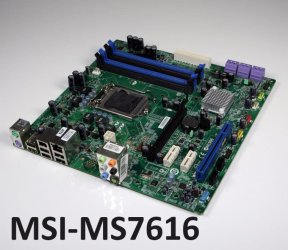
Here's a pic of the motherboard, an MSI MS-7616.

Apparently socket 1156, era circa 2010; uses DDR3 memory.

It's highly likely you can put another hard drive in it, but I can't find a clear picture of the interior of the case nor do I know exactly who made that case.

I'd never heard of Medion before---apparently they were purchased by Lenovo a few years back.

You can download the manual for the PC at this link. I looked at it, but it does not provide any details about the case or adding additional drives:

https://www.medion.com/gb/service/start/_product.php?msn=10013506&gid=2


Worst case scenario----even if it won't accept another hard drive, you could replace that full 1 TB drive with a larger 2 TB drive.
 

Attachments

  • MS7616,jpg.jpg
    MS7616,jpg.jpg
    88.1 KB · Views: 4

My Computer My Computer

At a glance

Windows 7 Home Premium SP1, 64-bitIntel Skylake i5-6600K, not overclocked8 GB HyperX DDR4-2666 (2 x 4 GB)none; graphics are integrated on CPU
Computer type
PC/Desktop
Computer Manufacturer/Model Number
Ignatz Special; 4 speed manual gearbox; factory air conditioning; one of one
OS
Windows 7 Home Premium SP1, 64-bit
CPU
Intel Skylake i5-6600K, not overclocked
Motherboard
AsRock Z170M Extreme 4, micro ATX
Memory
8 GB HyperX DDR4-2666 (2 x 4 GB)
Graphics Card(s)
none; graphics are integrated on CPU
Sound Card
onboard: Realtek ALC1150; external: USB Behringer UF0-202
Monitor(s) Displays
Dell S2340M 23 inch IPS
Screen Resolution
1600 x 900
Hard Drives
System: Crucial MX100 series SSD, 128 GB;
Data: Samsung Spinpoint 103SJ, 1 TB;
Backup: WD Caviar Green WD30EZRX-00D8PB0, 3 TB
PSU
Rosewill SilentNight 500 watt fanless, semi-modular
Case
Antec Solo II
Cooling
Noctua NH-U12S; Noctua F12 intake, Noctua S12A exhaust
Keyboard
Microsoft 200 6JH-00001 USB
Mouse
Dell or Microsoft optical wired; USB
Antivirus
Microsoft Security Essentials and Malwarebytes Premium
Browser
Pale Moon
Other Info
All fans PWM; speeds at idle: CPU circa 500 rpm; intake circa 600 rpm; exhaust circa 600 rpm; CPU temps 27 idle and 47 C load in a warm room (27 C/81 F) when running Intel Extreme Tuning Utility stress test.
You can't fit more than two hard drives in the case and you won't want to upgrade to anything more than a mid-range graphics card unless you also upgrade the power supply and get a new case. There won't be enough power to run a high-end graphics card, and there won't be sufficient space in the case to house a longer card and power supply.
But I don't know what your plan is but, YES, it will accept another hard drive. :cool:
 

My Computer My Computer

At a glance

Windows 7
Computer type
Laptop
OS
Windows 7
Here's a pic of the motherboard, an MSI MS-7616.

Apparently socket 1156, era circa 2010; uses DDR3 memory.

It's highly likely you can put another hard drive in it, but I can't find a clear picture of the interior of the case nor do I know exactly who made that case.

I'd never heard of Medion before---apparently they were purchased by Lenovo a few years back.

You can download the manual for the PC at this link. I looked at it, but it does not provide any details about the case or adding additional drives:

https://www.medion.com/gb/service/start/_product.php?msn=10013506&gid=2


Worst case scenario----even if it won't accept another hard drive, you could replace that full 1 TB drive with a larger 2 TB drive.
Thanks where did you get the picture of the MB? I have the manual but there is no relevant detail. I only want an extra drive and maybe a sound card with stereo mix which is disabled on this. PC. Did not know lenovo bought medion
 

My Computer My Computer

At a glance

win 7 home premium 64 bit16GB
Computer type
PC/Desktop
Computer Manufacturer/Model Number
Medion
OS
win 7 home premium 64 bit
Motherboard
ms 7616
Memory
16GB
Hard Drives
Two 1 TB
Thanks where did you get the picture of the MB? I have the manual but there is no relevant detail. I only want an extra drive and maybe a sound card with stereo mix which is disabled on this. PC. Did not know lenovo bought medion

https://www.google.com/search?q=MSI+MS-7616&ie=utf-8&oe=utf-8


Stereo Mix can be tricky on Windows 7.

Maybe you don't need another sound card for it. Maybe you do.

What exactly have you done to attempt to enable Stereo Mix?

Certain sound cards can add that capability, but many cannot. You need to be careful about which one you choose if you in fact cannot enable Stereo Mix with your existing setup.

A USB external sound card should work, for $30 or $40. That's what I used for a while until I changed to a motherboard that supported Stereo Mix directly from the built-in sound chip.
 

My Computer My Computer

At a glance

Windows 7 Home Premium SP1, 64-bitIntel Skylake i5-6600K, not overclocked8 GB HyperX DDR4-2666 (2 x 4 GB)none; graphics are integrated on CPU
Computer type
PC/Desktop
Computer Manufacturer/Model Number
Ignatz Special; 4 speed manual gearbox; factory air conditioning; one of one
OS
Windows 7 Home Premium SP1, 64-bit
CPU
Intel Skylake i5-6600K, not overclocked
Motherboard
AsRock Z170M Extreme 4, micro ATX
Memory
8 GB HyperX DDR4-2666 (2 x 4 GB)
Graphics Card(s)
none; graphics are integrated on CPU
Sound Card
onboard: Realtek ALC1150; external: USB Behringer UF0-202
Monitor(s) Displays
Dell S2340M 23 inch IPS
Screen Resolution
1600 x 900
Hard Drives
System: Crucial MX100 series SSD, 128 GB;
Data: Samsung Spinpoint 103SJ, 1 TB;
Backup: WD Caviar Green WD30EZRX-00D8PB0, 3 TB
PSU
Rosewill SilentNight 500 watt fanless, semi-modular
Case
Antec Solo II
Cooling
Noctua NH-U12S; Noctua F12 intake, Noctua S12A exhaust
Keyboard
Microsoft 200 6JH-00001 USB
Mouse
Dell or Microsoft optical wired; USB
Antivirus
Microsoft Security Essentials and Malwarebytes Premium
Browser
Pale Moon
Other Info
All fans PWM; speeds at idle: CPU circa 500 rpm; intake circa 600 rpm; exhaust circa 600 rpm; CPU temps 27 idle and 47 C load in a warm room (27 C/81 F) when running Intel Extreme Tuning Utility stress test.

My Computer My Computer

At a glance

win 7 home premium 64 bit16GB
Computer type
PC/Desktop
Computer Manufacturer/Model Number
Medion
OS
win 7 home premium 64 bit
Motherboard
ms 7616
Memory
16GB
Hard Drives
Two 1 TB
Back
Top