Can I allocate more memory for particular applications?

keshav1

New member
Local time
1:11 PM
Messages
2
Hi everyone,

This is my first post here, and sorry if this topic has been covered before, but I've searched extensively and still haven't found what I'm looking for.

Basically, I'm a recording engineer and I run Steinberg's Cubase on Windows 7 32-bit, Home Basic. For some reason, Windows has allocated about 950mb to Cubase, and if I cross this limit my projects crash. Now, what I want to know is - is there any way I can increase the amount of RAM allocated to Cubase? I believe in most cases Cubase can use up to 1.4GB, but I'm assuming that the 950mb limit in my case is somehow due to me using Home Basic (I can't think of any other reason).

The other option I've considered is the /3GB switch which would "free up" more memory for my applications, but I'm not sure if that's safe for my system - from what I understand, it allocates 3GB of RAM for user processes and just the 1GB for kernel processes. Would my system be able to run with just that 1 GB?

I'm sorry if I'm coming across as ignorant or silly, I'm just in a bit of a fix as 950mb is definitely WAY too little for my needs.

Any help would be greatly appreciated. Again, sorry if this has been covered before.

Regards,
Keshav
 

My Computer My Computer

At a glance

Windows 7 Home Basic 32bitIntel Core i7 870 @ 2.8Ghz4GB RAMNVIDIA 8600GT
OS
Windows 7 Home Basic 32bit
CPU
Intel Core i7 870 @ 2.8Ghz
Memory
4GB RAM
Graphics Card(s)
NVIDIA 8600GT
Sound Card
Focusrite Saffire Pro 14
Monitor(s) Displays
Samsung
PSU
Coolermaster
Case
Coolermaster
Cooling
Coolermaster
I don't think you can and I'm sure you shouldn't. Windows 7 will take care of handling the ram just great. I would recommend a upgrade to at least Windows 7 Home Premium 64. The programs you are using use a lot of ram. You are peaked out on the amount of ram your 32 bit system will recognize. If you do what I have suggested please make sure that your motherboard will allow more ram. IMHO there are not ram tweaks or any 3rd party program tweaks to Windows 7 ram that will help.
 

My Computer My Computer

At a glance

Windows 10 Pro. 64/ version 1709 Windows 7 Pr...Intel i7-6800K @ 4.3Corsair Platinum 16 gig @2400EVGA GTX 1070 OC
Computer type
PC/Desktop
Computer Manufacturer/Model Number
Home made Desktop
OS
Windows 10 Pro. 64/ version 1709 Windows 7 Pro/64
CPU
Intel i7-6800K @ 4.3
Motherboard
ASUS X-99 Deluxe II
Memory
Corsair Platinum 16 gig @2400
Graphics Card(s)
EVGA GTX 1070 OC
Monitor(s) Displays
Asus 27" LED LCD/VE278Q
Screen Resolution
1920-1080 or 1280-720 HDMI
Hard Drives
INTEL SSD 730-240 Gb Sata 3.0/
PSU
EVGA Platium 1200W
Case
Phanteks Luxe Tempered Glass 8 fans/ one radiator
Cooling
XSPC/ Water Cooled CPU
Keyboard
Das 4 Professional
Mouse
Logitech M705/MX Anywhere 2-S
Internet Speed
100 mbits
Antivirus
Microsoft Security Essentials/ Malwarebytes Premium 3.0/ SAS
Browser
I.E. 11 default/Firefox/ ISP Time Warner Cable/Spectrum
Other Info
LG BluRay Burner/
Sound system-KLipsch-THX/
Icy Dock ssd Hot Swap bays.
Thanks. Do you think increasing the size of the page file would help?
 

My Computer My Computer

At a glance

Windows 7 Home Basic 32bitIntel Core i7 870 @ 2.8Ghz4GB RAMNVIDIA 8600GT
OS
Windows 7 Home Basic 32bit
CPU
Intel Core i7 870 @ 2.8Ghz
Memory
4GB RAM
Graphics Card(s)
NVIDIA 8600GT
Sound Card
Focusrite Saffire Pro 14
Monitor(s) Displays
Samsung
PSU
Coolermaster
Case
Coolermaster
Cooling
Coolermaster
NO! You will at best make things worse. Go to Start on type in resmon and then go to memory and it will show you how your ram is being used. Windows 7 handle ram in a new better fashion. You can also see what programs are using your ram and decide if you want to turn some things off.
 

My Computer My Computer

At a glance

Windows 10 Pro. 64/ version 1709 Windows 7 Pr...Intel i7-6800K @ 4.3Corsair Platinum 16 gig @2400EVGA GTX 1070 OC
Computer type
PC/Desktop
Computer Manufacturer/Model Number
Home made Desktop
OS
Windows 10 Pro. 64/ version 1709 Windows 7 Pro/64
CPU
Intel i7-6800K @ 4.3
Motherboard
ASUS X-99 Deluxe II
Memory
Corsair Platinum 16 gig @2400
Graphics Card(s)
EVGA GTX 1070 OC
Monitor(s) Displays
Asus 27" LED LCD/VE278Q
Screen Resolution
1920-1080 or 1280-720 HDMI
Hard Drives
INTEL SSD 730-240 Gb Sata 3.0/
PSU
EVGA Platium 1200W
Case
Phanteks Luxe Tempered Glass 8 fans/ one radiator
Cooling
XSPC/ Water Cooled CPU
Keyboard
Das 4 Professional
Mouse
Logitech M705/MX Anywhere 2-S
Internet Speed
100 mbits
Antivirus
Microsoft Security Essentials/ Malwarebytes Premium 3.0/ SAS
Browser
I.E. 11 default/Firefox/ ISP Time Warner Cable/Spectrum
Other Info
LG BluRay Burner/
Sound system-KLipsch-THX/
Icy Dock ssd Hot Swap bays.
Hi everyone,

This is my first post here, and sorry if this topic has been covered before, but I've searched extensively and still haven't found what I'm looking for.

Basically, I'm a recording engineer and I run Steinberg's Cubase on Windows 7 32-bit, Home Basic. For some reason, Windows has allocated about 950mb to Cubase, and if I cross this limit my projects crash. Now, what I want to know is - is there any way I can increase the amount of RAM allocated to Cubase? I believe in most cases Cubase can use up to 1.4GB, but I'm assuming that the 950mb limit in my case is somehow due to me using Home Basic (I can't think of any other reason).

The other option I've considered is the /3GB switch which would "free up" more memory for my applications, but I'm not sure if that's safe for my system - from what I understand, it allocates 3GB of RAM for user processes and just the 1GB for kernel processes. Would my system be able to run with just that 1 GB?

I'm sorry if I'm coming across as ignorant or silly, I'm just in a bit of a fix as 950mb is definitely WAY too little for my needs.

Any help would be greatly appreciated. Again, sorry if this has been covered before.

Regards,
Keshav

And where is the /3G switch located?

Just make yourself a system restore point before using and you will probably be ok. If you want to play 100% safe then do a full system image backup of all partitions on the hard disk which contains the C drive.

The world won't come to an end.
 

My Computer My Computer

At a glance

MS Windows 7 Ultimate SP1 64-bitAMD A10-4600M6.00 GB Dual-Channel DDR3 @ 798MHz (11-11-12-28)AMD Radeon HD 7660G
Computer Manufacturer/Model Number
Toshiba Satellite S875D-S7239 laptop
OS
MS Windows 7 Ultimate SP1 64-bit
CPU
AMD A10-4600M
Motherboard
AMD Pumori (Socket FT1)
Memory
6.00 GB Dual-Channel DDR3 @ 798MHz (11-11-12-28)
Graphics Card(s)
AMD Radeon HD 7660G
Sound Card
High Definition Audio Device
Monitor(s) Displays
Generic PnP Monitor (1600x900@60Hz)
Screen Resolution
1600x900@60Hz
Hard Drives
SSD 119GB Corsair CSSD-V128GB2 ATA Device
Keyboard
Standard PS/2 Keyboard
Mouse
HP Wireless Optical Mobile Mouse Model FHA-3410
Internet Speed
What the local pub, local coffee shop offers.
Other Info
Optical Drive:MATSHITA BD-CMB UJ160B ATA Device


Also have an Asus ha1002xp netbook with Win 7 Ultimate installed.
karlsnooks is correct if done properly the world will not come to it's end. All I was trying to say is; your asking a 1# puppy to do a 10# dogs job. Your computer is doing that now just slower than you want it to. IMHO your system is max out for what you are asking it to do at the speed you want.
 

My Computer My Computer

At a glance

Windows 10 Pro. 64/ version 1709 Windows 7 Pr...Intel i7-6800K @ 4.3Corsair Platinum 16 gig @2400EVGA GTX 1070 OC
Computer type
PC/Desktop
Computer Manufacturer/Model Number
Home made Desktop
OS
Windows 10 Pro. 64/ version 1709 Windows 7 Pro/64
CPU
Intel i7-6800K @ 4.3
Motherboard
ASUS X-99 Deluxe II
Memory
Corsair Platinum 16 gig @2400
Graphics Card(s)
EVGA GTX 1070 OC
Monitor(s) Displays
Asus 27" LED LCD/VE278Q
Screen Resolution
1920-1080 or 1280-720 HDMI
Hard Drives
INTEL SSD 730-240 Gb Sata 3.0/
PSU
EVGA Platium 1200W
Case
Phanteks Luxe Tempered Glass 8 fans/ one radiator
Cooling
XSPC/ Water Cooled CPU
Keyboard
Das 4 Professional
Mouse
Logitech M705/MX Anywhere 2-S
Internet Speed
100 mbits
Antivirus
Microsoft Security Essentials/ Malwarebytes Premium 3.0/ SAS
Browser
I.E. 11 default/Firefox/ ISP Time Warner Cable/Spectrum
Other Info
LG BluRay Burner/
Sound system-KLipsch-THX/
Icy Dock ssd Hot Swap bays.
I think you are going about this the wrong way. You should be talking with Steinberg's support about these crashes. Trying to poke at assumptions that may just well be wrong is not going to solve anything. Furthermore, an application on a 32bit system can address up to 2 GB with default settings. Making that a none issue.

To add, is your version of Cubase on this list: https://www.steinberg.net/en/suppor...ity-with-steinberg-products/kb_back/2020.html
 

My Computer My Computer

At a glance

Windows 10 Pro (x64)Intel Core i7-3930K (3.2GHz - 4.5GHz)4x Samsung 4GB PC3-12800 DDR3 (16GB 1600MHz)Nvidia Geforce GTX 690
Computer type
PC/Desktop
Computer Manufacturer/Model Number
Alienware Aurora ALX R4
OS
Windows 10 Pro (x64)
CPU
Intel Core i7-3930K (3.2GHz - 4.5GHz)
Motherboard
Alienware Aurora-R4 x79
Memory
4x Samsung 4GB PC3-12800 DDR3 (16GB 1600MHz)
Graphics Card(s)
Nvidia Geforce GTX 690
Sound Card
SteelSeries Siberia Elite
Monitor(s) Displays
Dell UltraSharp U3011
Screen Resolution
2560x1600
Hard Drives
Samsung 850 Pro 256 GB, Seagate 1TB Desktop Hybrid HDD, 2x Western Digital 4TB Green HDD
PSU
875W Some Dell PSU <.<
Case
Alienware Aurora ALX
Cooling
Custom Liquid Cooling (EK CPU & GPU blocks) dual EK 480RAD
Keyboard
Logitech G710+ Mechanical
Mouse
Logitech G700s
Internet Speed
Verizon Fios (50 mbps average)
Other Info
Server: Intel NUC D54250WYK: i5-4250U, 16GB, 256 GB mSATA, Windows Server 2012 R2
Hi keshav1,

I have to agree with logicearth's sentiments here.

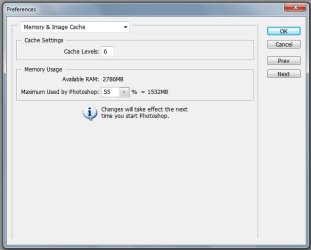
Also, is it possible (have you checked) that your version of Cubase has a setting similar to Adobe's Photoshop where you can allocate more RAM?

Here's an example of Photoshop's option...

Photoshop mem allocation.JPG

If you're really concerned about RAM, you might consider upgrading your system with the 64-bit version of Windows 7, but you'll need to insure your motherboard can handle more than 4gig of RAM, and that your hardware and software is 64-bit compatible.

My two cents.
 

My Computer My Computer

At a glance

Windows 10 ProIntel Core i7-4770K (3.5Ghz)32 gig Corsair Dominator Platinum (4x8Gig)Sapphire Tri-X R9 Fury
Computer type
PC/Desktop
Computer Manufacturer/Model Number
Custom built by me.
OS
Windows 10 Pro
CPU
Intel Core i7-4770K (3.5Ghz)
Motherboard
Gigabyte G1 Sniper 5 (F10 Bios)
Memory
32 gig Corsair Dominator Platinum (4x8Gig)
Graphics Card(s)
Sapphire Tri-X R9 Fury
Sound Card
Soundblaster ZXR
Monitor(s) Displays
NEC PA242W 24" LCD Monitor
Screen Resolution
1920 x 1200
Hard Drives
Primary - Samsung 850 Pro (512gig), Samsung 840 Pro (256gig), 2TB WD Caviar Black.
PSU
EVGA Supernova 1000 G2
Case
Cooler Master HAF X
Cooling
Corsair H100i with Corsair Air Series SP120 Quiet Fans
Keyboard
Logitech Wireless Wave
Mouse
Logitech Performance MX
Internet Speed
High Speed Cable
Antivirus
Norton Security
Browser
IE11
Other Info
Memory Timings - 1866MHz @ 9-9-9-27-1T @ 1.5 volts
Hi guys, I'm a fair bit late (about 658 days) but I'm having trouble with The Elder Scrolls V . Specifically the video cards dedicated ram. Now I believe that Layback Bear said something about typing resmon into the start menu and your pc ram usage comes up and such. Now my question is, can I use that to dedicate enough ram to the video card so Skyrim will run. Thanks guys :)
 

My Computer My Computer

At a glance

Windows 7 Home Premium 64bit
OS
Windows 7 Home Premium 64bit
Hi guys, I'm a fair bit late (about 658 days) but I'm having trouble with The Elder Scrolls V . Specifically the video cards dedicated ram. Now I believe that Layback Bear said something about typing resmon into the start menu and your pc ram usage comes up and such. Now my question is, can I use that to dedicate enough ram to the video card so Skyrim will run. Thanks guys :)

No. Windows 7 already does that. But it doesn't matter, Skyrim wants a lot of video memory, using RAM instead of VRAM is not going to help it.
 

My Computer My Computer

At a glance

Windows 10 Pro (x64)Intel Core i7-3930K (3.2GHz - 4.5GHz)4x Samsung 4GB PC3-12800 DDR3 (16GB 1600MHz)Nvidia Geforce GTX 690
Computer type
PC/Desktop
Computer Manufacturer/Model Number
Alienware Aurora ALX R4
OS
Windows 10 Pro (x64)
CPU
Intel Core i7-3930K (3.2GHz - 4.5GHz)
Motherboard
Alienware Aurora-R4 x79
Memory
4x Samsung 4GB PC3-12800 DDR3 (16GB 1600MHz)
Graphics Card(s)
Nvidia Geforce GTX 690
Sound Card
SteelSeries Siberia Elite
Monitor(s) Displays
Dell UltraSharp U3011
Screen Resolution
2560x1600
Hard Drives
Samsung 850 Pro 256 GB, Seagate 1TB Desktop Hybrid HDD, 2x Western Digital 4TB Green HDD
PSU
875W Some Dell PSU <.<
Case
Alienware Aurora ALX
Cooling
Custom Liquid Cooling (EK CPU & GPU blocks) dual EK 480RAD
Keyboard
Logitech G710+ Mechanical
Mouse
Logitech G700s
Internet Speed
Verizon Fios (50 mbps average)
Other Info
Server: Intel NUC D54250WYK: i5-4250U, 16GB, 256 GB mSATA, Windows Server 2012 R2
Back
Top