Solved Can I automate downloading numerous MP3 files?

PSB

New member
Local time
7:23 PM
Messages
5
Hi,
I'm not sure if this is the correct location to post this thread. If not, I apologize. I am trying to download hundreds of legal MP3 files. They are old radio shows that are in the public domain. One of the webs site is:

https://archive.org/details/OTRR_Suspense_Singles

This is an example of one radio program, there are many more I'd like to download. All the web sites are set up in this format. I'm wondering if there is a Windows scripting program that I can use/write that will iterate through the column that contains the link to the MP3 file and save each file to a specific folder on my laptop? To keep things simple I could navigate to the correct web location before invoking the script. In so doing, the script could simply act on the current screen and wouldn't have to dynamically find each web site. In addition, the script could have a static "save to" location that I would change before running it on a new radio program (I want to save each radio program in its own folder - i.e. Suspense radio in a folder, Night Beat in a folder, etc..). Again, thinking of ways to keep this simple and doable.

Anything along these lines would be a great help. Thanks in advance.
 

My Computer My Computer

At a glance

Windows 7 64 biti5-3210M @ 2.5Ghz4G
Computer type
Laptop
Computer Manufacturer/Model Number
Dell
OS
Windows 7 64 bit
CPU
i5-3210M @ 2.5Ghz
Memory
4G
Hard Drives
464G
Browser
Google Chrome
You could download something like gnuwin32 and/or cygwin and use a command like wget -r www. example.com
I have heard mixed reviews of this though, you may need to do some research on it because some have reported that it will download all files on said page so you will need to make sure you're downloading from a directory and not a full dynamic webpage.

This may help a little
http://pebblesinthesand.wordpress.c...et-to-download-multiple-files-from-a-website/

Remember, this isn't a native Windows command so you have to have a linux based CMD or find a Windows equivalent command.
 

My Computer My Computer

At a glance

Dual Boot: Windows 8.1 & Server 2012r2 VMs: K...A10 7700 Kavari SteamRoller8GB DDR3 SDRAM PC3-85001024MB ATI AMD Radeon R7 Graphics
Computer type
PC/Desktop
Computer Manufacturer/Model Number
Custom
OS
Dual Boot: Windows 8.1 & Server 2012r2 VMs: Kali Linux, Backbox, Matriux, Windows 8.1
CPU
A10 7700 Kavari SteamRoller
Motherboard
ASUS A88XM-PLUS (FM2+ )
Memory
8GB DDR3 SDRAM PC3-8500
Graphics Card(s)
1024MB ATI AMD Radeon R7 Graphics
Sound Card
Realtek High Definition Audio
Monitor(s) Displays
Samsung
Hard Drives
SSD Crucial 120gb
WD VelociRaptor 1tb
PSU
Rosewill Gaming 650w
Case
Rosewill Galaxy 2
Internet Speed
55/12
Antivirus
Malwarebytes, MSE, SAS
Browser
FireFox, Chrome
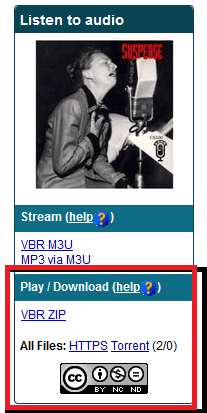
Also, I'm not familiar with the site, but does this option on the left side download the whole lot of the files?
 

Attachments

  • Capture.PNG
    Capture.PNG
    16.6 KB · Views: 49

My Computer My Computer

At a glance

Dual Boot: Windows 8.1 & Server 2012r2 VMs: K...A10 7700 Kavari SteamRoller8GB DDR3 SDRAM PC3-85001024MB ATI AMD Radeon R7 Graphics
Computer type
PC/Desktop
Computer Manufacturer/Model Number
Custom
OS
Dual Boot: Windows 8.1 & Server 2012r2 VMs: Kali Linux, Backbox, Matriux, Windows 8.1
CPU
A10 7700 Kavari SteamRoller
Motherboard
ASUS A88XM-PLUS (FM2+ )
Memory
8GB DDR3 SDRAM PC3-8500
Graphics Card(s)
1024MB ATI AMD Radeon R7 Graphics
Sound Card
Realtek High Definition Audio
Monitor(s) Displays
Samsung
Hard Drives
SSD Crucial 120gb
WD VelociRaptor 1tb
PSU
Rosewill Gaming 650w
Case
Rosewill Galaxy 2
Internet Speed
55/12
Antivirus
Malwarebytes, MSE, SAS
Browser
FireFox, Chrome
I would be surprised if there was anything like what you want. I frequent a site that has thousands of different "Desktop Wallpapers". To download them individually they are free. If you want to save time and download them in bulk, you must pay. If it were possible to download them in bulk for free, as you want to, I am sure someone would have figured this out. I just get mine in bulk and pay. (I understand that you site is free regardless)
 

My Computer My Computer

At a glance

Windows 7 Home Premium 32-Bit - Build 7600 SP1Intel Core i3-2120 3.30GhzKingston 4 GB DDR3 1333 mhzAMD Radeon HD6670
Computer type
PC/Desktop
Computer Manufacturer/Model Number
Custom Build
OS
Windows 7 Home Premium 32-Bit - Build 7600 SP1
CPU
Intel Core i3-2120 3.30Ghz
Motherboard
Asus P8Z68-V LX Intel Z68 Socket H2 ATX
Memory
Kingston 4 GB DDR3 1333 mhz
Graphics Card(s)
AMD Radeon HD6670
Sound Card
Sound Blaster Audigy SE 24-Bit
Monitor(s) Displays
Asus VE228
Screen Resolution
1440 X 900
Hard Drives
OCZ Vertex 3 120 GB Sata 3 SSD ==
Kingston SH103/S3 120 G Hyper X 120 GB SSD ==
Western Digital 500 GB Caviar Green 7200 RPM ==
PSU
Corsair CX600M == 600 Watt
Case
NZXT Apollo - Silver with Clear Side Panel
Cooling
Three 120 mm Fans
Keyboard
Microsoft Natural 4000
Mouse
Microsoft Custom Optical 3000
Internet Speed
AT&T Fiber Optic Wireless Network
Antivirus
Microsoft Security Essentials
Browser
Chrome
Other Info
120 mm Blue LED Fan -- Three Blue LED Lazer Light Sticks
There is Down Them All (DTA) which can do multiple downloads of file type you choose from a webpage. It is only for Firefox though.

DownThemAll!
 

My Computer My Computer

At a glance

Windows 7 Ultimate X64 SP1Intel i5-2550K, Differing ~4.4-4.8GHz No buil...16GB G.Skill Sniper 1866MHz @ 2133MHz 2x8GBASUS GTX650TIB-DC2OC-2GD5, (650TI Boost)
Computer type
PC/Desktop
Computer Manufacturer/Model Number
Home Built Desktop By DataTech
OS
Windows 7 Ultimate X64 SP1
CPU
Intel i5-2550K, Differing ~4.4-4.8GHz No built in GPU
Motherboard
ASUS P8Z68-V PRO/GEN3
Memory
16GB G.Skill Sniper 1866MHz @ 2133MHz 2x8GB
Graphics Card(s)
ASUS GTX650TIB-DC2OC-2GD5, (650TI Boost)
Sound Card
Onboard Realtek 5-1
Monitor(s) Displays
Samsung P2570HD
Screen Resolution
1920x1080
Hard Drives
Samsung 840 Pro 256GB SSD for OS, 500GB Seagate Constellation (Enterprise drive) for Data
PSU
Corsair HX650W
Case
Inwin Dragon Rider
Cooling
Hyper 212 EVO w/two Noctua fans, push-pull, @1300 RPM
Keyboard
E-Z Eyes, bright yellow keys with large characters
Mouse
steelseries SENSEI Laser Pro Gaming
Internet Speed
48-51Mbs Mbs down, 11 Mbs up Xfinity Cable
Antivirus
Norton Internet Security 2013
Browser
IE 10, Opera, Pale Moon if needed
Other Info
4 case fans, LG BluRay-RE, ASUS DVD-RW, Mr. Fusion power supply, 1.21 gigawatts.
There is Down Them All (DTA) which can do multiple downloads of file type you choose from a webpage. It is only for Firefox though.

DownThemAll!
Nice suggestion, I'll look into this one.
 

My Computer My Computer

At a glance

Dual Boot: Windows 8.1 & Server 2012r2 VMs: K...A10 7700 Kavari SteamRoller8GB DDR3 SDRAM PC3-85001024MB ATI AMD Radeon R7 Graphics
Computer type
PC/Desktop
Computer Manufacturer/Model Number
Custom
OS
Dual Boot: Windows 8.1 & Server 2012r2 VMs: Kali Linux, Backbox, Matriux, Windows 8.1
CPU
A10 7700 Kavari SteamRoller
Motherboard
ASUS A88XM-PLUS (FM2+ )
Memory
8GB DDR3 SDRAM PC3-8500
Graphics Card(s)
1024MB ATI AMD Radeon R7 Graphics
Sound Card
Realtek High Definition Audio
Monitor(s) Displays
Samsung
Hard Drives
SSD Crucial 120gb
WD VelociRaptor 1tb
PSU
Rosewill Gaming 650w
Case
Rosewill Galaxy 2
Internet Speed
55/12
Antivirus
Malwarebytes, MSE, SAS
Browser
FireFox, Chrome
Another method

If you're running Firefox browser or a Firefox variant you can try:

FoxySpider

Just selectively enable the add on when you want to use it and disable it at other times when it's not needed.

Right click the FoxySpider icon to choose your options (there's a lot of them).

The icon is the red one to the left of the browser's address bar.

Screenshots:

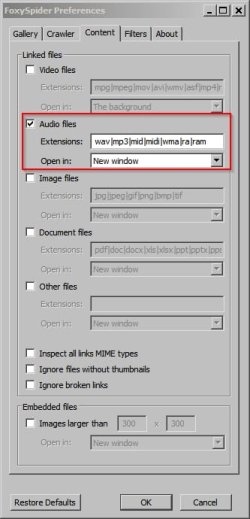
Configured to crawl for mp3 files:

FoxySpider 2.jpg

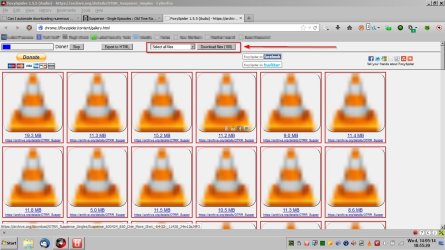
FoxySpider opens a list of files in a new tab. Select files to download and choose download folder:

FoxySpider.jpg

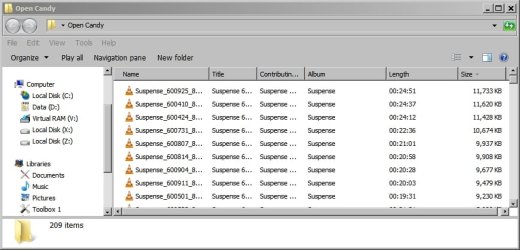
Download in progress:

Downloads.jpg

Haven't tried DownThemAll so can't comment on it. FoxySpider has plenty of options and content filters!
 

My Computer My Computer

At a glance

Microsoft Windows 7 Home Premium 64-bit 7601 ...AMD C-60 APU with Radeon(tm) HD Graphics4.00 GBAMD Radeon HD 6290 Graphics
Computer type
Laptop
Computer Manufacturer/Model Number
ASUS
OS
Microsoft Windows 7 Home Premium 64-bit 7601 Multiprocessor Free Service Pack 1
CPU
AMD C-60 APU with Radeon(tm) HD Graphics
Motherboard
ASUSTeK COMPUTER INC. X501U
Memory
4.00 GB
Graphics Card(s)
AMD Radeon HD 6290 Graphics
Sound Card
(1) AMD High Definition Audio Device (2) Realtek High Defi
Screen Resolution
1366 x 768 x 32 bits (4294967296 colors) @ 60 Hz
Hard Drives
Hitachi HTS545050A7E380 SATA Disk Device
Antivirus
Comodo CIS & FW, SecureAplus App Whitelisting, Threatfire
Browser
Cyberfox 64bit, Opera 64bit, Airfox
Other Info
Spy-The-Spy, HitmanPro.Alert, Norton Connect Safe, MJRegWatcher, BitDefender TrafficLight, Voodoo Shield, Zemana AntiMalware
All of the suggestions mentioned above would probably work, but I'm not a big fan of using browser extensions or add-ons. They tend to break when the browser is updated or they need updating - then features change and you have to learn how to use the new version.

Also, the link that you provided has 909 MP3 files to be downloaded.
(https://ia600604.us.archive.org/13/items/OTRR_Suspense_Singles/)
If you opt not to use the script that I've provided below, then I would suggesting picking an option that automatically crawls the webpage so that you don't have to select each file to be downloaded. There are several tools that will crawl websites and download the items that you want... but they can be hard to learn how to use.


Here is how I would get the MP3 files that you want:

1) Make the folder where you want the files to go.
2) Copy/paste/run the script file below into that folder.
3) Click on the HTTPS link that Gator mentioned:

317756d1400077482-can-i-automate-downloading-numerous-mp3-files-capture.png


4) Paste the URL from that HTTPS page into the script's prompt.
5) Click OK to start the downloads.

Code:
Opt("TrayIconDebug", 1)

Global $current_handle, $element, $file, $FileArray, $link, $position, $running, $total, $track, $URL

HotKeySet("^+a", "_end_this")

$URL = InputBox("URL entry", "Paste the URL.", "Paste URL here.", "", 600, 100, 0, 0)
If @error = 1 Then Exit ;Cancel was selected

;FYI URL
;https://archive.org/details/OTRR_Suspense_Singles

;sample URL that can be pasted - 900+ files (20+GB)
;$URL = "https://ia600604.us.archive.org/13/items/OTRR_Suspense_Singles/"


$running = "AutoIt - " & $URL
If WinExists($running) Then
    MsgBox(0, "AutoIt", "This script is already pulling files from:" & @CR & $URL)
    Exit
EndIf
AutoItWinSetTitle($running)


$FileArray = StringSplit(BinaryToString(InetRead($URL)), @CRLF, 1)

$total = 0
For $element In $FileArray
    $position = StringInStr($element, '.mp3">')
    If $position Then $total = $total + 1
Next

$track = 0
For $element In $FileArray
    $position = StringInStr($element, '.mp3">')
    If $position Then
        $track = $track + 1
        $file = StringTrimLeft($element, 9)
        $file = StringLeft($file, $position - 6)
        $link = $URL & $file
        $current_handle = InetGet($link, $file, 1, 1)
        Do
            ToolTip("Downloading " & $track & " of " & $total & "  Press Ctrl + Shift + a to abort.  " & InetGetInfo($current_handle, 0) & " bytes", 10, 10)
            ;TrayTip("Downloading " & $track & " of " & $total, "Press Ctrl + Shift + a to abort." & @CR & InetGetInfo($current_handle, 0) & " bytes", 100)
            Sleep(333)
        Until InetGetInfo($current_handle, 2)
        InetClose($current_handle)
    EndIf
Next

Func _end_this()
    InetClose($current_handle)
    FileDelete($file) ;delete current file in case it had not completed the download
    Exit
EndFunc
After you install AutoIt* from here...
AutoIt Downloads - AutoItScript
...copy/paste the code above into a new script file.
You can sort of see that being done in second video in this post.
You do not need to compile the code...
...just run it as a text file.
You don't need to put it in the start up folder either.

*Right after the AutoIt installation completes, you might need to select an empty spot on the desktop and press F5. Doing that should rebuild/refresh the options that are available to you via Explorer's context menu (right click > New...).


The script has two download progress indicator. You can keep bot, pick one or remove both. Place a semicolon in front of ToolTip and/or TrayTip to turn them off. You can also move the ToolTip to another location if you want.


You can run as many copies of this script at the same time as you want. Just create as many folders as you want and copy/paste/run the script from that folder. The downloaded files go into that same folder that the script is in. If you want to run lots of these at the same time, either turn off the ToolTip and TrayTip progress indicators or just turn off the TrayTip and change the location of each ToolTip so that they do not overlap.

For example, you can change this part of the ToolTip line so that each copy of the script is painting the ToolTip in a different location:
....bytes", 10, 10)
For another copy that is running from another folder, you could use 20:
....bytes", 20, 10)
For another copy that is running from another folder, you could use 40:
....bytes", 40, 10)
For another copy that is running from another folder, you could use 60:
....bytes", 60, 10)

I've not tested those numbers - you might need a larger increment like 10, 50, 100, 150.....


edit: Minor change to the script:
It now prevents multiple copies of the script from downloading files from the same URL at the same time.
 
Last edited:

My Computer My Computer

At a glance

W7 Pro SP1 64biti78GBIntel HD Graphics
Computer type
Laptop
Computer Manufacturer/Model Number
Employer provided Dell Latitude
OS
W7 Pro SP1 64bit
CPU
i7
Memory
8GB
Graphics Card(s)
Intel HD Graphics
Hard Drives
crappy SSD
Antivirus
Employer mandated Symantec Endpoint Protection
Browser
Pale Moon 64bit, IE11 64bit & Chrome 64bit

My Computer My Computer

At a glance

Windows 7 32 bitAMD 5200+ dual core2 GBNVidia GeForce 6150SE 128 MB
Computer Manufacturer/Model Number
HP Media Center
OS
Windows 7 32 bit
CPU
AMD 5200+ dual core
Memory
2 GB
Graphics Card(s)
NVidia GeForce 6150SE 128 MB
Monitor(s) Displays
CRT
Screen Resolution
1280x1024
Hard Drives
500 GB Sata internal :

SIIG USB 3.0 docking stations w/WD Caviar Black 6 Gb/s drives
Keyboard
PS/2
Mouse
PS/2 Wheel Mouse
Other Info
SIIG USB 3.0 PCIexpress card.
Thanks everyone - there are some great suggestions. I am going to try them out next week when I once again have access to high speed internet. I'll let you know.
 

My Computer My Computer

At a glance

Windows 7 64 biti5-3210M @ 2.5Ghz4G
Computer type
Laptop
Computer Manufacturer/Model Number
Dell
OS
Windows 7 64 bit
CPU
i5-3210M @ 2.5Ghz
Memory
4G
Hard Drives
464G
Browser
Google Chrome
Back
Top