Can I boot from a 30GB SSD or did I just waste my money?

Osuchan

New member
Local time
11:31 PM
Messages
8
Location
Manchester
Hi,

Situation:
-1x Alienware laptop bought rather impulsively with regrettably little research and money (bought on finance)
-Alienware laptop has 500GB HDD and a 30GB SSD
-Alienware laptop is running Windows Home Premium x64
-Is there any way I can run/boot windows from the SSD or did I just waste much money on nothing?

and you don't think I can run/boot windows from the SSD;

-What is a good use for a 30GB SSD?

Any help or input is welcomed and much appreciated,

Osuchan
 

My Computer My Computer

At a glance

Windows 7 Home Premium x64Intel Core i&-3740QM CPU @ 2.70GHz (8 CPUs), ...12.0GB RAMNVIDIA GeForce GTX 675M
Computer type
Laptop
Computer Manufacturer/Model Number
Dell Alienware
OS
Windows 7 Home Premium x64
CPU
Intel Core i&-3740QM CPU @ 2.70GHz (8 CPUs), ~2.7GHz
Motherboard
ACPI x64 motherboard
Memory
12.0GB RAM
Graphics Card(s)
NVIDIA GeForce GTX 675M
Hard Drives
ATA WDC WD5000BPKT-7 SCSI Disk Device 500GB
ATA SAMSUNG SSD PM83 SCSI Disc Device 30GB
Case
Alienware M17x 2013 Case
Mouse
Razer Mamba 4G 2012
Antivirus
AVG 2013
Browser
Google Chrome
I wouldn't try installing 7 to the 30 gig SSD, too small IMHO. It's likely already in use as a cache drive to speed up loading frequently used files. Similar to a hybrid SSD/HDD.
 

My Computer My Computer

At a glance

Windows 10 Education 64 bitAMD Phenom II X4 980 Black Edition Deneb 3.7GHz8GB 4GBx2 Kingston PC10600 DDR3 1333 MemoryZotac NVIDIA Geforce GT640 2 Gig DDR3 PCIe
Computer type
PC/Desktop
Computer Manufacturer/Model Number
Home Built
OS
Windows 10 Education 64 bit
CPU
AMD Phenom II X4 980 Black Edition Deneb 3.7GHz
Motherboard
Asus M4N68T-M V2 µATX Motherboard
Memory
8GB 4GBx2 Kingston PC10600 DDR3 1333 Memory
Graphics Card(s)
Zotac NVIDIA Geforce GT640 2 Gig DDR3 PCIe
Sound Card
VIA VT1708s High Definition Audio 8-channel Onboard
Monitor(s) Displays
22" LG E2242 1080p and 2 19" I-INC AG191D
Screen Resolution
1280x1024 - 1920x1080 - 1280x1024
Hard Drives
Crucial M100 256 GB SSD and 500 GB WD Blue SATA
PSU
Thermaltake TR 620
Case
Power Up Black ATX Mid-Tower Case
Cooling
Stock heatsink and fan
Keyboard
Logitech Wireless K350 Wave
Mouse
Logitech Wireless M570 Trackman Wheel
Internet Speed
80 Mbps Down 30 Mbps Up
Antivirus
Windows Defender
Browser
Internet Explorer 11
Other Info
HP DVD1040e Lightscribe - External USB2
I wouldn't try installing 7 to the 30 gig SSD, too small IMHO. It's likely already in use as a cache drive to speed up loading frequently used files. Similar to a hybrid SSD/HDD.

In your experience, how big is Windows 7 when put onto an SSD? Also I've heard that perhaps disabling hibernate settings and limiting/moving page files can limit the size but I have no idea if I could make 30GB work or how to do any of that stuff :/
 

My Computer My Computer

At a glance

Windows 7 Home Premium x64Intel Core i&-3740QM CPU @ 2.70GHz (8 CPUs), ...12.0GB RAMNVIDIA GeForce GTX 675M
Computer type
Laptop
Computer Manufacturer/Model Number
Dell Alienware
OS
Windows 7 Home Premium x64
CPU
Intel Core i&-3740QM CPU @ 2.70GHz (8 CPUs), ~2.7GHz
Motherboard
ACPI x64 motherboard
Memory
12.0GB RAM
Graphics Card(s)
NVIDIA GeForce GTX 675M
Hard Drives
ATA WDC WD5000BPKT-7 SCSI Disk Device 500GB
ATA SAMSUNG SSD PM83 SCSI Disc Device 30GB
Case
Alienware M17x 2013 Case
Mouse
Razer Mamba 4G 2012
Antivirus
AVG 2013
Browser
Google Chrome
On this PC with Windows 8.1 Pro and Office 2013 I'm using up about 20 GB. That's with hibernation disabled, system restore disabled, and all my user folders moved to my Data partition. The tutorials section will tell you how to turn those features off. There are installation tutorials too. I only just installed a little while ago and haven't installed all my programs etc, that's just the basics so far.
 

My Computer My Computer

At a glance

Windows 10 Education 64 bitAMD Phenom II X4 980 Black Edition Deneb 3.7GHz8GB 4GBx2 Kingston PC10600 DDR3 1333 MemoryZotac NVIDIA Geforce GT640 2 Gig DDR3 PCIe
Computer type
PC/Desktop
Computer Manufacturer/Model Number
Home Built
OS
Windows 10 Education 64 bit
CPU
AMD Phenom II X4 980 Black Edition Deneb 3.7GHz
Motherboard
Asus M4N68T-M V2 µATX Motherboard
Memory
8GB 4GBx2 Kingston PC10600 DDR3 1333 Memory
Graphics Card(s)
Zotac NVIDIA Geforce GT640 2 Gig DDR3 PCIe
Sound Card
VIA VT1708s High Definition Audio 8-channel Onboard
Monitor(s) Displays
22" LG E2242 1080p and 2 19" I-INC AG191D
Screen Resolution
1280x1024 - 1920x1080 - 1280x1024
Hard Drives
Crucial M100 256 GB SSD and 500 GB WD Blue SATA
PSU
Thermaltake TR 620
Case
Power Up Black ATX Mid-Tower Case
Cooling
Stock heatsink and fan
Keyboard
Logitech Wireless K350 Wave
Mouse
Logitech Wireless M570 Trackman Wheel
Internet Speed
80 Mbps Down 30 Mbps Up
Antivirus
Windows Defender
Browser
Internet Explorer 11
Other Info
HP DVD1040e Lightscribe - External USB2
So considering that you're running at 20GB, how come you, and many people online, say that 30GB isn't enough given that it seems it would fit?
 

My Computer My Computer

At a glance

Windows 7 Home Premium x64Intel Core i&-3740QM CPU @ 2.70GHz (8 CPUs), ...12.0GB RAMNVIDIA GeForce GTX 675M
Computer type
Laptop
Computer Manufacturer/Model Number
Dell Alienware
OS
Windows 7 Home Premium x64
CPU
Intel Core i&-3740QM CPU @ 2.70GHz (8 CPUs), ~2.7GHz
Motherboard
ACPI x64 motherboard
Memory
12.0GB RAM
Graphics Card(s)
NVIDIA GeForce GTX 675M
Hard Drives
ATA WDC WD5000BPKT-7 SCSI Disk Device 500GB
ATA SAMSUNG SSD PM83 SCSI Disc Device 30GB
Case
Alienware M17x 2013 Case
Mouse
Razer Mamba 4G 2012
Antivirus
AVG 2013
Browser
Google Chrome
If you watch how you install programs 30GB well run windows 7 just fine. You should move the "User" folder to the hhd as this folder can become very large, 10GB or more is not uncommon.

On all my Win machines I use a ssd for the OS only and the average size is 20GB total for 64 bit HP and Ultimate. Claims that 30GB is insufficient are from users that have not really looked into it.
 

My Computer My Computer

At a glance

Win8/8.1,Win7-U64, Vista U64, uncounted Linux...AMD and Intell, 9590, 8350, i5 3570kCorsair G SkillCrossfired Sapphire HD 7950 Vapor-X, ASUS R9 ...
Computer type
PC/Desktop
Computer Manufacturer/Model Number
Custom, Dell and Lenono LT's
OS
Win8/8.1,Win7-U64, Vista U64, uncounted Linux distor's
CPU
AMD and Intell, 9590, 8350, i5 3570k
Motherboard
CFVFZ, GA990FXA, Z77e-itx
Memory
Corsair G Skill
Graphics Card(s)
Crossfired Sapphire HD 7950 Vapor-X, ASUS R9 280X TOP
Sound Card
Realtek ALC889
Monitor(s) Displays
ViewSonic VX2770SMH 27" / ViewSonic VX2433 LCD 24"
Screen Resolution
1080i HD
Hard Drives
Samsung SSD 840 Pro
OCZ Agility 3's
OCZ Vector's
WD's Blue, red, green, Velociraptors
Seagate USB3 & Hybrid's
ASUS Blu-Ray
ASUS DVD
PSU
Corsair AX1200i, Seasonice 850 Gold
Case
Cooler Master HAF 922 & HAF 932, Lian Li Train case.
Cooling
Air, Glacer 240L expanded, custom EK loop with duel D5's
Keyboard
Microsoft SideWinder X4 USB Keyboard / Logitech 250 PS2
Mouse
Logitech G500 / MS wireless 5000
Internet Speed
Best of 5ms / 75+ dn / 12+ up More or less.
Antivirus
MS esentials-MalwareBytes
Browser
Firefox Chromebook

My Computer My Computer

At a glance

ME/XP/Vista/Win7
OS
ME/XP/Vista/Win7
Thanks very much for the advice madcratebuilder. I have my data backed up now, but am very nervous as to how I will actually do the SSD transfer. Given that i don't have enough room for some options for the transfer, any advice as to how best I should proceed?
 

My Computer My Computer

At a glance

Windows 7 Home Premium x64Intel Core i&-3740QM CPU @ 2.70GHz (8 CPUs), ...12.0GB RAMNVIDIA GeForce GTX 675M
Computer type
Laptop
Computer Manufacturer/Model Number
Dell Alienware
OS
Windows 7 Home Premium x64
CPU
Intel Core i&-3740QM CPU @ 2.70GHz (8 CPUs), ~2.7GHz
Motherboard
ACPI x64 motherboard
Memory
12.0GB RAM
Graphics Card(s)
NVIDIA GeForce GTX 675M
Hard Drives
ATA WDC WD5000BPKT-7 SCSI Disk Device 500GB
ATA SAMSUNG SSD PM83 SCSI Disc Device 30GB
Case
Alienware M17x 2013 Case
Mouse
Razer Mamba 4G 2012
Antivirus
AVG 2013
Browser
Google Chrome
You will need to un-raid the drives.

Dell tutorial links:
http://dell.to/15Cz2AS
http://dell.to/13EbJpn

How to order Microsoft official Dell OEM manufacturer's Recovery Disks.
Manuals | Dell US


RouteTo
Dell - Support

Thanks a bunch. Very handy links. Feeling ready to move boot to SSD but have obvious concerns as I don't want to ruin my re-install. Is there an order to following the tutorials? (i.e should I complete the top link then the bottom one?)

Also, I am still in possession of the following discs;

-Microsoft windows 7 Home premium SP1 64 Bit
-M17x R4 resource DVD
-Resource media webcam cenral

With these resource discs and the tutorials you've linked to, Do I now have all the resources I need to attempt this? And how does disabling Hibernate and moving "Users" factor in to all this?

Sorry for so many questions, this is my first experience interacting with OS installation and as such I am very nervous and very inept at even understanding which things apply to me and which don't and which things I should be doing and need not be doing, etc.

Thanks
 

My Computer My Computer

At a glance

Windows 7 Home Premium x64Intel Core i&-3740QM CPU @ 2.70GHz (8 CPUs), ...12.0GB RAMNVIDIA GeForce GTX 675M
Computer type
Laptop
Computer Manufacturer/Model Number
Dell Alienware
OS
Windows 7 Home Premium x64
CPU
Intel Core i&-3740QM CPU @ 2.70GHz (8 CPUs), ~2.7GHz
Motherboard
ACPI x64 motherboard
Memory
12.0GB RAM
Graphics Card(s)
NVIDIA GeForce GTX 675M
Hard Drives
ATA WDC WD5000BPKT-7 SCSI Disk Device 500GB
ATA SAMSUNG SSD PM83 SCSI Disc Device 30GB
Case
Alienware M17x 2013 Case
Mouse
Razer Mamba 4G 2012
Antivirus
AVG 2013
Browser
Google Chrome
You will need to un-raid the drives.

Dell tutorial links:
http://dell.to/15Cz2AS
http://dell.to/13EbJpn

How to order Microsoft official Dell OEM manufacturer's Recovery Disks.
Manuals | Dell US


RouteTo
Dell - Support

Thanks a bunch. Very handy links. Feeling ready to move boot to SSD but have obvious concerns as I don't want to ruin my re-install. Is there an order to following the tutorials? (i.e should I complete the top link then the bottom one?)

Also, I am still in possession of the following discs;

-Microsoft windows 7 Home premium SP1 64 Bit
-M17x R4 resource DVD
-Resource media webcam cenral

With these resource discs and the tutorials you've linked to, Do I now have all the resources I need to attempt this? And how does disabling Hibernate and moving "Users" factor in to all this?

Sorry for so many questions, this is my first experience interacting with OS installation and as such I am very nervous and very inept at even understanding which things apply to me and which don't and which things I should be doing and need not be doing, etc.

Thanks

Hi Osuchan,

Theog asked me to look into this. I have some recommendations that might be useful. MSATA drive on your system is used as a cache device which helps in improving speed of the system already.

Installing OS on MSATA would increase the speed of booting the system and functionality but changes would not be alot if you are expecting one.

If you still wish to install windows on the MSATA drive only then follow this link to set the system to Non RAID and then cleaning disks:

http://dell.to/15Cz2AS

Once disks are cleaned then you should do a clean install using the Microsoft windows 7 Home premium SP1 64 Bit by following this link below:

http://www.sevenforums.com/tutorials/1649-clean-install-windows-7-a.html

Once windows is installed you can use the M17x R4 resource DVD to install drivers or you can perform the same from our support site. Check this video for performing the same:

Updating Dell Drivers

Then you can install various other softwares shipped with your system if you like:

Downloading software using DELL Downloads

Now about the space it should install fine as I just reinstalled Win 7 Ultimate and it took about 25 Gb of space on the system. However, you would need to disable alot of features. Check this for doing so:

http://www.sevenforums.com/tutorials/819-hibernate-enable-disable.html

http://www.sevenforums.com/tutorials/81500-system-restore-enable-disable.html

Also, any software that you install on the system make sure you install it on a folder on SATA harddrive and not the MSATA to save you from running out of space.

Hope this answers your query. If you have any further queries, please feel free to contact us.
 

My Computer My Computer

At a glance

Winndows 7 32 bit
Computer type
PC/Desktop
OS
Winndows 7 32 bit
@Sandeep P and theog,

Thanks for the great advice. I've managed to get my laptop to boot from the SSD! Success!

However, I now cannot access my HDD.

Owing to only having 30GB SSD I've economized drivers I installed in the hopes that after installing chipset and network drivers the HDD drivers could auto update and after a reset or two I could access it again.

Please help!!
 

My Computer My Computer

At a glance

Windows 7 Home Premium x64Intel Core i&-3740QM CPU @ 2.70GHz (8 CPUs), ...12.0GB RAMNVIDIA GeForce GTX 675M
Computer type
Laptop
Computer Manufacturer/Model Number
Dell Alienware
OS
Windows 7 Home Premium x64
CPU
Intel Core i&-3740QM CPU @ 2.70GHz (8 CPUs), ~2.7GHz
Motherboard
ACPI x64 motherboard
Memory
12.0GB RAM
Graphics Card(s)
NVIDIA GeForce GTX 675M
Hard Drives
ATA WDC WD5000BPKT-7 SCSI Disk Device 500GB
ATA SAMSUNG SSD PM83 SCSI Disc Device 30GB
Case
Alienware M17x 2013 Case
Mouse
Razer Mamba 4G 2012
Antivirus
AVG 2013
Browser
Google Chrome
@Sandeep P and theog,

Thanks for the great advice. I've managed to get my laptop to boot from the SSD! Success!

However, I now cannot access my HDD.

Owing to only having 30GB SSD I've economized drivers I installed in the hopes that after installing chipset and network drivers the HDD drivers could auto update and after a reset or two I could access it again.

Please help!!

Hi Osuchan,

Its great to hear that you were able to boot through MSATA drive.

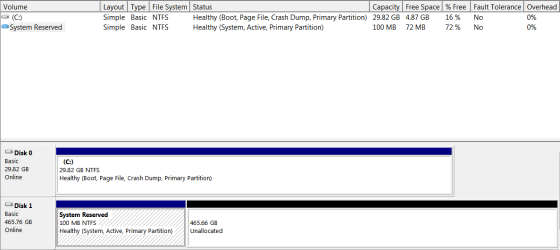
Please upload the images of your disk mnagement as you might need to format the harddrive. Post the screnshot as advised by theog so we can advise you further.
 

My Computer My Computer

At a glance

Winndows 7 32 bit
Computer type
PC/Desktop
OS
Winndows 7 32 bit
Hopefully the attachment works.

Thank you again for the support. At the moment I feel like pulling my hair out this whole experience has been very stressful. Without such generous support I would be probably alot worse off and in a much worse state :)

EDIT: Also, just because I apparently wasn't having enough problems before, the in-built speakers are acting very odd.

One the left of my laptop I have 3 audio jacks (2 headphone, 1 mic)
From the front it goes headphone, headphone, mic.

-With no audio jacks plugged in it does not emit any sound even though mixer tells me itis
-With audio jack (headphones) in the front most headphone socket, I get low quality, tinny audio through headphones
-With audio jack (headphones in the second headphone socket, the audio comes out in reasonable quality through the in-built speakers

Well, that's something to consider on top of EVERYTHING ¬_¬
 

Attachments

  • Capture.PNG
    Capture.PNG
    11.7 KB · Views: 3
Last edited:

My Computer My Computer

At a glance

Windows 7 Home Premium x64Intel Core i&-3740QM CPU @ 2.70GHz (8 CPUs), ...12.0GB RAMNVIDIA GeForce GTX 675M
Computer type
Laptop
Computer Manufacturer/Model Number
Dell Alienware
OS
Windows 7 Home Premium x64
CPU
Intel Core i&-3740QM CPU @ 2.70GHz (8 CPUs), ~2.7GHz
Motherboard
ACPI x64 motherboard
Memory
12.0GB RAM
Graphics Card(s)
NVIDIA GeForce GTX 675M
Hard Drives
ATA WDC WD5000BPKT-7 SCSI Disk Device 500GB
ATA SAMSUNG SSD PM83 SCSI Disc Device 30GB
Case
Alienware M17x 2013 Case
Mouse
Razer Mamba 4G 2012
Antivirus
AVG 2013
Browser
Google Chrome
System reserved is a hidden partition with no drive letter, it will only be visible in device manager. The other partition is unallocated so it will not be visible either. I'm not sure if the System reserved is a left over from the previous install or actually in use. It's the only one marked active so I think it might be in use. Normally that would be on the drive Windows is installed to so it should be on Disk 0, not Disk 1. One way to find out is to delete it and see if Windows will still load. Ideally it should have been deleted during the install to Drive 0. It will work the way it is but its not what I would call ideal.
 

My Computer My Computer

At a glance

Windows 10 Education 64 bitAMD Phenom II X4 980 Black Edition Deneb 3.7GHz8GB 4GBx2 Kingston PC10600 DDR3 1333 MemoryZotac NVIDIA Geforce GT640 2 Gig DDR3 PCIe
Computer type
PC/Desktop
Computer Manufacturer/Model Number
Home Built
OS
Windows 10 Education 64 bit
CPU
AMD Phenom II X4 980 Black Edition Deneb 3.7GHz
Motherboard
Asus M4N68T-M V2 µATX Motherboard
Memory
8GB 4GBx2 Kingston PC10600 DDR3 1333 Memory
Graphics Card(s)
Zotac NVIDIA Geforce GT640 2 Gig DDR3 PCIe
Sound Card
VIA VT1708s High Definition Audio 8-channel Onboard
Monitor(s) Displays
22" LG E2242 1080p and 2 19" I-INC AG191D
Screen Resolution
1280x1024 - 1920x1080 - 1280x1024
Hard Drives
Crucial M100 256 GB SSD and 500 GB WD Blue SATA
PSU
Thermaltake TR 620
Case
Power Up Black ATX Mid-Tower Case
Cooling
Stock heatsink and fan
Keyboard
Logitech Wireless K350 Wave
Mouse
Logitech Wireless M570 Trackman Wheel
Internet Speed
80 Mbps Down 30 Mbps Up
Antivirus
Windows Defender
Browser
Internet Explorer 11
Other Info
HP DVD1040e Lightscribe - External USB2
I cleaned both disks before this install and so it will be from this install.

If I were to delete it, what are the negatives of such an action?
 

My Computer My Computer

At a glance

Windows 7 Home Premium x64Intel Core i&-3740QM CPU @ 2.70GHz (8 CPUs), ...12.0GB RAMNVIDIA GeForce GTX 675M
Computer type
Laptop
Computer Manufacturer/Model Number
Dell Alienware
OS
Windows 7 Home Premium x64
CPU
Intel Core i&-3740QM CPU @ 2.70GHz (8 CPUs), ~2.7GHz
Motherboard
ACPI x64 motherboard
Memory
12.0GB RAM
Graphics Card(s)
NVIDIA GeForce GTX 675M
Hard Drives
ATA WDC WD5000BPKT-7 SCSI Disk Device 500GB
ATA SAMSUNG SSD PM83 SCSI Disc Device 30GB
Case
Alienware M17x 2013 Case
Mouse
Razer Mamba 4G 2012
Antivirus
AVG 2013
Browser
Google Chrome

My Computer My Computer

At a glance

Windows 10 Education 64 bitAMD Phenom II X4 980 Black Edition Deneb 3.7GHz8GB 4GBx2 Kingston PC10600 DDR3 1333 MemoryZotac NVIDIA Geforce GT640 2 Gig DDR3 PCIe
Computer type
PC/Desktop
Computer Manufacturer/Model Number
Home Built
OS
Windows 10 Education 64 bit
CPU
AMD Phenom II X4 980 Black Edition Deneb 3.7GHz
Motherboard
Asus M4N68T-M V2 µATX Motherboard
Memory
8GB 4GBx2 Kingston PC10600 DDR3 1333 Memory
Graphics Card(s)
Zotac NVIDIA Geforce GT640 2 Gig DDR3 PCIe
Sound Card
VIA VT1708s High Definition Audio 8-channel Onboard
Monitor(s) Displays
22" LG E2242 1080p and 2 19" I-INC AG191D
Screen Resolution
1280x1024 - 1920x1080 - 1280x1024
Hard Drives
Crucial M100 256 GB SSD and 500 GB WD Blue SATA
PSU
Thermaltake TR 620
Case
Power Up Black ATX Mid-Tower Case
Cooling
Stock heatsink and fan
Keyboard
Logitech Wireless K350 Wave
Mouse
Logitech Wireless M570 Trackman Wheel
Internet Speed
80 Mbps Down 30 Mbps Up
Antivirus
Windows Defender
Browser
Internet Explorer 11
Other Info
HP DVD1040e Lightscribe - External USB2
The System Reserved Partition is the Windows 7 one, follow the tutorial above.
 

My Computer My Computer

At a glance

ME/XP/Vista/Win7
OS
ME/XP/Vista/Win7
lol, for a second there I forgot what forum I was on. ;)
 

My Computer My Computer

At a glance

Windows 10 Education 64 bitAMD Phenom II X4 980 Black Edition Deneb 3.7GHz8GB 4GBx2 Kingston PC10600 DDR3 1333 MemoryZotac NVIDIA Geforce GT640 2 Gig DDR3 PCIe
Computer type
PC/Desktop
Computer Manufacturer/Model Number
Home Built
OS
Windows 10 Education 64 bit
CPU
AMD Phenom II X4 980 Black Edition Deneb 3.7GHz
Motherboard
Asus M4N68T-M V2 µATX Motherboard
Memory
8GB 4GBx2 Kingston PC10600 DDR3 1333 Memory
Graphics Card(s)
Zotac NVIDIA Geforce GT640 2 Gig DDR3 PCIe
Sound Card
VIA VT1708s High Definition Audio 8-channel Onboard
Monitor(s) Displays
22" LG E2242 1080p and 2 19" I-INC AG191D
Screen Resolution
1280x1024 - 1920x1080 - 1280x1024
Hard Drives
Crucial M100 256 GB SSD and 500 GB WD Blue SATA
PSU
Thermaltake TR 620
Case
Power Up Black ATX Mid-Tower Case
Cooling
Stock heatsink and fan
Keyboard
Logitech Wireless K350 Wave
Mouse
Logitech Wireless M570 Trackman Wheel
Internet Speed
80 Mbps Down 30 Mbps Up
Antivirus
Windows Defender
Browser
Internet Explorer 11
Other Info
HP DVD1040e Lightscribe - External USB2
Hopefully the attachment works.

Thank you again for the support. At the moment I feel like pulling my hair out this whole experience has been very stressful. Without such generous support I would be probably alot worse off and in a much worse state :)

EDIT: Also, just because I apparently wasn't having enough problems before, the in-built speakers are acting very odd.

One the left of my laptop I have 3 audio jacks (2 headphone, 1 mic)
From the front it goes headphone, headphone, mic.

-With no audio jacks plugged in it does not emit any sound even though mixer tells me itis
-With audio jack (headphones) in the front most headphone socket, I get low quality, tinny audio through headphones
-With audio jack (headphones in the second headphone socket, the audio comes out in reasonable quality through the in-built speakers

Well, that's something to consider on top of EVERYTHING ¬_¬

Hi Osuchan,

Its good to know that you were able to install Windows on MSATA drive as desired by you. Your SATA harddrive is detected all you have to do is right click on the unallocated drive,select create volume and follow onscreen instructions to format and assign the volume label to your SATA drive.

Then you should be able to use your SATA drive as a storage drive.

Now, for the audio issue did you update the drivers after installation of Windows 7. Check this video for updating all the correct drivers:

.Updating Dell Drivers

Also, make sure you download and install the audio driver from the link below:

Audio driver

Keep us posted with the results so we can advise you further.
 

My Computer My Computer

At a glance

Winndows 7 32 bit
Computer type
PC/Desktop
OS
Winndows 7 32 bit
Back
Top