Can I combine two OS drives,each with a differnt OS,into one dual boot

Protheos

New member
Local time
4:43 AM
Messages
11
How can I combine two drives, each with a differnt OS, into one bigger, dual OS bootable drive, keeping both OS +apps
I used clonezilla to move all contents of a 259GB OS windows 7 drive onto a new 1.8TB drive. I want to now move all contents of a second 250GB OS windows 10 drive (I have at other times used on the same computer) onto the 1.8TB drive. I want to ultimately have both OS and all programs available to me on the new 1.8TB drive, and be able to boot into either OS and use all the apps and functions, without having to change out my drives from one 250GB original drive to the other 250GB drive. Thus I want to place now, the full content of my second 250GB OS windows 10 drive onto the 1.8TB drive, so I can boot into either drives original content and OS, and apps, from the one new 1.8TB drive. Is this possible? I believe I will have to change some of the partitions on each drive from primary partitions to logical partitions, so as to not exceed placing more than 4 primary partitions on the new 1.8 Hard drive. I think I know how to do that. But otherwise, will this work, and dual book OK, OR how can I proceed to accomplish my goals.
 

My Computer My Computer

At a glance

windows 7 32 bit home premium4gb
Computer type
Laptop
Computer Manufacturer/Model Number
msi
OS
windows 7 32 bit home premium
Memory
4gb
Hard Drives
1.8tb
Browser
firefox
Welcome to the forum. It can be done but depends if your disk is gpt or mbr and whether your using uefi or legacy the simple way is to run one as a virtual PC
 

My Computer My Computer

At a glance

win 8 32 bit
Computer type
PC/Desktop
OS
win 8 32 bit
As you already have Win 7 on the disk, you can make another partition on the empty space an then copy win 10 to it. Then with Easy BCD modify the boot loader. EasyBCD - NeoSmart Technologies
I personally think that the best is to have each OS in his own disk, but on a laptop is a different story.
 

My Computers My Computers

  • At a glance

    Windows 7 HP 64i5 6600K - 800MHz to 4200MHz4+4G GSkill DDR4 3000IG - Intel 530
    Computer type
    PC/Desktop
    Computer Manufacturer/Model Number
    custom build
    OS
    Windows 7 HP 64
    CPU
    i5 6600K - 800MHz to 4200MHz
    Motherboard
    GA-Z170-HD3P
    Memory
    4+4G GSkill DDR4 3000
    Graphics Card(s)
    IG - Intel 530
    Monitor(s) Displays
    Samsung 226BW
    Screen Resolution
    1680x1050
    Hard Drives
    (1) -1 SM951 – 128GB M.2 AHCI PCIe SSD drive for Windows 7 and Lubuntu
    (2) -1 WD SATA 3 - 1T for Data
    (3) -1 WD SATA 3 - 1T for backup
    PSU
    Thermaltake 450W TR2 gold
    Keyboard
    Old and good Chicony mechanical keyboard
    Mouse
    Logitech mX performance - 9 buttons (had to disable some)
    Internet Speed
    500Mb/s
    Browser
    Firefox 64
    Other Info
    TinyWall firewall
  • At a glance

    Windows 7 Proi7-4500U 800MHz to 3.0GHz(4+4)G DDR3 1600IG intel 4400 + NVIDIA GeForce GT 745M
    Computer type
    Laptop
    System Manufacturer/Model Number
    Asus Q550LF
    OS
    Windows 7 Pro
    CPU
    i7-4500U 800MHz to 3.0GHz
    Motherboard
    Asus Q550LF
    Memory
    (4+4)G DDR3 1600
    Graphics Card(s)
    IG intel 4400 + NVIDIA GeForce GT 745M
    Sound Card
    Realtek
    Monitor(s) Displays
    LG Display LP156WF4-SPH1
    Screen Resolution
    1920 x 1080
    Hard Drives
    BX500 120G SSD for Windows and programs +
    1T HDD for data
    Internet Speed
    500 Mb/s
    Browser
    Firefox
    Other Info
    TinyWall firewall
Thank you for your help!! For clarity then, I should only bring over the main partition, disk management calls (Healthy Boot,Page file, Crash Dump, Primary Partition) and leave the 100MB healthy (Recovery Partition) and the 10.00GB healthy (Recovery Partition) behind. I am fine with that, as long as they are not needed for OS 10 to boot. Also I suppose then I do not need to convert any partitions from primary, type partitions, into logical type partitions, as by following this instruction I will not end up with more than the 4 maximum that can, in my limited understanding, abide on a single drive. (I will only have the three in total windows 7 related partitions, and the one main windows 10 partition.) Then by doing as you said, I can use Easy BCD to make both OS bootable. I hope I will be able to figure out how to use BCD to do that, IF I get stuck I will check back with you. If my understanding of your suggestions are correct than I am going to try this. Thank you!
 

My Computer My Computer

At a glance

windows 7 32 bit home premium4gb
Computer type
Laptop
Computer Manufacturer/Model Number
msi
OS
windows 7 32 bit home premium
Memory
4gb
Hard Drives
1.8tb
Browser
firefox
I would like to see Disk management from both disks (win 7 and 10).
How did you install win 10 on the 250GB OS windows 10 drive? Did you clone win 7 on it and then did the update or did you do a fresh install?

Did you know that you can have a 256G SSD for Win 7 and Win 10 and replace the ODD with a ODD replacement case for the HDD?
Aluminum Caddy for ODD Laptop Drive Bay - Newegg.com
 

My Computers My Computers

  • At a glance

    Windows 7 HP 64i5 6600K - 800MHz to 4200MHz4+4G GSkill DDR4 3000IG - Intel 530
    Computer type
    PC/Desktop
    Computer Manufacturer/Model Number
    custom build
    OS
    Windows 7 HP 64
    CPU
    i5 6600K - 800MHz to 4200MHz
    Motherboard
    GA-Z170-HD3P
    Memory
    4+4G GSkill DDR4 3000
    Graphics Card(s)
    IG - Intel 530
    Monitor(s) Displays
    Samsung 226BW
    Screen Resolution
    1680x1050
    Hard Drives
    (1) -1 SM951 – 128GB M.2 AHCI PCIe SSD drive for Windows 7 and Lubuntu
    (2) -1 WD SATA 3 - 1T for Data
    (3) -1 WD SATA 3 - 1T for backup
    PSU
    Thermaltake 450W TR2 gold
    Keyboard
    Old and good Chicony mechanical keyboard
    Mouse
    Logitech mX performance - 9 buttons (had to disable some)
    Internet Speed
    500Mb/s
    Browser
    Firefox 64
    Other Info
    TinyWall firewall
  • At a glance

    Windows 7 Proi7-4500U 800MHz to 3.0GHz(4+4)G DDR3 1600IG intel 4400 + NVIDIA GeForce GT 745M
    Computer type
    Laptop
    System Manufacturer/Model Number
    Asus Q550LF
    OS
    Windows 7 Pro
    CPU
    i7-4500U 800MHz to 3.0GHz
    Motherboard
    Asus Q550LF
    Memory
    (4+4)G DDR3 1600
    Graphics Card(s)
    IG intel 4400 + NVIDIA GeForce GT 745M
    Sound Card
    Realtek
    Monitor(s) Displays
    LG Display LP156WF4-SPH1
    Screen Resolution
    1920 x 1080
    Hard Drives
    BX500 120G SSD for Windows and programs +
    1T HDD for data
    Internet Speed
    500 Mb/s
    Browser
    Firefox
    Other Info
    TinyWall firewall
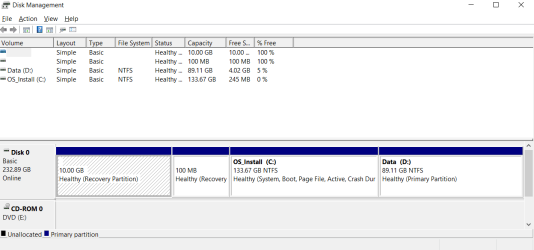
Thank you, Ok here are the snips of each drive in disk management. This first one is the 250 GB OS 10 drive. I will note that I do not need to move or preserve, the content from partition D. I have already saved that content elsewhere. I only need C, the 10 OS and apps. bootable on the new 1.8 drive.

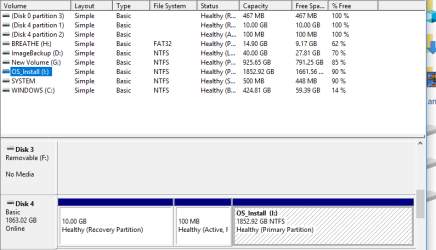
The second is the new 1.8 TB drive, with the cloned old 250GB OS7 in place, now bootable to OS7 just fine.
 

Attachments

  • 250GB windows 10 drive.PNG
    250GB windows 10 drive.PNG
    14.4 KB · Views: 0
  • New 1.8 TB drive with cloned and bootable windows 7 in pace.PNG
    New 1.8 TB drive with cloned and bootable windows 7 in pace.PNG
    13 KB · Views: 0
Last edited by a moderator:

My Computer My Computer

At a glance

windows 7 32 bit home premium4gb
Computer type
Laptop
Computer Manufacturer/Model Number
msi
OS
windows 7 32 bit home premium
Memory
4gb
Hard Drives
1.8tb
Browser
firefox
Megahertz07, I see I missed a question of yours. The windows 10 on the 250GB drive was put in place over an original OEM windows 7, a couple of years ago, using the then free, windows 10 upgrade Microsoft was offering. The upgrade process worked it's magic on the machine. thank you again
 

My Computer My Computer

At a glance

windows 7 32 bit home premium4gb
Computer type
Laptop
Computer Manufacturer/Model Number
msi
OS
windows 7 32 bit home premium
Memory
4gb
Hard Drives
1.8tb
Browser
firefox
As we can see from the Disk management images, both disks has:
- Partition 1 - 10G Recovery. This partition has the Factory Recover Image
- Partition 2 - 100M Recovery. This partition has the Main Boot loader. On the Win 10 installation it has been deactivated.

So, under Win 7, you can you can make another partition (at least 250G) on the empty space of C: win 7 drive and then copy win 10 to it.
Install Macrium Software | Macrium Reflect Free (better than Clonezilla) and try to copy only the Win 10 partition to the unallocated space you created.
Then with Easy BCD modify the boot loader. EasyBCD - NeoSmart Technologies

As you are dealing with disk tools, better do a data backup before you begin.
 

My Computers My Computers

  • At a glance

    Windows 7 HP 64i5 6600K - 800MHz to 4200MHz4+4G GSkill DDR4 3000IG - Intel 530
    Computer type
    PC/Desktop
    Computer Manufacturer/Model Number
    custom build
    OS
    Windows 7 HP 64
    CPU
    i5 6600K - 800MHz to 4200MHz
    Motherboard
    GA-Z170-HD3P
    Memory
    4+4G GSkill DDR4 3000
    Graphics Card(s)
    IG - Intel 530
    Monitor(s) Displays
    Samsung 226BW
    Screen Resolution
    1680x1050
    Hard Drives
    (1) -1 SM951 – 128GB M.2 AHCI PCIe SSD drive for Windows 7 and Lubuntu
    (2) -1 WD SATA 3 - 1T for Data
    (3) -1 WD SATA 3 - 1T for backup
    PSU
    Thermaltake 450W TR2 gold
    Keyboard
    Old and good Chicony mechanical keyboard
    Mouse
    Logitech mX performance - 9 buttons (had to disable some)
    Internet Speed
    500Mb/s
    Browser
    Firefox 64
    Other Info
    TinyWall firewall
  • At a glance

    Windows 7 Proi7-4500U 800MHz to 3.0GHz(4+4)G DDR3 1600IG intel 4400 + NVIDIA GeForce GT 745M
    Computer type
    Laptop
    System Manufacturer/Model Number
    Asus Q550LF
    OS
    Windows 7 Pro
    CPU
    i7-4500U 800MHz to 3.0GHz
    Motherboard
    Asus Q550LF
    Memory
    (4+4)G DDR3 1600
    Graphics Card(s)
    IG intel 4400 + NVIDIA GeForce GT 745M
    Sound Card
    Realtek
    Monitor(s) Displays
    LG Display LP156WF4-SPH1
    Screen Resolution
    1920 x 1080
    Hard Drives
    BX500 120G SSD for Windows and programs +
    1T HDD for data
    Internet Speed
    500 Mb/s
    Browser
    Firefox
    Other Info
    TinyWall firewall
And label your OS partitions, Windows 7, Windows 10, etc
 

My Computer My Computer

At a glance

Windows 10 Pro x64Intel Core i7 6700KGSkill TridentZ RGB 16GB 3600 16-16-16-36EVGA GTX 980 Ti SC x2
Computer type
PC/Desktop
Computer Manufacturer/Model Number
Skylake Special #666
OS
Windows 10 Pro x64
CPU
Intel Core i7 6700K
Motherboard
Asus Sabertooth Z170 Mark 1
Memory
GSkill TridentZ RGB 16GB 3600 16-16-16-36
Graphics Card(s)
EVGA GTX 980 Ti SC x2
Sound Card
Realtek High Definition
Monitor(s) Displays
AOC G2460PG
Screen Resolution
1920 x 1080 144Hz
Hard Drives
Samsung 860 Pro 256GB, Seagate Barracuda 4TB x2
PSU
EVGA 1000 P2, EVGA White Custom Braided Cables
Case
Corsair Vengeance C70 Gunmetal Black
Cooling
Corsair H100i v2, Corsair ML120 x2, Thermal Grizzly Kryonaut
Keyboard
Logitech G910 Orion Spectrum
Mouse
Logitech G700s
Internet Speed
Verizon Fios Quantum Gateway 75/75
Antivirus
Windows Defender, Malwarebytes Free 3.8.3
Browser
Chrome
Other Info
Corsair SP120 x4, LG Blu-ray Drive, Durabrand HT-395 100 Watt Dolby Digital Amp, Corsair H2100 Wireless 7.1 Headset
In Macrium I think it may be going to delete all of my target disk

As we can see from the Disk management images, both disks has:
- Partition 1 - 10G Recovery. This partition has the Factory Recover Image
- Partition 2 - 100M Recovery. This partition has the Main Boot loader. On the Win 10 installation it has been deactivated.

So, under Win 7, you can you can make another partition (at least 250G) on the empty space of C: win 7 drive and then copy win 10 to it.
Install Macrium Software | Macrium Reflect Free (better than Clonezilla) and try to copy only the Win 10 partition to the unallocated space you created.
Then with Easy BCD modify the boot loader. EasyBCD - NeoSmart Technologies

As you are dealing with disk tools, better do a data backup before you begin.

As you are dealing with disk tools, better do a data backup before you begin.[/QUOTE]

Thank you... Sorry for the delay, had to go out of town. I have followed the above advice. I have copied the main windows 10 partition onto a new partition on the 1.8tb drive. I have used the boot program suggested above, easyBCD to create a new entry in the boot menu, directed to the windows 10 partition, I copied to the new 1.8 drive, on its own D partition. However, when I reboot the computer and select that boot option I get the message "windows can not verify the digital signature for this file" File: /windows/system32/winload.exe I am stuck.... so close and yet so far. How can I fix this, does Megahertz07 or anyone else have any ideas????Thank you. I will attempt to add a shot of this screen. Cant get it to post.... see it here: IMG_20180221_090707.jpg - Google Drive
 
Last edited:

My Computer My Computer

At a glance

windows 7 32 bit home premium4gb
Computer type
Laptop
Computer Manufacturer/Model Number
msi
OS
windows 7 32 bit home premium
Memory
4gb
Hard Drives
1.8tb
Browser
firefox
Back
Top