Solved Can I configure Windows Explorer to use a single program icon?

xpda

New member
Local time
4:55 AM
Messages
24
Location
Pryor
Windows explorer uses one program icon for Computer, a different icon for drive C:, another for folders and files, and yet others for libraries. (I am not talking about the icons inside Windows Explorer, I'm talking about the icon you see on the taskbar or Alt-Tab).

When I use Alt-Tab or glance at the taskbar, I would like to see a single, recognizable icon for Windows Explorer. Is it possible to configure Windows Explorer to use a single program icon no matter what you're looking at?
 

My Computer My Computer

At a glance

Windows 7
OS
Windows 7

My Computers My Computers

  • At a glance

    Win7, Win10, Win11
    Computer type
    PC/Desktop
    Computer Manufacturer/Model Number
    HP Pavilion 6751c
    OS
    Win7, Win10, Win11
    Internet Speed
    100 Mbps
    Antivirus
    Norton 360
    Browser
    IE 11
  • At a glance

    Win7, Win10, Win11
    Computer type
    PC/Desktop
    System Manufacturer/Model Number
    HP ENVY 750-514 & Dell XPS 8960
    OS
    Win7, Win10, Win11
    Antivirus
    Norton 360
If I'm understanding you correctly?

Do you have Quick Launch Bar enabled? This is the icons located at the left side of the taskbar. The Window Explorer icon appears as a yellow envelope.

Guided Help: Enable the Quick Launch bar in Windows 7

Right. But when it's running, Windows Explorer's icon changes depending on what's being viewed at the time. Files and folders keep the folder. When you view "Computer", the icon changes to a computer, which is similar to the remote destop icon. When you view Drive C:, the Windows Explorer icon looks like a 300 baud modem, etc. I would like it to remain the same no matter what is being viewed. The icon in Alt-tab is actually more important to me than the task bar or quick launch bar, but it changes in the same manner.
 

My Computer My Computer

At a glance

Windows 7
OS
Windows 7
I think what your describing is normal. Mine does this, as well. But, the icon change you see is not Windows Explorer icons changing, your seeing the icon for whatever folder or file your in.
 

My Computers My Computers

  • At a glance

    Win7, Win10, Win11
    Computer type
    PC/Desktop
    Computer Manufacturer/Model Number
    HP Pavilion 6751c
    OS
    Win7, Win10, Win11
    Internet Speed
    100 Mbps
    Antivirus
    Norton 360
    Browser
    IE 11
  • At a glance

    Win7, Win10, Win11
    Computer type
    PC/Desktop
    System Manufacturer/Model Number
    HP ENVY 750-514 & Dell XPS 8960
    OS
    Win7, Win10, Win11
    Antivirus
    Norton 360
I think what your describing is normal. Mine does this, as well. But, the icon change you see is not Windows Explorer icons changing, your seeing the icon for whatever folder or file your in.

I realize that's normal. But is it possible to configure Windows Explorer so the icon does not change?
 

My Computer My Computer

At a glance

Windows 7
OS
Windows 7
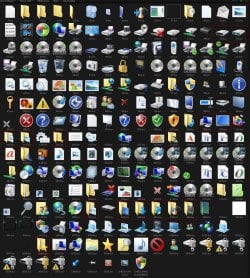
It can be done but you would need to change the at least the icons I highlighted in red(kind of hard to see sorry) maybe some more with the 1 icon you want with a resource hacker.

These icons are in the imageres.dll in C:\Windows\System32 for 32 bit(x86) and both C:\Windows\System32 and C:\Windows\SysWOW64 for 64 bit (x64)
Then:
To properly change a system file you need to take ownership give yourself permission and rename the old file and then copy in the new one look at Post #6 of this thread will tell you how to do it http://www.sevenforums.com/customization/179502-basic-networking-information.html#post1525656

Jerry
icons.jpg
 

My Computer My Computer

At a glance

Win 7 Pro x64 / Win 10 ProIntel(R) Core(TM) i7-3630QM CPU @ 2.40GHz12 GB(1) Intel(R) HD Graphics 4000 (2) NVIDIA GeFo...
Computer type
Laptop
Computer Manufacturer/Model Number
Sager NP9170
OS
Win 7 Pro x64 / Win 10 Pro
CPU
Intel(R) Core(TM) i7-3630QM CPU @ 2.40GHz
Motherboard
CLEVO P170EM
Memory
12 GB
Graphics Card(s)
(1) Intel(R) HD Graphics 4000 (2) NVIDIA GeForce GTX 675M
Sound Card
(1) Realtek High Definition Audio (2) Intel(R) Display Aud
Monitor(s) Displays
17.3
Screen Resolution
1920x1080
Hard Drives
(1) Samsung 860 EVO 500GB(OS) (1) Samsung 860 EVO 500GB(Data)
Keyboard
Backlite
Antivirus
MSE, Malwarebytes Pro
Browser
Firefox
Other Info
DESKTOP: Custom-built.
OS: Win 10 Pro x64.
CASE: Rosewill R5.
CPU: Intel I5 4670K CPU @ 3.40GHz.
CPU COOLER: Cool Master Hyper 212 EVO.
MOTHERBOARD: Asus Z87-A.
MEMORY: Kingston HyperX 2x4 GB.
GPU: Nvidia Geforce 650 TI.
PSU: Corsair TX750.
DRIVES: (1) Samsung 840 120 GB SSD (2) Western Digital blue 500 GB 7200 RPM.
Thank you! I didn't think of that. I'll just change the ones that get on my nerves, like Computer and the drives.
 

My Computer My Computer

At a glance

Windows 7
OS
Windows 7
You're Welcome
 

My Computer My Computer

At a glance

Win 7 Pro x64 / Win 10 ProIntel(R) Core(TM) i7-3630QM CPU @ 2.40GHz12 GB(1) Intel(R) HD Graphics 4000 (2) NVIDIA GeFo...
Computer type
Laptop
Computer Manufacturer/Model Number
Sager NP9170
OS
Win 7 Pro x64 / Win 10 Pro
CPU
Intel(R) Core(TM) i7-3630QM CPU @ 2.40GHz
Motherboard
CLEVO P170EM
Memory
12 GB
Graphics Card(s)
(1) Intel(R) HD Graphics 4000 (2) NVIDIA GeForce GTX 675M
Sound Card
(1) Realtek High Definition Audio (2) Intel(R) Display Aud
Monitor(s) Displays
17.3
Screen Resolution
1920x1080
Hard Drives
(1) Samsung 860 EVO 500GB(OS) (1) Samsung 860 EVO 500GB(Data)
Keyboard
Backlite
Antivirus
MSE, Malwarebytes Pro
Browser
Firefox
Other Info
DESKTOP: Custom-built.
OS: Win 10 Pro x64.
CASE: Rosewill R5.
CPU: Intel I5 4670K CPU @ 3.40GHz.
CPU COOLER: Cool Master Hyper 212 EVO.
MOTHERBOARD: Asus Z87-A.
MEMORY: Kingston HyperX 2x4 GB.
GPU: Nvidia Geforce 650 TI.
PSU: Corsair TX750.
DRIVES: (1) Samsung 840 120 GB SSD (2) Western Digital blue 500 GB 7200 RPM.
Back
Top