Can I delay the left or right channel by a few milliseconds?

amireldor

New member
Local time
1:12 AM
Messages
4
I want to delay the only left channel by a few milliseconds.

My speaker setup requires me to put the right speaker about 1.5m further than the left speaker is. This way, the sound coming from the left speaker reaches the ear faster than sound from right one. This causes me great woes and headache.

If I delay the left signal, then the sound coming from the left speaker will arrive exactly when the sound from the right speaker reaches my ear.

How do I approach this?
 

My Computer My Computer

At a glance

Windows 7 64bit
Computer type
PC/Desktop
OS
Windows 7 64bit
Your estimation of milliseconds is correct. The speed of sound is 343 m/s, so 1.5 m would be 4 milliseconds of delay. I'm surprised your ear/brain can detect 4ms. Sometimes, when a movie I am watching has out of sync sound I alter the sync (on VLC player) in 50 ms quanta. I find I can't see any lipsync difference below 100ms, whilst > 250ms 'out' is unwatchable, for me anyway. That said, I've read that a skilled cinema lipsync expert can make adjustments of fractions one frame (about 40ms). I know this is a different scenario to what you are describing, but I find your perception of 4ms interesting.

What about wall reflections - are you listening to your hifi in an anechoic chamber ?

The subject of imperceptible audio differences usually triggers jokes about Russ Andrews, and their $1000 phono leads, mains cables etc.

audio interconnects, hdmi and Kimber speaker cable from Russ Andrews for your hifi and home cinema

Sorry for being of no help - just my $0.02
 

My Computer My Computer

At a glance

W10 Pro x64, W7 Pro x64 in VMwarei7 2600K @ 4.4GHz8GB Mushkin @ 1600MHzNvidia GTX 750 Ti
Computer type
PC/Desktop
Computer Manufacturer/Model Number
self build
OS
W10 Pro x64, W7 Pro x64 in VMware
CPU
i7 2600K @ 4.4GHz
Motherboard
MSI Z68A-GD80
Memory
8GB Mushkin @ 1600MHz
Graphics Card(s)
Nvidia GTX 750 Ti
Monitor(s) Displays
27" Benq + 27" LG
Screen Resolution
1080p
Hard Drives
500GB 850 Evo SSD + 3 * 2TB Seagate
PSU
EVGA 650 GS modular
Case
Antec 300
Cooling
Seidon 120V v2
Internet Speed
62/18 Mbps
Antivirus
Defender (W10) + MSE (W7)
Browser
Firefox
I don't think you can do that without external hardware, of which I know nothing about.
 

My Computer My Computer

At a glance

Windows 7 Pro 64 bitXeon W35208 GBNvidia Geforce 210
Computer type
PC/Desktop
Computer Manufacturer/Model Number
HP
OS
Windows 7 Pro 64 bit
CPU
Xeon W3520
Memory
8 GB
Graphics Card(s)
Nvidia Geforce 210
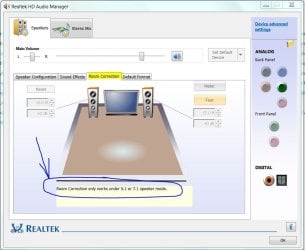
The Realtek Audio Manager has a room correction (spacing) option. At least mine does. However, it's only available when using 5.1 or 7.1 sound systems. Check it out.

Added pic
 

Attachments

  • Sound - Room Correction.JPG
    Sound - Room Correction.JPG
    69.8 KB · Views: 0
Last edited:

My Computer My Computer

At a glance

Windows 7 Pro-x64i7-2600 3.4GHz - 3.8GHz Turbo8Gb - 2x4GB, Muskin 991770 PC3-1333Integrated Intel HD 2000
Computer type
PC/Desktop
Computer Manufacturer/Model Number
Built 2/11/2011
OS
Windows 7 Pro-x64
CPU
i7-2600 3.4GHz - 3.8GHz Turbo
Motherboard
Intel DH67BL-B3
Memory
8Gb - 2x4GB, Muskin 991770 PC3-1333
Graphics Card(s)
Integrated Intel HD 2000
Sound Card
Integrated Intel 10.1 HD, RealTek ALC892
Monitor(s) Displays
Asus LCD VH222H, Haier HL24XSL2a
Screen Resolution
1920x1080, 1920x1080
Hard Drives
Crucial SSD C300-128Gb,
Western Digital WD5002AALX - 500Gb,
Western Digital WD7501AALS - 750Gb
PSU
Seasonic 650W 80+ Gold Modular
Case
Rosewill Defender
Cooling
Stock CPU, Four 120mm case fans, PCH fan added
Keyboard
Logitech EX100 Y-RBH94 Wireless
Mouse
Logitech EX100 M-RCE95 Wireless
Internet Speed
3.0/1.5 Mbs
Antivirus
Microsoft Security Essentials
Browser
Microsoft Internet Explorer 11
Other Info
Antec Veris Premier-Multimedia IR Station,
Cyber Accoustics-3602 Speakers,
AFT XM-5U Card Reader,
Hauppauge TV-HVR-2250,
Sony LX300 USB Turntable
I'm surprised your ear/brain can detect 4ms. Sometimes, when a movie I am watching has out of sync sound I alter the sync (on VLC player) in 50 ms quanta. I find I can't see any lipsync difference below 100ms, whilst > 250ms 'out' is unwatchable, for me anyway.

It's not the delay effect that I feel (i.e. a 'stutter' in the audio), it's more related to a "phasing" effect. Imaging two sine wave signals at the same frequency and amplitude. Summed up, their volume increase; but if one is a bit 'delayed' from the other then you start getting cancellations and boosts to the overall signal which distorts the sound and that's my case. This brings me to:

carwiz said:
The Realtek Audio Manager has a room correction (spacing) option. At least mine does. However, it's only available when using 5.1 or 7.1 sound systems. Check it out.

This is exactly what I need and thought about, but alas! I do not have a 5.1+ output setting.
Maybe I can at least find a media player that supports this feature. This way I can solve phasing for hearing music or watching stuff.
 

My Computer My Computer

At a glance

Windows 7 64bit
Computer type
PC/Desktop
OS
Windows 7 64bit
I found this interesting article on sound delay as used by p.a. crews to delay the signal feeding the relay speakers at the back of a large venue (eg rock gigs at a football stadium). The writer says that a typical value for a large arena of 1/6 sec makes music muddy and speech difficult to understand.

Sound Delay Explained, SXS Events

I also found this commercial DSP that is calibrated in metres, feet or ms

Behringer: SHARK DSP110

fascinating topic
 

My Computer My Computer

At a glance

W10 Pro x64, W7 Pro x64 in VMwarei7 2600K @ 4.4GHz8GB Mushkin @ 1600MHzNvidia GTX 750 Ti
Computer type
PC/Desktop
Computer Manufacturer/Model Number
self build
OS
W10 Pro x64, W7 Pro x64 in VMware
CPU
i7 2600K @ 4.4GHz
Motherboard
MSI Z68A-GD80
Memory
8GB Mushkin @ 1600MHz
Graphics Card(s)
Nvidia GTX 750 Ti
Monitor(s) Displays
27" Benq + 27" LG
Screen Resolution
1080p
Hard Drives
500GB 850 Evo SSD + 3 * 2TB Seagate
PSU
EVGA 650 GS modular
Case
Antec 300
Cooling
Seidon 120V v2
Internet Speed
62/18 Mbps
Antivirus
Defender (W10) + MSE (W7)
Browser
Firefox
Yes, I realized I have the problem at my home while studying for my sound technician certificate. We had a course about live shows amplification. It is a fascinating subject!

Regarding the Behringer, yes, I came across that unit last couple of days while searching for a solution. It is rather cheap (concerning pro audio equipment), but I'd rather not buy one for my particular setup ATM. Also, similar to carwiz's advice, home cinema receivers usually have this delay compensation function for individual speakers.
 
Last edited:

My Computer My Computer

At a glance

Windows 7 64bit
Computer type
PC/Desktop
OS
Windows 7 64bit
As the Realtek driver suggest, in true stereo, left and right output shouldn't make much difference. If you are hearing a phase shift then perhaps the source is not true stereo but mono to two speakers channels. My speakers are oriented on my left as I face the PC screen but left and right as I face the keyboard. If there is phasing, I can't perceive it in stereo mode because the sound from each speaker is different. Perhaps you need to invest in a better sound card that allows the adjustments you need.

Or you could just wear headphones. ;)
 
Last edited:

My Computer My Computer

At a glance

Windows 7 Pro-x64i7-2600 3.4GHz - 3.8GHz Turbo8Gb - 2x4GB, Muskin 991770 PC3-1333Integrated Intel HD 2000
Computer type
PC/Desktop
Computer Manufacturer/Model Number
Built 2/11/2011
OS
Windows 7 Pro-x64
CPU
i7-2600 3.4GHz - 3.8GHz Turbo
Motherboard
Intel DH67BL-B3
Memory
8Gb - 2x4GB, Muskin 991770 PC3-1333
Graphics Card(s)
Integrated Intel HD 2000
Sound Card
Integrated Intel 10.1 HD, RealTek ALC892
Monitor(s) Displays
Asus LCD VH222H, Haier HL24XSL2a
Screen Resolution
1920x1080, 1920x1080
Hard Drives
Crucial SSD C300-128Gb,
Western Digital WD5002AALX - 500Gb,
Western Digital WD7501AALS - 750Gb
PSU
Seasonic 650W 80+ Gold Modular
Case
Rosewill Defender
Cooling
Stock CPU, Four 120mm case fans, PCH fan added
Keyboard
Logitech EX100 Y-RBH94 Wireless
Mouse
Logitech EX100 M-RCE95 Wireless
Internet Speed
3.0/1.5 Mbs
Antivirus
Microsoft Security Essentials
Browser
Microsoft Internet Explorer 11
Other Info
Antec Veris Premier-Multimedia IR Station,
Cyber Accoustics-3602 Speakers,
AFT XM-5U Card Reader,
Hauppauge TV-HVR-2250,
Sony LX300 USB Turntable
Ideally you will want to balance your 2 speakers the same distance from your listening position. However, I know this is not always possible. Foobar2000 (for music only) has a component that will allow you to add delay to one or all your channels. You will need to install Foobar first (personal favorite of all music players), then install the component found here. Channel Mixer (foo_channel_mixer) - Hydrogenaudio Forums


What’s great about Foobar is that it and all of its components (and there are many) is free! :cool:
 

My Computer My Computer

At a glance

Windows 7 ProfessionalIntel i7 4790K32 GB G.SKILL TridentX F3-2400C10D-GTXEVGA GeForce GTX 980 Superclocked X2 SLI
Computer type
PC/Desktop
Computer Manufacturer/Model Number
Misfits Machine!
OS
Windows 7 Professional
CPU
Intel i7 4790K
Motherboard
ASUS Maximus VII Hero
Memory
32 GB G.SKILL TridentX F3-2400C10D-GTX
Graphics Card(s)
EVGA GeForce GTX 980 Superclocked X2 SLI
Sound Card
Teac UD-501 External USB DAC/Bryston BHA-1 Headphone Amp
Monitor(s) Displays
BenQ BL3200PT
Screen Resolution
2560x1440
Hard Drives
Samsung 850 Pro Series 256GB SSD
Western Digital Red 3TB
PSU
Corsair RM Series Gold 1000W
Case
Corsair Carbide Series Air 540
Cooling
Corsair Hydro Series H110
Keyboard
Corsair Vengeance K70 - Cherry MX Red/Razer Orbweaver Elite
Mouse
Razer DeathAdder Chroma
You can change the direction you point speaker and make a m/s change in travel time to your ears.
The quality of each speaker connection can change m/s.
The variation of each speaker can change m/s.
The length of each speaker wire can change m/s.

Remember a m/s =1/1000th of a second.
The human ear will never hear a m/s or several m/s difference.
 

My Computer My Computer

At a glance

Windows 10 Pro. 64/ version 1709 Windows 7 Pr...Intel i7-6800K @ 4.3Corsair Platinum 16 gig @2400EVGA GTX 1070 OC
Computer type
PC/Desktop
Computer Manufacturer/Model Number
Home made Desktop
OS
Windows 10 Pro. 64/ version 1709 Windows 7 Pro/64
CPU
Intel i7-6800K @ 4.3
Motherboard
ASUS X-99 Deluxe II
Memory
Corsair Platinum 16 gig @2400
Graphics Card(s)
EVGA GTX 1070 OC
Monitor(s) Displays
Asus 27" LED LCD/VE278Q
Screen Resolution
1920-1080 or 1280-720 HDMI
Hard Drives
INTEL SSD 730-240 Gb Sata 3.0/
PSU
EVGA Platium 1200W
Case
Phanteks Luxe Tempered Glass 8 fans/ one radiator
Cooling
XSPC/ Water Cooled CPU
Keyboard
Das 4 Professional
Mouse
Logitech M705/MX Anywhere 2-S
Internet Speed
100 mbits
Antivirus
Microsoft Security Essentials/ Malwarebytes Premium 3.0/ SAS
Browser
I.E. 11 default/Firefox/ ISP Time Warner Cable/Spectrum
Other Info
LG BluRay Burner/
Sound system-KLipsch-THX/
Icy Dock ssd Hot Swap bays.
Changing the direction of the speaker (ie; off axis) will actually do more harm than good. One will lose detail and increase or decrease wall reflections depending on how and where it has been pointed.

Sound level will decrease by 6db for every double the distance the listener is from the source. So, if the OP was 1.5m from the right speaker, his left which is now 3m away will be 6db down requiring 4x the power to achieve the same volume as the right. This is just a very simplified example and does not take into effect reflections from the walls, ceilings and floor which will have a greater impact than just changing the delay (changing the delay does not rectify reflections – just makes them nonlinear).

Amireldor; I suggested Foobar because it’s free to try and it’s fun to toy with. It’s a pretty powerful media player if you can get around the whole DIY feel of it. But if you are serious enough about sound reproduction, adding delay will only correct the time in which direct sound will hit your ears. It will not correct the differences between amplitude or reflective sounds. Having your speakers of equal distance from both their reflective boundaries and your ears will create a predictable environment in which you can work with using acoustics and or DSP equalization.
 

My Computer My Computer

At a glance

Windows 7 ProfessionalIntel i7 4790K32 GB G.SKILL TridentX F3-2400C10D-GTXEVGA GeForce GTX 980 Superclocked X2 SLI
Computer type
PC/Desktop
Computer Manufacturer/Model Number
Misfits Machine!
OS
Windows 7 Professional
CPU
Intel i7 4790K
Motherboard
ASUS Maximus VII Hero
Memory
32 GB G.SKILL TridentX F3-2400C10D-GTX
Graphics Card(s)
EVGA GeForce GTX 980 Superclocked X2 SLI
Sound Card
Teac UD-501 External USB DAC/Bryston BHA-1 Headphone Amp
Monitor(s) Displays
BenQ BL3200PT
Screen Resolution
2560x1440
Hard Drives
Samsung 850 Pro Series 256GB SSD
Western Digital Red 3TB
PSU
Corsair RM Series Gold 1000W
Case
Corsair Carbide Series Air 540
Cooling
Corsair Hydro Series H110
Keyboard
Corsair Vengeance K70 - Cherry MX Red/Razer Orbweaver Elite
Mouse
Razer DeathAdder Chroma
Remember a m/s =1/1000th of a second.
The human ear will never hear a m/s or several m/s difference.

That's what I was alluding to when I mentioned the delay problem at rock gigs in football stadiums. Any delay due to speakers at home being 1.5 metres apart is imaginary IMHO.
 

My Computer My Computer

At a glance

W10 Pro x64, W7 Pro x64 in VMwarei7 2600K @ 4.4GHz8GB Mushkin @ 1600MHzNvidia GTX 750 Ti
Computer type
PC/Desktop
Computer Manufacturer/Model Number
self build
OS
W10 Pro x64, W7 Pro x64 in VMware
CPU
i7 2600K @ 4.4GHz
Motherboard
MSI Z68A-GD80
Memory
8GB Mushkin @ 1600MHz
Graphics Card(s)
Nvidia GTX 750 Ti
Monitor(s) Displays
27" Benq + 27" LG
Screen Resolution
1080p
Hard Drives
500GB 850 Evo SSD + 3 * 2TB Seagate
PSU
EVGA 650 GS modular
Case
Antec 300
Cooling
Seidon 120V v2
Internet Speed
62/18 Mbps
Antivirus
Defender (W10) + MSE (W7)
Browser
Firefox
Actually, the human auditory system can detect delays as low as ~0.6 milliseconds. This is how we localize sounds. A single sound source that is not [FONT=&quot] or [/FONT]180° in front or behind the head will produce a delay to the furthest ear which is easily detectable. Of course amplitude and frequency will also play a part in this but to say the human ear cannot detect a millisecond of delay is not true. [FONT=&quot][/FONT]
 

My Computer My Computer

At a glance

Windows 7 ProfessionalIntel i7 4790K32 GB G.SKILL TridentX F3-2400C10D-GTXEVGA GeForce GTX 980 Superclocked X2 SLI
Computer type
PC/Desktop
Computer Manufacturer/Model Number
Misfits Machine!
OS
Windows 7 Professional
CPU
Intel i7 4790K
Motherboard
ASUS Maximus VII Hero
Memory
32 GB G.SKILL TridentX F3-2400C10D-GTX
Graphics Card(s)
EVGA GeForce GTX 980 Superclocked X2 SLI
Sound Card
Teac UD-501 External USB DAC/Bryston BHA-1 Headphone Amp
Monitor(s) Displays
BenQ BL3200PT
Screen Resolution
2560x1440
Hard Drives
Samsung 850 Pro Series 256GB SSD
Western Digital Red 3TB
PSU
Corsair RM Series Gold 1000W
Case
Corsair Carbide Series Air 540
Cooling
Corsair Hydro Series H110
Keyboard
Corsair Vengeance K70 - Cherry MX Red/Razer Orbweaver Elite
Mouse
Razer DeathAdder Chroma
Those of us with tinnitus welcome some deviation from the hissing and 10-pound crickets in either or both ears. ;)
 

My Computer My Computer

At a glance

Windows 7 Pro-x64i7-2600 3.4GHz - 3.8GHz Turbo8Gb - 2x4GB, Muskin 991770 PC3-1333Integrated Intel HD 2000
Computer type
PC/Desktop
Computer Manufacturer/Model Number
Built 2/11/2011
OS
Windows 7 Pro-x64
CPU
i7-2600 3.4GHz - 3.8GHz Turbo
Motherboard
Intel DH67BL-B3
Memory
8Gb - 2x4GB, Muskin 991770 PC3-1333
Graphics Card(s)
Integrated Intel HD 2000
Sound Card
Integrated Intel 10.1 HD, RealTek ALC892
Monitor(s) Displays
Asus LCD VH222H, Haier HL24XSL2a
Screen Resolution
1920x1080, 1920x1080
Hard Drives
Crucial SSD C300-128Gb,
Western Digital WD5002AALX - 500Gb,
Western Digital WD7501AALS - 750Gb
PSU
Seasonic 650W 80+ Gold Modular
Case
Rosewill Defender
Cooling
Stock CPU, Four 120mm case fans, PCH fan added
Keyboard
Logitech EX100 Y-RBH94 Wireless
Mouse
Logitech EX100 M-RCE95 Wireless
Internet Speed
3.0/1.5 Mbs
Antivirus
Microsoft Security Essentials
Browser
Microsoft Internet Explorer 11
Other Info
Antec Veris Premier-Multimedia IR Station,
Cyber Accoustics-3602 Speakers,
AFT XM-5U Card Reader,
Hauppauge TV-HVR-2250,
Sony LX300 USB Turntable
Those of us with tinnitus welcome some deviation from the hissing and 10-pound crickets in either or both ears. ;)

:thumbsup:
You had to remind me and now it's louder.
 

My Computer My Computer

At a glance

Windows 10 Pro. 64/ version 1709 Windows 7 Pr...Intel i7-6800K @ 4.3Corsair Platinum 16 gig @2400EVGA GTX 1070 OC
Computer type
PC/Desktop
Computer Manufacturer/Model Number
Home made Desktop
OS
Windows 10 Pro. 64/ version 1709 Windows 7 Pro/64
CPU
Intel i7-6800K @ 4.3
Motherboard
ASUS X-99 Deluxe II
Memory
Corsair Platinum 16 gig @2400
Graphics Card(s)
EVGA GTX 1070 OC
Monitor(s) Displays
Asus 27" LED LCD/VE278Q
Screen Resolution
1920-1080 or 1280-720 HDMI
Hard Drives
INTEL SSD 730-240 Gb Sata 3.0/
PSU
EVGA Platium 1200W
Case
Phanteks Luxe Tempered Glass 8 fans/ one radiator
Cooling
XSPC/ Water Cooled CPU
Keyboard
Das 4 Professional
Mouse
Logitech M705/MX Anywhere 2-S
Internet Speed
100 mbits
Antivirus
Microsoft Security Essentials/ Malwarebytes Premium 3.0/ SAS
Browser
I.E. 11 default/Firefox/ ISP Time Warner Cable/Spectrum
Other Info
LG BluRay Burner/
Sound system-KLipsch-THX/
Icy Dock ssd Hot Swap bays.
Thank you for all the replies.
 

My Computer My Computer

At a glance

Windows 7 64bit
Computer type
PC/Desktop
OS
Windows 7 64bit
Back
Top