I have a little Acer Revo HTPC. I am running out of recording space, so I took a look to see what was using up my 500GB drive. Turns out almost 50% of it is set aside in a partition for "Data". I would assume this is for system recovery, but it shows empty.
Can I reclaim this space or extend the main partition? I do not want to lose my ability to recover my system.
My Computer
Computer type
PC/Desktop
Computer Manufacturer/Model Number
Custom
OS
Microsoft Windows 7 Home Premium 64-bit 7601 Multiprocessor Free Service Pack 1
CPU
Intel(R) Core(TM) i7 CPU 860 @ 2.80GHz
Motherboard
ASRock P55 Pro
Memory
8.00 GB
Graphics Card(s)
NVIDIA GeForce GTX 670
Sound Card
(1) High Definition Audio Device (2) Logitech G930 Headset
Screen Resolution
1920 x 1080 x 32 bits (4294967296 colors) @ 60 Hz
Hard Drives
(1) Hitachi HDS5C3020ALA632 ATA Device (2) Samsung SSD 850 EVO 500GB ATA Device (3) EPSON Stylus Storage USB Device (4) (5) Generic- MS/MS-Pro USB Device (6) Generic- SD/MMC USB Device (7) Generic- SM/xD-Picture USB Device
One other Desktop (tester) and spare Toshba laptop both with SSD's
Running Kaspersky 2016 ISS on all machines config'd identically
Logitec audio stereo systems on each machine (x3)
Canon MG5250MFC
Router/modem TP-Link running WPA2SK
It is not used for recovery as there is nothing on it, you can either just start using that partition for data, a great idea so you can always just reinstall windows to C if you have to. Or you can delete it and add the space to C.
John has given excellent advice, but it can also be done just using Disk Management.
Simply moving your data to D will clear up plenty of room on C, i`ts 6 of 1 or a half dozen of the other kind of thing, it`s all 1 hard drive, so however you do it does not really matter, but your data should never be stored with C
Best thing you could do is buy an external usb drive for more storage. 2 TB or more.
I am a little confused. I know I see nothing on the D: partition and I have double checks to show any hidden files and still see nothing there. I THOUGHT the only way they could protect an system image for recovery would be to put it on a separate partition. How can Acer offer system recovery if the image is on the C: drive?
My Computer
Computer type
PC/Desktop
Computer Manufacturer/Model Number
Custom
OS
Microsoft Windows 7 Home Premium 64-bit 7601 Multiprocessor Free Service Pack 1
CPU
Intel(R) Core(TM) i7 CPU 860 @ 2.80GHz
Motherboard
ASRock P55 Pro
Memory
8.00 GB
Graphics Card(s)
NVIDIA GeForce GTX 670
Sound Card
(1) High Definition Audio Device (2) Logitech G930 Headset
Screen Resolution
1920 x 1080 x 32 bits (4294967296 colors) @ 60 Hz
Hard Drives
(1) Hitachi HDS5C3020ALA632 ATA Device (2) Samsung SSD 850 EVO 500GB ATA Device (3) EPSON Stylus Storage USB Device (4) (5) Generic- MS/MS-Pro USB Device (6) Generic- SD/MMC USB Device (7) Generic- SM/xD-Picture USB Device
Hum well unless I am terribly wrong that recovery is just that the D: you can do with what I said to or using that software make it a usable partition by formatting it. If you use PW click on the D: and see if it will explore it that will show if there is anything on it or look in Disk Management it will show what the partition is probably unallocated.
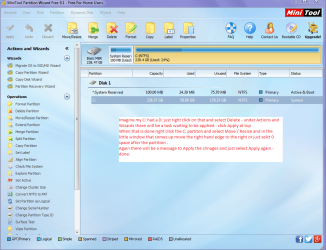
Start > right click Computer > left click Manage > left click Disk management see pic for example.
Personally I like to back up (image) to an external drive / separate drive in case the internal goes south taking all hands down.
Attachments
DISK.PNG
19.7 KB
· Views: 3
My Computer
Computer type
PC/Desktop
Computer Manufacturer/Model Number
Own build (new) Desk1 / Asus ROG Win 7 / Desk2 1st build
OS
Desk1 7 Home Prem / Desk2 10 Pro / Main lap Asus ROG 10 Pro 2 laptop Toshiba 7 Pro Asus P2520 7 & 10
One other Desktop (tester) and spare Toshba laptop both with SSD's
Running Kaspersky 2016 ISS on all machines config'd identically
Logitec audio stereo systems on each machine (x3)
Canon MG5250MFC
Router/modem TP-Link running WPA2SK
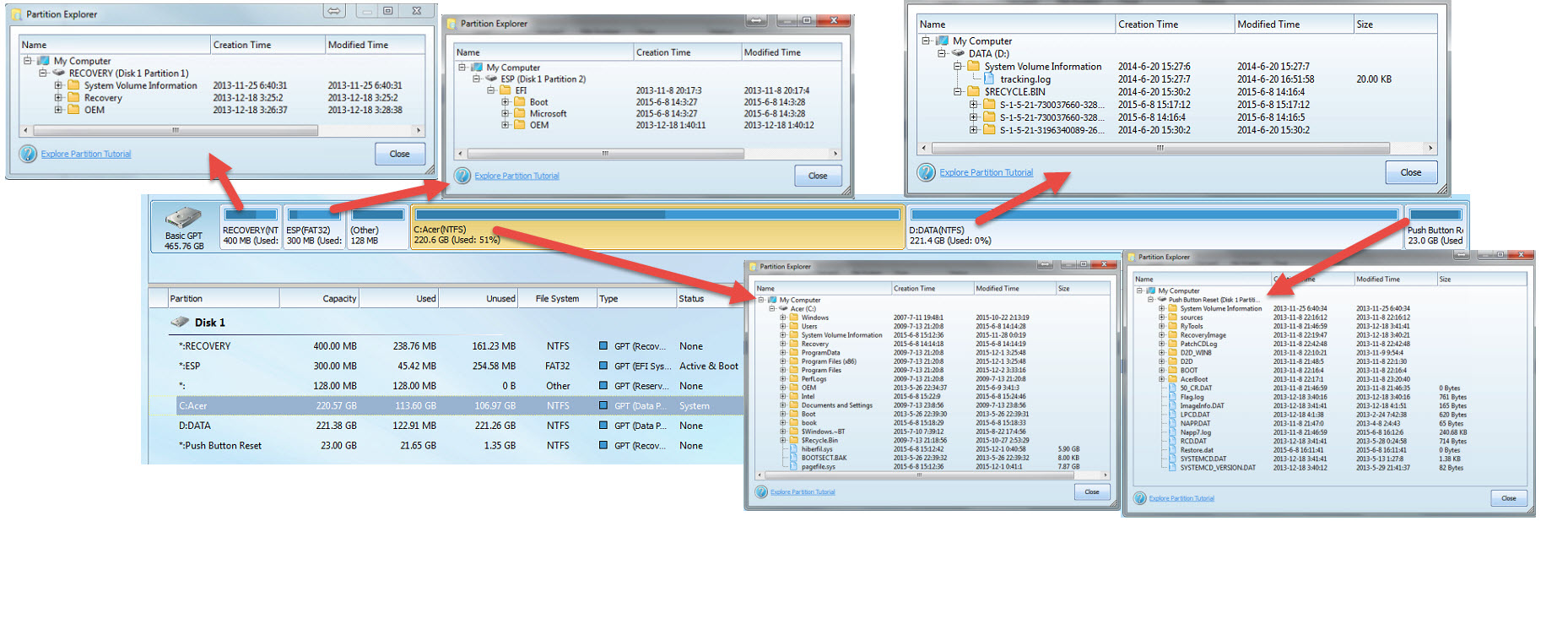
Sorry Layback Bear. Totally missed the clues. Yes, disk management showed far more. And what a mess that disk is. Maybe you guys can help me determine what I need to save.
My Computer
Computer type
PC/Desktop
Computer Manufacturer/Model Number
Custom
OS
Microsoft Windows 7 Home Premium 64-bit 7601 Multiprocessor Free Service Pack 1
CPU
Intel(R) Core(TM) i7 CPU 860 @ 2.80GHz
Motherboard
ASRock P55 Pro
Memory
8.00 GB
Graphics Card(s)
NVIDIA GeForce GTX 670
Sound Card
(1) High Definition Audio Device (2) Logitech G930 Headset
Screen Resolution
1920 x 1080 x 32 bits (4294967296 colors) @ 60 Hz
Hard Drives
(1) Hitachi HDS5C3020ALA632 ATA Device (2) Samsung SSD 850 EVO 500GB ATA Device (3) EPSON Stylus Storage USB Device (4) (5) Generic- MS/MS-Pro USB Device (6) Generic- SD/MMC USB Device (7) Generic- SM/xD-Picture USB Device
One other Desktop (tester) and spare Toshba laptop both with SSD's
Running Kaspersky 2016 ISS on all machines config'd identically
Logitec audio stereo systems on each machine (x3)
Canon MG5250MFC
Router/modem TP-Link running WPA2SK
OK. I am getting somewhere. Have a look at this. I had a crash back in June and did a restore. I wonder if that is what created this mess on the HDD. Please have a look. It appears I could delete multiple partitions.
My Computer
Computer type
PC/Desktop
Computer Manufacturer/Model Number
Custom
OS
Microsoft Windows 7 Home Premium 64-bit 7601 Multiprocessor Free Service Pack 1
CPU
Intel(R) Core(TM) i7 CPU 860 @ 2.80GHz
Motherboard
ASRock P55 Pro
Memory
8.00 GB
Graphics Card(s)
NVIDIA GeForce GTX 670
Sound Card
(1) High Definition Audio Device (2) Logitech G930 Headset
Screen Resolution
1920 x 1080 x 32 bits (4294967296 colors) @ 60 Hz
Hard Drives
(1) Hitachi HDS5C3020ALA632 ATA Device (2) Samsung SSD 850 EVO 500GB ATA Device (3) EPSON Stylus Storage USB Device (4) (5) Generic- MS/MS-Pro USB Device (6) Generic- SD/MMC USB Device (7) Generic- SM/xD-Picture USB Device
Ok we may be getting soemwhere but I am not sure which is the duplicate and maybe Mitchell could answer tis better than me.
What I personally would do and I know it sounds rather drastic - is to clone this drive and take out the original or disconnect the SATA lead and boot the clone and remove the duplicates and see what happens. If all goes well then either use the cloned drive or go back and delete the duplicates on the original. But whatever you decide I would suggest you fully back up any data and programs you need.
My Computer
Computer type
PC/Desktop
Computer Manufacturer/Model Number
Own build (new) Desk1 / Asus ROG Win 7 / Desk2 1st build
OS
Desk1 7 Home Prem / Desk2 10 Pro / Main lap Asus ROG 10 Pro 2 laptop Toshiba 7 Pro Asus P2520 7 & 10
One other Desktop (tester) and spare Toshba laptop both with SSD's
Running Kaspersky 2016 ISS on all machines config'd identically
Logitec audio stereo systems on each machine (x3)
Canon MG5250MFC
Router/modem TP-Link running WPA2SK
Not to worry. There is nothing on the drive that I am attached to. If it all went South I would just rebuild from scratch. All I would be out is some time and the wife beating on me until the HTPC was up and running again
Getting back to the issue- Like many off the shelf PCs this has a recovery system that makes it easy to push a button and put back to factory. If I lost this am I just back to being like my custom builds? I would just use a bootable version of WIN7 to install a fresh copy and go?
The most simple thing I see here is the delete the data partition and extend the main partition to regain 220GB. Should be safe?
My Computer
Computer type
PC/Desktop
Computer Manufacturer/Model Number
Custom
OS
Microsoft Windows 7 Home Premium 64-bit 7601 Multiprocessor Free Service Pack 1
CPU
Intel(R) Core(TM) i7 CPU 860 @ 2.80GHz
Motherboard
ASRock P55 Pro
Memory
8.00 GB
Graphics Card(s)
NVIDIA GeForce GTX 670
Sound Card
(1) High Definition Audio Device (2) Logitech G930 Headset
Screen Resolution
1920 x 1080 x 32 bits (4294967296 colors) @ 60 Hz
Hard Drives
(1) Hitachi HDS5C3020ALA632 ATA Device (2) Samsung SSD 850 EVO 500GB ATA Device (3) EPSON Stylus Storage USB Device (4) (5) Generic- MS/MS-Pro USB Device (6) Generic- SD/MMC USB Device (7) Generic- SM/xD-Picture USB Device
Yes well if you have the factory recovery partition then it is the most important one to save and if you want to get it all back in shape then do a factory restore.
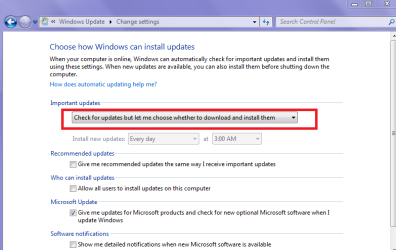
Just one thing if you do and want to steer clear of any 10 crap then when updating and I would set them to let me choose what to download and install - look carefully through them for KB3035533 - right click it and hide it.
If you miss it and it gets installed then does the disable upgrade from this Upgrade to Windows 10 Update - Enable or Disable in Windows 7 or 8.1 - Windows 10 Forums
Attachments
UPDATE SET.PNG
21.5 KB
· Views: 0
My Computer
Computer type
PC/Desktop
Computer Manufacturer/Model Number
Own build (new) Desk1 / Asus ROG Win 7 / Desk2 1st build
OS
Desk1 7 Home Prem / Desk2 10 Pro / Main lap Asus ROG 10 Pro 2 laptop Toshiba 7 Pro Asus P2520 7 & 10
One other Desktop (tester) and spare Toshba laptop both with SSD's
Running Kaspersky 2016 ISS on all machines config'd identically
Logitec audio stereo systems on each machine (x3)
Canon MG5250MFC
Router/modem TP-Link running WPA2SK
Thanks for the tip on 10. I always set my PCs to check for, not autoinstall updates. At this point I do not want Win10. I watch closely for that one.
Thx.
My Computer
Computer type
PC/Desktop
Computer Manufacturer/Model Number
Custom
OS
Microsoft Windows 7 Home Premium 64-bit 7601 Multiprocessor Free Service Pack 1
CPU
Intel(R) Core(TM) i7 CPU 860 @ 2.80GHz
Motherboard
ASRock P55 Pro
Memory
8.00 GB
Graphics Card(s)
NVIDIA GeForce GTX 670
Sound Card
(1) High Definition Audio Device (2) Logitech G930 Headset
Screen Resolution
1920 x 1080 x 32 bits (4294967296 colors) @ 60 Hz
Hard Drives
(1) Hitachi HDS5C3020ALA632 ATA Device (2) Samsung SSD 850 EVO 500GB ATA Device (3) EPSON Stylus Storage USB Device (4) (5) Generic- MS/MS-Pro USB Device (6) Generic- SD/MMC USB Device (7) Generic- SM/xD-Picture USB Device
Ok alls good and I suspect if you were not looking for it that KB3035533 was installed on your machine during any clean install because it was very ambiguous in the description of it.
Anyway you have the disable thing to keep it out and personally unless they address the privacy and ability to have what you want on your computer I shall not be using 10.
My Computer
Computer type
PC/Desktop
Computer Manufacturer/Model Number
Own build (new) Desk1 / Asus ROG Win 7 / Desk2 1st build
OS
Desk1 7 Home Prem / Desk2 10 Pro / Main lap Asus ROG 10 Pro 2 laptop Toshiba 7 Pro Asus P2520 7 & 10
One other Desktop (tester) and spare Toshba laptop both with SSD's
Running Kaspersky 2016 ISS on all machines config'd identically
Logitec audio stereo systems on each machine (x3)
Canon MG5250MFC
Router/modem TP-Link running WPA2SK
I went ahead and used the registry fix to disable the Win10 update. Keeps me from having to keep an eye on it.
Thanks for the tip.
My Computer
Computer type
PC/Desktop
Computer Manufacturer/Model Number
Custom
OS
Microsoft Windows 7 Home Premium 64-bit 7601 Multiprocessor Free Service Pack 1
CPU
Intel(R) Core(TM) i7 CPU 860 @ 2.80GHz
Motherboard
ASRock P55 Pro
Memory
8.00 GB
Graphics Card(s)
NVIDIA GeForce GTX 670
Sound Card
(1) High Definition Audio Device (2) Logitech G930 Headset
Screen Resolution
1920 x 1080 x 32 bits (4294967296 colors) @ 60 Hz
Hard Drives
(1) Hitachi HDS5C3020ALA632 ATA Device (2) Samsung SSD 850 EVO 500GB ATA Device (3) EPSON Stylus Storage USB Device (4) (5) Generic- MS/MS-Pro USB Device (6) Generic- SD/MMC USB Device (7) Generic- SM/xD-Picture USB Device
No problems and if you have to ever reinstall just use the update settings as in the pic and just hide the KB mentioned then you will not have to worry about disabling the update, because once on it leaves a registry entry GWX which cannot be removed without wiping the disk and doing a clean install
My Computer
Computer type
PC/Desktop
Computer Manufacturer/Model Number
Own build (new) Desk1 / Asus ROG Win 7 / Desk2 1st build
OS
Desk1 7 Home Prem / Desk2 10 Pro / Main lap Asus ROG 10 Pro 2 laptop Toshiba 7 Pro Asus P2520 7 & 10
One other Desktop (tester) and spare Toshba laptop both with SSD's
Running Kaspersky 2016 ISS on all machines config'd identically
Logitec audio stereo systems on each machine (x3)
Canon MG5250MFC
Router/modem TP-Link running WPA2SK
hi
Im no expert, but how about moving all photos or music etc to the d drive or even my documents, but whatever you do get a usb external drive and back up the lot first good luck
hi
Im no expert, but how about moving all photos or music etc to the d drive or even my documents, but whatever you do get a usb external drive and back up the lot first good luck