Can I delete the healthy (recovery partition)?

RN09

New member
Local time
8:39 AM
Messages
25
I am not sure if this is right forum.

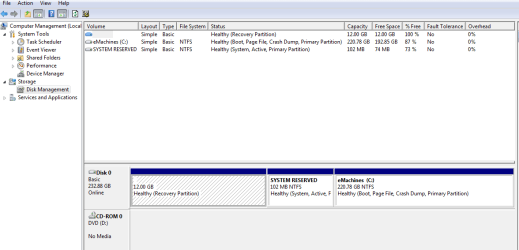
I go into Computer - Manage - Disk Management, right click and it shows no option to delete, only "help".

I clone the whole hard drive once in awhile and don't want it neither in my computer nor clone hard drive.

Windows 7 Home Prem. notebook.

Thanks
 

My Computer My Computer

At a glance

Window 7 Ultimate
OS
Window 7 Ultimate
I am not sure if this is right forum.

I go into Computer - Manage - Disk Management, right click and it shows no option to delete, only "help".

I clone the whole hard drive once in awhile and don't want it neither in my computer nor clone hard drive.

Windows 7 Home Prem. notebook.

Thanks

Is it an OS partition? if so the only way is to do it outside of the OS with a 3rd party app like parigon disk management
 

My Computer My Computer

At a glance

Win 8 Release candidate 8400[email protected]4 gigsNvidia 9600M
Computer Manufacturer/Model Number
HP Pavillion dv-7 1005 Tx
OS
Win 8 Release candidate 8400
CPU
[email protected]
Memory
4 gigs
Graphics Card(s)
Nvidia 9600M
Sound Card
HD built-in
Monitor(s) Displays
17" Wxga
Screen Resolution
1440x900
Cooling
none
Internet Speed
45Mb down 5Mb up
I am not sure if this is right forum.

I go into Computer - Manage - Disk Management, right click and it shows no option to delete, only "help".

I clone the whole hard drive once in awhile and don't want it neither in my computer nor clone hard drive.

Windows 7 Home Prem. notebook.

Thanks

Have you made your notebook Recovery DVD's?
 

My Computer My Computer

At a glance

ME/XP/Vista/Win7
OS
ME/XP/Vista/Win7
Yes you can delete it.
 

My Computer My Computer

At a glance

Windows 8.1 PRO3rd Generation Intel Core i7‐3612QM CPU @ 2.1...8GB DDR3NVIDIA GeForce GT 525M (128 bit), 1GB Grpahics
Computer type
PC/Desktop
Computer Manufacturer/Model Number
DELL VOSTRO 3650
OS
Windows 8.1 PRO
CPU
3rd Generation Intel Core i7‐3612QM CPU @ 2.10GHZ
Memory
8GB DDR3
Graphics Card(s)
NVIDIA GeForce GT 525M (128 bit), 1GB Grpahics
Screen Resolution
1920X1080
Hard Drives
750GB 5400RPM
A screenshot of the Disk Management Window might help.

The boot files might be located in the partition. and would need to be re-located. EasyBCD might provide a clue....
 

My Computer My Computer

At a glance

XP Pro & Vista Home Premium (x86); Windows Ul...
OS
XP Pro & Vista Home Premium (x86); Windows Ultimate 7600 x64 Retail
As requested, please post back a screenshot of your full Disk Management drive map, using Snipping tool in Start Menu, attach file using paper clip in reply box.

Tell us exactly what you want to achieve and we will give you the steps.

You can delete the Recovery partition if you need the space and have made the backup disks.
 
No, I don't make the recovery dvd. I like to clone the whole hard drive using acronis to external hard drive. I find it is easy for me later so I just swap the hard drive.

This is the new laptop with 250gb hard drive. I want to remove the partition on top (12.0 GB) and bottom (SYSTEM RESERVED - 102 MB)
 

Attachments

  • Capture.PNG
    Capture.PNG
    17.7 KB · Views: 2,589

My Computer My Computer

At a glance

Window 7 Ultimate
OS
Window 7 Ultimate
Even with cloning the drive, it may be useful to burn the recovery dvds from the recovery partition before you delete it. This is just an extra security. You never know whether your clone/image will work. As to the little 100 MB partition, I would leave it alone. There is nothing to be gained.
 

My Computer My Computer

At a glance

Vista, Windows7, Mint Mate, Zorin, Windows 8from 1.6GHz Duo to i7
Computer Manufacturer/Model Number
HP, Dell, Gateway, Toshiba - 4 laptops and 2 desktops
OS
Vista, Windows7, Mint Mate, Zorin, Windows 8
CPU
from 1.6GHz Duo to i7
Monitor(s) Displays
2x HP w2207
Hard Drives
5x HDD, 7x SSD, 12x Externals
Keyboard
with trackball - no mices
Mouse
Trackball mice
Internet Speed
DSL 6000
Can anyone walk me through how to delete it? I want to get the 12 GB seems nothing in there.

Thanks
 

My Computer My Computer

At a glance

Window 7 Ultimate
OS
Window 7 Ultimate
If you really want to delete that partition, see this thread: http://www.sevenforums.com/general-...tition-no-re-install-needed-3.html#post588327

To delete the partition in Diskpart, boot from the installation/repair disc and press Shift+F10 on the language screen.

Enter the following:

diskpart
list disk
select disk
[whatever the disk number is]
list partition
select partition
[100mb partition #]
delete partition override

Then mark the main OS partition as active: http://www.sevenforums.com/installation-setup/34853-common-installation-problems.html

Then run a Startup Repair: http://www.sevenforums.com/tutorials/681-startup-repair.html
 

My Computer My Computer

At a glance

Windows 7 Professional x64Intel i7 2600K OC'd @ 4620 MHz16GB GSkill Sniper 2133 Mhz (4x4GB)EVGA GeForce GTX 480 SuperClocked+
Computer Manufacturer/Model Number
Custom
OS
Windows 7 Professional x64
CPU
Intel i7 2600K OC'd @ 4620 MHz
Motherboard
Asus P8Z68-V Pro
Memory
16GB GSkill Sniper 2133 Mhz (4x4GB)
Graphics Card(s)
EVGA GeForce GTX 480 SuperClocked+
Sound Card
Realtek High Definition Audio
Monitor(s) Displays
2x Acer S273HLbmii 27"
Screen Resolution
2 x 1920x1080
Hard Drives
64GB Crucial M4 SSD

Storage: Hitachi 1TB 5400RPM, Samsung 1.5TB 5400RPM
PSU
Corsair HW Series 750w (modular)
Case
Cooler Master HAF 932 Advanced Blue Edition
Cooling
CM Hyper 212+ CPU cooler, 3x 230mm + 1x 140mm case fans
Keyboard
Logitech MK320 (wireless)
Mouse
Logitech MK320 (wireless)
Internet Speed
30 Mb/s : 2 Mb/s
I would advice to only delete the 12gb partition, leave 100mb in place.
 

My Computer My Computer

At a glance

ME/XP/Vista/Win7
OS
ME/XP/Vista/Win7
Don't worry Theog, the 100MB system partition is safe to remove.
 

My Computer My Computer

At a glance

Windows 7 Professional x64Intel i7 2600K OC'd @ 4620 MHz16GB GSkill Sniper 2133 Mhz (4x4GB)EVGA GeForce GTX 480 SuperClocked+
Computer Manufacturer/Model Number
Custom
OS
Windows 7 Professional x64
CPU
Intel i7 2600K OC'd @ 4620 MHz
Motherboard
Asus P8Z68-V Pro
Memory
16GB GSkill Sniper 2133 Mhz (4x4GB)
Graphics Card(s)
EVGA GeForce GTX 480 SuperClocked+
Sound Card
Realtek High Definition Audio
Monitor(s) Displays
2x Acer S273HLbmii 27"
Screen Resolution
2 x 1920x1080
Hard Drives
64GB Crucial M4 SSD

Storage: Hitachi 1TB 5400RPM, Samsung 1.5TB 5400RPM
PSU
Corsair HW Series 750w (modular)
Case
Cooler Master HAF 932 Advanced Blue Edition
Cooling
CM Hyper 212+ CPU cooler, 3x 230mm + 1x 140mm case fans
Keyboard
Logitech MK320 (wireless)
Mouse
Logitech MK320 (wireless)
Internet Speed
30 Mb/s : 2 Mb/s
Definitely create the repair disc first. Your installation DVD will also work.

You actually need the repair disc/installation dvd to delete the partition, so that will not be hard to remember.
 

My Computer My Computer

At a glance

Windows 7 Professional x64Intel i7 2600K OC'd @ 4620 MHz16GB GSkill Sniper 2133 Mhz (4x4GB)EVGA GeForce GTX 480 SuperClocked+
Computer Manufacturer/Model Number
Custom
OS
Windows 7 Professional x64
CPU
Intel i7 2600K OC'd @ 4620 MHz
Motherboard
Asus P8Z68-V Pro
Memory
16GB GSkill Sniper 2133 Mhz (4x4GB)
Graphics Card(s)
EVGA GeForce GTX 480 SuperClocked+
Sound Card
Realtek High Definition Audio
Monitor(s) Displays
2x Acer S273HLbmii 27"
Screen Resolution
2 x 1920x1080
Hard Drives
64GB Crucial M4 SSD

Storage: Hitachi 1TB 5400RPM, Samsung 1.5TB 5400RPM
PSU
Corsair HW Series 750w (modular)
Case
Cooler Master HAF 932 Advanced Blue Edition
Cooling
CM Hyper 212+ CPU cooler, 3x 230mm + 1x 140mm case fans
Keyboard
Logitech MK320 (wireless)
Mouse
Logitech MK320 (wireless)
Internet Speed
30 Mb/s : 2 Mb/s
The laptop come with pre-install OS but no cd. I want to delete the 12GB.

I manage to use partition wizard to move the 12GB position. Before it was 12GB - 102MB - 220GB.

Now 102MB - 12GB - 220GB, but only if I can more the 12B to the right so I can delete it and extend 220GB. The problem is I can't move it.
 

My Computer My Computer

At a glance

Window 7 Ultimate
OS
Window 7 Ultimate
Use Partition Wizard if you want to move the partition.

If you want to delete it, select it in Diskpart (like explained above) and type delete partition override.
 

My Computer My Computer

At a glance

Windows 7 Professional x64Intel i7 2600K OC'd @ 4620 MHz16GB GSkill Sniper 2133 Mhz (4x4GB)EVGA GeForce GTX 480 SuperClocked+
Computer Manufacturer/Model Number
Custom
OS
Windows 7 Professional x64
CPU
Intel i7 2600K OC'd @ 4620 MHz
Motherboard
Asus P8Z68-V Pro
Memory
16GB GSkill Sniper 2133 Mhz (4x4GB)
Graphics Card(s)
EVGA GeForce GTX 480 SuperClocked+
Sound Card
Realtek High Definition Audio
Monitor(s) Displays
2x Acer S273HLbmii 27"
Screen Resolution
2 x 1920x1080
Hard Drives
64GB Crucial M4 SSD

Storage: Hitachi 1TB 5400RPM, Samsung 1.5TB 5400RPM
PSU
Corsair HW Series 750w (modular)
Case
Cooler Master HAF 932 Advanced Blue Edition
Cooling
CM Hyper 212+ CPU cooler, 3x 230mm + 1x 140mm case fans
Keyboard
Logitech MK320 (wireless)
Mouse
Logitech MK320 (wireless)
Internet Speed
30 Mb/s : 2 Mb/s
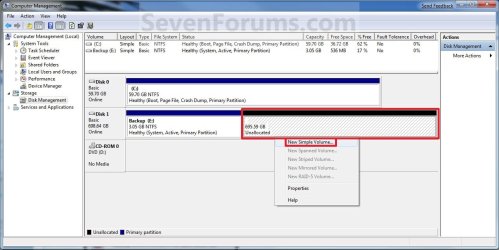
Do this:
 

Attachments

  • Create_Step1.jpg
    Create_Step1.jpg
    91.7 KB · Views: 1,143

My Computer My Computer

At a glance

ME/XP/Vista/Win7
OS
ME/XP/Vista/Win7
You say you want to delete the Recovery and System Reserved partitions and recover the space into Win7.

You will also need to recover the MBR and active flag into Win7. Back up your files and make a Win7 Repair CD if you don't have an installation DVD.

Boot Partition Wizard CD, select 1 for screen resolution, right click partitions which you want delete and choose Delete, OK.

Now rightclick Win7 partition>Modify>Set to Active, OK.

Again rightclick Win7 partition>Resize>slide left grey border to the left over all of the deleted space, OK, Apply all steps.

Now Win7 will not boot. Instead, boot Win7 Repair CD or DVD Repair console, click through to Recovery Tools list to run Startup Repair up to 3 separate times with reboots to write MBR to Win7 partition. You can also use Rebuild MBR on Partition Wizard Disk tab to do this.

Save a Win7 backup image externally so you never have to reinstall Win7 again, just reimage the HD using Repair CD and your image in 15 minutes.
 
You say you want to delete the Recovery and System Reserved partitions and recover the space into Win7.

You will also need to recover the MBR and active flag into Win7. Back up your files and make a Win7 Repair CD if you don't have an installation DVD.

Boot Partition Wizard CD, select 1 for screen resolution, right click partitions which you want delete and choose Delete, OK.

Now rightclick Win7 partition>Modify>Set to Active, OK.

Again rightclick Win7 partition>Resize>slide left grey border to the left over all of the deleted space, OK, Apply all steps.

Now Win7 will not boot. Instead, boot Win7 Repair CD or DVD Repair console, click through to Recovery Tools list to run Startup Repair up to 3 separate times with reboots to write MBR to Win7 partition. You can also use Rebuild MBR on Partition Wizard Disk tab to do this.

Save a Win7 backup image externally so you never have to reinstall Win7 again, just reimage the HD using Repair CD and your image in 15 minutes.


Thanks. Followed this and I could delete them. I downloaded iso OS from digitalriver link to use to repair tool.


The reason I like to clone HD because if computer crashed, I can clone back WITHOUT install whole bunches of software.

Question: If i make a back up image dvd, can I use it in the future in case the computer crashed without install softwares or I have to re install everything again?

Sorry for a dumb question. Just try to learn new things from experts.
 

My Computer My Computer

At a glance

Window 7 Ultimate
OS
Window 7 Ultimate
Back
Top