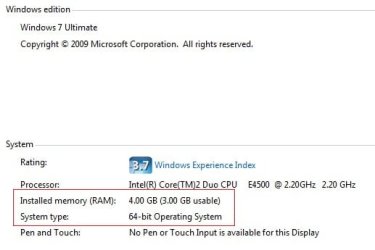
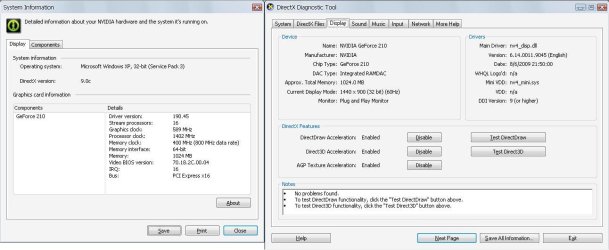
can i get full 4 Gb RAM for my specifications?

taralmehta15

New member
Local time
11:28 AM
Messages
15
Hi,
My 1st post so sorry if m wrong somewhere..

I installed windows 7 ultimate x64..its a dual boot along with windows xp sp3.
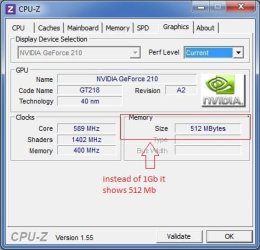
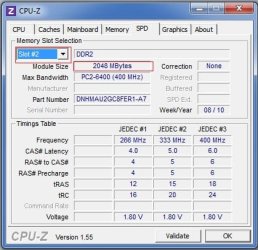
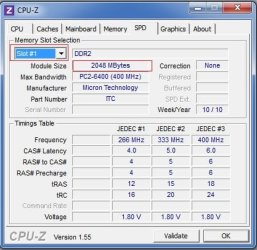
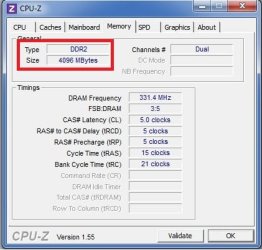
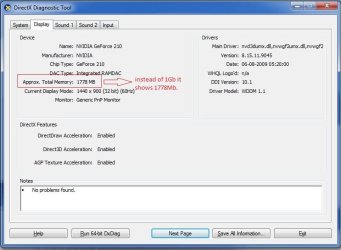
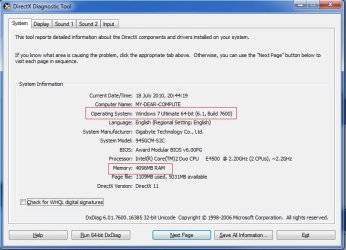
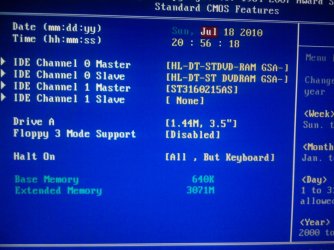
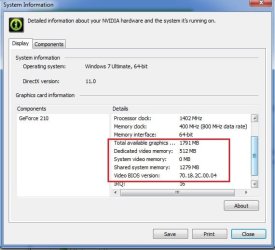
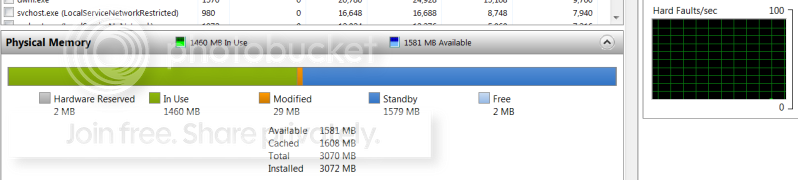
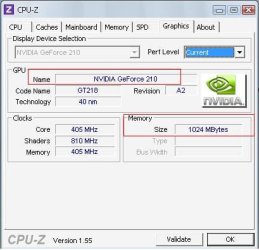
in system it shows - 4 gb ram (3 gb usable).i saw dat in windows7, my 1 Gb Graphics card is shown as 1778 Mb in dxdiag (in xp sp3 it shows 1024Mb only,vich is correct) while with cpu-z it shows 512 Mb only..BIOS shows 3 Gb RAM..

Max. memory in msconfig is already unticked..it dint help.

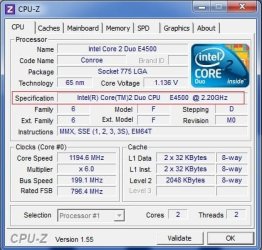
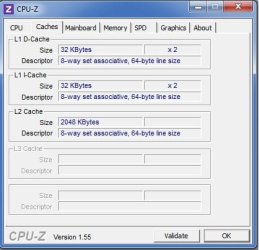
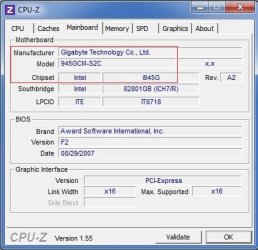
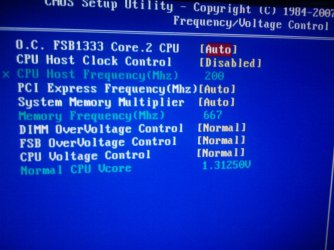
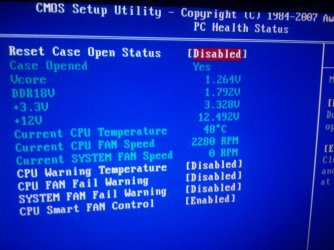
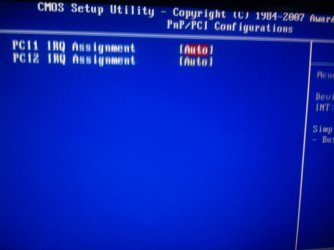
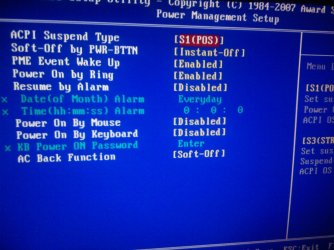
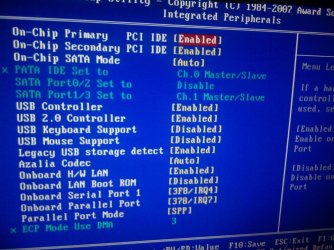
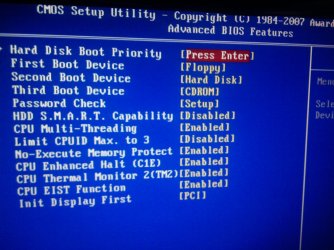
M attaching pics for clearity wid problems marked in red, specifications and BIOS to know if any change is needed in it.


Plz help coz i installed 4 Gb RAM just b4 few days n installed windows7 x64 to use full 4 Gb.. I wouldnt mind if uninstalling xp sp3 n keeping only w7 can really solve d prob.

Thanx...
 

Attachments

  • 8.jpg
    8.jpg
    16.4 KB · Views: 12
  • 1.jpg
    1.jpg
    39.8 KB · Views: 12
  • 2.jpg
    2.jpg
    28.1 KB · Views: 5
  • 3.jpg
    3.jpg
    28.9 KB · Views: 5
  • 7.jpg
    7.jpg
    28.8 KB · Views: 2
  • 6.jpg
    6.jpg
    34.7 KB · Views: 3
  • 5.jpg
    5.jpg
    34.6 KB · Views: 2
  • 4.jpg
    4.jpg
    29.3 KB · Views: 1
  • graphics.jpg
    graphics.jpg
    46.9 KB · Views: 16
  • 9.jpg
    9.jpg
    54 KB · Views: 14
  • Photo0451.jpg
    Photo0451.jpg
    269.3 KB · Views: 2
  • Photo0450.jpg
    Photo0450.jpg
    261 KB · Views: 2
  • Photo0449.jpg
    Photo0449.jpg
    177.5 KB · Views: 2
  • Photo0448.jpg
    Photo0448.jpg
    275.7 KB · Views: 3
  • Photo0447.jpg
    Photo0447.jpg
    345.1 KB · Views: 2
  • Photo0446.jpg
    Photo0446.jpg
    306 KB · Views: 3
  • Photo0445.jpg
    Photo0445.jpg
    287.1 KB · Views: 3
  • Photo0444.jpg
    Photo0444.jpg
    268.2 KB · Views: 3
Last edited:

My Computer My Computer

At a glance

windows 7 ultimateintel core2duo e45004 gb DDR2nvidia geforce 6400 1 gb
OS
windows 7 ultimate
CPU
intel core2duo e4500
Motherboard
gigabyte 945gcm-s2c
Memory
4 gb DDR2
Graphics Card(s)
nvidia geforce 6400 1 gb
You need is most cases "Memory Remapping" provided by the BIOS...not all have this feature, however.

The system memory that is reported in the System Information dialog box in Windows Vista is less than you expect if 4 GB of RAM is installed
The BIOS must support the memory remapping feature. The memory remapping feature allows for the segment of system memory that was previously overwritten by the Peripheral Component Interconnect (PCI) configuration space to be remapped above the 4 GB address line. This feature must be enabled in the BIOS configuration utility on the computer. View your computer product documentation for instructions that explain how to enable this feature. Many consumer-oriented computers may not support the memory remapping feature. No standard terminology is used in documentation or in BIOS configuration utilities for this feature. Therefore, you may have to read the descriptions of the various BIOS configuration settings that are available to determine whether any of the settings enable the memory remapping feature.
 

My Computer My Computer

At a glance

Windows 10 Pro (x64)Intel Core i7-3930K (3.2GHz - 4.5GHz)4x Samsung 4GB PC3-12800 DDR3 (16GB 1600MHz)Nvidia Geforce GTX 690
Computer type
PC/Desktop
Computer Manufacturer/Model Number
Alienware Aurora ALX R4
OS
Windows 10 Pro (x64)
CPU
Intel Core i7-3930K (3.2GHz - 4.5GHz)
Motherboard
Alienware Aurora-R4 x79
Memory
4x Samsung 4GB PC3-12800 DDR3 (16GB 1600MHz)
Graphics Card(s)
Nvidia Geforce GTX 690
Sound Card
SteelSeries Siberia Elite
Monitor(s) Displays
Dell UltraSharp U3011
Screen Resolution
2560x1600
Hard Drives
Samsung 850 Pro 256 GB, Seagate 1TB Desktop Hybrid HDD, 2x Western Digital 4TB Green HDD
PSU
875W Some Dell PSU <.<
Case
Alienware Aurora ALX
Cooling
Custom Liquid Cooling (EK CPU & GPU blocks) dual EK 480RAD
Keyboard
Logitech G710+ Mechanical
Mouse
Logitech G700s
Internet Speed
Verizon Fios (50 mbps average)
Other Info
Server: Intel NUC D54250WYK: i5-4250U, 16GB, 256 GB mSATA, Windows Server 2012 R2
ussually with any windows they leave 1 gig unused especially when you have the max recommended im using 8 gigs but only 6.83 are usable some memory gets shifted to the gpu but ultimatly windows will all ways leave one gig unusable
 

My Computer My Computer

At a glance

Windows 10 Home Premium 64bit sp1Intel I7-6700K @ 4.6 Ghz 1.344 volts everyday OC32GB G-Skill TridentZ 3200mhz 16-18-18-38 DDR4Sli Gigabyte Windforce GTX 980 G1
Computer type
PC/Desktop
Computer Manufacturer/Model Number
CoreI7-6700K MrFingerIII Special Builds
OS
Windows 10 Home Premium 64bit sp1
CPU
Intel I7-6700K @ 4.6 Ghz 1.344 volts everyday OC
Motherboard
Asrock Fatality K6 Z170 Socket 1151
Memory
32GB G-Skill TridentZ 3200mhz 16-18-18-38 DDR4
Graphics Card(s)
Sli Gigabyte Windforce GTX 980 G1
Sound Card
AC97 Creative Rage Tactic 3D Headphones Bluetooth
Monitor(s) Displays
27" Asus ROG Swift PG278Q G-Sync 48" Vizio Smart HD TV
Screen Resolution
2560x1440p 27"- 48" Currently Gaming at 2560x1440p Res 2K
Hard Drives
250GB Samsung Evo840SSD Seagate baracuda 500 GB WD Mybook 500Gb 1TB Seagate Barracuda
PSU
HX1050w Corsair Silver 80plus certified crosfire/sli
Case
Enthod Pro Full Tower
Cooling
Corsair H110i GT 280 mm High Performance WaterBlock
Keyboard
Logitech wireless keyboard
Mouse
Logitech wireless mouse
Internet Speed
Cox Cable 100+ mb
Antivirus
WebRoot Spysweeper with Antivirus
Browser
IE-10, Chrome, Opera
Other Info
My Other Rig is a AMD FX8320E @4.6Ghz 16GB Ballistic Sport Ram
Mobo Asrock Fatality 990FX 120GB OCZ SSD 1TB Seagate Barracuda Corsair H75 Cooling PSU Corsair CX750
GPU GTX Gigabyte 970G1
ussually with any windows they leave 1 gig unused especially when you have the max recommended im using 8 gigs but only 6.83 are usable some memory gets shifted to the gpu but ultimatly windows will all ways leave one gig unusable

That would be your hardware that does that. Not Windows.
 

My Computer My Computer

At a glance

Windows 10 Pro (x64)Intel Core i7-3930K (3.2GHz - 4.5GHz)4x Samsung 4GB PC3-12800 DDR3 (16GB 1600MHz)Nvidia Geforce GTX 690
Computer type
PC/Desktop
Computer Manufacturer/Model Number
Alienware Aurora ALX R4
OS
Windows 10 Pro (x64)
CPU
Intel Core i7-3930K (3.2GHz - 4.5GHz)
Motherboard
Alienware Aurora-R4 x79
Memory
4x Samsung 4GB PC3-12800 DDR3 (16GB 1600MHz)
Graphics Card(s)
Nvidia Geforce GTX 690
Sound Card
SteelSeries Siberia Elite
Monitor(s) Displays
Dell UltraSharp U3011
Screen Resolution
2560x1600
Hard Drives
Samsung 850 Pro 256 GB, Seagate 1TB Desktop Hybrid HDD, 2x Western Digital 4TB Green HDD
PSU
875W Some Dell PSU <.<
Case
Alienware Aurora ALX
Cooling
Custom Liquid Cooling (EK CPU & GPU blocks) dual EK 480RAD
Keyboard
Logitech G710+ Mechanical
Mouse
Logitech G700s
Internet Speed
Verizon Fios (50 mbps average)
Other Info
Server: Intel NUC D54250WYK: i5-4250U, 16GB, 256 GB mSATA, Windows Server 2012 R2
taralmehta15, welcome to the forums.

Same board with the same issue here,

http://www.sevenforums.com/hardware-devices/9887-problem-using-4gb-64-bits.html

and this Microsoft KB article linked to in it,

The system memory that is reported in the System Information dialog box in Windows Vista is less than you expect if 4 GB of RAM is installed

that applies to Windows 7 as well as Vista. The explanation in the "Workarounds" section pretty much explains what is happening in your case. Basically comes down to whether the chipset/bios support memory remapping, and as logicearth said if it doesn't then even on 64 bit Windows the memory will still work the same as on 32 bit.

As for the memory reading in dxdiag, your card does not have 1778 MB. This,

http://www.sevenforums.com/tutorials/89278-video-memory-virtualization-brief-guide.html

should help explain what it means.
 

My Computer My Computer

At a glance

Win 7 Ultimate x64FX-8350 @ 4.6 GHz so farADATA XPG V1 Series Black 8GB DDR3 1600Sapphire R9 270x Dual-X
Computer type
PC/Desktop
Computer Manufacturer/Model Number
Me
OS
Win 7 Ultimate x64
CPU
FX-8350 @ 4.6 GHz so far
Motherboard
Asus M5A97 EVO
Memory
ADATA XPG V1 Series Black 8GB DDR3 1600
Graphics Card(s)
Sapphire R9 270x Dual-X
Sound Card
Xonar DGX w/ Corsair Vengence 1300
Monitor(s) Displays
Acer S232HL Abid
Screen Resolution
1920x1080
Hard Drives
120 GB OCZ Vertex 3
500 GB Seagate 7200.12
PSU
Antec Earthwatts 650W Green
Case
Antec Three Hundred
Cooling
Cooler Master 212 EVO
Keyboard
Logitech G510
Mouse
Logitech G500s
Internet Speed
35000/3000
You need is most cases "Memory Remapping" provided by the BIOS...not all have this feature, however.

The system memory that is reported in the System Information dialog box in Windows Vista is less than you expect if 4 GB of RAM is installed
The BIOS must support the memory remapping feature. The memory remapping feature allows for the segment of system memory that was previously overwritten by the Peripheral Component Interconnect (PCI) configuration space to be remapped above the 4 GB address line. This feature must be enabled in the BIOS configuration utility on the computer. View your computer product documentation for instructions that explain how to enable this feature. Many consumer-oriented computers may not support the memory remapping feature. No standard terminology is used in documentation or in BIOS configuration utilities for this feature. Therefore, you may have to read the descriptions of the various BIOS configuration settings that are available to determine whether any of the settings enable the memory remapping feature.


Thanx for such quick reply..can u plz tel from the pics of BIOS dat i have attached,how to do memory remapping? its 2 yrs since i bought d pc so i dunno where the manuals would be..

and if there is no such option, what would i have to do? update BIOS? For that, to contact Gigabyte( as motherboard is of gigabyte) or intel (coz chipset is intel)?
 

My Computer My Computer

At a glance

windows 7 ultimateintel core2duo e45004 gb DDR2nvidia geforce 6400 1 gb
OS
windows 7 ultimate
CPU
intel core2duo e4500
Motherboard
gigabyte 945gcm-s2c
Memory
4 gb DDR2
Graphics Card(s)
nvidia geforce 6400 1 gb
why is it showing dedicated video memory 512 Mb only,even though i have 1Gb Card?
 

Attachments

  • 12.jpg
    12.jpg
    35.5 KB · Views: 12

My Computer My Computer

At a glance

windows 7 ultimateintel core2duo e45004 gb DDR2nvidia geforce 6400 1 gb
OS
windows 7 ultimate
CPU
intel core2duo e4500
Motherboard
gigabyte 945gcm-s2c
Memory
4 gb DDR2
Graphics Card(s)
nvidia geforce 6400 1 gb
A quick search on Google shows that the Geforce 210 is a 512MB card, not 1GB. Sorry if you ordered the wrong card, but it is not a 1GB card. Windows XP might share another 512MB with the graphics since you have 1GB that isn't used for anything else. After taking another look, it seems like 7 is doing the same. All I can figure is that it is a setting in the BIOS. Restore defaults in BIOS. I'm guessing you already tried re-seating the RAM a number of times.

I don't understand why your processor is highlighted in red in your first post. That is the speed of the E4500.
 

My Computer My Computer

At a glance

Windows 7 Professional SP1 64-bitIntel Core i5-2450M @2.5 GHz6 GB DDR3 1333MHzIntel HD 3000
Computer type
Laptop
Computer Manufacturer/Model Number
Toshiba P775-S7100
OS
Windows 7 Professional SP1 64-bit
CPU
Intel Core i5-2450M @2.5 GHz
Memory
6 GB DDR3 1333MHz
Graphics Card(s)
Intel HD 3000
Monitor(s) Displays
Built-in 17.3" LED; 22" Insignia NS-L22Q-10A
Screen Resolution
1600x900; 1360x768
Hard Drives
750 GB Hitachi
1TB Seagate FreeAgent External
Internet Speed
Verizon DSL Speed(Down/Up): 3360 Kbps / 800 Kbps
Antivirus
MSE and MBAM Pro
Browser
IE10
ussually with any windows they leave 1 gig unused especially when you have the max recommended im using 8 gigs but only 6.83 are usable some memory gets shifted to the gpu but ultimatly windows will all ways leave one gig unusable
I do not think this is a general rule. RAM is constrained

1. either because the system needs some address space for other functions - typically graphics, the BIOS, IO cards, networking, PCI hubs, bus bridges, PCI-Express, etc. But that only applies to 32bit systems.

2. or there is a need for some real memory e.g. by an on-board graphic, the BIOS, etc. That applies to both 32 and 64bit.

Here is the example of one of my systems. As you can see, there are only 2MBs reserved.

2010-05-02_194339.png
 

My Computer My Computer

At a glance

Vista, Windows7, Mint Mate, Zorin, Windows 8from 1.6GHz Duo to i7
Computer Manufacturer/Model Number
HP, Dell, Gateway, Toshiba - 4 laptops and 2 desktops
OS
Vista, Windows7, Mint Mate, Zorin, Windows 8
CPU
from 1.6GHz Duo to i7
Monitor(s) Displays
2x HP w2207
Hard Drives
5x HDD, 7x SSD, 12x Externals
Keyboard
with trackball - no mices
Mouse
Trackball mice
Internet Speed
DSL 6000
A quick search on Google shows that the Geforce 210 is a 512MB card, not 1GB. Sorry if you ordered the wrong card, but it is not a 1GB card. Windows XP might share another 512MB with the graphics since you have 1GB that isn't used for anything else. After taking another look, it seems like 7 is doing the same. All I can figure is that it is a setting in the BIOS. Restore defaults in BIOS. I'm guessing you already tried re-seating the RAM a number of times.

I don't understand why your processor is highlighted in red in your first post. That is the speed of the E4500.

its a 1Gb card.. M attaching d pic i took in xp..w7 sees it as 512 Mb card..
 

Attachments

  • untitled.JPG
    untitled.JPG
    25.9 KB · Views: 6
  • 1.JPG
    1.JPG
    81.1 KB · Views: 7

My Computer My Computer

At a glance

windows 7 ultimateintel core2duo e45004 gb DDR2nvidia geforce 6400 1 gb
OS
windows 7 ultimate
CPU
intel core2duo e4500
Motherboard
gigabyte 945gcm-s2c
Memory
4 gb DDR2
Graphics Card(s)
nvidia geforce 6400 1 gb
Okay, I made a mistake. The nVidia web site does show that there is a 1GB version of your card, but can you see a lable on the card itself that confirms it is the 1GB version? Also, I notice that on the ...9th... image you posted it says 1440x900 (32 bit) (60Hz). It looks like you have the 32 bit driver installed. Unlike most software, 32 bit drivers do not function correctly in a 64 bit environment. Please uninstall your current video drivers, then download and install the 64 bit driver from the NVIDIA website. This might solve some of your problems.

NVIDIA DRIVERS 257.21 WHQL

Also, you still did not explain why you circled your CPU.

EDIT: based on what logicearth said, it might still show 512 no matter what you do. You still need the 64 bit drivers installed; emphasis on the word need.
 

My Computer My Computer

At a glance

Windows 7 Professional SP1 64-bitIntel Core i5-2450M @2.5 GHz6 GB DDR3 1333MHzIntel HD 3000
Computer type
Laptop
Computer Manufacturer/Model Number
Toshiba P775-S7100
OS
Windows 7 Professional SP1 64-bit
CPU
Intel Core i5-2450M @2.5 GHz
Memory
6 GB DDR3 1333MHz
Graphics Card(s)
Intel HD 3000
Monitor(s) Displays
Built-in 17.3" LED; 22" Insignia NS-L22Q-10A
Screen Resolution
1600x900; 1360x768
Hard Drives
750 GB Hitachi
1TB Seagate FreeAgent External
Internet Speed
Verizon DSL Speed(Down/Up): 3360 Kbps / 800 Kbps
Antivirus
MSE and MBAM Pro
Browser
IE10

My Computer My Computer

At a glance

Win 7 Ultimate x64FX-8350 @ 4.6 GHz so farADATA XPG V1 Series Black 8GB DDR3 1600Sapphire R9 270x Dual-X
Computer type
PC/Desktop
Computer Manufacturer/Model Number
Me
OS
Win 7 Ultimate x64
CPU
FX-8350 @ 4.6 GHz so far
Motherboard
Asus M5A97 EVO
Memory
ADATA XPG V1 Series Black 8GB DDR3 1600
Graphics Card(s)
Sapphire R9 270x Dual-X
Sound Card
Xonar DGX w/ Corsair Vengence 1300
Monitor(s) Displays
Acer S232HL Abid
Screen Resolution
1920x1080
Hard Drives
120 GB OCZ Vertex 3
500 GB Seagate 7200.12
PSU
Antec Earthwatts 650W Green
Case
Antec Three Hundred
Cooling
Cooler Master 212 EVO
Keyboard
Logitech G510
Mouse
Logitech G500s
Internet Speed
35000/3000
Okay, thank you stormy.

:sarc: Logic earth had mad a post, but either he deleted it or someone else did. Basically he explained that the 210 actually only has 512MB installed, but the 1GB version uses system RAM, just like I thought. It is called turbocache. XP thinks that all 1GB belongs to the card, but 7 knows that it doesn't (according to Logicearth).
TurboCache - Wikipedia, the free encyclopedia
 

My Computer My Computer

At a glance

Windows 7 Professional SP1 64-bitIntel Core i5-2450M @2.5 GHz6 GB DDR3 1333MHzIntel HD 3000
Computer type
Laptop
Computer Manufacturer/Model Number
Toshiba P775-S7100
OS
Windows 7 Professional SP1 64-bit
CPU
Intel Core i5-2450M @2.5 GHz
Memory
6 GB DDR3 1333MHz
Graphics Card(s)
Intel HD 3000
Monitor(s) Displays
Built-in 17.3" LED; 22" Insignia NS-L22Q-10A
Screen Resolution
1600x900; 1360x768
Hard Drives
750 GB Hitachi
1TB Seagate FreeAgent External
Internet Speed
Verizon DSL Speed(Down/Up): 3360 Kbps / 800 Kbps
Antivirus
MSE and MBAM Pro
Browser
IE10
Okay, thank you stormy.

:sarc: Logic earth had mad a post, but either he deleted it or someone else did. Basically he explained that the 210 actually only has 512MB installed, but the 1GB version uses system RAM, just like I thought. It is called turbocache. XP thinks that all 1GB belongs to the card, but 7 knows that it doesn't (according to Logicearth).
TurboCache - Wikipedia, the free encyclopedia

I did, but I wanted to be double sure I was correct.
All my searching points to the same thing, TurboCache bites another consumer with falsifying information. Dell and ATI did the same thing when I bought my laptop. Told me the video had 256 MB of memory. They failed to mention that HyperMemory actually takes half of that from system RAM.

The drivers for Windows XP actually do cover this fact up.
 

My Computer My Computer

At a glance

Windows 10 Pro (x64)Intel Core i7-3930K (3.2GHz - 4.5GHz)4x Samsung 4GB PC3-12800 DDR3 (16GB 1600MHz)Nvidia Geforce GTX 690
Computer type
PC/Desktop
Computer Manufacturer/Model Number
Alienware Aurora ALX R4
OS
Windows 10 Pro (x64)
CPU
Intel Core i7-3930K (3.2GHz - 4.5GHz)
Motherboard
Alienware Aurora-R4 x79
Memory
4x Samsung 4GB PC3-12800 DDR3 (16GB 1600MHz)
Graphics Card(s)
Nvidia Geforce GTX 690
Sound Card
SteelSeries Siberia Elite
Monitor(s) Displays
Dell UltraSharp U3011
Screen Resolution
2560x1600
Hard Drives
Samsung 850 Pro 256 GB, Seagate 1TB Desktop Hybrid HDD, 2x Western Digital 4TB Green HDD
PSU
875W Some Dell PSU <.<
Case
Alienware Aurora ALX
Cooling
Custom Liquid Cooling (EK CPU & GPU blocks) dual EK 480RAD
Keyboard
Logitech G710+ Mechanical
Mouse
Logitech G700s
Internet Speed
Verizon Fios (50 mbps average)
Other Info
Server: Intel NUC D54250WYK: i5-4250U, 16GB, 256 GB mSATA, Windows Server 2012 R2

My Computer My Computer

At a glance

Win 7 Ultimate x64FX-8350 @ 4.6 GHz so farADATA XPG V1 Series Black 8GB DDR3 1600Sapphire R9 270x Dual-X
Computer type
PC/Desktop
Computer Manufacturer/Model Number
Me
OS
Win 7 Ultimate x64
CPU
FX-8350 @ 4.6 GHz so far
Motherboard
Asus M5A97 EVO
Memory
ADATA XPG V1 Series Black 8GB DDR3 1600
Graphics Card(s)
Sapphire R9 270x Dual-X
Sound Card
Xonar DGX w/ Corsair Vengence 1300
Monitor(s) Displays
Acer S232HL Abid
Screen Resolution
1920x1080
Hard Drives
120 GB OCZ Vertex 3
500 GB Seagate 7200.12
PSU
Antec Earthwatts 650W Green
Case
Antec Three Hundred
Cooling
Cooler Master 212 EVO
Keyboard
Logitech G510
Mouse
Logitech G500s
Internet Speed
35000/3000
To the OP, I'm sorry your video card is not all it is cracked up to be. On a similar note, I have read that some people have found something in the registry that can turn off TurboCache. If you wish I will try to find out how this is done and post a link to a good tutorial. I believe this will get you your extra gig back, but your card might not do as well as it does now. Looks like you have a decision to make as to which is more important to you. Available RAM, or best possible graphics (on current hardware).
 

My Computer My Computer

At a glance

Windows 7 Professional SP1 64-bitIntel Core i5-2450M @2.5 GHz6 GB DDR3 1333MHzIntel HD 3000
Computer type
Laptop
Computer Manufacturer/Model Number
Toshiba P775-S7100
OS
Windows 7 Professional SP1 64-bit
CPU
Intel Core i5-2450M @2.5 GHz
Memory
6 GB DDR3 1333MHz
Graphics Card(s)
Intel HD 3000
Monitor(s) Displays
Built-in 17.3" LED; 22" Insignia NS-L22Q-10A
Screen Resolution
1600x900; 1360x768
Hard Drives
750 GB Hitachi
1TB Seagate FreeAgent External
Internet Speed
Verizon DSL Speed(Down/Up): 3360 Kbps / 800 Kbps
Antivirus
MSE and MBAM Pro
Browser
IE10
If it is Turbo Cache then none of the 7 different manufacturers of that card listed here,

Newegg.com - Computer Hardware,Video Cards & Video Devices,Desktop Graphics / Video Cards,GeForce G/GT series,GeForce 210,1GB

make any mention of it, they all just list it as a 1 GB card.

P.S. Not that it helps with the detection issues, but that card isn't fast enough to make use of 512 MB of ram on it, never mind the 1 GB versions.

I did find one site that says it uses turbo cache.
http://www.vtechindustries.com.au/g...0-turbo-cache-1gb-pci-express-[gv-n210tc-1gi]
 
Last edited:

My Computer My Computer

At a glance

Windows 7 Professional SP1 64-bitIntel Core i5-2450M @2.5 GHz6 GB DDR3 1333MHzIntel HD 3000
Computer type
Laptop
Computer Manufacturer/Model Number
Toshiba P775-S7100
OS
Windows 7 Professional SP1 64-bit
CPU
Intel Core i5-2450M @2.5 GHz
Memory
6 GB DDR3 1333MHz
Graphics Card(s)
Intel HD 3000
Monitor(s) Displays
Built-in 17.3" LED; 22" Insignia NS-L22Q-10A
Screen Resolution
1600x900; 1360x768
Hard Drives
750 GB Hitachi
1TB Seagate FreeAgent External
Internet Speed
Verizon DSL Speed(Down/Up): 3360 Kbps / 800 Kbps
Antivirus
MSE and MBAM Pro
Browser
IE10
Okay, I made a mistake. The nVidia web site does show that there is a 1GB version of your card, but can you see a lable on the card itself that confirms it is the 1GB version? Also, I notice that on the ...9th... image you posted it says 1440x900 (32 bit) (60Hz). It looks like you have the 32 bit driver installed. Unlike most software, 32 bit drivers do not function correctly in a 64 bit environment. Please uninstall your current video drivers, then download and install the 64 bit driver from the NVIDIA website. This might solve some of your problems.

NVIDIA DRIVERS 257.21 WHQL

Also, you still did not explain why you circled your CPU.

EDIT: based on what logicearth said, it might still show 512 no matter what you do. You still need the 64 bit drivers installed; emphasis on the word need.


i circled it just to mention abt d specifications,just dat my pc can run x64..thought it might help showing it.not much into d computer field so dint knew it would help or nt..

i have installed x64 drivers from d nvidia disc i got along with the card
 

My Computer My Computer

At a glance

windows 7 ultimateintel core2duo e45004 gb DDR2nvidia geforce 6400 1 gb
OS
windows 7 ultimate
CPU
intel core2duo e4500
Motherboard
gigabyte 945gcm-s2c
Memory
4 gb DDR2
Graphics Card(s)
nvidia geforce 6400 1 gb
To the OP, I'm sorry your video card is not all it is cracked up to be. On a similar note, I have read that some people have found something in the registry that can turn off TurboCache. If you wish I will try to find out how this is done and post a link to a good tutorial. I believe this will get you your extra gig back, but your card might not do as well as it does now. Looks like you have a decision to make as to which is more important to you. Available RAM, or best possible graphics (on current hardware).

oh ya,plz tel me how to do dat..i ll try to do it,if it solves my problem
 

My Computer My Computer

At a glance

windows 7 ultimateintel core2duo e45004 gb DDR2nvidia geforce 6400 1 gb
OS
windows 7 ultimate
CPU
intel core2duo e4500
Motherboard
gigabyte 945gcm-s2c
Memory
4 gb DDR2
Graphics Card(s)
nvidia geforce 6400 1 gb
Sorry to say that after half an hour of searching the consensus is that it can't be done in Vista/7. Shared system memory is now controlled by the OS, not the video card driver. It can be done in XP, but you have 4gigs of RAM, so there would be no point. It still seems odd that there is not a registry change that can do it. It looks like a lot of really smart people have tried and failed. Sorry for making you think I could help when I can't *hangs head in sham*
 

My Computer My Computer

At a glance

Windows 7 Professional SP1 64-bitIntel Core i5-2450M @2.5 GHz6 GB DDR3 1333MHzIntel HD 3000
Computer type
Laptop
Computer Manufacturer/Model Number
Toshiba P775-S7100
OS
Windows 7 Professional SP1 64-bit
CPU
Intel Core i5-2450M @2.5 GHz
Memory
6 GB DDR3 1333MHz
Graphics Card(s)
Intel HD 3000
Monitor(s) Displays
Built-in 17.3" LED; 22" Insignia NS-L22Q-10A
Screen Resolution
1600x900; 1360x768
Hard Drives
750 GB Hitachi
1TB Seagate FreeAgent External
Internet Speed
Verizon DSL Speed(Down/Up): 3360 Kbps / 800 Kbps
Antivirus
MSE and MBAM Pro
Browser
IE10
Back
Top