Solved Can I get rid of older Win 7 System Volume Information Files?

p23185

New member
Member
Local time
2:28 AM
Messages
46
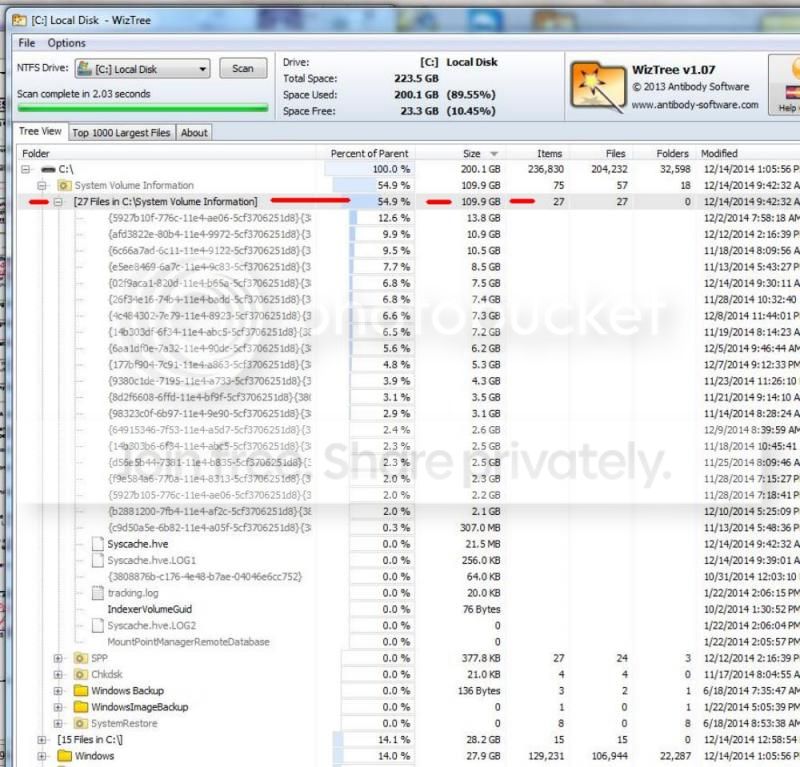
On a 256Gb SSD I am already out of space and the largest contributor using WizTree iis a thing called C:\System Volume Information. Is my assumption that these are Win update hidden files needed to do a uninstall of a particular Win 7 update? Can I dump the older ones?

Also - does anyone know why is my 256Gb SSD (Win explorer shows "240Gb usable") only showing 200.1Gb on WizTree ?
winopersystemfiles121414_zpsbd12cd1d.jpg
 

My Computer My Computer

At a glance

Windows 7 Ultimate x64i7-26008GbBFGgts250
Computer Manufacturer/Model Number
me/na
OS
Windows 7 Ultimate x64
CPU
i7-2600
Motherboard
Asus P8P67eluxe_i7-2600
Memory
8Gb
Graphics Card(s)
BFGgts250
Sound Card
mobo
Monitor(s) Displays
Acer P236H
Hard Drives
500Gb system Hitachi
1000Gb video Seagate 6.0 Gp/s SATA
1000Gb special project Seagate 3.0Gb/s SATA
PSU
thermaltake_600w
Case
Antec_900
Cooling
fans
That is where your system restore shadow copies are stored. Don't muck with the files in that or any system directory. If you want to reduce the amount used, reduce the amount of space allocated to system restore for that volume.

You could also use vssadmin to manage shadow copies, but I would not recommend that unless you read quite a bit about it and know what you are doing.

Use the tools in windows to clean up disk space. Windows update cleanup can be done through the disk context menu disk cleanup option. Nothing to do with these files.
 

My Computer My Computer

At a glance

Windows 10 Pro. EFI boot partition, full EFI ...i7 4770k 4.4GHz (44-44-43-43 turbo) @ 1.248V16GB (8GBx2) @2200 MHz G.skill Sniper 10-11-1...MSI GTX 970 Gaming 4G
Computer type
PC/Desktop
Computer Manufacturer/Model Number
Home built (GeneO industries)/Model 4
OS
Windows 10 Pro. EFI boot partition, full EFI boot
CPU
i7 4770k 4.4GHz (44-44-43-43 turbo) @ 1.248V
Motherboard
ASUS Maximus VI Hero
Memory
16GB (8GBx2) @2200 MHz G.skill Sniper 10-11-10-30-1, 1.6V
Graphics Card(s)
MSI GTX 970 Gaming 4G
Sound Card
Onboard SupremeFX Audio
Monitor(s) Displays
NEC Spectraview 2490WUXi-SV
Screen Resolution
1920 x 1200
Hard Drives
Samsung 850 Pro 256GB (OS), Samsung 2x 128GB 840 Pro SSD in RAID0, 3x WD Blue 6Gb/s 1TB RAID0, WD 2TB Black external USB 3.0, 2TB WD20EARS Green external USB 3.0, 2x 500GB Seagate and 1 750 GB external USB, 1x 350GB external USB3
PSU
Seasonic X-850 (2012 KM3 model)
Case
Fractal Design Define R4
Cooling
NH-D14, NF-F12, NF-A15; NF-P14, NF-P12,NF-A14, S12A PWM
Keyboard
Cooler Master Storm Quickfire Rapid - Brown
Mouse
Logitech G602
Internet Speed
126.4 Mb/s down, 24.3 Mb/s up
Other Info
USB 3.0 x8 , SATA III x8, eSATA, USB 2.0 x6. Samsung DVD R/W drive.

WEI: CPU 7.8, Memory 7.9, Graphics 7.9, Disk 7.9
That is where your system restore shadow copies are stored. Don't muck with the files in that or any system directory. If you want to reduce the amount used, reduce the amount of space allocated to system restore for that volume.

You could also use vssadmin to manage shadow copies, but I would not recommend that unless you read quite a bit about it and know what you are doing.

Use the tools in windows to clean up disk space. Windows update cleanup can be done through the disk context menu disk cleanup option. Nothing to do with these files.


OK. I understand. I always use the cleanup tools, and I have gone to deleting stuff including programs that I am not using regularly. BUT this SVI stuff is eating up a FULL half of my expensive 256Gb SSD. I will search for a way to adjust the amount of space allocated for these files - guess it is under the system restore setup? Does that then mean the older files will be dumped automatically OR will it dump the largest files first?
 

My Computer My Computer

At a glance

Windows 7 Ultimate x64i7-26008GbBFGgts250
Computer Manufacturer/Model Number
me/na
OS
Windows 7 Ultimate x64
CPU
i7-2600
Motherboard
Asus P8P67eluxe_i7-2600
Memory
8Gb
Graphics Card(s)
BFGgts250
Sound Card
mobo
Monitor(s) Displays
Acer P236H
Hard Drives
500Gb system Hitachi
1000Gb video Seagate 6.0 Gp/s SATA
1000Gb special project Seagate 3.0Gb/s SATA
PSU
thermaltake_600w
Case
Antec_900
Cooling
fans
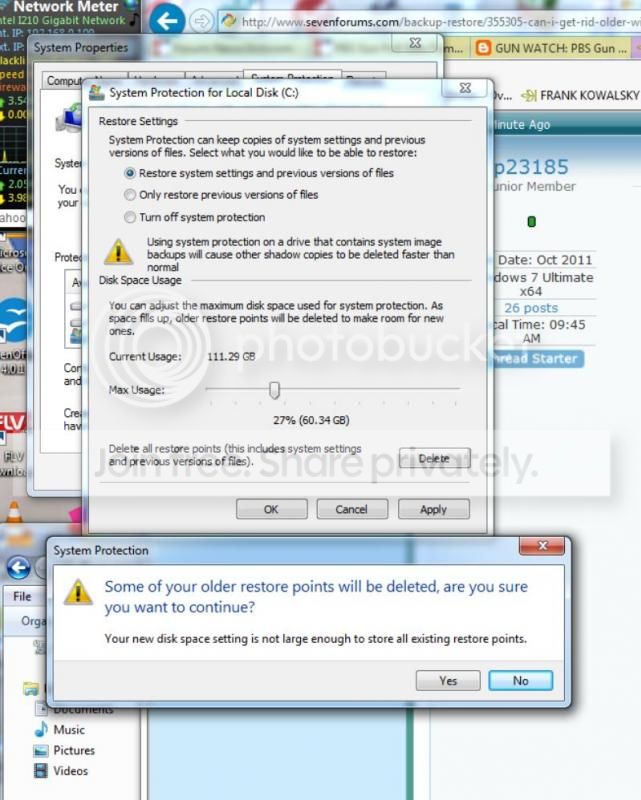
Actually my System Protection tab in my control panel system section has the C:\ drive configured for a max of 5.59Gb with actual usage being reported as 2.29Gb. Surely this is a reporting error!!! My WizTree still shows SVI at 111.6Gb. How does one make it go away?????
TRI262_zpsed27e11d.jpg
 

My Computer My Computer

At a glance

Windows 7 Ultimate x64i7-26008GbBFGgts250
Computer Manufacturer/Model Number
me/na
OS
Windows 7 Ultimate x64
CPU
i7-2600
Motherboard
Asus P8P67eluxe_i7-2600
Memory
8Gb
Graphics Card(s)
BFGgts250
Sound Card
mobo
Monitor(s) Displays
Acer P236H
Hard Drives
500Gb system Hitachi
1000Gb video Seagate 6.0 Gp/s SATA
1000Gb special project Seagate 3.0Gb/s SATA
PSU
thermaltake_600w
Case
Antec_900
Cooling
fans
Actually my System Protection tab in my control panel system section has the C:\ drive configured for a max of 5.59Gb with actual usage being reported as 2.29Gb. Surely this is a reporting error!!! My WizTree still shows SVI at 111.6Gb. How does one make it go away?????
TRI262_zpsed27e11d.jpg
Opps, I am adjusting the aux Video capture SSD. Now I see my error after POSTING. Sorry
 

My Computer My Computer

At a glance

Windows 7 Ultimate x64i7-26008GbBFGgts250
Computer Manufacturer/Model Number
me/na
OS
Windows 7 Ultimate x64
CPU
i7-2600
Motherboard
Asus P8P67eluxe_i7-2600
Memory
8Gb
Graphics Card(s)
BFGgts250
Sound Card
mobo
Monitor(s) Displays
Acer P236H
Hard Drives
500Gb system Hitachi
1000Gb video Seagate 6.0 Gp/s SATA
1000Gb special project Seagate 3.0Gb/s SATA
PSU
thermaltake_600w
Case
Antec_900
Cooling
fans
TRI3110_zpsc4b9c3d6.jpg
 

My Computer My Computer

At a glance

Windows 7 Ultimate x64i7-26008GbBFGgts250
Computer Manufacturer/Model Number
me/na
OS
Windows 7 Ultimate x64
CPU
i7-2600
Motherboard
Asus P8P67eluxe_i7-2600
Memory
8Gb
Graphics Card(s)
BFGgts250
Sound Card
mobo
Monitor(s) Displays
Acer P236H
Hard Drives
500Gb system Hitachi
1000Gb video Seagate 6.0 Gp/s SATA
1000Gb special project Seagate 3.0Gb/s SATA
PSU
thermaltake_600w
Case
Antec_900
Cooling
fans
Not an expert at all in these matters. Glad you found the correct area, and I guess you have reduced the %age allocation and hence the pop-up screen message you show as screen capture. My understanding from your prior ?, is that when you reduce the allocation space that System Restore will delete the oldest dated restore points first and move up to the more recent until what is still saved is below your maximum set threshold.

On the screen prior to the one that you show: I don't know your SSD drive setup, and if you have the operating system on C along with programs AND then a separate partition e.g. D for data ... If so, AND if you are doing back ups of your D and data to a separate external HD as most people would do, then make sure that SYstem Restore is NOT set to work on the D drive as this would be (in my opinion) a wasted use of your precious SSD space. Good luck ...
 

My Computer My Computer

At a glance

Windows 7 Pro 64-bitIntel i7 M620 @2.67GHz8 GB
Computer type
Laptop
Computer Manufacturer/Model Number
Lenovo Thinkpad W510
OS
Windows 7 Pro 64-bit
CPU
Intel i7 M620 @2.67GHz
Memory
8 GB
Hard Drives
Internal 500GB several USB external 2.0 & 3.0
Antivirus
Bitdefender
Browser
Chrome
Well looking at the proper drive is surly helpful.
 

My Computer My Computer

At a glance

Windows 10 Pro. 64/ version 1709 Windows 7 Pr...Intel i7-6800K @ 4.3Corsair Platinum 16 gig @2400EVGA GTX 1070 OC
Computer type
PC/Desktop
Computer Manufacturer/Model Number
Home made Desktop
OS
Windows 10 Pro. 64/ version 1709 Windows 7 Pro/64
CPU
Intel i7-6800K @ 4.3
Motherboard
ASUS X-99 Deluxe II
Memory
Corsair Platinum 16 gig @2400
Graphics Card(s)
EVGA GTX 1070 OC
Monitor(s) Displays
Asus 27" LED LCD/VE278Q
Screen Resolution
1920-1080 or 1280-720 HDMI
Hard Drives
INTEL SSD 730-240 Gb Sata 3.0/
PSU
EVGA Platium 1200W
Case
Phanteks Luxe Tempered Glass 8 fans/ one radiator
Cooling
XSPC/ Water Cooled CPU
Keyboard
Das 4 Professional
Mouse
Logitech M705/MX Anywhere 2-S
Internet Speed
100 mbits
Antivirus
Microsoft Security Essentials/ Malwarebytes Premium 3.0/ SAS
Browser
I.E. 11 default/Firefox/ ISP Time Warner Cable/Spectrum
Other Info
LG BluRay Burner/
Sound system-KLipsch-THX/
Icy Dock ssd Hot Swap bays.
Back
Top