Solved Can I Have DVD WINDOWS BY Recovery (D:)?

xhimi

TonT
Member
Local time
7:05 AM
Messages
45
Can someone help please?
I have a HP Laptop DV5
Home Premium was installed. WINDOWS 7
After several months my friend gave me a W-7 Ultimate and I installed IN THIS laptops,
Once told me is better SE Home Premium.
WINDOWS but it was not the original.
W7 I was not Home Premium DVD, as ME said that recovery becomes manager, AND DOES NOT Recovery DVD that I made before W7-install Ultimate.
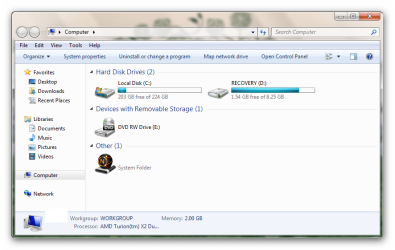
TO MY COMPUTER exist "Recovery (D:).
Is there any way that I return again W7 Home Premium?
Thanks to all.
BEST WEEKEND TO ALL.
 

My Computer My Computer

At a glance

w7 home premium2.13gb1gb
OS
w7 home premium
CPU
2.1
Motherboard
amd athlon
Memory
3gb
Graphics Card(s)
1gb
Internet Speed
8MBS/S
Can someone help please?
I have a HP Laptop DV5
Home Premium was installed. WINDOWS 7
After several months my friend gave me a W-7 Ultimate and I installed IN THIS laptops,
Once told me is better SE Home Premium.
WINDOWS but it was not the original.
W7 I was not Home Premium DVD, as ME said that recovery becomes manager, AND DOES NOT Recovery DVD that I made before W7-install Ultimate.
TO MY COMPUTER exist "Recovery (D:).
Is there any way that I return again W7 Home Premium?
Thanks to all.
BEST WEEKEND TO ALL.

Can you describe your problem again? what are you trying to do, return to home premium?

Need more info


ken
 

My Computer My Computer

At a glance

Win 8 Release candidate 8400[email protected]4 gigsNvidia 9600M
Computer Manufacturer/Model Number
HP Pavillion dv-7 1005 Tx
OS
Win 8 Release candidate 8400
CPU
[email protected]
Memory
4 gigs
Graphics Card(s)
Nvidia 9600M
Sound Card
HD built-in
Monitor(s) Displays
17" Wxga
Screen Resolution
1440x900
Cooling
none
Internet Speed
45Mb down 5Mb up
If I understand correctly, your computer came with Home premium preinstalled. Subsequently, you used a pirated disk to install Ultimate. Now you want to revert to Home Premium.

Did you make recovery disks before installing Ultimate? If you did, you can go back to Home Premium by reinstalling with the recovery disks.

If you did not, you can try recovering via the HP recovery partition (unless you deleted it), although that method works only with the original OS. Still, you can give it a shot. You'll need to download the software called HP Recovery Manager from the HP website, then run it and see if it'll allow you to recover from the recovery partition.

If nothing works, get hold of a win7 retail disk (borrow, download), install win7 HOME PREMIUM only, then activate by calling MS and using the COA sticker key at the back of your computer.
 

My Computer My Computer

At a glance

Windows 7 x64 pro/ Windows 7 x86 Pro/ XP SP3 x86
Computer Manufacturer/Model Number
Too many to describe...
OS
Windows 7 x64 pro/ Windows 7 x86 Pro/ XP SP3 x86
Try starting the HP Recovery by taping the F11 key at startup.
 

My Computer My Computer

At a glance

ME/XP/Vista/Win7
OS
ME/XP/Vista/Win7
If I understand correctly, your computer came with Home premium preinstalled. Subsequently, you used a pirated disk to install Ultimate. Now you want to revert to Home Premium.

Did you make recovery disks before installing Ultimate? If you did, you can go back to Home Premium by reinstalling with the recovery disks.

If you did not, you can try recovering via the HP recovery partition (unless you deleted it), although that method works only with the original OS. Still, you can give it a shot. You'll need to download the software called HP Recovery Manager from the HP website, then run it and see if it'll allow you to recover from the recovery partition.

If nothing works, get hold of a win7 retail disk (borrow, download), install win7 HOME PREMIUM only, then activate by calling MS and using the COA sticker key at the back of your computer.


Yes, correct, as it is, but I've never done before recovery dvd to install Ultimate-7.
tried the recovery manager from the hp website, but after installing this program becomes, can not I get nowhere in the pc.
In "My computer" is "Recovery (D:)", see image:
 

Attachments

  • Snap_2010.05.29 18.36.24_003.png
    Snap_2010.05.29 18.36.24_003.png
    41.3 KB · Views: 15

My Computer My Computer

At a glance

w7 home premium2.13gb1gb
OS
w7 home premium
CPU
2.1
Motherboard
amd athlon
Memory
3gb
Graphics Card(s)
1gb
Internet Speed
8MBS/S
Thnx all you for your help.:)
 

My Computer My Computer

At a glance

w7 home premium2.13gb1gb
OS
w7 home premium
CPU
2.1
Motherboard
amd athlon
Memory
3gb
Graphics Card(s)
1gb
Internet Speed
8MBS/S
Have you tried starting the HP Recovery by taping the F11 key at startup?
 

My Computer My Computer

At a glance

ME/XP/Vista/Win7
OS
ME/XP/Vista/Win7
If he has installed an o/s , unlikely the usual methods of accessing recovery partition will work.

Best bet is to d/l Free Partition Wizard Bootable CD , boot it up, mark recovery partition Active.

Restart pc - recov program should boot up from recov partition.
 

My Computers My Computers

  • At a glance

    7 X64i5 84002x8gb 3200mhz
    Computer type
    PC/Desktop
    OS
    7 X64
    CPU
    i5 8400
    Motherboard
    gigabyte b365m ds3h
    Memory
    2x8gb 3200mhz
    Hard Drives
    various
    PSU
    pure power 11 400w cm
    Case
    Coolermaster
    Cooling
    cryorig m9i
  • At a glance

    7x64g54008gb ddr4 2400
    Computer type
    PC/Desktop
    OS
    7x64
    CPU
    g5400
    Motherboard
    ga b365m ds3h
    Memory
    8gb ddr4 2400
    PSU
    xfx pro 450w
Try pressing F11 at boot as theog suggested but I doubt it'll work because Recovery manager is not working otherwise.

You have 2 more options:

1) Simplest- Just go to the HP website and order recovery disks for your specific model. They cost $10-20.

2) Click on Start button, then type "diskmgmt.msc" without quotes. In the window that opens, right click on your recovery partition and set it Active, if it lets you. Agree to the confirmation prompt, then reboot. The computer should now reboot straight into the recovery partition.
 

My Computer My Computer

At a glance

Windows 7 x64 pro/ Windows 7 x86 Pro/ XP SP3 x86
Computer Manufacturer/Model Number
Too many to describe...
OS
Windows 7 x64 pro/ Windows 7 x86 Pro/ XP SP3 x86
If these methods to run Recovery partition fail, then simply unlock all versions in your Ultimate DVD to reinstall Home Premium. Activate using the Product Key on the COA sticker on bottom of laptop.

Here is the tool to use to unlock all versions in installer: Ei.cfg Removal Utility Lets You Use Any Product Key With Your Windows 7 Disc

You can also change between Win7 versions by adapting the workaround given here: Upgrade the Windows 7 RC to any retail version « Icrontic Tech The registry changes trick the installer into thinking it is doing a same-version "Repair Install" while it really Downgrades Ultimate to Premium and also resets activation so you can start fresh with the HP Product Key.
 
Back
Top