can i install two win7 in two partition in same pc?

raniero

New member
Local time
7:33 PM
Messages
31
hello ive an hd with 2 partitions, c and e, ive installed win7 in e: can i make a second installation in c: with win7? if i make a new installation of win7 in c: i will be able to boot both os (the old win7 in e: and the new one in c:)

what im afraid of is that after installing the new win7 in c: i will loose the boot option to log in the old previous win7 installation in e: but im pretty shure that i should be able to log in both win7 cause the new installation will retain the second os boot option.. theres someone can confirm?
 

My Computer My Computer

OS
win 7
Shouldn't be a problem. During the beta testing I had multiple versions of 7 on various partitions. Remember that the default OS will be the last one installed. Only question I might have is activation if you have only one key. I don't see where this would be against the EULA, but you may have to call MS for clarification and activation.
 

My Computer My Computer

Computer Manufacturer/Model Number
Dell XPS420
OS
Vista Ult 64 bit Seven Ult RTM x64
CPU
Intel Core2 Quad Q6600 2.40 gigahertz
Memory
Crucial Ballistix 4x2GB PC2 6400
Graphics Card(s)
NVIDIA GeForce 8600 GTS 256 MB
Sound Card
Creative SB X-Fi audio
Monitor(s) Displays
HP w2207 + HPvs15
Screen Resolution
1680x1050 + 1024x768
Hard Drives
2-WD5000AAKS-500 GB
WD5000AAV-500 GB external
Keyboard
Microsoft Comfort Curve
Mouse
MX Revolution
Other Info
Wacom Intuos 2 Graphics Tablet
Experience Index=5.5
4 activation i think i should be able to use in the new installation the same activation files from the old partition as the computer hardware its the same, the only change is actually the partition size and letter
 

My Computer My Computer

OS
win 7
I don't think there will be any problem. Just being cautious. I had to do a call to activate once in Vista. Relatively painless.
 

My Computer My Computer

Computer Manufacturer/Model Number
Dell XPS420
OS
Vista Ult 64 bit Seven Ult RTM x64
CPU
Intel Core2 Quad Q6600 2.40 gigahertz
Memory
Crucial Ballistix 4x2GB PC2 6400
Graphics Card(s)
NVIDIA GeForce 8600 GTS 256 MB
Sound Card
Creative SB X-Fi audio
Monitor(s) Displays
HP w2207 + HPvs15
Screen Resolution
1680x1050 + 1024x768
Hard Drives
2-WD5000AAKS-500 GB
WD5000AAV-500 GB external
Keyboard
Microsoft Comfort Curve
Mouse
MX Revolution
Other Info
Wacom Intuos 2 Graphics Tablet
Experience Index=5.5
Hi Guys, I have a problem, I installed windows 7 to the second partition of the disk, but the windows7 on the first partition is no more available for booting. I need to boot from the original windows 7 partition, have any idea how to fix that? Thanks in advance:)
 

My Computer My Computer

OS
Windows 7
Please post back a screenshot of your full Disk Management drive map, using Snipping Tool in Start Menu, attaching file with paper clip in reply box.

Tell us which OS you are able to boot into.
 
I tried that, but the problem is that it didn't give me a chance to choose between the dual boot, it is acting like there is only this new windows seven. I need to get the other windows to appear at the startup to chose it.
 

My Computer My Computer

OS
Windows 7
And we can tell you how to achieve that once we see the screenshot.
 
Here is what you were asking for (atleast i hope), i put it in "attachements" hope you can see it. My new windows 7 copy is now installed on C: , but i have the previous one on D: that I am not able to boot from, it is not showing.
 

Attachments

  • Diskdrives.JPG
    Diskdrives.JPG
    46.8 KB · Views: 153

My Computer My Computer

OS
Windows 7
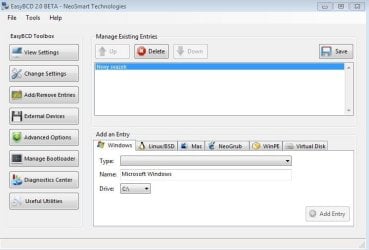
Download install EasyBCD 2.0 beta after doing a quick registration to use beta version.

On the Add/Remove tab, add the missing Win7 by name, type and drive letter.

If there are any problems, post back a screenshot of EasyBCD listings. Sometimes the System Reserved 100mb partition needs to have a letter assigned to complete dual booting.
 
I am still not successful, I removed the partion, which the computer uses for booting and added the one i want it to boot from, but still it boots from the partion C:
 

Attachments

  • Boot.JPG
    Boot.JPG
    32.6 KB · Views: 47
  • Overview.JPG
    Overview.JPG
    44.2 KB · Views: 63

My Computer My Computer

OS
Windows 7
I finally managed to fix it, it needed MBR reinstall, i did it and it works, thanks million times for your time and this software, it is surely powerfull one, have a nice day.:-)
 

My Computer My Computer

OS
Windows 7
Back
Top